|

Leaderboard


.thumb.gif.704e8e80bff8d8baa365115adc2ca31b.gif)

Popular Content
Showing content with the highest reputation since 05/17/26 in all areas
-
The new MAME title videos are complete. They are located on the FTP here: /-GameEx-/- Emulator Artwork & Videos -/MAME/video_title 95% of them are a decent attract mode capture. The upscaled videos on the FTP are however the best quality. In the next release of GameEx there will be an option to chose between the three types to automatically download. Audio can be a slight issue on the title videos because they are all fixed to 60hz. The title videos are up to date as of MAME 0.287 and include all working or imperfect non clones unless the name of the clone game is different. View the full article3 points
-
I have good news! I know I'm a bit slow to reply, but between work and other commitments, I haven't been able to do much. To get to the point, I've managed to create a new system that opens Visual Pinball X and Future Pinball tables from Pinball X. It's somewhat complex, but having all the tables from both systems together is fantastic. Give me a few days, and I'll post a step-by-step guide and a file showing how I'm doing it. Thanks to @Mike_da_Spike and @Draco1962 for your help. It all seemed impossible, but I didn't want to give up, and so far, the tests with two tables from each system have gone well.3 points
-
Another blast from the past from Tony.2 points
-
That might work (if process to monitor accepts the pinballx parameter names). It shouldn't be set to Explorer! Failing a change to PinballX to extract the process name the lnk file uses, something like this might work as a launch after; Parameters used are a powershell command to get the actual exe and kill it; powershell -command "$t = (New-Object -ComObject WScript.Shell).CreateShortcut('[TABLEPATH]\[TABLEFILE].lnk').TargetPath; Stop-Process -Name ([System.IO.Path]::GetFileNameWithoutExtension($t)) -Force" (note, even if that does work it make not be a clean way to close the pc game!)
 2 points
 -
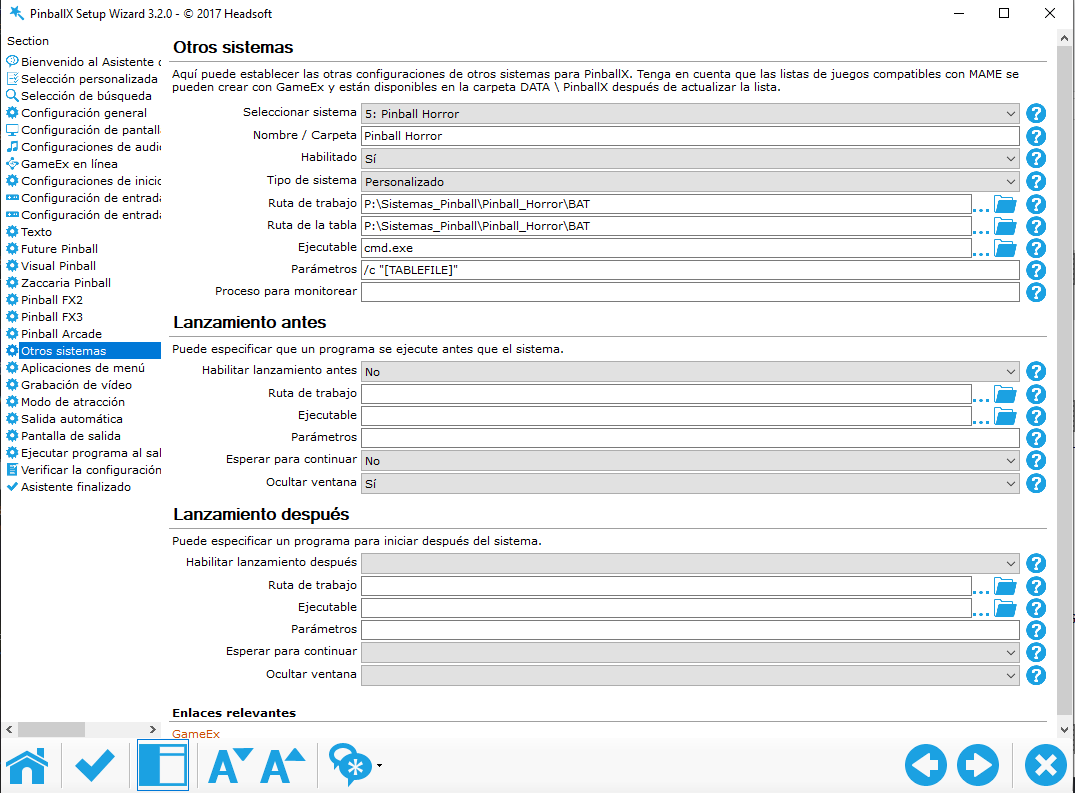
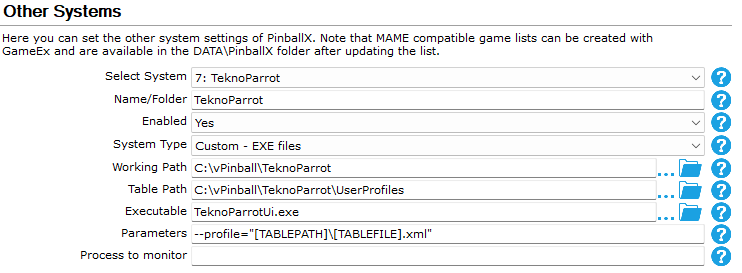
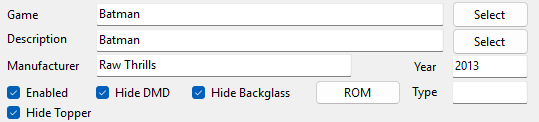
So, back in the day, in 2023, I tried to get TeknoParrot working on PinballX. It was successful. Sorta.... The end result was entering one TeknoParrot instance for each game because I couldn't figure out how to get around the XML's instead of roms. Thanks to @Mike_da_Spike, that's a thing of the past. I just didn't realize it because I never saw his entry, post-solution. Tonight, because I reconfigured a ton of crap on both my cab and my son's arcade, I decided to screw around with TeknoParrot again and try out Mike's config...IT WORKS! Here is the new, working config which will launch ANY game within TeknoParrot: And here's the Game Manager settings: Name the description of your game whatever you'd like but name the "Game" after the game's XML file in the UserProfiles folder. So, if your game is Mario Kart DX and the game's XML is "MKDX118", put "MKDX118" in the "Game" slot on the Game Manager. If you're unable to choose it, just manually write it in. It will work. That's it. Just thought I would write to say this has been fully solved. Special thanks to both @Draco1962 and @Mike_da_Spike for the help on this. Also thanks to @Tom Speirs who keeps driving me to keep at these things until they're solved. Thanks, all.
 2 points
 -
Thanks, @Draco1962 and thanks, @Mike_da_Spike!!!2 points
-
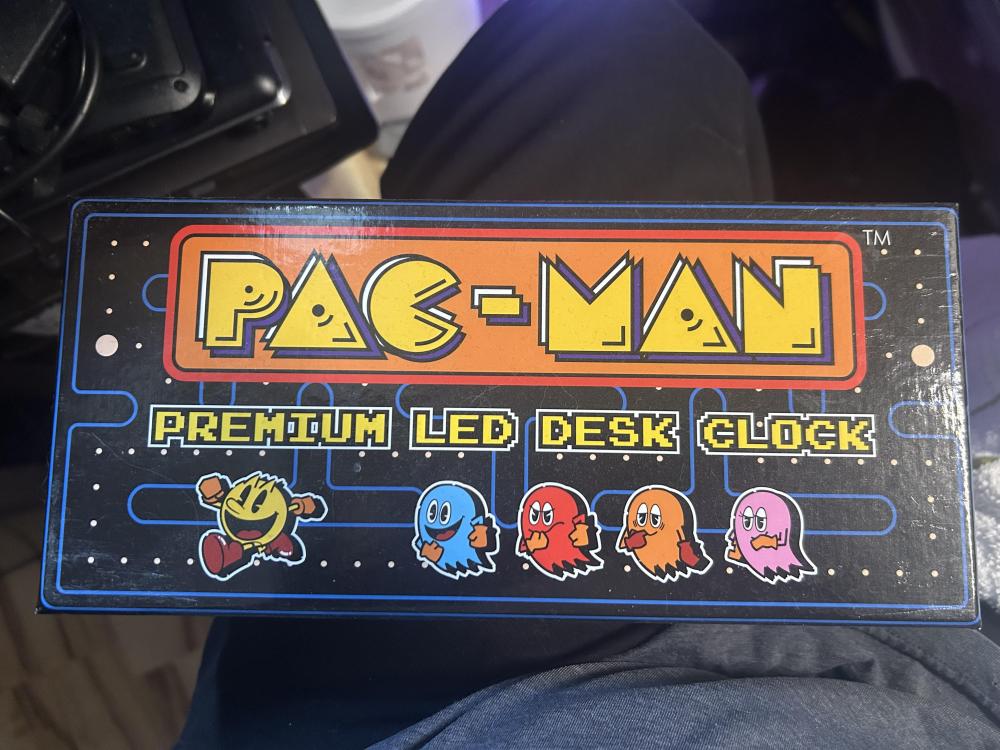
Still have mine BNIB (almost - I did test it initially) until I get the basement office back in order. I refuse to sell it though I could probably get 6x the price I paid. I love this clock.
 2 points
 -
its the video. its never going to work. its recorded with the default x264 4:4:4. it wont even play in windows. It needs to be a pixel format of 4:2:0. just rerecord the video with something else.2 points
-
PbxRecorder isn't supported actively anymore so any changes to the encoding there (if that's the issue) are unlikely. If you want to stick with pbxrecorder you could try changing the existing output options it already has (mp4/flv etc) to see if that helps, or try the recorder built into Database Manager instead. For PinballX attaching an example video might help Tom to look into it further, as well as confirming you've tested it against all the Media Foundation setting options available in PinballX 7.23 (Yes, No and Sample Grabber) with no success.2 points
-
I did it to your specifications exactly and it worked! @Draco1962, @Mike_da_Spike, and @Tom Speirs, you guys continue to be amazing. Thanks for helping me build this cab throughout the years. I know I have a penchant for putting PBX through its paces and making it run some funky stuff but you guys don't give up until it's done. I love it. One of these days, I'm gonna write an essay about all the things you guys have helped me with throughout the years. You guys helped me with some tough stuff like Daphne, getting Mario Kart GP to work through Dolphin, TeknoParrot, and the 150 emulators I put on my son's big arcade project a couple years ago. Every single time I'm stuck and think it can't be done, you guys always reply with, "What are you talking about? It CAN be done! Let's go!" Thank you so much.2 points
-
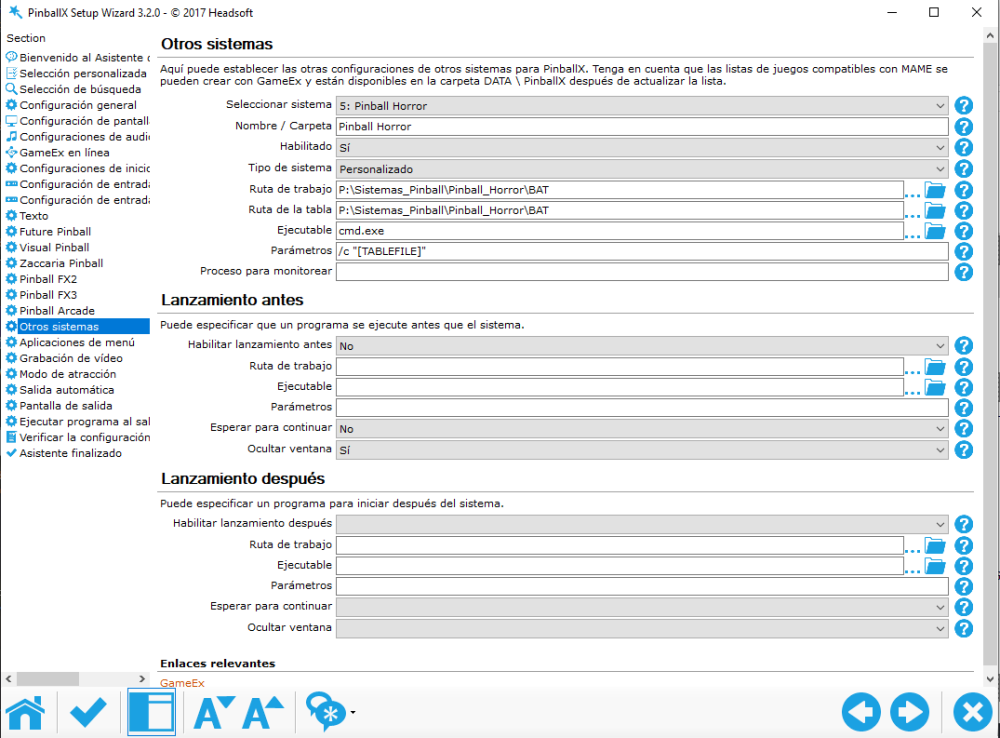
I hope I do it right. Here's a YouTube link where I uploaded my "terrible" system, which uses VPX and FP BAM tables. https://youtu.be/TgAuOA6p4yU It's made with .bat files because PinballX doesn't allow you to have two systems in one with tables. I've attached the .bat file for what I set up for Future Pinball, the VPX .bat file, and the .ahk file to close the process. If it can be improved, which I'm sure it can, let me know so I can polish it even more. Cerrar_horror.ahk Class of 1812 (Gottlieb 1991) v3.0.21.bat ClassicPanicSE.bat
 2 points
 -
No time to test properly at the moment, but the code makes sense and is definitely more readable than a magic one liner! (only downside to it is having to maintain the gamen.exe entries in the bat file)1 point
-
I just developed and designed three web sites in only one evening using you know what, including seo optimisation. spesoft,com was the main one. cics.uk.com was redesigned and this one was new. Crazy! View the full article1 point
-
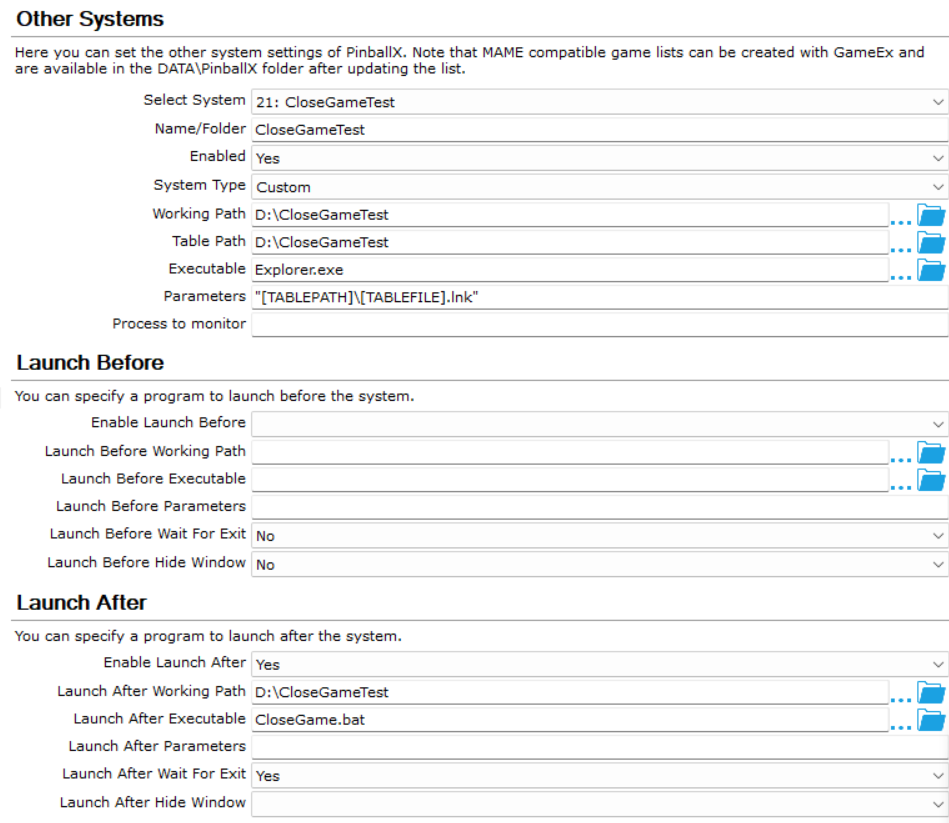
@tabascoman77 If this works for you, it should be much easier to manage than a separate System entry for each game. You originally started with this: The command line should be "[TABLEPATH]\[TABLEFILE].lnk" - no executable or process to monitor entries. So your entry will look something like this: Also, let's take a step or two back with the Launch After. Copy & paste the following into a .bat file named CloseGame.bat: DOS @echo off :LOOP :: 1. Check if ANY of your game executables are currently running tasklist /FI "IMAGENAME eq game1.exe" 2>NUL | find /I /N "game1.exe">NUL if "%ERRORLEVEL%"=="0" (goto WAIT) tasklist /FI "IMAGENAME eq game2.exe" 2>NUL | find /I /N "game2.exe">NUL if "%ERRORLEVEL%"=="0" (goto WAIT) tasklist /FI "IMAGENAME eq game3.exe" 2>NUL | find /I /N "game3.exe">NUL if "%ERRORLEVEL%"=="0" (goto WAIT) tasklist /FI "IMAGENAME eq game4.exe" 2>NUL | find /I /N "game4.exe">NUL if "%ERRORLEVEL%"=="0" (goto WAIT) :: 2. If none of the games are running, it means you manually closed the game. Proceed to cleanup. goto KILL :WAIT :: Sleep for 2 seconds and check the loop again timeout /t 2 /nobreak >nul goto LOOP :KILL :: Clean up any stubborn hung processes or background helper apps taskkill /f /im "game1.exe" taskkill /f /im "game2.exe" taskkill /f /im "game3.exe" taskkill /f /im "game4.exe" exit You will replace each "game#.exe" with the actual game executable name in each tasklist and taskkill line, for example, using halo.exe as the game name in the taskkill lines: taskkill /f /im "game1.exe" becomes taskkill /f /im "halo.exe" Wash-rinse-repeat for each game exe that you are adding to your system. taskkill should ignore the processes that aren't currently running, and shouldn't throw errors or disrupt PinballX. Next, place the CloseGame.bat file within the same path as your .lnk files, put the path within your Launch After Working Path field, and the CloseGame.bat file name within your Launch After Executable field. Within the PinballX > Databases, you may have to create a folder for the PC Games XML file with a PC Games.xml file within. Below is one that I created for testing: <menu> <game name="notepad"> <description>Notepad</description> <rom></rom> <manufacturer>Microsoft</manufacturer> <year>1977</year> <type>EM</type> <hidedmd>True</hidedmd> <hidetopper>True</hidetopper> <hidebackglass>True</hidebackglass> <enabled>True</enabled> <rating>0</rating> </game> <game name="chrome"> <description>Chrome</description> <rom></rom> <manufacturer>Google</manufacturer> <year>1977</year> <type>EM</type> <hidedmd>True</hidedmd> <hidetopper>True</hidetopper> <hidebackglass>True</hidebackglass> <enabled>True</enabled> <rating>0</rating> </game> </menu> @Mike_da_Spikeand/or @scutters - I was able to get Notepad to launch on my laptop, but Notepad closes after a few seconds. So I know that the batch file works, just something I am missing in the additional Launch After parameters, as it shouldn't be killing Notepad before I manually do so. EDIT: Review and test the new CloseGame.bat file if you can please. I was able to get Notepad to launch and stay focused, then closed it manually, and the PinballX menu returned. I repeated the same with a launch of Chrome from PinballX. CloseGame.bat CloseGameTest.xml
 1 point
 -
Oh, you...c'mere... (hugs you)1 point
-
...yes?... Even though a piece of code like that looks like an insane glowing part you're supposed to drop into some slot on a fictional mystery machine thing you see in a movie. :)\1 point
-
Ha, I did , and this is the one liner ! powershell -command "$t=(New-Object -ComObject WScript.Shell).CreateShortcut('[TABLEPATH]\[TABLEFILE].lnk').TargetPath;$n=[IO.Path]::GetFileNameWithoutExtension($t);Get-Process $n -ErrorAction SilentlyContinue|%{if($_.MainWindowHandle){$_.CloseMainWindow()}else{Stop-Process $_ -Force}}" Please try this as well1 point
-
You can ask AI to convert that cmd to request a clean exit, and wait a few seconds before killing if still running if you want/need to later. Hope things go well with Rocket Launcher anyway!1 point
-
Let me try Terry's method first.1 point
-
Mike, Can't attach files to PM, but here's a sample configuration using most relevant plugins. VPinballX.zip1 point
-
It definitely wouldn't hurt to try. The issue is that it's going to get a touch convoluted because I have to MMT the game to get it to run on the backglass monitor which means I'd have to write a BAT file to kill the game and go back to the first monitor with MMT. Interestingly enough, @TerryRed had this same issue ten years ago and I was looking into it today. He had used RocketLauncher in conjunction with PinballX and that seemed to work for him. I might give that a quick spin.1 point
-
For killing the games on exit, have you tried ALT-F4?1 point
-
Much closer to the water table. Most would be inside swimming pools!1 point
-
Thanks for the update. Since this has been identified as a PBXRecorder issue, the author of PBXRecorder has not been active here since 2021 (no compatibility updates likely), it is not a PinballX issue, workaround (use previous Nvidia driver) and alternative solution (Database Manager) have been provided, I will close this thread. Should you decide to pursue using Database Manager and require assistance, please open a new thread with attached support files regarding.1 point
-
Few basements to be found in Florida! My office space is a major wreck and in dire need of attention before I am evicted from the dining room! LOL!1 point
-
I did post a version 2.1 some time ago, PBX Recorder - captures Playfield, Backglass and DMD videos and images - FAQs, Guides, & Other Useful Information - Spesoft Forums (but i won't be updating it again!), you can try that version if you want. It sounds like you were using the 'default' recorder in database manager (which just calls the inbuilt PinballX ffmpeg recording functions). I think all the options you want are available if you use it's own recorder (which you have to select in DBM options). @Mike_da_Spike describes how to use it in this post (and also in the documentation) - https://forums.gameex.com/forums/topic/23840-app-pinballx-database-manager-2605080-supports-touch-play-as-well/page/15/#findComment-223806. Nice! 👍 (but i think that potentially this could be slightly slower in PinballX than using fully compatible media foundation videos, if PinballX navigation is still fine for you on your hardware then not a problem)1 point
-
Not sure if I ever linked it before but for reference here’s my basement. I do love the kitsch items like the lamps and figures but for me I also had to be able to hang it or shelf it. I went with the cloth wall tapestries, framed magazine ads, even got a few different light switch covers I found online. I wanted the decorative clutter, but I wanted to make sure it took up as little space as possible… And the walls are always a good place to put stuff and not take up desk space! For reference the only two standing Nintendo displays I have left that are taking up floor space are blocking the closets. I got rid of the third one and I’m thinking about getting rid of these two as well just because they’re in the way sometimes. But I like them!1 point
-
Cool It's a cool clock, but mine doesn't keep time very well. Still, another clock wasn't the motivation. I collected a lot of stuff like this while the arcade boom was peaking, which is what I believe led to things like Arcade 1up, although I admit that found those units to be incredibly cheaply built, but fit the bill for many since they offered a quick nostalgia fix for those not wanting to dive into a full time hobby.1 point
-
I got this one quite a while back, but now it's available only in aftermarket and is outrageously overpriced. https://youtu.be/SHyCtf4mkuQ1 point
-
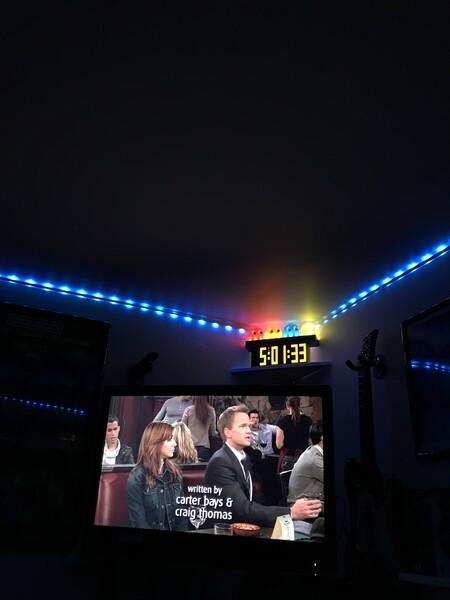
I got a small Padalone desk light on top of my yellow clock. PAC-Man colors and the clock looks like something out of the 80’s. Makes for a great retro display.
 1 point
 -
Sorry, i meant attach one of the videos you have issues with in PinballX rather than recording a video of the issue.1 point
-
Finally……… Empire and Tempest have followed. Black Widow is also out there, but may have been for all I know.1 point
-
A good alternative with the added benefit of using HDMI if you still have an OG Xbox but missed the opportunity to pick up some of the previously available high def options. https://electron-shepherd.com/products/electronxout1 point
-
Thanks, @tabascoman77for yet another guide! Moving to the "FAQs, Guides, & Other Useful Information" for posterity!1 point
-
Yep. Everything is good.1 point
-
The new MAME title videos are complete. They are located on the FTP here: /-GameEx-/- Emulator Artwork & Videos -/MAME/video_title 95% of them are a decent attract mode capture. The upscaled videos on the FTP are however the best quality. In the next release of GameEx there will be an option to chose between the three types to automatically download. Audio can be a slight issue on the title videos because they are all fixed to 60hz. The title videos are up to date as of MAME 0.287 and include all working or imperfect non clones unless the name of the clone game is different. View the full article1 point
-
I just posted a new topic. TP has been reworked! It runs all games!1 point
-
See. I told you to stick with it! lol. Teknoparrot is not hard to setup to launch games. The main issue with it is exiting games.1 point
-
I update my cab and all my software (Vpinmame, dof, b2s serveur etc....) and my windows to be in 18.09 now (windows dont wan't to update until the 22h2 and can't have Netframe work 4.8.1, only the 4.8) and all work fine now1 point
-
Hey Spike... My BAT file works for launching my nudge files but I can't seem to make a BAT file to make them quit. I thought I had the right syntax but maybe I'm missing something. Here's what I have in the "kill" BAT: @echo off taskkill /F /IM X-Hotkeys.exe taskkill /F /IM AutoHotKey 64-bit.exe exit The applications don't quit and will ignore the BAT file. Nevermind! Got it working! Did this for the kill BAT: @echo off TSKILL X-Hotkeys TSKILL Nudge exit Works like a charm! Thanks!1 point
-
I haven’t had one in 14 years and I still have occasion to look longingly at someone with a cigarette. Goes away in a flash but it’s always there. great job! 👍🏼1 point
-
Hyperspin and other frontends do not necessarily have the same code base. Some may be easier to adapt than others. Patience.1 point
-
I split this from the Feature Request thread. This is a query regarding a known issue and more appropriate to be asked and responded to within the General forum. There may not be a fix possible for PinballX as the issue, as noted in several posts, is Nvidia-inflicted. Tom has attempted to address as much as he can to date. Such is the way with software development - sometimes the only fix is a workaround. That said, no ETA for a fix at present.1 point
-
Let's get a fresh log.txt file (attach please, no copy & paste in the post) as well as a copy of your pinballx.ini file.1 point
-
Another 214 logos sourced and uploaded to the FTP. YAY!1 point
-
137 more logos sourced and uploaded to the FTP1 point
-
Since the button works in PinballX but not while VPX is running, the issue is that VPX is taking control of the input and not passing it back to PBX.The clean way to fix this is: Do not map Exit inside VPX. In PinballX Setup map your controller button to Exit Emulator only (not Quit). In VPX make sure the Exit key is set to ESC (default). In PBX confirm that ESC is the key being sent to close the emulator. Also make sure: VPX is not running as administrator (and PBX isn’t either — both should match). In PBX settings “Hide Backglass” and “Hide DMD” are enabled if used. “Launch Before/After” isn’t interfering. If that still doesn’t work, JoyToKey mapping your button to ESC (like you are doing now) is honestly a perfectly fine and reliable solution. Many people use it for exactly this reason.1 point
-
As close to GE OS as I could find anyway! The first thing I installed on my GPD Win 4. Or is it considered a GPD TGE 4? 🤣 BOOTS RIGHT TO GAMEEX BABY!1 point
-
Pbx Recorder V2.1 Changes V2.0 Skip comment (#) lines in screenres.txt If screenres.txt not found in Visual Pinball\Tables folder attempt to locate using B2S registry entries Added a taskkill catch all (useful if using vpx starter app - https://vpuniverse.com/files/file/17134-vpinballxstarter/ where the actual vpinball exe is a child process) Changed DMD_X location to also include backglass offset value Playfield screen videos captured via ddagrab instead of gdigrab should now capture VPX OpenGL fullscreen (requires updated ffmpeg.exe) Added link to forum post re audio capture Kill pinemhi rom monitor at startup and restart on exit (avoid potential for leaderboard popups in captured videos) Changes V2.1 (thanks @Mike_da_Spike) Add option for ‘-INI’ Check: Added a check for the ‘-INI’ parameter on the launch line to facilitate launching VPX. Correction custom XML handling . Fixed an issue where custom XML files were creating new systems in the media directory with the name of the XML file. Bug Fix: Progress Window: Replaced internal function progress with newly created myprogress to avoid flickering during rapid updates to the Progress window. Pause Progressbar: Fixed the progress window behaviour after return of pause Note - this version uses a newer version of ffmpeg to enable ddagrab for VPX OpenGL capture (gdigrab results in a static image capture only), this is included in the zip, an older ffmpegold.exe version is included as well which after renaming to ffmpeg.exe can be used with V1.9 if you have any problems with V2.1. PBXRecorder_x64_v2.1.zip1 point
-

Version 3.4.0
1183 downloads
This is the latest release of my "Generate loading Videos" from playfield program. The idea started when PinballX introduced loading Videos and @scutters modified his "Loading Video & Image Changer (de-randomiser) " With Scutters his plugin and this program (and a lot of creativity of yourself), you can create your loading video's per table. Version 3 of this program, makes it much easier than the previous version I created. And more flexible. The settings interface can now easily add 'animations' (.gif, .apng or .mp4), you can choose the location where the animation should be added to playfield image And you can choose if you want to use an overlay (Some overlays already included) When set everything up, the program will create from your playfield video , a video with the animation on top (and if you choose an overlay, that will be placed above the playfield video and under the animation) Setup : Download the zip file , and extract all to the same folder Download the individual animations that you want to use as well Run CreateLoadingVideos.exe Select the PinballX system where you want to create the videos for Go to tab 'animations', and setup your Animations path. Put all your animations in that folder. Click on Add to add an entry, select your animation, select the overlay (or use the checkbox to not use an overlay) and set the location where you want the animation Exit the program if all is setup correctly Run CreateLoadingVideos.exe every time you add/modify your playfield videos The program will create missing loading videos and re-create loading videos if your playfield video is newer. It will randomly pick an animation that was setup. A big thanks to @scutters He created some animations, tested the program and helped with ideas on it if you create Videos of your playfield yourself (and with every update of the table), uses Scutters his de-randomizer plugin and this tools to generate the videos, it will look like a seamless start from front-end to the emulator itself. Some examples video's1 point