|



MNMax21
-
Posts
515 -
Joined
-
Last visited
-
Days Won
9
Content Type
Profiles
Forums
Events
Downloads
Store
Articles
Everything posted by MNMax21
-

[PEDESTAL] Draco's Pedestal Project (It's dead, Jim!)
MNMax21 replied to tthurman's topic in Gamer Rigs
Yeah, I like the nostalgia of the upright. However, if I would've done something different, it would've been something like a coffee table type thing -
[PEDESTAL] Draco's Pedestal Project (It's dead, Jim!)
MNMax21 replied to tthurman's topic in Gamer Rigs
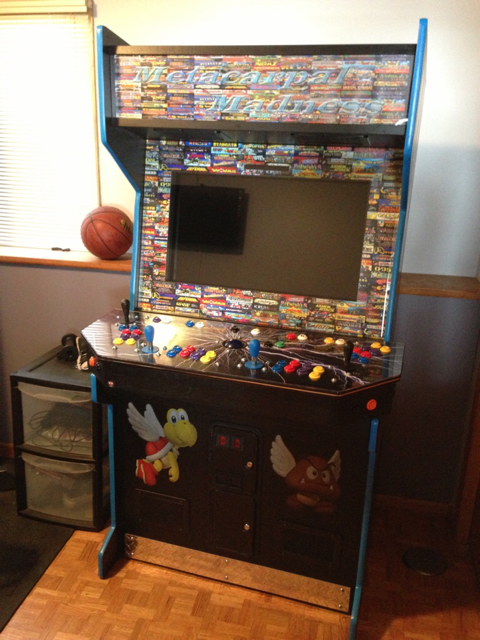
You guys don't need a pedestal stand to fit a 32" LCD TV, just a little ingenuity. I fit mine just fine. I also have arcade guns. If you looks very closely above the tv screen, you will see the section I cut out of the bezel to accommodate the light gun sensor. The control panel is removable too.
-
Adding psyvaria.chd to MAME in GameEX - Game won't show up
MNMax21 replied to MoggFanatic's topic in General
No worries, just pay it forward. People on here gave me the same advice a few moons ago. -
It could be your filtering. I am going to be honest though. I was lazy and did not read through your .ini. I know I had a problem with mine. Some of my roms were japan in nature and the default filter in gameex will filter out japan roms. Take a look at the attached picture. p.s.- Sorry, not a very good writer with the mouse. Maybe try changing the things I marked.

-
I would look into the run on launch section of the MAME Advanced settings. Here is a link. I would navigate to your .exe for joy tray http://www.gameex.com/Support/SetupWizardconfigurationguide.aspx#mamesettings As far as the command lingo. It may be possible for you to place the -servo joy8way into the mame options, which is depicted on the same above link. The link has "-nowindow -joy -skip_gameinfo" in their currently, which I believe is default. You may have to make it something like the below: "-nowindow -joy -skip_gameinfo -servo joy8way -servo joy4way" If you run the joytray.exe at mame startup, that may alleviate the having to put -servo .... information in the command line though, as the program would now be running in the background once MAME starts up and should run the same way it would if you were just playing MAME in MAME.
-
Adding psyvaria.chd to MAME in GameEX - Game won't show up
MNMax21 replied to MoggFanatic's topic in General
Google is your best friend on this one. Also, try looking into a program called romcenter. -
Sorry Adultery, I know you've touched on this topic before. I don't mean to keep rehashing it. I compiled my current version of MAME with the HK Mame Compiler 64(Edit: pretty sure it's .153). I don't recall an option for how you wanted to have things rendered. Is there a wiki or some website I can go to for further information? I really have no clue what the rendering stuff means, so I'd be starting from zero.
-
Hey Adultery, I was just reading this topic again due to the recent postings and I thought of something. I am not a programmer by any means, so I am wondering if this is even an option. I still use the turn on and turn off option for the plugin, because of the whole d3d deal. It's still a fairly easy deal, as I just exit out of GameEx and check the box to turn it on when I need a snapshot. Again, I do this because I use bezel artwork around the game itself, due to my larger screen. When the plugin is enabled, that artwork becomes blurry. Long short of it, I was wondering if there was a way to somehow make a sequence of key pressing put a check mark into that box without exiting GameEx to get to the PlugIn enabler .exe. Meaning basically, is there a way one could just make the plug in active while staying inside GameEx?
-
This is really cool. Thanks for creating it and allowing us to utilize it Adultery. Pretty cool looking tag!
-
Test post
-
This was probably my error, but I just thought I'd post it in case it happened to anyone else. When I updated to the most recent version of GameEx, it put my screen into a rotate 90 degrees format, similar to a cocktail cab. It was easy to go in and change in the wizard, but was just odd. The reason I thought it was probably my error, was because I opened GameEx and clicked confirm to download the new update. It then downloaded it, but I thought it stalled out once GameEx closed to update the files like it has in past updates. I then reopened GameEx and heard the GameEx intro music, but GameEx was not open. The update then started to load, but then stopped and closed. I then did the update a second time and it worked fine, but still auto rotated screen 90 degrees. Just an FYI I guess.
-
Sweet, this is exciting. Thanks for all the hard work!
-
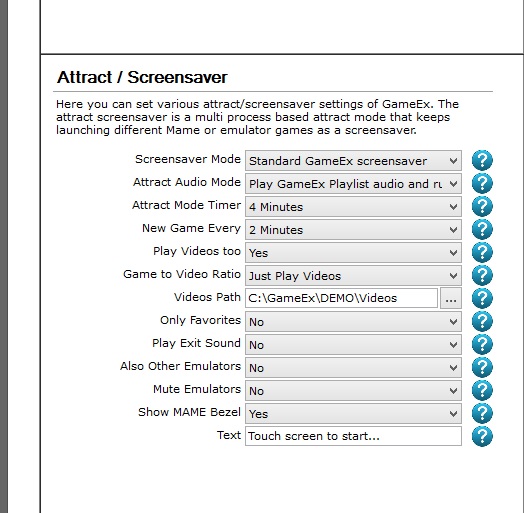
Guygizmo, if you need some assistance on where to locate the built in screensaver, it's within the setup wizard under "Attract/Screensaver." For what you're talking about, you probably want the "turn off monitor" option. Just a heads up, if you like glitz and glamour. You can also select the gameex screensaver, which is awesome. It plays short video previews of games. I love it. However, if you plan on leaving it on all the time, it would be a power drain. I have attached a picture of the applicable portion of the gameex setup wizard. You can just do a google search for "gameex setup wizard" and locate what I am talking about. It's a very detailed explanation of the setup process for the technologically challenged folks, like myself. Here's a link too http://www.gameex.com/Support/SetupWizardconfigurationguide.aspx#attractscreensaver

-
Wow, has everyone seen these real life video game videos? They're pretty hilarious!
-
NBA Jam and NBA Jam TE Rampage, Mario Bros.
-
Indiana State for Bird was an odd ball college location. Michigan State for Magic. Those years were a little before my time. I was old enough to enjoy Bird v. Magic in their final years. I have a tendency to both like the Celtics, due to McHale who is from Minnesota and then hate them for getting Garnett from us. Not their fault though, our management was awful and didn't build a competitive team around Garnett. We're about to lose K Love to the Cavs now too. I don't like Loves game anywhere near as much as I liked Garnett's game though. I was somewhat hoping Lebron and Durant could start a rivalry. We shall see I guess. I miss the old days. Jordan vs. everybody. Patrick Ewing, Olajuwon, Miller dropping threes, Stockton/Malone, even Shaquille is not around. Just not the same these days.
-
That might work. Thanks!
-
Anybody know of an app or a way to turn your iPhone into a controller for nes type emulators on your computer? I like this, but $70? Nope… http://www.amazon.com/gp/aw/d/B00A2URU42?pc_redir=1405521947&robot_redir=1
-
http://www.gameex.info/forums/index.php?/topic/11710-%5BAPPLICATION%5D-GameExLaunch
-
You basically have to navigate back through the open tasks through ctrl,alt,delete. I believe you have to go through that and then stop the shelling and restart. I have decided to go with other options than the sheller. You can just place the gameex.exe icon into the run on startup file in the start menu under programs. This will then start up windows and gameex will start up immediately after, which will allow you to then go back and use windows after exiting gameex. You could also use Adultery's Gammeex Launcher program. It's pretty slick. It will allow you to set a time delay on how quickly you want to launch gameex after start up.
-
http://www.gameex.info/forums/index.php?/topic/4655-%5BAPPLICATION%5D-CPWizard-v2%2E35
-
I'd try the romcenter program. You may need to do some reconnecting of files. I had quite a few of my roms have missing files when I updated to .153. Once you run the romcenter program on your main rom files, it'll show you what files are missing. Then Google May or May not be your best friend.
-
I think my TV just defaulted to this resolution with the hdmi output from my GeForce card. Good to know its right.
-
Did u remove the TV housing? The table looks awesome. Nice job.
-
What size TV did you fit in the existing pinball box?