



|



Adultery
-
Posts
10152 -
Joined
-
Last visited
-
Days Won
159
Content Type
Profiles
Forums
Events
Downloads
Store
Articles
Everything posted by Adultery
-
I do love suggestions! Its the only way to learn! In RE: I actually use Application.StartupPath most times unless its for a process Working Directory, in which case I use Path.GetDirectoryName Most of the time I do use Path.Combine, but not always. I will now though as you make a great point there. I usually use vbcrlf for a new line. I used StramReader.ReadLine since I thought it may be faster than parsing the whole file after loading it. On that note I was using Exit While (Do While SR.Peek() <> -1) to break the loop.
-
Maybe you have verify turned on and your ROMs aren't passing that check? Your sets match your MAME version, right?
-
That's not a bad idea, except there's already some threading going on anyways. Too many threads will bring lag.
-
Yeah, like Drac said, it happens at startup. Only at startup. I don't notice it on my cab which is always on.
-
Can't wait to play with the new .NET framework! Anybody play with this yet?
-
Wow! Cool! I didn't know that could be done! Does it work on the loading windows too?
-
Don't quote me, but you may see a performance hit if you're using FLV (not 100% on that however).
-
I dont see this issue anymore and I use GameExtender, so I don't think that's the issue TBH. EDIT @Krak: Are you still working some strange circles to get all your monitors to work as mentioned before? Maybe that has something to do with this?
-
AFAIK, you need to use the CL version instead of the UI for launching games from the command-line, and the arg is: Supermodel.exe "[ROMPath]\[ROMFile]"
-
You can't right now, sorry... This is really made to compliment GameExtender and that doesn't offer the functionality to use another monitor besides the 2nd (yet). Your best bet is to disable it for those games (for now) until I come up with something more elegant. It's easy enough to add a setting globally, but on a per-game basis is a little more tricky. To disable it for a game just add [NOINFO] to the game's command line that uses the 2nd monitor. EDIT: I just re-read your post... How is it that GameExtender is displaying on the 3rd monitor? There's no setting for that AFAIK... GameInfo is hard coded to use monitor #2 all the time (as GameExtender should be also??) I might add a CL switch for this (like [iNFOSCREEN = 3] or something similar).
-
Apparently not... I'm not saying you should have just used MAME, but you threw in a jab at all the contributors trying to help you, and that was unnecessary IMHO. I'm not the type to throw my weight around, but please be considerate to others when posting, and keep your opinion to yourself next time if you're planning on being abusive. We like to keep the morale high around here. Thanks STONEDSTONER. No hard feelings.
-
Like you guys? Hmm. The posts above me look like they came from people who don't use ZiNc, so how would you come to expect any one of us to explain how to set it up? Your response was kinda uncalled for, especially if you're not gonna bother to share your results. You're welcome.
-
Don't quote me on this but I think the snaps are gathered dynamically now with the DB info.
-
*UPDATED 9/16/12* (Console) Added MAMEINFO.DAT parsing (GUI) Added options for MAMEINFO.DAT (GUI) Cosmetic updates
-
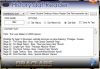
Not a big deal (not even enough to make a glamorous page for it), but I wrote an app for snagging History.dat info while I was practicing writing my own parser. It's simple to use and quick as hell, and it was fun to make (what's a couple hours on a Saturday anyhow?) So... For the console app (historysearcher.exe): Example CL: "History Reader.exe" -rom punchout -history "C:\History Reader\DATs\history.dat" -mameinfo "C:\History Reader\DATs\mameinfo.dat" -rom -romname -romfile The name of the rom to get the info for. -history -historypath -historyfile The location of your History.dat file. (If you don't specify a path the app will look in the application's root folder). -mameinfo -mameinfopath -mameinfofile The location of your MameInfo.dat file. (If you don't specify a path the app will look in the application's root folder). You can just code your program to redirect the standard output if one was so inclined to do so. Otherwise this is probably useless to ya unless you wanted to look around at your MAME game history... I also made a GUI for this little bugger and I thought it turned out kinda sexy! (History Searcher GUI.exe): The GUI has a file browsing option and can save the output to a text file as well. Not sure what else I can really say about it. Maybe someone might find it useful. I mean, ya just never know! *UPDATED 9/22/12* (Console) Updates to code as per Ben's suggestions (GUI) Likewise. *UPDATED 9/16/12* (Console) Added MAMEINFO.DAT parsing (GUI) Added options for MAMEINFO.DAT (GUI) Cosmetic updates History Reader.rar
-
Notice anything wrong with this map? *Hint: Pay extra special attention to MS, AL and MO. Source: http://foxnewsinsider.com/2012/09/14/breaking-university-of-texas-in-austin-orders-evacuation-due-to-threats-on-campus/ Okay, I forgot Hurricane Issac made a mess down there... But relocating whole states! Wow! Always trust your news station. LOL!

-
Ahh so it's like that... OK then. You're welcome I guess.
-
All of it that you would normally download using "-All Artwork-"? Maybe you already have all the artwork available on EmuMovies and it's looking for (and not finding) missing artwork? PS: Was it really necessary to bump a < 4 hour old thread?
-
BTW... I'm pretty sure emu 1000 was Daphne... Could be MAME also, but pretty sure it's Daphne anyways.
-
Updated to 1.0.4: Fixed TopMost setting issues Added minimize button (can't believe I forgot it! LOL!) Minor code fixes
- 44 replies
-
- 3
-

-
- gameexlaunch
- addon
- (and 1 more)
-
That's a DB error there. I used to see the same behavior right after the move to the new DB system, but it's working for me now.
-
Always nice to see things being coded up! Nice work.
-
Glad you like it!
-
Configure it first then launch it?
-
Radness!


