



|



Adultery
-
Posts
10152 -
Joined
-
Last visited
-
Days Won
159
Content Type
Profiles
Forums
Events
Downloads
Store
Articles
Everything posted by Adultery
-
Ahh kickstarter... That idea is really taking off! It's crazy how much one can raise up with fan money on the table! $400k isn't a huge amount for all these tables, especially if you jump in on this tier: Reward selection PLEDGE $10,000 OR MORE ULTRA JACKPOT! A special lunch with Pat Lawlor, John Youssi and Adrian Barritt in Chicago (the home of pinball), special thanks on all FIVE playfields, and all previous reward tiers! (You must arrage your own transport to Chicago) (2 of 3 remaining) Est. Delivery: Oct 2013
-
Wow! Now THAT was a story!
-
Good spot null!
-
OK, but you are redownloading the EXE from here everytime, right? You're not using the same one over and over?
-
Yup Null suggested exactly what I would have. Uninstall .NET and reinstall it and see if it helps. I'm really starting to get curious about your build of XP... You sure you're not using a lite version?
-
Please do as I asked above you.
-
Try and install GameEx using the offline installer and post your Windows Log afterwards: How to View Event Logs To open Event Viewer, follow these steps: Click Start, and then click Control Panel. Click Performance and Maintenance, then click Administrative Tools, and then double-click Computer Management. Or, open the MMC containing the Event Viewer snap-in. In the console tree, click Event Viewer. The Application, Security, and System logs are displayed in the Event Viewer window.
-
Some are populated after launch but they would be "seeded" with default values during install, not after launch. Except the gamercard which uses its own reg installer.
-
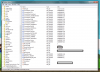
Either somethings blocking you out (AV, Windows Firewall, something like) or you don't have the proper permissions to install GameEx (are you the admin on both machines), or youre using a lite install of Windows. Here's what the reg screen looks like after a proper install: Note at least the 2 sub folders and tons more reg values as opposed to yours. The problem is most definitely something you're doing (or not doing), not GameEx itself (an offline install worked fine on my dev machine).
-
Your Reg info is missing a ton of stuff. Like literally a ton. Somethng is wrong with your install to say the least. Let me get a snap of mine and you'll see what I mean. Hold on.
-
My concern here is that this LOG is from April and it's September. Go to your C prompt and type in RegEdit. Under HKEY_Local_Machine\Software\GameEx what is the value for InstallLocation? Is it the right path? I'm willing to bet your install location is not the same as the one as the INI and LOG came from... Like you reinstalled it and you're still looking at an old folder.
-
Hmm, this looks OK to me... Can you try and run it with GameBase disabled and see if it runs? If you are getting an error window before the crash can you post a snapshot of it?
-
Your log doesn't show any kind of interaction with Attract Mode at all. When a game lunches in Attract Mode on my machine it puts in an entry, like so: 22:05:53.7 8/31/2012: Running: cmd.exe /c F: F:\Emulators\MAME\mame.exe skyarmy -rompath F:\Emulators\MAME\roms -nowindow -joy -mt -video d3d -mouse -noka -volume -32 -bezel -artpath artworkgameex Your log doesn't even have any evidence of it doing anything at all, so...
-
I was just guessing. Seems like you're already scraping to grab the image... But I'm also lazy. Lol?
-
Would you even need one if you were scraping Steam anyway?
-
Thanks Tom! Nice work Ben!
-
Let's not get carried away now! Lol! There's an importable config for PC games that use the .lnk method. It is refreshing to see folks try instead of just asking though! /me pats Venomouse on the back
-
You have both set up in the emu? Video Path: Snap Path: Or are you combining them into one directory? If you are... Don't do that. There's settings for both.
-
If you're using .lnk files (Windows shortcuts) the path is: CmdLine=""[RomPath]\[RomFile]"" Works great on my machine this way.
-
Can you see all your forums or just generals?
-
No worries. I map everything (obviously why I created a solution to generate them).
-
@Null: nope to #2. All lists are sorted alphabetically MAP file or not. I did add functionality to sort your list in Map File Maker though in case Tom grants my request for manual sorting with a MAP file.
-
Looks fun! My kids would be bored without an Xbox though! Lol!
-
@Circo: Does tapatalk offer up any moderation options?
-
1: Custom Menus. The EXE is in the GameEx start menu. 2: You can't. Lists are alphabetical by design. 3: Check out the Setup Wizard in GameEx and select emulator setup. 4: See #3... same place. 5: See #3 (external applications)


