



|

.gif.6d0defdbb7838a856f87aa25d43c69ad.gif)
scutters
-
Posts
2122 -
Joined
-
Last visited
-
Days Won
190
Content Type
Profiles
Forums
Events
Downloads
Store
Articles
Everything posted by scutters
-
Agree with Draco1962, I don't think you can have a table shown in Visual Pinball list but not then in the All tables list when the others are. If you don't use ratings maybe you could rate them all as 1 star and others as 5 star or something to filter that way. For WIP's etc i tend to add a spanner symbol alt code (ALT+128295) in the table description field after name before manufacturer so i can tell when scrolling through the wheel.
-
Sounds like an underlay, have a look for and then rename or delete; \Pinballx\Media\Images\Underlay.png \Pinballx\Media\System Underlays\systemname.png
-
Ahh ok, fair enough. That's pretty much why i'm setting up the nudging as quite sensitive. I do get a kick out of seeing the saucer wobble in Attack From Mars when i tap the cabinet!. Edit - wrote up my virtuapin settings for tilit & nudge https://www.gameex.info/forums/topic/22391-virtuapin™-digital-plunger-kit-v3-nudge-and-tilt-setup-for-visual-pinball-10/?tab=comments#comment-187363
-
Great build and write up! @Mike_da_Spike I'm just switching over from digital nudge and plunge to a vituapin v3 plunger kit. I've gone through calibration and now set nudge threshold in virtuapin controller to 0 and tilt sensitivity in VPX to 900. I still need to dial in the numbers a bit but it's a good start, did you tweak any other settings on your setup? Thanks.
-
Be careful if you try the new B2S sever, the send to back 'feature' might catch you out and display the B2S behind the pinballx blank backglass for every table - follow the instructions on outheres link. For the 2nd issue, videos not showing in font end (except dmd), can you post your LAV settings? Also noticed your screens are all set to monitor = 0 and positioned by x values instead. Not sure if that's a factor but i think there was a change to how pinballx uses display numbers recently so it might be worth changing the display numbers and setting x =0 instead to see if that changes anything, you can always restore the original ini file if not.
-
What happens if you run C:\Pinball FX3\Pinball FX3.exe -applaunch 442120 "-table_Citadel" from a cmd line?
-
Glad it worked. Off topic, but as it's a new build i'd go for visual pinball 10 vpx tables rather than the older vpt files. Up to you though and you probably have a good idea about what hardware you'll be running pc wise.
-
I think Star Trek is one of the example database entries in new installs, although i think it's under Future Pinball rather than VP. Are you looking at All Tables? Have a look in Future Pinball xml, if'ts there remove or disable it directly or via Game Manager. If you're not using future pinball you could disable that system in settings.exe instead.
-
You got the right files! Try updating pinballx to the latest version, 3.38 (you're on 3.02) - and install the 32 bit version. Please also confirm if pinballx and/or fx3 are set to run as administrator (right click on the exe files, Properties->Compatibility) And then post the files back again..
-
Thanks Draco.. I passed the buck with the player position to Windows!, I've hopefully clarified the Tips section in first post a bit, basically you need to open windows media player on its own outside pinballx, switch to now playing view and then drag it to the screen you want it on before closing it. When the plugin opens it it'll open on that screen.
-
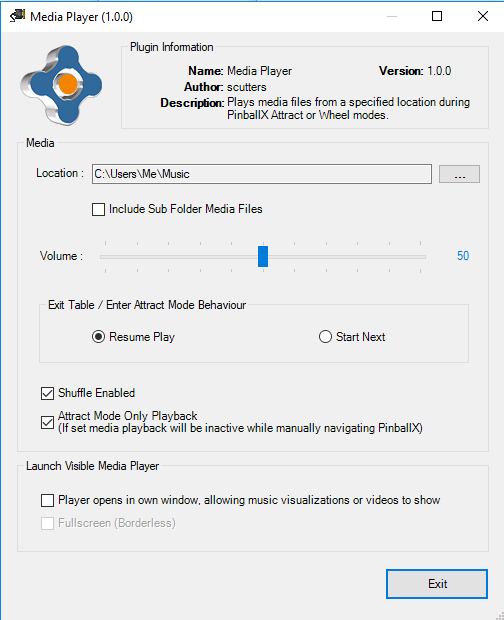
Some might prefer the excellent table audio files from gStAv https://www.gameex.info/forums/topic/13893-table-sound-when-browsing-tables in both PinballX Wheel & Attract modes, but if you want to additionaly / optionally play a selection of music files and/or videos in the PinballX front end then read on as this plugin might be for you.. What Does It Do Using Windows Media Player (WMP) the plugin will let you play media files from a specified folder whilst in PinballX. It will pause playback when tables are selected and then resume on table exit, or just on entry and exit of Attract Mode. Although originally intended as a music only player, it uses WMP and as that can also can also play videos i added an optional visible WMP window. The default mode is audio only, but if displaying a WMP window then that is hidden when playback is paused. So is it a Jukebox? V1 No - but if want to play random media (music or video) when you wander away from the cabinet for a few minutes (i.e. PinballX Attract Mode starts) then you can, or you can have them playing all the time whilst in wheel mode. V2 In PinballX Attract Mode? - Pretty much yes (depending on your definition), same as V1 outside PinballX Attract Mode. To Use The Plugin 1/ download the attached zip and extract the files into your PinballX\Plugins\ folder (use PBXMediaPlayerV2_1_1.zip for pinballx v3.47 and later) 2/ Unblock the files if required (https://www.limilabs.com/blog/unblock-dll-file) 3/ Open PinballX\PluginManager.exe, enable the Media Player plugin. 4/ Still in PluginManager, Select the Media Player plugin and click Configure. You'll get a message first time while an ini file is created for the plugin (in the Plugins folder). 5/ Optional - If you intend to use a visible player then you may also want to install the BackGlass Skin.zip (see https://www.gameex.info/forums/topic/22325-plugin-pinballx-media-player/?do=findComment&comment=187793) After this the plugin is enabled and will be configured with default values as screenshot below. If you want to view / change the configuration information, go through PluginManager Configure again. The screen below should show. Hopefully the options are fairly self-explanatory, but a brief description follows.. Media Location - Click the ... button to browse and select a media folder Include Sub Folders - Checkbox, check if your media is nested in sub folders under the main location Volume - Slider bar. Exit Table / Enter Attract Mode Behaviour - Resume last file from where it was left on table selection, or start next Shuffle - Checkbox, select to play media in random order Attract Mode Only Playback = Checkbox, check to disable playback in manual wheel navigation Launch Visible Media Player Player opens in own window - Checkbox, if not checked the plugin will play audio only regardless of content. Check this box if you want a visible window displayed in 'Now Playing' view. Fullscreen - Checkbox, select if you want windows media player to open in fullscreen mode Tips PinballX Audio For Attract Mode only media playback try muting PinballX in Attract Mode (PinballX Settings -> Attract Mode -> Mute Audio = Yes). If you're not running the plugin in Attract Mode only (so always on when in the PinballX Wheel) you may want to back up and then remove normal PinballX audio files, like Startup Sounds & Table Audio to avoid multiple sounds playing over each other. Audio Volume If playing with no visible WMP window then this will control all PinballX volume as the plugin is using an internal player, however if using a visible window it will control the volume of the media you're playing only (PinballX audio level will not be affected) Visible Player Best suited for cab owners with > 1 screen Open Windows Media Player on its own first, switch to the Now Playing view (bottom right of screen) then move / position & resize the player on to the screen you'll want it visible on. Right click on it and select Always Show Now Playing On Top. Right Click again and select the view you want for music files (if not playing video) visualisations etc. Close the player and it should default to those settings when opened by the plugin, although the window may resize automatically for video playback if fullscreen is not selected. Visible player is not compatible with PinballX Fullscreen exclusive (it's hidden), in PinballX display settings set Full Screen Windowed = Yes if you want to use a visible player. Additional Notes For Version 2 (Requires PinballX V3.47 or later) Adds Attract Mode media navigation for skipping tracks, playback modes and playlists. New functions are available ONLY if PinballX is in Attract Mode. Navigation Button / Keys used (as mapped in pinballx settings) left - skip back right - skip forward page/nudge left - change playback mode page/nudge right - skip to next in mode, or if in Play All mode toggle shuffle on/off (overriding default shuffle mode in plugin config) instructions - if using visible player (via plugin config) switch in and out of full screen for videos etc. pause in game - pause playback (if you have a pause in game button mapped in pinballx). Press again or skip to next track to resume Any other button / key - exit attract mode (disabling media player navigation until pinballx reenters into attract mode) Navigation button presses are accompanied by either a beep (skip) or a voice detailing current mode or selection. Player Modes Loop All (start) → Artist → Album ↑ ↓ Playlist ← Decade ← Genre During attract mode if the page/nudge left button/key (usually left magna save) is pressed the player mode will be changed as shown in the loop above based on mp3 / wma ID3 tag values, if the current track doesn't have a specific tag for the file then that mode will be unavailbale and the player will skip to the next valid mode. Likewise, if no playlists are found then that mode will skipped. During playback modes other than All the page/nudge right button/key (usually right magna save) can be used to skip to the next value found for that mode, i.e. next artist, next album, next playlist etc. Playlists Playlists for the media player are simple text files, to use them create a MediaPlayerPlayLists folder under \Pinballx\Plugins\ and then create playlist.txt files (the playlist file names can be whatever you want, they just have to be txt files). Add playlist entries to the txt file(s) as file paths, e.g. C:\Pinball Vids\Metallica Pinball from Stern.mp4 C:\Pinball Vids\Kiss Pinball 2015.mp4 etc.. Note that for playlists the location of the files does not have to be under the plugins main media folder they can be anywhere with a valid path. On my system i have the plugin config pointing at C:\Music\ and subfolders, but then use C:\Pinball Vids\ for a video playlist. To create large playlists i'd recommend using FileListCreator to save time, it's free and allows you to easily drag and drop files or folders to build a list which can be copied to clipboard or saved as a playlist. Note, if you do use this tool that you'll need to change the default format, basically uncheck all boxes under the Columns drop downs on the right hand side so the output preview is just file path & name. See also https://www.gameex.info/forums/topic/22325-plugin-pinballx-media-player/?do=findComment&comment=188275 for settings you can just load. Playlists can also be used for lists of internet radio stations - see https://forums.gameex.com/forums/topic/22325-plugin-pinballx-media-player/?do=findComment&comment=218864 Other Stuff No changes to ini file or plugin config in V2 so just copy over V1 if you have that or install as in original notes above. If you have thousands of media files the plugin may slow down pinballx startup when first run as it reads mp3 tag data. To improve this a cache file of media data is created under the plugins folder by the plugin, that file is used on following starts to remove the delay and will be recreated if you add more media files. Notes The plugin was built and tested on Win10, but i have now tested on Win11 and it (and the WMP skin) still works (but you may need to enable Windows Media Player Legacy in windows features) I think i got all the main media formats covered that windows media player can play back, but i may have missed some. If the player doesn't find some of your files (and they work in windows media player) then please let me know. Any issues Please have a look at \Pinballx\Plugins\PBXMediaPlayer_log.txt, if it's something obvious the detail should be in there. If an error has occurred playing a specific file then confirm it can be opened in Windows Media Player (if you can't play a file in WMP then the plugin can't either). Otherwise, please reply attaching your PBXMediaPlayer_log.txt, PBXMediaPlayer.ini, Pinballx.ini & log.txt files as well as the issue description. Thanks To @wrd1972 & @simbamame for help testing the plugin on their systems. Also thanks to @Tom Speirsand @Adultery for pinballx and the plugin template used, and Perry Butler for the excellent mp3 tag reader library i used in Version 2 16/06/2019 Update - Attached Backglass Skin.zip This is a skin for windows media player that is more in keeping with a pinball theme than the default media player. Use of this with the plugin is entirely optional and is intended mainly for users playing audio only files who want track information to be displayed on a backglass screen over the backglass video. More information https://www.gameex.info/forums/topic/22325-plugin-pinballx-media-player/?do=findComment&comment=187793. To install you'll need to unzip the 'Backglass Skin.zip' file and then install the Digir___0.ttf font file (used by the skin) - double click that and then click install. Next step is to install the Windows Media Player (WMP) skin by double clicking the PBX Backglass.wmz file, that should bring up a View Now option which will open WMP and allow you to position the track info on screen by dragging it to position. Close WMP and then select to use a visible player in the plugin via plugin manager. 29/06/2019 Update - Plugin Version 2 attached. Requires PinballX V3.47 or later. Notes updated. Version 1 left as attachment for anyone who doesn't want the new features or for whatever reason doesn't want to update PinballX. See https://www.gameex.info/forums/topic/22325-plugin-pinballx-media-player/?do=findComment&comment=188154 for quick demo. 12/09/2019 Update - Plugin Version 2.1 attached Allows disabling of media navigation keys/buttons via config/ini. Enabled by default. 12/09/2019 Update - Plugin Version 2.1.1 attached Added Pause playback. Changed to .net 4.0. 26/04/2025 Update - Plugin Version 2.2.0 attached Compatibility fix for PinballX 6.59 and later. Changed to .net 4.8. V1 (PinballX versions up to V3.47) PBXMediaPlayer.zip V2 (PinballX versions from V3.47) PBXMediaPlayerV2_2_0.zip Backglass Skin.zip
- 35 replies
-
- 3
-

-
- plugin
- media player
- (and 4 more)
-
Try tweaking settings.exe->display settings->playfield brightness
-
You have two main options, either add a custom system in settings.exe for diferent VP versions or use the alternateexe flag in the database xml file to point at the correct exe. Have a look at this thread. Let us know if you need more help..
-
I haven't used FX3 in a while so i may be a bit off, but do you have cabinet mode enabled for it? https://www.pinballfx.com/?page_id=7754, do FX3 backglasses work outside pinballX? For the DMD freeze check all monitor refresh rates match
-
It might be available to supporting members only, not sure. There's a v10.5 installer here though https://www.vpforums.org/index.php?app=downloads&showfile=11573
-
.thumb.gif.704e8e80bff8d8baa365115adc2ca31b.gif)
New Feature: View 3D Table Models in Browser
scutters replied to freezy's topic in VPDB General Discussion
Well i was kinda kidding about pinballx!, but hey it would be great if it could be done even if it was if cab online only to a cut down version online. I reckon if you disabled most pinballx functionality while viewing it you'd have 7 buttons on mast cabs availbale, flippers, magna's, add player, add credit & plunger, leaving Exit to go back to pinballx. Don't know how you'd know the exact version of a table being played though. Thanks a lot for it on vpdb anyway -
New Feature: View 3D Table Models in Browser
scutters replied to freezy's topic in VPDB General Discussion
Forget pretty, that is bloody awesome! Can you plug it into pinballx somewhere as a table explorer option?!?! Slight issue with popeye though; Other tables i looked at look great though.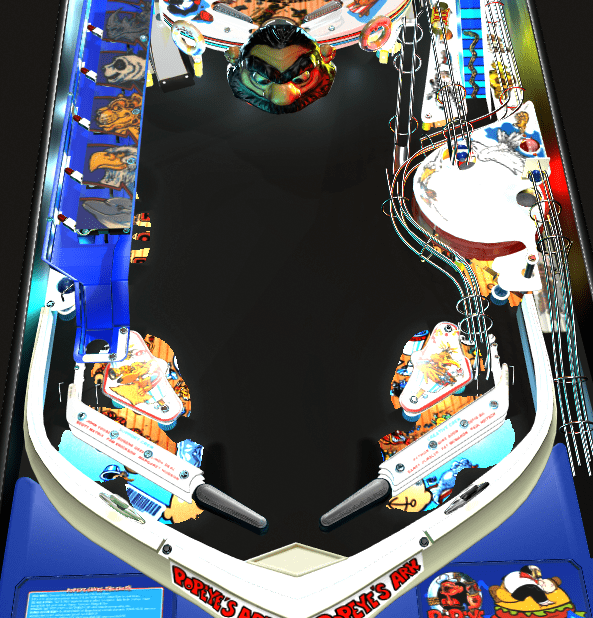
-
@Mike_da_Spike Pinsound offers better sound quality than the rom sounds. Some pinsound mixes have changes to music, on others people have updated callouts etc too. Some mixes are better than others but the sound is normally vastly superior to the rom and it doesn't distort like rom sounds can as volume goes up. Most people use it in place of the rom sounds all the time, i'm slightly different (call me a weirdo! ) and use it to allow me to play my music in game by removing music from the table in pinsound (but leaving the enhanced callouts and special effects) in one pinballx system and use normal rom sounds for the same table under another system.
-
[OBSOLETE][PLUGIN] PinballX Loading Image Changer (de-randomiser)
scutters replied to scutters's topic in User Projects
Updated to V1.0.2 - attachment updated in first post -
Glad to be of help! Sounds like your sttng files are the old altsound format which don't work with pinsound studio. Not a problem running either way across different tables though. If you want to see a fun alternate use of pinsound (to blank out game music and play a bit of random metal instead) have a look at https://www.vpforums.org/index.php?showtopic=41071&hl=
-
Try opening pinsound studio on its own, drag to playfield and close it. It should open on playfield next time then. To minimise add the /minimized parameter. So in a bat file like; START /b cmd /c "C:\PinSoundStudio\PinSoundStudio.exe" /minimized It will still open briefly maximised though. If the new version of pinsound studio in fact doesn't resolve DE tables then i think you'd have to pass Manufacturer to a batch file and call a pinsound studio exe version based on that. Post back if you need a hand with that.
-
No easy way that i know of, as you suspect you could split off tables to different custom systems in pinballx and launch a different version on each. I only use one version of pinsound studio, can't remember the version number off the top of my head. Is there a reason for running more than one other than one? I know there were issues with a version of pinsound studio not working for Data East tables but i thought that had been resolved (although i still use altsound = 1 for pinsound on the DE tables i use rather than pinsound studio and altsound = 2)
-
I use a mini wireless keyboard, so it's always close to hand somewhere near the cab - but i can see how that utility could be useful. I'd suggest moving that into it's own thread in the User Projects section. The description is fine, your English is maybe better than you think! For the tags on this thread i'd probably add; Wallpaper Black DMD DMD Border
-
Nice one! And thanks for sharing your solution for others. It might be worth adding some tags to the the topic to make it easier for them to find.
-
I guess it's personal choice at the end of the day. You have a few options; Size all DMD's with the same 4:1 ratio and keep the yellow border. But Fullscreen DMD's will look stretched, but they are the minority. Size all DMD's to fully fit your DMD area, but normal DMD's would look squeezed. The option you've ruled out - Don't hide the DMD video in the background which will show the border still. A DMD image would use less resource, but then you won't have a DMD video in the front end. Don't use DMD at all in PinballX - just have a static DMD wallpaper image in windows. Stay as you are and live with the black border on the DMD!! Sadly no 'proper' solution that i know of, but you could add to the feature request thread a request to make the default black dmd (when Hide DMD is selected) to be a customisable image. (I imagine the reason for the black screen being used in PinballX is performance - so you don't have an image or video playing in the background like option 3 above)
