|



headkaze
-
Posts
5120 -
Joined
-
Last visited
-
Days Won
37
Content Type
Profiles
Forums
Events
Downloads
Store
Articles
Everything posted by headkaze
-
Can I suggest something else? With CPWizard you can actually batch export your CP as bezels for every game in Mame (to it's artwork folder). You also need to patch Mame using the bezel patch from the CPWizard website. But once this is done, when you press the pause button in Mame it will show an overlay (which is really a bezel) of your CP ingame. You don't have to run CPWizard in the background to use this feature. It uses no memory and shows instantly while in Mame. If all you want is to be able view controls in Mame then this is the way to go. Another benefit is you can actually use the editor to make it look like your own CP. CPWizard will also take into account any special key mappings you may have so the buttons will show the correct labels.
-
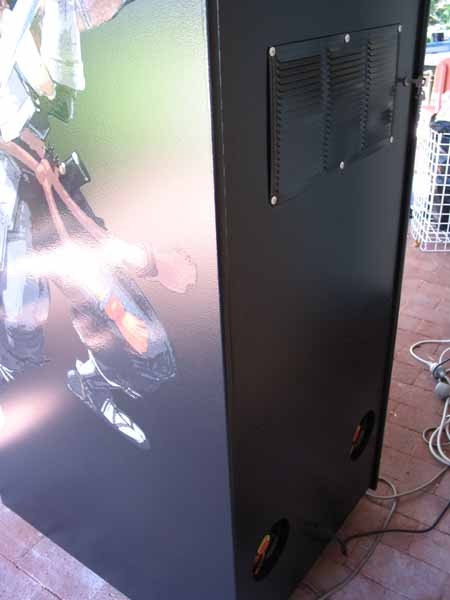
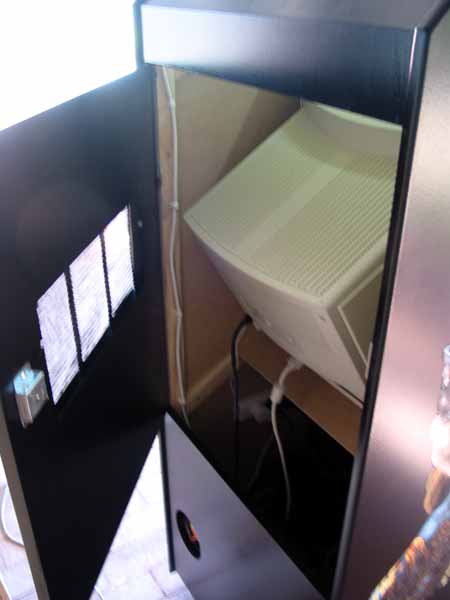
Well, lets face it PC's aren't supposed to be locked inside a big wooden box. Having a few holes at the top of the cab IMHO would not be good enough. You really need air flow so you need fans to blow the hot air out of the cab and have some sort of air flow going through the whole cab. Since the monitor generates alot of heat I put the grill behind it and with the fans below (just behind where the PC sits) it should create a cycle of air coming in through the grill to cool the monitor and the hot air being blown out the bottom.
-
Do you have ventilation for your cab, as your PC can get hot in there there even if you have fans in the PC. Especially a big ass monitor like a wells garner. I have two fans at the back of my cab and a ventilation screen. Here are some pics showing you what I mean. You could always open your PC up and have a big ass fan blowing in there just to see if it is a heat problem.

-
Did you give those two options a try? Open up your mame.ini (if you don't have one run "mame -cc" on the command line to create one. Open it up then turn off triple buffering and enable d3d rendering. So it should have these options set like so: triplebuffer 0 video d3d
-
Take a screenshot of your D:\GameEx\Vids folder in Windows Explorer and post it here (Alt-PrtScn then paste into Paint). It might give us a clue *shrugs*
-
Not really, it's usually display settings that cause sound stuttering. Try turning off triple buffering and turn on Direct3D rendering if you haven't already. Taking some of the rending to the graphics card can take some of the pressure off the CPU which is what Mame uses the most. What are your system specs including video card?
-
You really need the hardware to play with the LED animations because you actually need to assign your LED's to the buttons and replicate your CP layout in the animation editor. So unfortunately you will have to rig up your hardware first.
-
The PlugInLCD is what your after and it's part of the GameEx install. It supports both the LEDWiz and PacDrive. When you install GameEx you select Start->Programs->GameEx->Plugin Manager to enable the plugin and configure it. It depends on how you want to do things I guess, since the LEDWiz support PMW which means it can light buttons using different colors when using it with RGB LED modules that plug in underneath a button. You need the Electric Ice buttons to go with them so to diffuse the color properly. The PacDrive on the other hand only supports mono LED's (on and off) but you can still light buttons to show which ones are used, but you can't light buttons to the colors of the real CP's. They both support LWAX format which is an LED animation format that allows you to light buttons in complex animation sequences. So I guess what you want to do depends on your budget and needs.
-
I did ask Tom about this a couple of times but I think he's been snowed under lately, so give it some time and I'll ask him again.
-

The GameEx Database Project
headkaze replied to headkaze's topic in FAQs, Guides, & Other Useful Information
GameEx DBM Version 1.29 Released - Had to do some pretty major changes to allow for multiple games with the same name (needed for C64 database) Please report back any problem with this version. There is a good chance I've introduced some bugs in this one. Flash: Cheers mate, and I have something for you Yes I've converted the GameBase 64 database to our xml format (20,000 games!). I'll PM you with a download link a few minutes. -
Found my old post about this, should point you in the right direction. * Removing disclaimer Mame\src\emu\ui.c int ui_display_startup_screens(int first_time, int show_disclaimer) show_gameinfo = show_warnings = show_disclaimer = FALSE; /* disable everything if we are using -str */ if (!first_time || (str > 0 && str < 60*5)) show_gameinfo = show_warnings = show_disclaimer = FALSE; void ui_update_and_render(void) //ui_draw_text_box("Updating Artwork...", JUSTIFY_CENTER, 0.5f, 0.5f, messagebox_backcolor); static UINT32 handler_messagebox(UINT32 state) { //ui_draw_text_box(messagebox_text, JUSTIFY_LEFT, 0.5f, 0.5f, messagebox_backcolor); return 0; } * Removing border Mame\src\emu\render.c else { /* render_primitive *prim; prim = alloc_render_primitive(RENDER_PRIMITIVE_QUAD); set_render_bounds_xy(&prim->bounds, 0.0f, 0.0f, (float)target->width, (float)target->height); set_render_color(&prim->color, 1.0f, 1.0f, 1.0f, 1.0f); prim->texture.base = NULL; prim->flags = PRIMFLAG_BLENDMODE(BLENDMODE_ALPHA); append_render_primitive(&target->primlist[listnum], prim); prim = alloc_render_primitive(RENDER_PRIMITIVE_QUAD); set_render_bounds_xy(&prim->bounds, 1.0f, 1.0f, (float)(target->width - 1), (float)(target->height - 1)); set_render_color(&prim->color, 1.0f, 0.0f, 0.0f, 0.0f); prim->texture.base = NULL; prim->flags = PRIMFLAG_BLENDMODE(BLENDMODE_ALPHA); append_render_primitive(&target->primlist[listnum], prim); */ }
-
The GameEx Database Project
headkaze replied to headkaze's topic in FAQs, Guides, & Other Useful Information
GameEx DBM Version 1.28 Released - Now you can select multiple games in the gamelist to delete - Copy and paste added to game editor - Various other tweaks and fixes -
I'm assuming your running the latest version of CPWizard but even so can you change UseOverlay=True to UseOverlay=False in your CPWizard.ini. Can you please turn on Verbose Logging in CPWizard, then post your CPWizard.log file.
-
Unfortunately the other fields it could have supported arn't really worth using because there is so much missing data from Moby. The idea of the new databases is to complete them by adding the games that arn't on Moby and there is a lot of them. I think we would all agree that it would be better to have complete databases than new fields that only a handful of games support. Two new fields that have been added are NoIntro and TOSEC. Which means you can have your ROM set in GoodTool, NoIntro or TOSEC naming conventions and GameEx will still display the correct info for the game. This has the side benefit of helping match EmuMovie videos because they are named by NoIntro->GoodTool->TOSEC. Another addition is the Biography, each system will have information about the system being emulated. Right now there are no new databases included in GameEx. Flash is the only one who's finished a database (two of them) but I have yet to get them into mdb format for Tom to release. It's a big job to finish all the databases but we have a group of volunteers that will hopefully eventually get them all done.
-
Version 1.16 Released - Added support for compiling Mame 0126
-
Hey Tom is there any chance this could be caused by UpgradeConfig.exe? I noticed it running for quite a while just after I installed a new version of GameEx today. Not sure what the purpose of this program is though. I've never had GameEx screw up my configs. Flash: Next time you install GameEx try running Process Monitor and see if you can figure out what process is writing to GameEx.ini.
-
What version of CPWizard are you running? Make sure you running the latest (1.80). If your still having the same problem with 1.80 then can you post your CPWizard.ini.
-
Okay I've found some more issues, not sure if this is related to the database I'm using created by WinUAE Loader which is in the new format. Love the new Biography, love V3 themes in general. But above my Amiga game list I have By Name, By Category, By Manufacturer, By Year, Biography - If I select "By Category" I get a NumPlayers list to choose from. - Should "By Manufacturer" be "By Publisher" instead? I guess it doesn't matter - There is no "By NumPlayers"
-
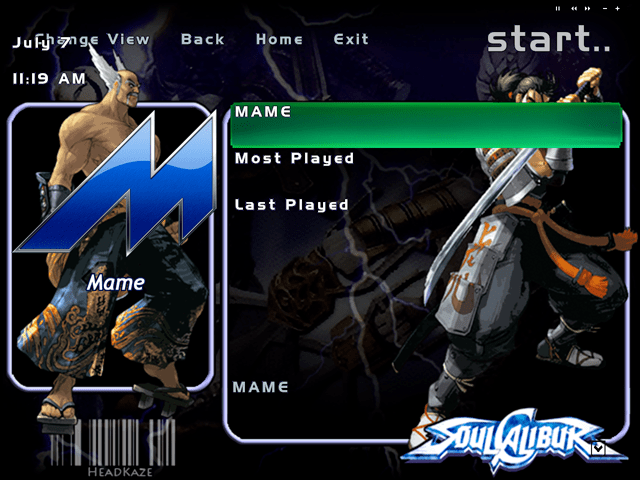
Hey Tom, I decided to change my Soul Calibur theme to V3 so it will have the menu's across the top. So I edited my Theme.ini to say Version=3. This worked great! But I found a bug in the process, when I select "Change View" over and over the vertical gap between text becomes greater and greater. Do it enough times and the selection bar's height will be massive and only a couple of menu items will fit into the main list. Attached is a screenshot after I've selected "Change View" about 8 times.

-
Okay sorry about this, there was a bug introduced in the last PlugInLCD update. I've sent off the fix to Tom. For now you can download it from the PlugInLCD thread (all you need to do is copy over PlugInLCD.dll with the new one and that should fix it) Apologies for the inconvenience!
-
Version 2.76 Released - Fixed bug not allowing to exit back to GameEx when running Mame Sorry about this, this was an introduced bug in the previous release!
-
TimmyB: I just tested on my cab and I'm getting the same problem with PlugInLCD. I'll have to check it out.
-
[PC] Commodore Amiga.mdb is a database for GameEx it does not contain the slave info. That is contained in Data\GameBase.xml, Data\WHDLoad.xml and Data\SPS.xml. And as you've discovered the version number is not releated to the game series number. If you want to play Speedball 2 or Xenon 2 just play the adf versions. I know the WHDLoad games are better, but they take alot of time and hacking to get them into that format. That is why there is a whole team of people creating WHDLoad games. Some games are more difficult than others depending on their protection schemes, loading systems, memory usage etc. so some games may never appear in the WHDLoad format. For more information check out the WHDLoad website. They have a search there where you can search for titles, but just because there is a WHDLoad game doesn't mean it is supported in GameBase Amiga. They still have to get the game running in WinUAE, then KillaGorilla has to add it to his packs, then Belgarath has to add it to the database.
-
Hi TimmyB Can you please post your PlugInLCD.log. Try enabling it first, running a game, then escaping. Close down GameEx then post the PlugInLCD.log file. The log file is only really helpful when it logs an error so the idea is to try and get the error occuring if there is one and logged in the log file.
-
The GameEx Database Project
headkaze replied to headkaze's topic in FAQs, Guides, & Other Useful Information
Another great thing about all this is that the EmuMovies collection should now match GameEx's databases. Tom has gone in the same order that Circo has NoIntro->GoodName->TOSEC.