|



headkaze
-
Posts
5120 -
Joined
-
Last visited
-
Days Won
37
Content Type
Profiles
Forums
Events
Downloads
Store
Articles
Everything posted by headkaze
-
The onscreen keyboard your using there is one I designed for use on the Nintendo DS. Seems a little small for a PC application. I think it would work much better if a bigger one was designed and stretched across the bottom screen?
-
Lawence couldn't you just do the following? [MameMaps] joy8way=easyjoy8way Or are you only creating maps for fighter games? Perhaps I could create a section that allows you to map games for specific genre's?
-
That's really cool Tom will be checking them out a bit later. So now along with Flash we have another oldshool C64 demo coder here I think I've really found home here!
-
I thought that GameEx supported both bezel formats for the vertical bezel so it should copy the bezel into the artwork folder when you run a game. Double check your bezel settings in the GameEx Setup Wizard. Easiest way to do that is to use it's search function and type in "bezel". Then in Mame's artwork folder check that it's copying the bezel files (named after the game your playing). Is it copying them? Can you run Mame outside GameEx with the bezel file and have it show the bezel? Do you have bezel's turned on in Mame?
-
Have you downloaded WinIPAC? Can you program it?
-
Yes I never got around to making a FE as it gets quite complex when you need to be able to configure all emulators. Yes my name is "Ben" so that is my plugin. And the plugin already maps MAME games based on data sent from GameEx, so most MAME games are automatic. There are a few that need to be done manually which is available through the PlugInUltraStik.ini file.
-
Did you have a look at PlugInUltraStik.ini? You can have a custom map for any game you want. The plugin I'm talking about is the one written by me (HeadKaze). It's the best one you will find that works with both Vista and XP and can program the joysticks without the need for UltraMap to be installed. At the moment it's the one that you will find in the Plugin Manager by default.
-
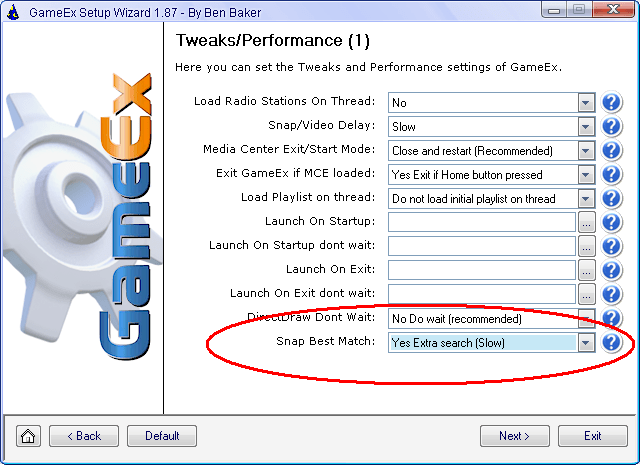
Do you have it turned on in the GameEx Setup Wizard?
-
You can set it to change to any profile you like upon exit. Open up [Program Files]\GameEx\PLUGINS\PlugInUltraStik.ini and set the following value [GameEx] Exit=mouse # Configuration for joystick(s) on exit of GameEx
-
I won't delete this post because I like happy endings! Glad you got it working
-
I believe GameEx supports both formats for the vertical bezel so you should be fine using that. Yes I did mean "or later"
-
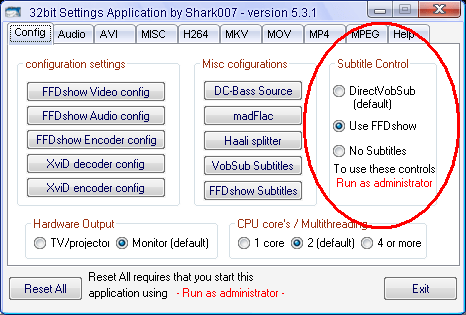
If your toggling subtitles in GameEx and get two overlayed sets of subtitles you will need to turn off VobSub and let ffdshow render them. Some codec packs such as the Vista Codec pack allow you to select which codec to use for subtitles. Attached is a picture showing the latest version of the Vista Codec pack which now includes a nice configuration utility that allows you to select which codec to use. For now GameEx can only toggle the ffdshow subtitle codec so you will need to set it to use ffdshow for the subtitle renderer. EDIT: Looks like I've found a way to add VobSub support as well, so next release of GameEx should allow you to use either codec now
-
Mame 102 uses the old bezel format. You need Mame 107 or later to use the newer bezel format that the game info feature requires.
-
Nice looking cab
-
Looks good to me, the E8400 is a nice budget CPU that will allow you to overclock. You want to aim for around the 4Ghz mark and the E8400 can reach that when it's overclocked. Another option is the E8700 as you might not want to run the machine overclocked all the time. I'm no expert on it but it does create more heat in the chip which is a problem in an arcade cab if there is not sufficient cooling. Check out BYOAC as there are a few threads over there about overclocking. Also don't forget you really need to get a 64-bit OS too. Either XP 64, Vista 64 or Win7 64. You get a substancial boost running the 64-bit compiled version of Mame. 2 Gig RAM running in dual channel mode is perfect and 500W PSU should be ample. You might want to consider a nice big terrabyte drive too as its very easy to fill up drives on a cab. The video card sounds fine also. One final thing I don't know how well they cool their cab's but I have two beefy fans with variable speed dials that blow air out the back of the cab just behind the PC. I also keep the lid off the PC and have an air grill just behind the monitor. It's important to keep the air flowing.
-
Unforunately it hasn't been updated in a long time. The last version is 2007-08-19 so you probably have the latest one. SirPoonga has been trying to get a hold of the guy hosting his project. I believe he wants to move to another server and update the online software. So hopefully we can see this project continue on in the near future.
-
I think this theme would look great having the sub picture set as the background. Have you tried that view yet?
-
Yes it can use fuzzy matching not sure how well it will match the sort of names in the C64 collection though. Might be better off using a renaming utility to get them matched instead. You can find some utils to do that at the following link http://wiki.arcadecontrols.com/wiki/Utilities#File_Renamers

-
Thanks for letting me know Lawrence I don't always get to hear feedback when things are working! Sometimes I just assume that when people are quiet they're happy LOL With the HitToText thing sorting itself out I always try to grab the latest version so perhaps it was a bug that Fyrecrypts fixed. Anyway I like your suggestion about the brackets and hopefully remember it next time I do a release, should be easy enough to add.
-
I don't know about "revolutionary" as I've seen quite a few 3d style interfaces like that before. I really like the OnLive UI http://www.youtube.com/watch?v=j5oIr4o_MIk
-
Profiles should only be use when a personal manually edits a game's colors in the profile editor. Otherwise it should be using the info from colors.ini. Just be sure you setup a GameEx profile and when browsing through games using the profile editor it should be lighting the buttons correctly as you click on a game.
-
Have you tried running WinUAELoader and making sure all your folders are setup correctly? Can you run a game by going to the Tools tab and selecting "Run ROM"?
-
Seems there is still not enough error checking in HiToText so it can fail gracefully when it encounters a non-compatible .hi file. If you can make a screenshot of the error I can post it for Fyrcrypts to take a look. The way I'm using HiToText nothing is being written by it so it should not be a permission issue AFAIK. Actually it might be easier to just post the .hi file and then I can take a look at it myself.
-
Good point and for a while there I was posting updates to DBM into the Database thread but have not done so for a while. I should probably do that again so people can see things are still moving along. There have been alot of updates to DBM since the project started and a number of more recent updates stemming from Lawrence's feedback. Flash has also helped make DBM much more efficient and easier to use over the past year since the project began. So I think it's worth a mention as there is alot going on "behind the scenes" to make the databases a reality. There is still alot of work to be done, but I think it's one of the greatest features in GameEx so very much worth the effort IMHO.