



|



headkaze
-
Posts
5120 -
Joined
-
Last visited
-
Days Won
37
Content Type
Profiles
Forums
Events
Downloads
Store
Articles
Everything posted by headkaze
-
Not at the moment, but I have just finished writing the GameEx Theme Editor application which has a control panel editor. At the moment it's very basic, but in future versions you can bet that it will show the joystick configs for each game. It's very easy to add since the info is in controls.ini, infact I should have added it in version 1 of the theme editor, but I didn't want to throw too much shit to add for Tom. But expect support soon
-
I find XP's "Remote Desktop" to be more than adiquate for my needs. Have you tried it? It works almost flawlessly, and in most circumstances it's like your accessing the machine like it's in front of you. GameEx has crashed every time I've accessed it from Remote Desktop, but today it didn't. I was able to gain control and even control the menu like I was on the machine. Must be something new Tom has changed, but either way, I believe it's the best way to go. A remote system that works wen I move the mouse left or right of my screen seems a little strange. I just have an icon "Remote Desktop" on each computer that I double click and select the computer I want to access and bang, I can control it over my network. No need for any 3rd party software like VNC. Personally I don't know why people use VNC when Remote Desktop works so well. And Microsoft has been doing thin client suppot via terminal services for years so they know what their doing.
-

Completed Feature Requests (Moved)
headkaze replied to jr9770's topic in FAQs, Guides, & Other Useful Information
Your thinking of Autohotkey which can map any key to another key and works very well. I use it in a couple of situations with games that don't allow custom controls. You can map any joystick or key to another key on the keyboard very easily. On top of that you can compile the ahk files to an exe and launch them before an emulator. I use taskkill.exe /F /IM [scriptname].exe to kill the script after it's launched. -
Check out this thread http://www.gameex.info/forums/index.php?showtopic=1036&hl=
-
Is it just me or does GameEx now work with Remote Desktop.. I just remotely accessed my arcade machine and could control GameEx instead of it crashing with an error log. Nice work Tom!
-
Quick update.. the theme editor is complete on my end, so now we just wait for Tom to integrate it. Stay tuned, I really hope it helps everyone make cool themes for GameEx!
-
Check out my post in the user submitted config topic pinned in the forums. I have an example config pasted in their.
-
There are also the -skipdisclaimer etc. command line options in the GameEx config that you should not be using.
-
Not entirely sure how it will work yet. I could later down the track add a CP editor with all the buttons and controls etc. but that will take quite a lot of work. But as for changing the CP to your own, you will be able to import your own image of your CP (that you will have to draw in Photoshop or whatever) then you can move about the labels to right places.
-
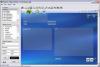
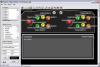
GameEx Theme Editor is coming... Here are some screenshots. Still a fair bit of work to do, and Tom still needs to implement some things for it to work. But it should make creating themes alot easier. It will also include a CP editor
-
BTW You can also use http://localhost:8383 (same thing, just easier to remember) What version of Mame are you using jedah?
-
Silly question, but are you pressing 'L' while your in a Mame game?
-
Why not use AutoHotkey instead? I just create a script for any game I need to remap controls. To give you an idea of how easy it is, just create a *.ahk script file and place, for example place "LAlt::v" in the file to map the left alt key to v. You can even compile the script file to an exe and run it before the emulator in GameEx. I use "taskkill /F /IM [scriptfile].exe" at the end to kill the compiled script. Of course if programming your ipac is as simple as that, the you can just run a batch file or whatever before and after launching an emulator in GameEx. GameEx has "Also Launch" and "Launch After" options for each emulator to run a program and kill it afterwards. Not yet, the CP viewer is hard coded in GameEx. This has already been requested and probably on the list of todo's. It would be a quite easy to do this, I might even add this into the GameEx Theme Editor I'm writing. Hmm strange, generally if it works in WMP it works in GameEx. Have you tried downloading ffdshow and installing? It adds alot of codecs. Other than that, not sure what it could be. No, but there are default emulators setup in GameEx, also there is a pinned post with user configs, also just post here if you have a problem and we can probably help out.
-
BEWARE: I am using a wireless mouse and it is *severely* effected by my wireless connection to my arcade cabinet (to the point where heavy traffic results in a mouse that can't be controlled and this is a $130 lazer Logitec wireless mouse). I have no idea why there is a conflict it seems insaine to me to use the same frequencies. But this could be your problem interference with you wireless keyboard. Try disconnecting the wireless keyboard and see if the problem dissapears. Otherwise you could have a faulty IPAC or something, but as Tom says something is triggering F9. Keys don't just press themselves
-
You can get free arcade art from http://www.localarcade.com/arcade_art/ And don't forget the best arcade resource on the web http://arcadecontrols.com/
-
I noticed if you don't have the appropriate codecs to play the video for a theme this can happen. Try launching the video files manually, they should be located in C:\Program Files\GameEx\Themes\Default - Tron\MEDIA\ and called bak.mpg and emubak.mpg. Do you get an error "can't play, no codec" sort of thing?
-
I'm currently writing a theme editor for GameEx.. stay tuned
-
Still have the bug from my first post. This is how I tested... 1. Installed GameEx 5.40, launched GameEx 2. Selected "All MAME Games" 3. Hilight bar is selecting 6th game down the list 4. Select game at top of list, start game, exit 5. Exit back to main menu 6. Select "All MAME Games" again 7. Hilight bar starts at 6th game again I can repeat this over and over and get the same result, apart from which game is selected each time. It seems to change each launch of GameEx, but each session will select the same game on the list. VERY strange. Blit issue seems to be solved, although I will keep testing tonight. Not sure about the other issue, I'll keep you posted. Thanks for your prompt response to these albeit small but annoying bugs. Cheers
-
Check your filter options. By default GameEx filters many foreign roms like japanese and korean. Also you may have show clones turned off.
-
Completed Feature Requests (Moved)
headkaze replied to jr9770's topic in FAQs, Guides, & Other Useful Information
Have you tried the latest version? It has "bigger" font sizes. -
Found another small bug. This one seems to be after returning from attract mode. I am returns to the main menu, where I select All MAME Games which brings me to a screen of a selected game but I didn't select one. Then I pressed the back key which brought up the same "selected game" screen. Then I press back key again and I am back at the main menu.
-
This bug is still in the latest release, and I've since found out the location in the list it jumps to can be random, not just as explained in my first post. What I mean by jump is the starting location of the green selection bar when the list is first displayed. It should be at the start of the list right? Another small bug I found today was when I pressed a key to exit attract mode, it brought me back to the main menu, but the images on the top left corner which say MAME, Mame original etc. are supposed to have the black background "colour keyed" out when blitting. But the backgrounds were black (non-transparent). I went into a menu and exited back out from it and then they were correctly using the colour key. Small bug again, but I guess worth reporting.
-
Wow, the CP Viewer works great! I see what you mean about using the pause key too. I suppose I could just disable the 'p' key in mame and assign that in GameEx? Or do you send the 'p' key to mame to unpause? Also, did you try minimising Mame while showing the CP viewer? From my experiments it would keep Mame paused. If that's the case then 'p' could be used along with any other key. Also, there is still a little bug that going to the Mame list will jump randomly to down the list (now it's not just skipping the games that start with a number, now it just seems random in the list). Bloody great release though! Love the CP viewer, havn't had much of a chance to check out the networked stuff. Any basic instructions on how to get it to work? I suppose by saying "from a web brower" you mean just type in the IP address of the machine while GameEx is running or is it more involved? Do you have to turn on the server? Also I guess for dynamic IP's it might be cool to display the IP address on the GameEx screen. I use Remote Desktop to administer my Mame machine wirelessly. But GameEx will crash when connecting using it. Perhaps this new feature will open up new things like remote administration, perhaps even things like watching people play remotely using a web cam. The mind boggles what this could bring to GameEx
-
Great release! Can't wait to try out some of these things
-
I've found a strange bug, when I go to the standard list of Mame games it keeps jumping to the first letter of the alphabet and will skip games that start with a number. I remember someone else here mentioning a similar problem. It dosn't matter what is the last game you played or selected it will always jump to the first 'A' game in the list.

