|



headkaze
-
Posts
5120 -
Joined
-
Last visited
-
Days Won
37
Content Type
Profiles
Forums
Events
Downloads
Store
Articles
Everything posted by headkaze
-
lol!
-
Ok, got it sorted. The paths to the ini files were wrong because I thought they were relative to the Mame32 directory, not the GameEx directory!
-
I'm using Mame32FX, I'll see if I get the same problem.. EDIT: Ok, I launched a game from favourites.. quit the game, then waited... and the screensaver came up ok.
-
Whats the mame commandline from your log?
-
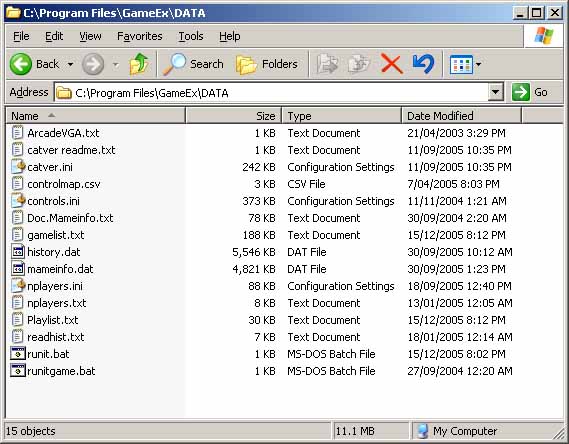
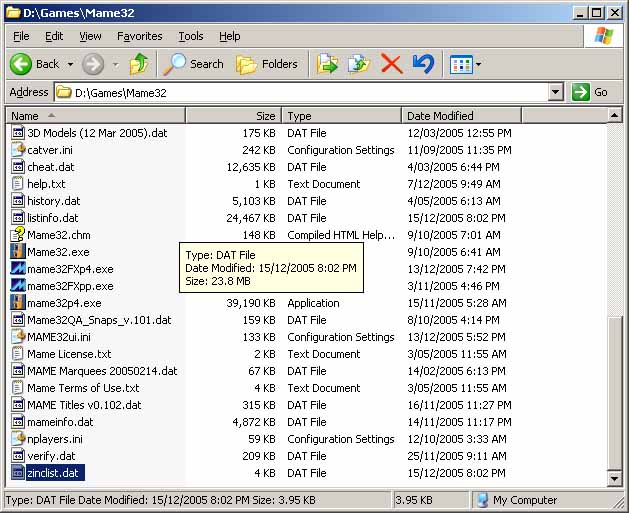
vibez: according to the docs, the version we should be using is from http://www.mameworld.net/catlist/ Tom: I'm still trying a few things to get the Adult games working. This time I deleted the entire DATA directory, re-installed GameEx to re-create the default DATA directory and then did an "Update List". Exited GameEx and re-started to rebuild the icon cache (BTW perhaps that should be done during "Update List"?) Okay, still nothing in Adult.. Here is some strange errors in my log file It says it can't find Catver.ini, History.Dat etc. yet they are both available in my Mame32 and GameEx\DATA folder as you can see from the attached images. Do these errors indicate why the Adult category is not being generated. BTW I'm using the latest catver.ini file from the above link which uses *Mature* to identify them.
-
I've heard of people using Resource Hacker to remap keys. You could try that also. I think most of the hacked emu's here are done this way.
-
Good point, saving your GameEx directory will not save your activation key!
-
Great work as always Tom
-
1. Make a backup of the GameEx directory (usually C:\Program Files\GameEx) 2. Reload your machine 3. Copy your GameEx directory from backup back to C:\Program Files\GameEx 4. Install the latest version (if you like) and it will not overwrite your custom options. If anything goes wrong, you always have your backup of GameEx anyways, but there should be no problem.
-
This is a common problem (one for the FAQ?), the newer versions of Mame, including Mame32 0.102 no longer support the -skip_disclaimer and -skip_gameinfo options. If you include them, Mame will mysteriously close without any obvious reason why (unless you run it from command prompt whereby it states the option is unknown). Simply, remove those two options and use GameEx's built in skip disclaimer option.
-
Just download BitTorrent, then when you open a *.torrent file, it will ask where you want to download and off it goes. You'll wonder why you didn't get it sooner
-
Just checked and I do indeed have the catlist file containg "*Mature*" for adult games.. hmm so must be something else then.
-
I was just browing arcadecontrols, and came upon a quote that got me thinking. Perhaps this is the cause for the adult games not showing up since I updated my catlist.ini file?
-
You can use Daemon Tools to mount a CD/DVD image on a virtual drive using it's command line options (-mount). You can make a batch file that will mount the image, then launch the game.
-
Yes, I did edit it.. quite a few boards only place an edited timestamp if you don't edit within a particular time limit. I think some allow you to edit a few times before they timestamp too. Not sure which one this forum uses.
-
Have you tried going into your GameEx folder and launching "GameExConfig.exe"?
-
Try some of the following options in the config: - Display Settings (Page 1) / Alpha Blend Videos : No - Display Settings (Page 2) / Advance Graphics : No - Tweaks/Performance / Dont Wait for VSYNC : Dont Wait - Tweaks/Performance / DirectDraw Dont Wait : Yes Dont wait for blitting and maybe... - Display Settings (Page 1) / Anit Alias Fonts : No - Display Settings (Page 1) / Use 16 Bit Colour : Yes Also, if your using the default theme, I suggest you go to the THEMES\Default - Default directory, open the Theme.ini file and change to AniBak=False. I also have the following setting : - Tweaks/Performance / Reduce CPU Utilisation (MS) : 16 But I think that is for faster CPU's.. along with the Don't wait for VSYNC option it changes my CPU utilization from around 50% to 5%! I'm not sure about the Create Image/Video on thread and Load Playlist on thread options may be worth trying. Although I havn't tried these specifically. There are a few other options in there you can try out too.
-
[Emulator_6] Enabled=True StartPageName=Pinball Games TitleText=Pinball StartPageLogo=pinball RomFilter=*.vpt RomsInFolders=False RomPath=D:\Games\VPinMame\tables SnapPath=D:\Games\VPinMame\snap WorkingPath=C:\Program Files\Visual Pinball MapKeys=True WaitBeforeKeys= SendKeys= ReplaceDash=True ReplaceUnder=True Capitals=True RemoveBrackets=True ShowDesktop=True Debug=False MapFile= AlsoLaunch=vpauto.exe Command=VPinball-XPFix5.exe -play -"[ROMPath]\[ROMFILE]" OLDatZip= TitlePath=D:\Games\VPinMame\snap BoxPath= LaunchBefore= LaunchAfter= CartPath= configFile=Visual Pinball ExcludedFiles= CustomBackground=
-
Instead of hiding the desktop and icons, I use launchshell (follow instructions on the link) along with Instant Sheller to set GameEx "Application to Shell". Now when you boot up your PC GameEx will launch instead of the shell. If you exit GameEx the shell will open and give you access to your desktop. If you launch GameEx again, the shell will close, and so on. I believe it's a better method than "Set background and wallpaper to black". You can always set your background to be black manually anyway.
-
Try these things: 1. Defrag your HDD (Right click the drive in Explorer->properties->Tools->Defrag Now... 2. Delete listinfo.dat/gamelist.txt and download latest history.dat/mameinfo.dat and overwrite the old ones. 3. Re-install GameEx with the latest version. 4. Download Process Explorer from Sysinternals and kill every task under explorer.exe (hilight each one and hit DEL, then confirm) 5. Launch GameEx and try another update. Double check you have no screensaver and all monitor power settings including "Turn off hard disks", "System standby" and "System hibernates" are all set to Never.
-
I had the problem where the VP table would not come to the front of the screen. I started writing my own vpauto app when I discovered GameEx wasn't launching it at all. I found the following problem.. I had to change: AlsoLaunch=[appath]\vpauto.exe to AlsoLaunch=vpauto.exe If you have made the same error by copying the config posted by oxbow in the "user config" forum, you will need to make the same change. Finally solved that mystery! Also, a question for Tom, why does vpauto.exe stay resident after it brings the "Visual Pinball Player" window to the front? Shouldn't it just exit after it's job is done?
-
You can try MusicBrainz Tagger to try to automatically tag your music collection.
-
There are better ways of doing this, that don't involve waiting. For example, if you use CreateProcess() to launch a program then WaitForInputIdle(), you can then EnumWindows() to match a window handle to the process ID. Once you have the handle you can force it to the foreground and top of z order, thus forcing any other screen into the background. I also have code which can achieve the same result from launching shortcuts (*.lnk). Normally getting a window handle of a program launched by a shortcut is difficult.
-
Hey movieman Your post is not really to do with the original post which is "GameEx 5.23 Released", other posts relate to this release hence being "On Topic". Your last two threads are really OT (off topic) and deserve a new topic. Sorry to be on your back about this, but I'm trying to help you learn the way things are on a forum. Your obviously new to all this, so it's okay. Also, talk about ROMs is frowned upon, so try to keep talk about that to a minimum. And pasting your error log over and over is not needed 99% of the time, so only paste it if we ask for it, thanks. As for your problem with znes, try changing: Emu_2 Rom Filter: *.zip to Emu_2 Rom Filter: *.smc;*.fig