



|



shaunopp
-
Posts
300 -
Joined
-
Last visited
Content Type
Profiles
Forums
Events
Downloads
Store
Articles
Everything posted by shaunopp
-
If you need me to do any testing with the Theme Editor, let me know. I'm a graphic artist and web developer by trade so I have over 15yrs. worth of layout & photo editing software experience to draw comparison from. Even though I came to GameEx from using Mamewah I didn't use the converter as it wasn't reliable and just became quicker to recreate it. Not sure how this affects the conversion.
-
And the winner is... 'Try a different theme'. Thanks for the suggestion kenobi I wouldn't have guessed that from the error I got. Any idea what causes this? I'm guessing it's a fluke and I can probably just dupe or recreate it since the theme works fine on my machine. More just curious how/why a theme would cause a DirectX. Even stranger to me is that the error only happens when selecting certain console emu's. Seems like if it was theme related it would happen out of the gate when launching. Thanks to everyone for their suggestions.
-
Agreed, bunch of ways to tackle a cab. All those suggested are structurally sound. Not sure I agree that using the 1x1's and a brad nailer are cheaper or easier than a Kreg Jig if you have neither though. You'd have to buy the gun and an air compressor if you didn't already own them. I had my choice of tools out of the gate but the Kreg Jigs just seemed simpler, cleaner and stronger to me but it all works.
-
Thanks for the suggestions kenobi. Is there any way to roll back to 9.0c if I already have 10 installed? I don't think you can completely uninstall DirectX 10. Anyway, DirectX 10 must work with GameEx since it's running fine on one cab. Hadn't thought to try a different theme but I'll give it a whirl. Why would the theme throw a DirectX error just out of curiosity?
-
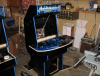
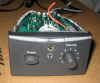
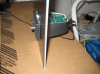
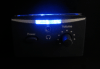
Used a little bit of wood glue here and there but those Kreg Jigs are friggin solid! You can see the melamine and sorta see the Kreg pockets on the inside of the cab in the pic below. Also, while I'm thinking about it, another good trick is to use a cheap computer speaker for an audio control bank. It can give you a small amp, volume control, headphone jack and audio only power button for pretty cheap. The control in the pics below was from $10 computer speakers I bought new at a local computer store. After cutting the speaker off the top I had a small amp, nice faceplate, led, potentiometer and headphone jack for $10. The pictures were a test hole I cut in some plastic. For the final I ended up notching the top of the control panel box and dropping it in right under the lip of the lid of the cp. Works slick! I then hooked them up to some midrange 5.25" Blitz car speakers and a $40 Durabrand surround system from Walmart for some base. The Blitz speaker are just ok for the price, they have a blue LED which I thought would light up more but only does when you really crank the volume.
-
You need to go into the Emulator and select a custom background there. Changing it in the Theme layout editor doesn't seem to work whether you have Advanced GFX on or not. From the GameEx setup wizard: Custom-->Emulator Setup Select the Emulator you want a custom background for from the pulldown Hit next twice to get to Emulator Setup (3) about halfway down is 'Custom Background'. Select your background. Keep hitting next and exit Should work in GameEx then.
-
Good, I was just razzing you a bit. You can do a cab in a day but the stars definitely have to align, ie. you need to have all of the tools, a workshop the materials prepped. Just wanted to let any newbie thinking about building a cab that it's a good investment of time and money. We all pulled our hair out at one point in the process and I see more than a fair share of listings on my local Craigslist selling half-built cabs. The funniest part is that most of them say 'almost complete'. I chuckle a little each time I see one. Anyway, I digress, it's some definite work and now anyone building one for the first time has been duly warned. That's not so bad! There's a lot to learn and each little problem can consume hours. That's what's great about a forum like this, everyone's help lessens the hair pulling and teeth gnashing and makes more time for the fun stuff. You should check out spray texture at Home Depot. That stuff's a great quickie finish for the sides. You can adjust the nozzle for different sized texturing. The Doughcade site tipped me off to it and I used it on my first refurb cab and was very pleased. The problem with splashy side art a lot of the times is that the significant other won't let it anywhere near the house. Texture gives it some personality and covers up imperfections nicely. It's a little expensive though at $12 a can it'll take you 3-4 cans. I had absolutely no cover-up to do with my scratch built cabs because of 2 important things that I'd highly recommend. 1.) We purchased black 3/4" melamine MDF coated on both sides. This was huge, no painting, no finishing, nice black coating. You have to be careful of it chipping when jigsawing etc.. but it touches up fine and was way better than painting. A little more expensive but it's really a wash when you consider the cost of primer and paint. 2.) A Kreg Jig. If you've never heard of one of these, you should really beg, steal or borrow one for assembling your cab. Basically it creates pockets you drop special wood screws into to draw 2 pieces of wood together. Super simple to use with a good cordless drill and it locks 2 pieces of wood together like nobody's business. Plus you can do all of the pockets on the inside of your cabinet, absolutely NO screwholes on the outside to fill and it's actually more structurally sound than driving a screw through the outside. It's a beautiful thing.
-
Answered some of my own questions on this. Found an old post from Brian Hoffman that tells how to check the DirectX version by going to Start/Run and typing 'dxdiag' so at least now I can see what version of DirectX is running. The system that is working is definitely running DirectX 10. Unfortunately I'm away from the system I'm troubleshooting but I'm almost positive I installed DirectX 10 on it. Both machines are running Vista which DirectX 10 was released with so I would think that'd be what to use. As I said, works fine on one machine but not the other. More info below for troubleshooting help: 1.) Both machines are Inspiron 531 AMD Athlon 64 x2 Dual Core Processor 4000+ 2.) Both machines have 1Gb of RAM 3.) Both machines have AracadeVGA cards and 27" Betson Imperial Monitors. 4.) Both machines have 250Gb hard drives with over 100Gb of space left. 5.) Doubt this is related but both machines have a 7 port hub that PacDrives are running off of. 6.) Newest version of GameEx 9.11. 7.) The cab that isn't working has a 4 player control panel and 2 MiniPacs 8.) The cab that is working is a 2P control panel and uses 1 MiniPac. 9.) Only happens when I select the NEStopia, ZSNES or Stella Emu's within GameEx, they run fine stand alone. 10.) Gens+, Daphne, ZiNc and MAME all run fine. Oddly when I select the Gens+ Emu it takes no time at all to show the game list of Rom's whereas all of the other Emulators (even on the working system) say 'please wait' and take 15-30seconds to load the gamelist every time.
-
Huh, I'll have to try that link. I'm pretty sure this is the version I downloaded though. Does anyone know if there's a 'best' version of DirectX to use with GameEx? Does it matter? This is really odd since I've never had any DirectX issues with GameEx at all and this hardware & software are direct dupes of mine. It also seems weird that it errors out when I select an emulator. How would a DirectX error get triggered while it's looking for the roms and why would it work with Gens+ and not NEStopia, ZSNES or Stella? Mame, Daphne and ZiNc work also so what's up with those 3 console Emu's and DirectX in GameEx? Just thinking out loud here, driving me a bit nutty
-
Thanks for the suggestion Tempest, I tried an older version of DirectX and still no luck. Maybe I need to unistall the version that's on there now? It isn't under programs to remove so not sure how. I'll have to dink with it some more. All of the Emu's launch fine by themselves so it's got to be a DirectX thing or GameEx's interaction with DirectX.
-
Ok, this is really wierd. I am helping a friend setup his machine and add some emulators (NEStopia, Gens+,ZSNES and Stella) and GameEx quits when I select any of these emulators. Mame, ZiNc and Daphne run fine. When I select one of the emulators from the list it'll say 'please wait' as if loading the rom list and then quit with an error log to the desktop. Edit: Gens+ works. It doesn't say 'please wait' and shows roms immediately. The others say 'please wait' and then poop out. From the error log it looks like a DirectX error but I've installed the most recent version of DirectX and that didn't solve the problem either. His cab is an exact dupe of mine from the computer to the vid card to the monitor, exactly the same and all of these emulators work great on mine. Thought it would be pretty 'plug and play' but not so much. Any help is greatly appreciated! Error log attached. log.txt
-
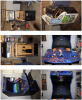
Having done both a 'refurbished' and multiple 'scratch built' cabinets now I'd say they both have their merits. Which you choose really depends on your individual circumstance... time, budget, tools, woodworking skills. Either way, you're going to run into hurdles with both. Below are a couple observations after having done each. REFURBISHED. 1. Can be cheap if you can find a good used cab. Look to get a coin door as part of the deal. 2. Selection can be limited. 3. You may still have to build a custom control panel for yourself. Figure this into time and cost. 4. Trying to use a pre-existing arcade monitor can pose challenging and may require an ArcadeVGA card. 5. Putting a TV or new arcade monitor in a pre-existing cab can be challenging. SCRATCH BUILT 1. You'll need tools and some sort of workshop. You may also need another persons help for the big cuts. 2. It's a mess. Cutting & routing MDF creates dust everywhere. Don't underestimate this, major pain in the ass. 3. Can build whatever you want, more custom. Alternatively this adds to complexity. Not always cheaper. 4. You'll still have to finish the cabinet (paint etc.). Look for black laminated MDF as an alternative. 5. Overall, fewer surprises but much more work. Even though Tempest can (supposedly ) build a cab in day, don't be that optimistic. This will take you some serious time. My refurbished cab took me 2 good months and had me stretched to the brink at points. For my scratch built cabs my friend and I used the mameroom designs and while it wasn't rocket science, it definitely was hard work over a couple month period of time for us to build 3 of them and get everything done. The SpyStyle and Project Arcade resources are very good reference, I'd recommend purchasing them especially since this is your first cab. Arm yourself with as much info as possible. I'd also recommend checking out all of the other build sites out there that show the process many of which are linked off of the byoac site. Here is a good one that includes a price parts list for planning: http://www.doughcade.com The spray texture for the outside is a really good idea I used on my first cab. I think given that this is your first cab, you don't have the woodworking tools etc., and that it's tough to get parts I'd go in this order: 1.)Buy a kit, like the mameroom kit if you can afford it and use a tv for your display. 2.)Find a cheap cabinet with a good control panel you can use, without a monitor and use a tv for display 3.)Build your own. Good luck, it's fun and rewarding to build your own cab but also a lot of work. Below is pic of my first build, an update of a 1983 Xevious cab.
-
How do you know the TV isn't the problem? You say you've replaced the video card, cable, computer and tried different refresh rates so that leaves the TV as the only component you haven't swapped. Just because it works with cable TV doesn't mean there may not be an oddity with that particular brand or model that causes it to behave erratically when hooked up to a video card.
-
How about just getting a new 27" TV. I've always been able to find them locally on Craigslist for around $40. Probably less than what your replacement video card cost.
-
Thanks guys, for some reason I remembered that as a universal setting rather than EMU specific. Works great with ZSNES and once you hit escape from within the GUI it brings focus back to GameEx too.
-
I've always been curious about this too. I'm always paranoid to turn off clones or preliminary games just in case I miss that one cool one. Consequently my games lists have a lot of dupes, multi-language and crap in them. Haven't found much info in the way of a comprehensive list.
-
But then escape won't exit out of any emulator, not just ZSNES correct? Maybe I'll just have to live with it or see if I can get the right mouse click to bring up the GUI
-
GameEx uses a modifier key to allow Alpha paging. While pressing in the modifier key (which is assignable through the GameEx setup Wizard) you press right/left on your joystick to go up or down by one letter and up/down on your joystick to go one full page up or down. So basically just go into the gamex setup, set that modifier key to what you want it to be then press (and hold it) in GameEx while pressing either up/dn/left/right on the joystick.
-
Thanks for all the feedback. At the end of the day I think I'm just going to leave as-is until I find a convincing reason to move it all around. A little off topic but speaking of paths... with the new (and maybe old) GameEx installer, the EMU downloader will only download Gens and the only Gens config file is for Gens+. Easy fix but could be frustrating for a newbie. I stumbled upon it while setting up.
-
By default ZSNES brings up the GUI when you hit Esc. which of course Exits the Game in GameEx. I need the GUI to save game states and config controls on the fly. Within the ZSNES options there's a setting to allow a right mouse click to bring up the GUI but it doesn't seem to work for me. Any other solutions anyone knows of?
-
Just took a look at mine (a PCIe AVGA that's about 2 mos. old) and the S-video is definitely 4 pin. The chipset it's based on is dependant on whether it's PCIe or AGP: "Powerful ATI Radeon 9250 AGP or Radeon X550 PCIe chipset for great performance in 3D games as well as emulation"
-
Looks like there's very little hope, here's a response from ACT Labs: The engineer confirmed that it (rewiring) does not work as the old gun has no calibration switch.
-
I have a pair of the old ACT Labs Light Guns pictured below: They don't hook up via usb and there's no drivers for Vista. ACT claims even if I buy a new VGA box they won't work with it (the round plugin looks similar though). I don't mind buying new light guns, I just really like the look of these, more of a space gun than a real gun so I'd like to use them. Anyone have any ideas for updating them or heard of it being done? I'm willing to hack wires, splice cables, whatever.
-
That's what I thought at first with mine but it wasn't the case, was the Video settings in the Emu's.
-
I think your problem with NEStopia and ZSNES are likely video related. I had the same problem when running them for the first time. Launch them through their individual .exe files rather than GameEx initially and setup the Video options. Also make sure there's a commandline entry for running NEStopia fullscreen. If the video settings don't jive with your monitor setup you'll get the blackscreen.


