|



fRequEnCy
-
Posts
3889 -
Joined
-
Last visited
-
Days Won
10
Content Type
Profiles
Forums
Events
Downloads
Store
Articles
Everything posted by fRequEnCy
-
Or simply just filtering them out. I have them setup as different emulators as well.
-
You bitching? LOL. I know. But I don't like the current setup of it so I'm gonna do it anyways. LOL. Will simplify things for everybody that wants ZiNc as a separate emulator. As for Brian's setup. Have no clue on that one. Haven't taken a look at his stuff. Briannnnn????? LOL. A little help here.
-
Not any morrrrrrre! LOL.
-
Well I'm not familiar with AHK as much as I use to be. Haven't tampered with it in years. But I am familiar with AI and can try to help out since they are kinda similar in some ways. But It seems like an easy task. Its just a matter of maintaining the lists. The only problem I see is when the roms required to run in the other emulator are different then the mame ones.
-
Well the number part is easy and I already have that part worked out. Simply tell the wrapper to run the respective number of the rom from the rom name in the commandline. As far as sound and graphics, I see your point. Would either need total control of the settings or basically a whole new gui will need to be written to select these options. Or build wrapper to support one of the two frontends available for ZiNc. But one with commandline options to be more cab-friendly. As for the controller I just used winterblasts plugin for first time and see that it makes a different controller.cfg for each game where as aldo's frontend only makes one controller.cfg. Both of these are useful frontends and maybe I can do something simple to integrate both into one with commanline options. Guess I was getting way in way over my head to make this work. LOL. But then again it gives me something to do to make it more cab-friendly which is what I'm all about as all of us are right? I had it working by using aldo's frontend but think a whole rewrite is required to make it run flawless.
-
LOL. Nice Brian!
-
Just use setup wizard. You can change the order in emulator selection.
-
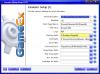
Well you're not pointing to the right path for Project64. Change the path to where you have that emulator in setup wizard. See highlighted in yellow in pic below
-
You have a problem with Emulator 17. Says the path does not exist. If this is one that you setup then you need to check your settings. If not then just disable it and you should be good to go.
-
I have a wrapper for this without the need for all the .bat files. Everything is hardcoded. So all that is needed is one file. I had posted at an earlier time what options were wanted but never got any responses. Just cleans things up a bit. So I can release as soon as I get some feedback.
-
Good Job Circo! Thanks for all your hard work!
-
Well we got that problem fixed. Other problem according to a good friend of mine might be because of select video blitter settings in the video setting. Try changing those and see what happens. I get different sizes when I mess with those settings.
-
LOL. Well congrats on the promotion. Nothing wrong with talking too much unless it's someone who doesn't wanna listen. Looking into it now. Looks like it's not going into full screen but windowed mode. Maximized perhaps.
-
Come on Tempest! Shouldn't be making rookie mistakes being a Ultimate GameEx Guru! LOL. Mine is working on my end so must be something you have different in the settings. Can you post a screen shot of what you're getting so I can duplicate?
-
Did you also set the rom path in the emulator as well?
-
Well when I first mentioned it, I had no intention of using it for support. Was just a place for us to all bs at. Of course the forums is the place for support that way we can search for previous posts. A place for chatting was suggested for just that. I think it would separate the junk from the support in the forums.
-
I say yay to IRC.
-
I use to use romcenter myself for the same reasons but now that I know how to use Clrmame Pro, I will never switch back. You can find a guide here. Also can ask in the clrmame forums. Roman is very helpful with his software and is pretty quick in answering questions.
-
You were suppose to extract them from 7z first and then zip them. Also why not just rebuild them with clrmame pro? Clrmame will read them from 7z and rebuild them to zip format.
-
Good to know that I know something. LOL.
-
Ok! Anytime!
-
Into individual Zips for each folder? Not sure if I'm understanding you correctly. But if you wanna zip a large amount of folders in to zips then it works the same way except your selecting folders instead of files. If not then please explain.
-
LOL. No problem. Glad you got it working! There's also a program out there called romzip that I used to use but when I found out that Winrar does it I stopped using it.
-
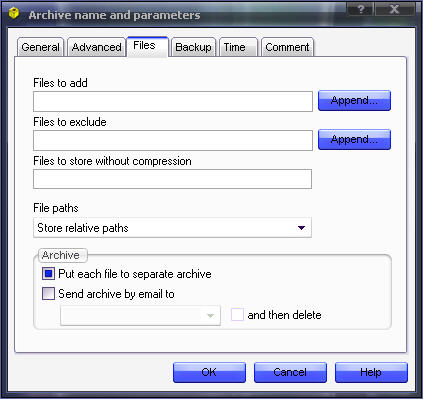
Do it from explorer and use following instructions: 1. Select All (Ctrl+A) 2. Right Click and select Add to archive 3. Choose Zip for Archive format 4. Click on Files tab and option should be available. If not then let me know and I'll let you know of another way.
-
Just extract all to another folder and use Winrar to zip to individual archives. Here are the settings.