|


.jpg.44da0172a400adb6811f03be15189781.jpg)
RIP-Felix
-
Posts
1540 -
Joined
-
Last visited
-
Days Won
33
Content Type
Profiles
Forums
Events
Downloads
Store
Articles
Everything posted by RIP-Felix
-
.jpg.44da0172a400adb6811f03be15189781.thumb.jpg.4316d89cc7dd35bcdf11c619d81a9d25.jpg)
Battle Damage - Unofficial Star Wars Hype Thread
RIP-Felix replied to tthurman's topic in Social Club
I'm not a big fan of movies in 3D, games are a completely different thing. See the movie the way it was meant to be seen, in glorious unencumbered cinema 2D! I went to a 3pm showing on opening day and it was reasonable, just get a bucket of popcorn to wedge in the seat next to you and arrive early to get a good seat. -
The fastest drive I have ever owned (so far).
RIP-Felix replied to Tom Speirs's topic in Social Club
I'm looking into this as well since I just upgraded to an i7 and GTX 970. I made sure to get a mother board that supports "M.2 ultra" AKA "PCI express 3.0 x4" devices". It' a small connector usually located under your graphics card on the motherboard itself. It just plugs in and is secured with a small screw. It's very low profile and very fast! It wont block you GPU either as it's not higher than the PCIe slot your GPU plugs into. Basically if your motherboard supports M.2 Ultra, any modern OS should see it. You may have trouble with older OS's. Win7 and up should be fine, don't know about mac (Yuck!).. The Samsung 256GB version is a good buy, you get half the write speed (900MB/s) but it's still way faster than any SATA SSD. Besides, read is way more noticeable than write in everyday tasks. Chances are you wont even perceive the difference in write speed from the 512GB version. I'm waiting a while first, but will likely pick one up when prices fall next year. BTW, if you get the 512GB at Neweqq now you get a free Assassins Creed Syndicate game code. Not bad! -
"Official" Star Wars 7 Thread (warning SPOILERS!)
RIP-Felix replied to hansolo77's topic in Social Club
Firstly, the Abrams vs Lucas debate will have to wait until after episode 8. The Sequel is usually the worst of a trilogy, but for me at least, The Empire Strikes Back was the best sequel to have ever been made. JJ has a LOT of ground to make up before he creeps into that conversation. Hey, I like the new Star Trek movies, but Lucas has way more movies I love than JJ. So, although I think he nailed episode 7, it's WAY too soon to start comparing him to Lucas. I don't deify George Lucas the way many seem to, I think he has a great imagination and I enjoy his work, even admire it, but I fall short of adulation. So if JJ Abrams were to put together a great career like Lucas, I would certainly consider the comparison, but he hasn't yet and won't for a long time. That's all I'm saying. As for if he did a better job with star wars than Lucas, I would say he needs to answer a few questions raised in episode 7 in the next film exactly right before that can even be considered. Something JJ can never do is take the story away from Lucas. It will always be George's brain child, and for this reason Abrams can probably only do a worthy imitation of the mold Lucas broke. I think episode 7 was worthy! DO NOT READ THIS IF YOU DON"T WANT THE MOVIE TO BE RUINED. SERIOUSLY, IF YOU HAVEN"T SEEN IT, DON'T READ THIS;: -
Ok, thanks. Yeah, sounds like I may have to lower a few settings. Also, I only got 8GB of RAM. I'll have to see how high the settings will go in order to maintain 90 FPS. Sounds like an SLI situation will work, but that's too much money for just 1 game IMO.
-
I apreciate that. I knew that the Occulus would require a beefy system to run well, and it must if I want to keep my lunch. So I was trying to at least meet their reccomended specs. From my research above I feel I got the best price/performance combo possable. There's certainly more headroom for overclocking and SLI in the future. So, as you say I can go that route if needed. Have you seen any juddering from the SLI config? I've read that for some reason SLI tends to do that, whereas a single won't. I'm not sure that is credable though.Also, do you think your GTX 970 is throttling due to high temps? I was thinking of getting this for sound and max performance without throttling. I've read reviews where their 970s were throttling down the FPS in games due to heat, when they water cooled them no more throttling. I'm mainly interested in Elite Dangerous/other space Sims with a HOTAS setup, Racing Sims (any suggestions?) with an old Playstation 2 Logitech Force Feedback Driving Wheel, and Dolphin VR. A single 970 will be plenty for Dolphin VR, so that's half of it. Elite dangerous is fairly mature now, so it shouldn't have any trouble. I'm not really into any shooters, maybe I'll get Battlefront, but this should be good for that too. I'll have to see. Obviously a 980 would be better, but it was out of my price range. I've already gone way over budget, total is over $1000 now. I suppose that's not too bad for these specs. --------------------------------------- I just received the stuff and was installing it. The nMediaPC 2800B is an awesome HTPC case, the GTX 970 fits in fine with plenty of room to spare! Hell I could easily fit another for SLI, which I was unsure about. The HDD rack behind the PSU wound be unsuable, but there are 2 3.5" under the slim optical drive and a 2.5" mount above. Just about everything in this case is removable, so it's very modder friendly. Everything is attached with screws, so If it won't fit with it, remove it. No need to cut! I love this case! I only have 2 gripes with it so far: It only has 140mm of clearance above the CPU for heatsinks, most of the better coolers now are 158mm tall. However this is way more space than I've had to work with in my last 2 HTPC builds, so I'm psyced to be able put a Zalmon 2-ball copper cooler (125mm tall) on my i7-4790k. That should do for a modest overclock if and when that becomes necessary. There is exactly 27mm between the edge of the motherboard and the 2x 120mm fan mounts on the side of the case opposite the PSU. This is where I would be interested in putting a dual 120mm all in one liquid CPU Cooler. I wish the case were about 30mm wider to allow it to be installed inside the case. As it is I would have to install the Radiator outside with the Fans inside. That's not a big deal, and I may do so, but I would have to cut a hole in the side for the tubes/block to fit through. Not a big deal, I'd just like to hide the Behemoth inside, for the same reason I want it to be quiet. It's an HTPC, it must be attractive looking without being distracting.
-
I only got up to 12 SPS before my wirless mouse started lagging, thats BS!
-
My eye was drawn to that too.
-
I found this today after buying another board yesterday. If I'd seen this yesterday and the i7-6700K were in stock, I'd of snatched this up instead. I'm good with my buying decision, but this deal is pretty sweet. http://www.newegg.com/Product/Product.aspx?Item=N82E16813157636 BTW: if your planning to get a 6th gen Intel processor get a Z170 board and 2666-2800MHz DDR4. This video explains how the cpu will benefit from the faster memory as it ages and gets into CPU bound sitiations, effectivly extending the life of your system. Or getting more out of a cheaper skylake processor.
-
I just bought an i7-4790K, Geforce GTX 970, and a HTPC case I hope will contain the blazing speed demon within. So, I guess I’m taking names too. I like the Phoenix also. How about Phoenix Caladrius, after the mythical snow white bird capable of curing sickness, and in this case rising from it's own ashes after being assinated as well. When your sick, you can go to her and she will cure you with her refreshing gaming magic. Or whenever your in need of having your mood lifted.
-
NF sale: PowerColor Radeon HD 6950 AX6950 1GBD5-2DHE 1GB 256-Bit GDDR5
RIP-Felix replied to tthurman's topic in Social Club
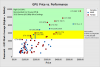
That is a good deal, but you can get a GTX 480 for about the same price on e-bay. See this graph, it shows it outperforms the above for about the same price. Data is taken from Here. I just bought a GTX 970 so I did my homework first, that's why I felt like sharing this Jem of a graph. By the way, 2 of thoes GTX 480's would be just shy to capable of playing modern games in 1080p with ultra settings. Tempting, but I'm getting a 970 so . -
Ok, so I went with an Intel i7-4790K, ASRock Z97 Extreme 6 motherboard, and a EVGA Nvidia Geforce GTX 970. I'm gonna try and fit it in this case. Total Cost = $876.85 (Ouch!) Ok, I'm over budget. But look at these graphs. The GTX 970 is right at the edge of what I'm willing to pay for a graphics card, but is much better performer than the R9 290 I was looking at, although it was $100 more expensive. I would’ve bought the R9, but I hesitated and they sold out. I think the 970 is worth the extra though. BTW: The graph is a compilation I made from here. As for the i7-4790K, it is alone in the category of High end CPU's. I think it is the best value High end CPU on the market right now, beating out the 6th gen i7-6700K in both performance and price. It's a no brainer. The FX-9590 comes close in value because it's much cheaper, but the cooling requirement is ridiculous. I'm a little burned out on AMD right now anyway, I'm not knocking it, I just want to try an Intel again. I haven’t had one since the Pentium 4, it's time for another, and this one is the right price/performance necessary to bring me back. EDIT: For the sake of it I looked at what it would have cost for an i7-6700K, 8GB (2x 4GB) DDR4 2800MHz + Compatible Z170 Motherboard, and the same GTX 970 Graphics card. It totals $859.96. The system I bought above should just edge this system out. So, I feel confident it was a good buy. Expensive, but these specs for less than $1000 is damn good. I will say this, as the cpu ages and gets into cpu bound situations, the i7-6700K if paired with 2666 or 2800MHz DDR4 on a z170 motherboard will see improvements that extend it's effective lifespan, possably beyond the i7-4790K. So if it were in stock I probably would have gone that route, but the i7-4790 is still a better value, especially since it Overclocks well. You can't go wrong with either, but you might go broke.
-
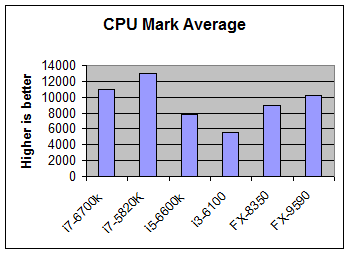
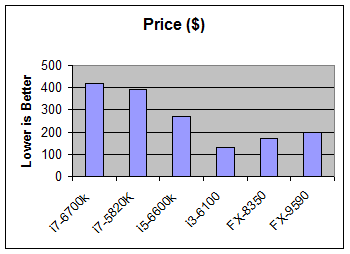
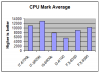
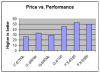
Apparently the skylake processors benefit substantially from 2666MHz DDR4 in a situation where the CPU is the bottleneck. An i3-6100 can see 10-15% increase in game performance over the 2133MHz. So I've decided to spend a little more on motherboard that will allow overclockable memory. When I get into CPU bound situations, god knows when, then that memory will extend the longevity of my cpu, squeezing every last bit of performance out. I imagine this will be long past any socket is relevant. So lets set upgradability off the table. The question now is which cpu combines the best price to performance ratio, among the high performers? I created the the attached graphs from info here. It's a useful resource. I copied all the CPU there into excell and removed the enterprise processors. It shows the i7-5820 is not only the best sub $400 performer, but also the best value of the Intel CPU's I'm looking at getting. The AMD FX CPU's are great value chips and you can see clearly why fanboi's boast. I'm looking above that performance range and can't deal with that much heat, so the i7-5820K or a i7-4790 (better price, great performance, even if not as good) I think are the best choices beyond the FX-9590. I was really close to getting a i7-6700K, thank you holiday shoppers for buying up all the inventory so I couldn’t. The 5820 is 6-core and has a better CPU Mark average score. It also costs less. Even a i7-4790K is better/cheaper. Sure the socket is a dead end, but it matters not. BTW: that price vs performance scatter plot was the most usefull graph I've ever made (Using Minitab, a statistics program). Saved me so much trouble. It clearly shows how all the cpus are in relation to one another. Simply awesome, if I may toot my own horn. Other thoughts: you can see how the FX line out performes for less money any Intel chip less powerful than the i7-4790K. If you don't see the appeal of AMD now, your hopless. I mean, there's a reason AMD is still in business! This is why!.


-
Advice? I read on a random forum, so who knows if its true, that intel sockets only stay around for two cpu generations. So by the time an upgrade is necessary a new motherboard is needed anyhow. The performance difference between end-of-socket and first generation high end cpus don't warrant an upgrade. Ok, so should I be worried about the fact that LGA 1150 is end of cycle, or that 2011v3 will not see another cpu line? If not, I could go with the i7-5820K, it's 6 core, in stock, and in the same price point as the i7-4790K and i7-6700K. I'm thinking by the time I should have to upgrade, I would likly have to buy another motherboard anyway, so I should just get what I want without considering upgradability. If upgrading later is a concirn, I could get a cheap i5 now and wait for the i7 that completes the 1151 socket cycle in a few years when the i5 can't keep up. I want the name i7, but really it's not that important. So should I wait for the 6700K to get back in stock or get a cheap i5 and wait for the next i7 offering on the 1151 socket in a year or two? Or Should I bypass the 1151 socket entirely banking on the idea that an i7-5820k on a dead end 2011v3 socket will outlast the 1151 sockets cpu cycle, upgrading later when I would have to get a new motherboard anyway?
-
Well, looking into it further, I could do the i7-6700K skylake and a cheap MSI MOBO. I was hoping to avoid buying DDR4 going with the i7-4790, I already have the DDR3 I would have used, so in that way I could have saved about $100. I also knoticed that the R9 290 is better than the 380, hence it's a bit more expensive. But thats what is reccomended with todays modern games and the occulus rift. Found one for $220. So the 14nm Skylake i7-6700K @ 4 GHz, MSI Z170A PC MATE LGA 1151 motherboard, 16GB DDR4, and 1x Saphire Radeon R9 290 would be future ready on the new 1151 socket. It would be cool and managable in my small case. Also it does significantly blow the FX out of the water. But the price premium puts me over budget at $830. Plus the i7-6700K is out of stock and prices are throught the roof above msrp. I'll wait and see if a better price comes along, Or maybe I'll just get the graphics card first and see how well my old processor handles itself.
-
Ok, so the infernal question faces me again! Do I build an Intel or AMD? Why I'm upgrading: Work picked up and I have saved a little money. I'm budgeting $750 for computer upgrade. I'm preparing for the consumer release of the Occulus Rift, which I'm excited about. They recommend at least "a NVIDIA GTX 970 / AMD 290 equivalent or greater, Intel i5-4590 equivalent or greater, 8GB+ RAM, HDMI 1.3 video output,2x USB 3.0 ports, Windows 7 SP1 or newer." My rig has only just been able to handle everything Dolphin can throw at it, with occasional slowdowns (usually cut scenes or transitions through doors). I want to eliminate my computer from bottlenecking any current Emulators. Also, I'd like to be able to run any current games on max settings that support Occulus Rift when it is released (Elite Dangerous, Fallout 4, Skyrim, Dolphin VR, and you name it).The Infernal Decision: ASRock Z97 Extreme3, LGA 1150, Intel Z97, HDMI, SATA 6Gb/s, USB 3.0, ATX IntelIntel Core i7-4790K, Devil's Canyon Quad-Core 4.0 GHz LGA 1150, BX80646I74790K, with Intel HD Graphics 46001x PowerColor PCS+ Radeon R9 380, DirectX 12 AXR9 380 4GBD5-PPDHE 4GB 256-Bit GDDR5 PCI Express 3.0 CrossFireX Support ATX Video Card $612.89 Shipped OR ASUS M5A99FX PRO R2.0 AM3+ AMD 990FX + SB950 SATA 6Gb/s USB 3.0 ATX AMD Motherboard with UEFI BIOS AMD FX-9590 Vishera 8-Core 4.7 GHz Socket AM3+ 220W - Black Edition 2x PowerColor PCS+ Radeon R9 380, DirectX 12 AXR9 380 4GBD5-PPDHE 4GB 256-Bit GDDR5 PCI Express 3.0 CrossFireX Support ATX Video Card $663.95 Shipped Discussion: You can read the wall of text that follows in the spoiler or skip to the bottom line below. But the spoiler explains the bottom line better. So, bottom line: If I go with the i7, I will have the better cpu now, but loose socket compatibility and upgradeability. The AM3+ is not going anywhere anytime soon and the next AMD will probably surpass this i7 anyway. I will see better gaming performance with two R9 380's now anyway. So I'm really torn. I like the i7-4790K's current performance, overclocking headroom, and cool 22nm architecture, but hate that it's the end of that socket line. I like the FX's 8 cores and the future readyness of the AM3+ socket, but hate the nuclear heat it produces with its 32nm architecture. What should I do? Intel or AMD? I've never had a bad experiance with either, So I'm not adverse to either. I know there are fanboy's out there. I've been on AMD's side for a while myself, but I want to make the best buying decision possable. This will be my first High end Gaming PC.
-
If you think of it just as a name for a movie, it is a pretty cool Title; DRAGON'S LAIR!. Frankly, I might go see it if it were a full blown motion pic with actors and CGI. I'd rather they just take the name and write a good tail then make an animated remake of the game. IDK, dragon themed movies always seem blaa to me. So maybe I would wait until I could rent on netflix.
-
NASA confirms that the ‘impossible’ EmDrive thruster really works
RIP-Felix replied to tthurman's topic in Social Club
This is the type of thing that makes me feel all all fuzzy inside. I'm a Geek! So, cool! -
Don't get me wrong, I love intel products. Just not the price. You pay for premium products and It makes sense sometimes. I went with Intel SSD's on my last 4 SSD purchases. They get the best NAND, fixed the sandforce firmware, and backed up my 180Gb 520 with a 5 year warranty. I wanted the performance of a sanforce SSD without the problems other manufactures were having, so buying a premium Intel SSD made sense. So I get it. I havn't been able to justify a more expensive CPU+Motherboard when AMD has a cheaper combo that contends. Obviously I'm talking about the Mid to lower-High end gaming range with AMD's best CPU for $300. A $400 intel usually gives around the same performance. I can Save a hundred bucks and put it in my GPU where I can make up the difference in a bigger way! That is the conversation I have every time I look into upgrading. I wouldn't knock AMD, they are still around because they tend to beat Intel at these lower price points. There's a large Niche and they exploit it well. In my experience, Die Hard intel guys want the best experience. So they pay extra expecting it. I've found some of these guys very pissed of to learn just a few months later that my new budget AMD CPU out performs their expensive monster. Why, because what they bought was the extra few months it takes for the competition to catch up. Yes you'll get the best, but it won't last that long. Depends how much you spend though. the $1000 CPU might buy you a year. I can wait, there are plenty of retro titles I've yet to enjoy or I'd like to revisit while i'm waiting;)
-
The 3 industries most people get extorted in are: Healthcare Automotive ComputerI try to become as knowledgeable as possible about the costs associated with any of the above. When something goes wrong I have a good idea when I'm being ripped off. These areas are admittedly difficult to understand and the average person works too hard and long to research them. It should be no surprise then that there’s much corruption and greed. Tread carefully! FanBoy Rant:
-
Ghostery + Duckduckgo + firefox private browser + MVPS Hosts + Norton 360 + Countless hours of searching and digging through settings = Target someone else!
-
Me too. Built 4 computers over the last 5-6 years all AMD/Radeon spaning Phenom X2 to A10 APU (the one I'm writing this on). The oldest is in the family room and stays on 24/7, no problems. My HTPC and arcade cab machine hahve never given me trouble associated with the AMD components. Having said that I usually never buy second hand or obsolete, and I read a lot of reviews to be sure of compatability (Memory, motherboard, CPU, graphics). I've been very pleased with AMD's Price to technology ratio. I feel their best offering always outperforms intel's best offering at that price point. I could never get myself to shell out $300-500 to get an intel cpu/motherboard combo when I could get a comparitive AMD combo for $250-350. Besides the more noticeable performance gains are found in SSD and graphics cards anyway. I perfer to spend the savings there. My $0.02
-
Touché!
-
What do you call a vacuum cleaner in space? Pointless?
-
Could it be because the computer that created the homegroup on the network is connected wirelessly to the xfinity modem/router? The HTPC is behind the switch, which by the way is how the network map sees the computer when directly connected to the TP-Link ETP. I disconnected from the homegroup, hoping to rejoin. tried to simplify things and go back to having the computer plugged into the TP-Link directly and it will not join. I tried to connect with my wireless adapter I had used before and it keeps giving me preshared key mismatch warnings even though that is not the issue. Troubleshooter can't fix it and only a reset of the network will. However it will recur on the next boot up I want to clear all network settings back to a default setting. Is there any way to completly obliterate any hidden saved network related settings, so I can start from the begining? The only thing I can think of now is a fresh install of windows, a logistic nightmare considering all the applications I've aquired and will never remember to re-load. EDIT: Solved, though I don't know what the issue was. I performed a factory reset to before I left the Homegroup and it worked. I can print, view files on the network and etc. The switch works fine now, as it should, without the headaches above. I don't have any answers, and I just hope it keeps working.
-
Yep, that's how I had it set up. Weird thing is that my shared folders on the HTPC are reachable from my family room PC, but not visa versa. That's odd.