|



Tom Speirs
-
Posts
19655 -
Joined
-
Last visited
-
Days Won
1076
Content Type
Profiles
Forums
Events
Downloads
Store
Articles
Everything posted by Tom Speirs
-
Thanks Rob, good idea, Ill do that.
-
Nice feature for a front end too, I think.
-
Hi all, I dont know if anyone has sent me any donations since around 23rd July, but if so I did not get them, as stupidly I removed an expired email address on PayPal. I just updated the site but my correct paypal ID is now: [email protected] If you sent to [email protected] since July 23rd. You might want to see if you can try and cancel that payment. Nobody else would have got the money as that is an inactive Paypal account.
-
Also, why cant you just change the volume in GameEx? Thats what the support is there for. Is it not working on your system?
-
Like if that's going to happen? Just kidding. Seriously not keen on your idea. Sorry.I may look at the multiple rom paths though.
-
Hey Jeff, It does not affect the clarity, but without it sometimes you get what is known as a tearing affect. This is where MAME is drawing to the screen when your physical display is updating the screen itself, therefore one frame is being drawn while its still displaying another. Its mostly noticable in vertical scrolling games. It basically makes scrolling games a bit smoother. Taken from MAME help file: Enables or disables "triple buffering". Normally, MAME just draws directly to the screen, without any fancy buffering. But with this option enabled, MAME creates three buffers to draw to, and cycles between them in order. It attempts to keep things flowing such that one buffer is currently displayed, the second buffer is waiting to be displayed, and the third buffer is being drawn to. Unfortunately, due to some DirectDraw issues, this doesn't always work out as well as it should. This is still being investigated. The default is OFF (-notriplebuffer). This option required -ddraw and -nowindow.
-
I am not so sure it does. I have had 32-bit colour on a PCI Nvidia 16MB TNT 2. I am guesing its some kind of incompatiblity. Id like to see your log. Also are you running the latest version of GameEx. There were fixes for older Gfx cards.
-
I think basically you have a bad Windows XP or .net framework install for some reason. Coul you try the version just uploaded, I am thinking it will be failing on the item after initializing bass. If so it has to be something up with your install. I dont think its to do with your hardware. I think someohow you got a bad install of Win XP or .net framework. Let me know.
-
Go get the latest release
-
30th July 2005 - GameEx 4.70 Modified all themes to work with VMWare, Virtual PC, and older graphics cards. If GamEx ended when creating surfaces and you weren't using the default theme this release should fix that. Better SlikStik, X-Arcade and Gamepad support. Ability to exit all emulators and applications with these devices (always on for MAME and Zinc. Use the MapKeys setting for emulators and apps). Ability to not exit attract mode with a Gamepad. See the docs page for controls [*]Kills VPAuto.exe process when running Visual Pinball. The MapKeys setting works fine for me with the latest version of Visual Pinball.
-
I think I know what the problem is. The Default theme should work. Ill fix the other themes in the next release.
-
Can you try the default theme.
-
-
I think if you turn off the -triplebuffer in the MAME CMD line options (in gameex) your onboard gfx will work. Also go get the latest version of GameEx theres been a ton of speed improvements since version 4.61
-
Jeff, Could you please provide the GameEx Log.
-
What exactly do you mean by OnExit?
-
Now if you set the use 16-bit colour setting in GameEx itself, it should look correct. Its not really a simple front end but yes, I have had GameEx running on an Intel 4MB onboard, BUT in 16 bit colour. Cheers. Tom
-
Ok, to help troubleshoot. After running a MAME32 game from GameEx that has slowdown, close GameEx, and Select Run Last Game from the GameEx program group. This will identify if the issue is GameEx or MAME32. Tom.
-
Why shouldnt it?
-
Turn off Verify ROMS, and turn on only Existing, then update. Cheers.
-
It looks like GameEx isnt creating two of its fonts correctly. All I can think is this is due to lack of memory. It just uses DirectDraw unless for Videos and DVD. I've had it running fine on some really ancient video cards. If the card is on board can you increase its memory? You could ttry newer or alternate drivers for your video card. You could also try running in 16 bit colour. Also check you have the latest directx 9 version, and .net framework 1.1 SP1. Cant think of much else for now. Thanks, Tom
-
Have you set the language to custom?
-
Thanks. I actually just went ahead and built the functionality into GameEx with the MAPKeys settings. It exits with Right Flipper and Player 2 now! Hope your doing OK.
-
Cabinets and HTPC Setups Running GameEx
Tom Speirs replied to David R Hilgendorf's topic in Gamer Rigs
Here's the latest cab.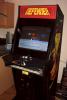
-
I'm sorry, I dont have any ideas at the moment. Which version of MCE are you using? Have you checked you sound card?