



|

Leaderboard

Popular Content
Showing content with the highest reputation on 06/01/26 in all areas
-
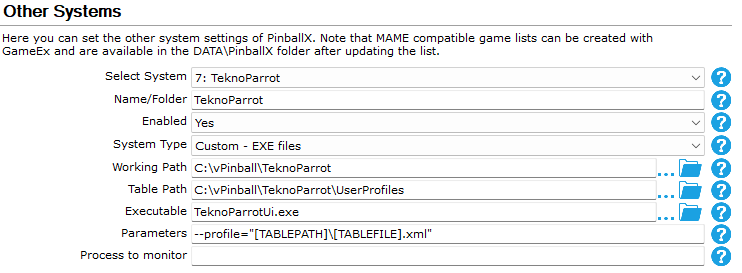
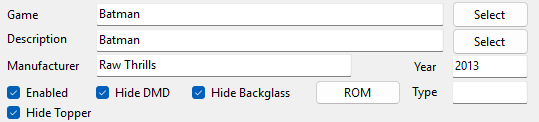
So, back in the day, in 2023, I tried to get TeknoParrot working on PinballX. It was successful. Sorta.... The end result was entering one TeknoParrot instance for each game because I couldn't figure out how to get around the XML's instead of roms. Thanks to @Mike_da_Spike, that's a thing of the past. I just didn't realize it because I never saw his entry, post-solution. Tonight, because I reconfigured a ton of crap on both my cab and my son's arcade, I decided to screw around with TeknoParrot again and try out Mike's config...IT WORKS! Here is the new, working config which will launch ANY game within TeknoParrot: And here's the Game Manager settings: Name the description of your game whatever you'd like but name the "Game" after the game's XML file in the UserProfiles folder. So, if your game is Mario Kart DX and the game's XML is "MKDX118", put "MKDX118" in the "Game" slot on the Game Manager. If you're unable to choose it, just manually write it in. It will work. That's it. Just thought I would write to say this has been fully solved. Special thanks to both @Draco1962 and @Mike_da_Spike for the help on this. Also thanks to @Tom Speirs who keeps driving me to keep at these things until they're solved. Thanks, all.
 1 point
 -
Yep. Everything is good.1 point