|



tabascoman77
-
Posts
224 -
Joined
-
Last visited
-
Days Won
15
Content Type
Profiles
Forums
Events
Downloads
Store
Articles
Everything posted by tabascoman77
-
 Forgot about the Joystick Settings in Setup Wiz. All fixed up. Thanks, Draco! I figured there was a simple fix...that was so close, it could have bitten me in the butt.
 -
Got it. I gotta get home first.
-
I don't have any XBOX controllers because I don't own an XBOX. I have used four Logitech controllers. Three are the F710 wireless brand and I have one that's wired. All four are quitting back to PBX when you hit the L2 button. That's on both my son's arcade and on my own cab.
-
Here's a weird one. While programming my son's arcade, I noticed that the Left Shoulder 2 button on Logitech game controllers (the L2 button, to be precise) kills the game and exits back to PBX. I guess Logitech controller L2 buttons are coded to Exit with PBX somehow? I am just wondering if there is a fix because it renders a lot of PS2, N64, and Switch games unplayable because L2 is fairly necessary to get through these games.
-
Guide updated to Version 3. This is a simple, easy fix anyone can implement. Thank you to @scutters for this.
-
Scutters, you're a genius. It works. Everything works. And to think I spent hours testing scripts and trying to figure out the lnk-exe issues when it's this simple. I want to improve the guide...but this is your idea and your fix. If you came up with this, I don't want to take credit for your idea. You should write up a guide for it. Unless you want me to simply change my guide and credit you. I just don't want your idea to be under my name.
-
Yes, but aren't you not supposed to make a folder full of EXE's? Usually, you have to use shortcuts because EXE files are dependent on .dll files in the game folder. Which is why I have to use shortcuts.
-
Funny story today, btw: I uploaded the config files here last night with the intent of putting them on the Guide the next day. I get to work and unzip the files and place them in the shared network drive...an hour later, I get an alert that my downloads have apparently caused alarm with our IT department and I get this nervous "security analyst" calling me to ask what I was doing. I told him I just downloaded game scripts so I could upload them to a gaming forum. Dude gets really weird and grills me on what the files do. I tell they're AHK and BAT files/scripts...dude actually says, "I've never heard of AHK or BAT files...can you enlighten me on what they do?" THIS. IS. A. SECURITY. ANALYST. Taken aback, I tell him they're designed to make slight adjustments to my monitors and gaming rig before I play games. He gets confused and says "Why would you bring those to work?" I explained I was using the drive as an intermediary. He gets all suspicious and says that it's suspicious that I would do such a thing and that the department suspects that this is malicious activity. So I tell him to open the files with Notepad and he can see for himself. He won't do it. So I do it from my computer and I read the files to him and go over each line with him and tell him what each one does. Then I copy-paste Gemini AI's thoughts, which say the same stuff I did...and even remarks that it's shocking that our IT Department doesn't know about AHK and BAT since they're extremely basic programming and coding files and any analyst worth their salt should know this and more. Anyhow, they let me off the hook and all I can do is chuckle. Like, how do you look at the coding and see my own drive path with the words "gaming", "GameEx" and "pinball" all over them and think "Oh no, we're under attack"? Anyway...back to work.
-
Issue fixed and guide updated.
-
Updated the guide. @Scutters, I can try your solution later as well because mine is just convoluted as hell since it involves editing scripts and compiling and the like...but I suppose, no pain, no gain. What would your config look like for your theory?
-
I think I tried that and it didn't work.
-
Yeah...but if I remember correctly, this was the ultimate result: These new config files should work.
-
I know. I'll explain it...lol...
-
Ok...THIS time I fixed it. Game stays open, monitors switch correctly, Escape key works...I'm going to upload all pertinent working parts and the config here and then I will edit the Guide in the morning. I need sleep. Here's the updated config: The config files are attached. I will edit everything in the morning. Pinky swear. See you guys soon... ConfigFiles.zip

-
NOT resolved, unfortunately. Apparently, unbeknownst to me, the PC games are quitting after 30 seconds by themselves. I don't know if it's because PinballX doesn't think the lnk shortcuts are running (since they hand off to Windows to deal with the exe files) or what. Something within PBX doesn't think the games are running and just quits back to the frontend. Meanwhile, the PC Game just continues to run in the background. I don't know what's causing this. It isn't the BAT files. I disabled those completely. The 30-second-kill still exists without them running. Log attached but, looking at it, I don't see any issues. It's just simply exiting the game for no reason. It's like PBX looks at the lnk and says "You didn't load anything...oh well, going back to the menu." Meanwhile, the exe is loaded up and running perfectly. log.txt PinballX.ini
-
Anytime, Draco!
-
Done sir. It's in the Guides section.
-
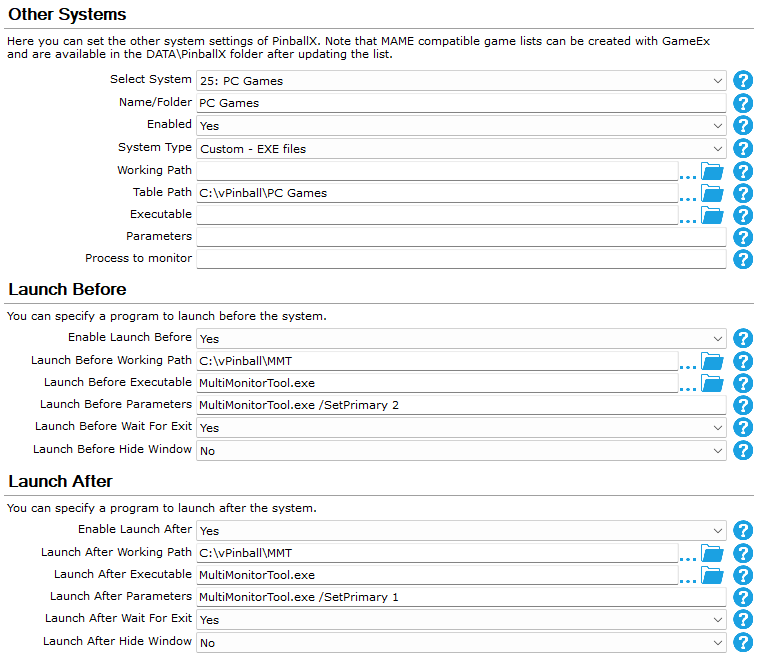
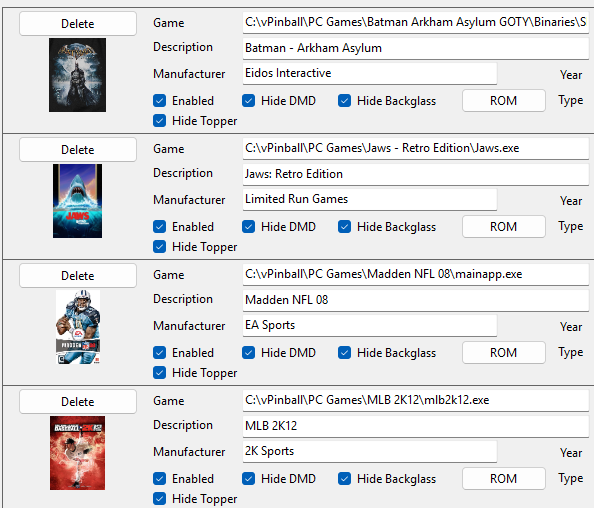
(A HUGE thank you to @scutters for this. Scutters is the person behind this insanely easy configuration. After you configure this yourself and get it to work, go to scutters and thank them profusely.) Do you have a pincab that isn't exclusive to pinball? Do you emulate console games with it, too? Ever wondered how to put PC games on there as well? Now you can. (QUICK NOTE: This is for a 2-screen virtual pinball cabinet setup and above. You can still use this guide if you have three or four screens but you just have to make sure that your backglass and playfield screens are monitors 1 and 2 for this to work. If you run PBX on a single screen, this isn't you're guide. I will do a guide for that later. Also, I know this is a lot and seems convoluted but it works.) Ready? Then... 1) Since you're gonna want the games on your backglass monitor (most, if not all, PC games start on the main playfield monitor by default) you're gonna need the MultiMonitorTool. You can get it here. Place that where ever you'd like on your drive. 2) Install your PC games where ever you'd like -- but make sure they're under a single parent folder. (eg: C:\Program Files\PC Games\Game Folders Here 3) After you're done installing everything you want to install, open up your PBX Setup Wizard and enter the following config: After doing this, MAKE SURE YOU CHANGE THE TABLE PATH, LAUNCH BEFORE PATH, AND LAUNCH AFTER PATH TO MATCH YOUR SYSTEM. For the rest of it, enter it as you see it above. When you're done, quit the Wizard. (NOTE: In my setup, my Playfield is Monitor 1 and my Backglass is Monitor 2. All you need to do is make sure that your "SetPrimary" number matches your backglass monitor number in the "Launch Before Parameters" and the Playfield monitor number in the "Launch After Parameters". If you don't know which is which -- and there are some out there who don't -- go to your Display Settings on Windows and hit "Identity" to see which is which.) 4) Go into Game Manager and hit your pull-down menu...you should now have "PC Games" (or whatever you decided to name it) in there. Select it and this is where you're gonna add your games...BUT... DO NOT USE THE "GAME SELECT" BUTTON. Instead, enter the pathway to each EXE...here's mine: After you're done, quit Game Manager. Lastly, go into PBX and make sure it's all working. If you did everything correctly, the game should launch on your backglass and should exit completely when you hit "escape". Your monitors should be normal when you quit PBX back to the desktop as well. That should do it. Enjoy, and happy gaming! (I'd like to thank @Draco1962, @Mike_da_Spike, and @scutters for their help in getting this working and all their suggestions. Thanks, guys!)

-
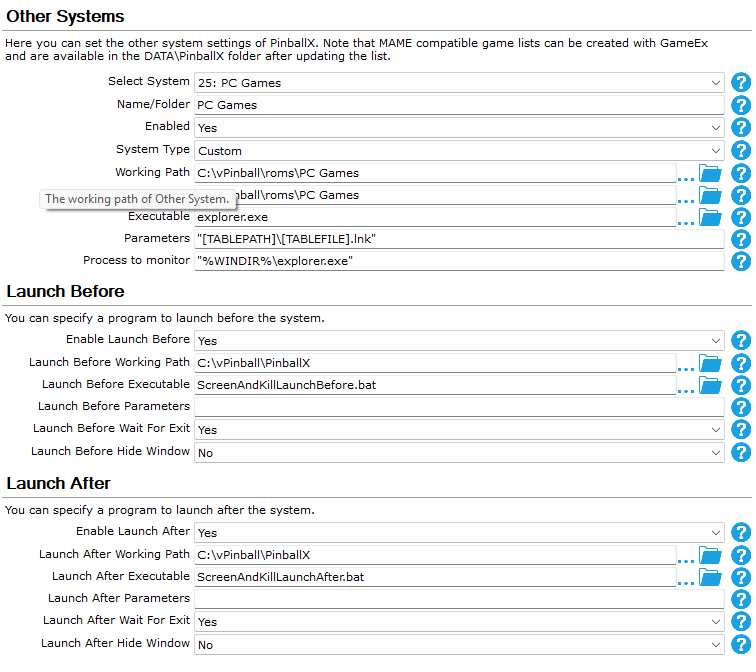
GOT IT!!! GOT IT!!!!!!!!! Here's the working config: BAT files are attached. This, effectively, will launch the game, place the game on the secondary monitor, and you can play it. Then, upon exit, it will kill the game, bring you back to the main menu in PBX, and you're golden. Make sure to alter the scripts paths to where MMT and your PC game rom folders might be (the one with the shortcuts and not the actual EXE files). The only catch is making sure to set a "normal" screen config in MMT (pre-game file called "normal.cfg") and a "gaming" config in MMT (during gaming, it will place the game on the second monitor; call it "gaming.cfg") so that the files can talk to the script and vice versa...but after that, these scripts work brilliantly. To do this, you set your monitors to their regular desired non-gaming config and simply save the config in MMT as "normal.cfg". Then, with MMT still open, go to the Windows Display Settings and set the OTHER monitor (backglass) as the "main display". Go back to MMT and save the config as "gaming.cfg". Make sure that both of those files are in the root MMT fiolder and make sure to go back to your normal display settings again after you do this. Mind you, this is if you have a 2-screen setup like I do...but it helps nicely. Still should work with 3 or 4 screens. Just name you screens accordingly and you're good. That's the ballgame, @Draco1962. Guide this sucker. ScreenAndKillLaunchBefore.bat ScreenAndKillLaunchAfter.bat

-
This breaks something. It launches. I can see the BAT file immediately working...then the game quits back to PBX immediately. Additionally, it changes my backglass monitor to #1 and I have to manually change it back. I kinda knew it was gonna do that having read the code. I need it to reverse because it impacts VPX and makes the playfield appear on the backglass.
-
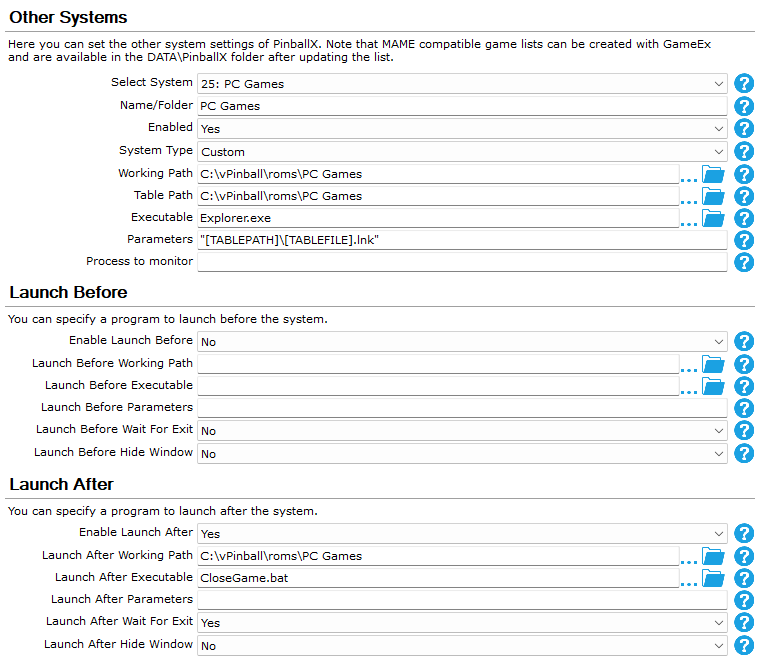
Did all of it. Both tests (my own system and the CloseGameTest). Things sorta work...but not quite. Both configs (CloseGameTest and PC Games) will launch apps...but my PBX music stays in the background with my arcade ambiance still playing. It won't shut off even though PBX seems to be relegating itself to the background. Additionally, hitting Escape won't exit the app at all. Also, the command line does not recognize the term "DOS" at the beginning of the code, so CMD stays stuck open while you're trying to do everything else. Config attached. Here's the log...but it doesn't tell you much: 22:12:36.18 6/16/2026: Started 22:12:47.81 6/16/2026: Launch System 22:12:47.81 6/16/2026: Hide Backglass 22:12:47.81 6/16/2026: Waiting for threads 22:12:47.81 6/16/2026: Disposing display 22:12:47.87 6/16/2026: Set Plugin data 22:12:47.95 6/16/2026: C:\vPinball\roms\PC Games\Explorer.exe "C:\vPinball\roms\PC Games\Jaws.lnk" 22:12:48.33 6/16/2026: C:\vPinball\roms\PC Games\CloseGame.bat 22:13:42.50 6/16/2026: Created DirectX BackGlass Window 22:13:46.94 6/16/2026: Exiting 22:13:46.97 6/16/2026: Showing Taskbar 22:13:46.97 6/16/2026: Unhiding Mouse Cursor 22:13:46.98 6/16/2026: Disposing Plugins 22:13:46.98 6/16/2026: Saving Settings 22:13:48.09 6/16/2026: Bye
-
When I get home, I will test it. The issue is if I use a BAT to close the game, I will also need to combine that with MMT because the games keep running on the playfield monitor and not on the backglass and MMT fixes that issue. I mentioned that a few posts ago.

-
I think I am about ready to give up on RocketLauncher. This app is a complete mystery to me and what little instructions they have aren't very specific (unless I'm missing something). Furthermore, the code supplied doesn't work and even if I configured it correctly, I suspect it wouldn't work anyhow since AI just makes guesses at coding. For now, I may just make a separate entry for each PC game entry. I tried asking TerryRed but even he said that RL is a pain in the ass to configure and that it "didn't always work". Not promising.
-
Oh, you...c'mere... (hugs you)