



|

Leaderboard



Popular Content
Showing content with the highest reputation on 09/29/25 in all areas
-
I play offline simply because my cab is in the garage is not online, and never will be, guess similar reason as @halen above, i want it to stay offline. Also, FWIW, just posting this here for those Zaccaria players using any frontends, I know this is definitely not a PinballX issue, so bear with me Offline definitely has issues (more on this later), and even though this is not how I normally play, I fired Zaccaria on my main rig last night, and ran the following tests: - Having ONLINE enabled and issuing a commandline like steam.exe -applaunch 444930 -skipmenu "Time Machine" is not as annoying as navigating multiple menus when in offline mode, but is not seamless as it used to be with older builds either (next point will elaborate). The table doesn't fall into a playable state, it still expects you to choose "START GAME", which, even if it's only one step, it's still a downgrade from previous builds when using frontends, experience-wise. - But issuing a more complete commandline like steam.exe -applaunch 444930 -skipmenu "Time Machine" -skipmenu_player 1 -skipmenu_gamemode classic_simulation works as intended, with the only annoyance being to wait for table tasks and online sync waiting. If you play online, and fast internet, this shouldn't be an issue. - Playing OFFLINE definitely is a severe downgrade to the user experience if you use frontends only, because otherwise, if you are just launching Zaccaria by itself, you pick a table and start a game, or if you have your rig/cab online, your experience shouldn't be different than on older builds, other than a new GUI and added Star Phoenix Deluxe table option. Bottom line, yes, this is on Zaccaria to "fix", but I'm not sure if they'll want to. Why? They moved to a new system using their servers to sync licensing, achievements, etc., so this might well be "intended" behavior, they want people to just play ONLINE, not offline, reasons could be that migration to their servers, but also to curb piracy. This is understandable in my opinion. They do allow and have worked to fix Steam Deck compatibility to play offline, if you're on the road without network access, but the game still expects ONLINE syncing periodically to sync licensing, scores, etc., and it's not like you run a frontend from the Steam Deck, so this is fine. This is what puts the nail on the coffin to OFFLINE-only players, at least if you play from a frontend, and I doubt they'll change their logic regarding ONLINE just for those frontend users who on top have their cabs OFFLINE all the time... Anyway, hope this is helpful for others looking for answers, and thanks Mike for the replies.2 points
-
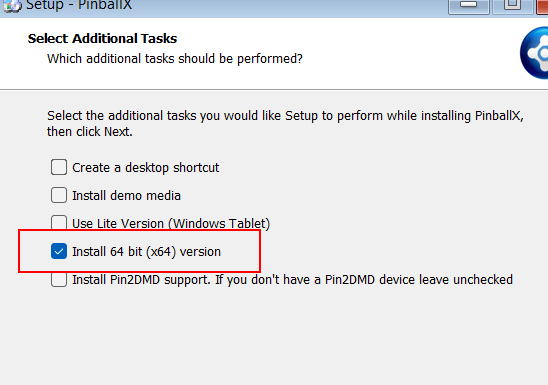
Strange, very strange!. I have no idea why the 64 bit version of PinballX can't launch B2S for you. You can still install the latest version of PinballX as 32 bit though On the installers setup.exe right click and select to run in Windows XP compatibility mode; And then when you run it you can uncheck the install 64 bit option

 1 point
 -
Been working on it buddy. It is coming.1 point
-
I haven't been satisfied with the idle temperatures of this build, as the CPU is using the stock Intel air cooler, which operates in the 50-60°C range. I decided to go for a little overkill and bought a PURE ROCK PRO 3 Black - BK042. I will report back soon with pics and temps, but for now, it's time to disassemble the rig to install the cooler MB backplate, etc.1 point