|



cnells2000
-
Posts
290 -
Joined
-
Last visited
Content Type
Profiles
Forums
Events
Downloads
Store
Articles
Everything posted by cnells2000
-
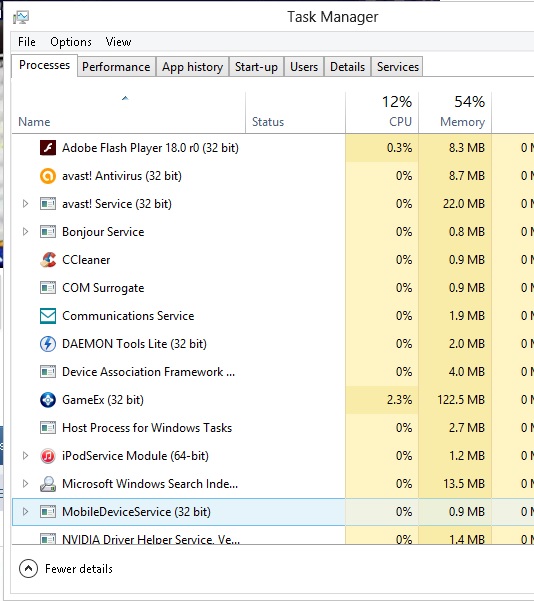
Gameex the only thing in the task manager nothing else. also after this update I'm experiencing the video problem from the post that we posted a while ago. Instead this time when the video ends it returns to the video selection menu instead of playing randomly like it should..... I've been thinking....... I think I'm just going to redo my entire computer removing windows 8 and putting Windows XP on. you think that would help? I have all my files and everything. So it would be fairly quick. I hope dolphin, ssf, null DC, and pspppp etc. emulators still wrk
-
Ive been having an issue lately where when i excape out ot gameex to work on the opposite side of the computer, the frontend remains in taskmanager. therefore when i start it up again it wont until i end task then click on gameex again. plz help.
-

Setting a command line for daphne for volume setting
cnells2000 replied to cnells2000's topic in General
sorry it took so long.......damn.....my apologies here is the log. i did as you said and i hit the volume + key which is the f12 key on the keyboard. i made sure no hotkeys are set to f12. this is during gameplay and i hit the volume key. --Command line is: Daphne.exe roadblaster vldp -fullscreen -x 640 -y 480 -nohwaccel -framefile C:\Roms\Laserdisc\Road Blaster\roadblaster.txt --CPU : AuthenticAMD 2900 MHz || Mem : 3072 megs --OS : Windows NT Derivative || Video : NVIDIA GeForce 9300 GE Setting screen width to 640 Setting screen height to 480 Set 640x480 at 32 bpp with flags: 80000000 Initializing sound system ... Joystick #0 was successfully opened Remapping input ... Loading compressed ROM image 01.bin...8192 bytes read. Loading compressed ROM image 00.bin...8192 bytes read. Loading compressed ROM image 08.bin...8192 bytes read. Loading compressed ROM image 07.bin...8192 bytes read. Loading compressed ROM image 06.bin...8192 bytes read. Loading compressed ROM image 05.bin...8192 bytes read. Loading compressed ROM image 04.bin...8192 bytes read. Loading compressed ROM image 03.bin...8192 bytes read. Framefile parse succeeded. Video/Audio directory is: E:/Roms/Daphne/Road_Blaster/Road Blaster/ YUV overlay is done in software (ie unaccelerated). Booting ROM ... MC6850: Master Reset! MC6850: clock set to x32 MC6850: 8 Bits+1 Stop Bits MC6850: /RTS=low, Transmitting Interrupt Disabled MC6850: Recieve Interrupt Enabled Search to 301 received NOTE: converting FPS from 29.970000 to 23.976000. This may be less accurate. Play Search to 10631 received Freeing memory used to store audio stream... NOTE: converting FPS from 29.970000 to 23.976000. This may be less accurate. Play Error, bug in move enable Error, bug in move enable Error, bug in move enable Search to 10687 received NOTE: converting FPS from 29.970000 to 23.976000. This may be less accurate. Freeing memory used to store audio stream... Shutting down sound system... Shutting down video display... -
Feature & Enhancement Requests
cnells2000 replied to Tom Speirs's topic in FAQs, Guides, & Other Useful Information
Thx -
Feature & Enhancement Requests
cnells2000 replied to Tom Speirs's topic in FAQs, Guides, & Other Useful Information
How do I embed null? -
Feature & Enhancement Requests
cnells2000 replied to Tom Speirs's topic in FAQs, Guides, & Other Useful Information
I would like to use my own music album art for jukebox because it doesn't show up correctly rt now -
[RESOLVED] Minor issue with latest version - video jukebox
cnells2000 replied to troy's topic in General
I don't know what it was but the latest gameex update fixed the issue! Bravo gents! (Resolved!!) -
[RESOLVED] Minor issue with latest version - video jukebox
cnells2000 replied to troy's topic in General
Anyone figured this out yet? -
[RESOLVED] Minor issue with latest version - video jukebox
cnells2000 replied to troy's topic in General
Thanx uber -
[RESOLVED] Minor issue with latest version - video jukebox
cnells2000 replied to troy's topic in General
Damn. I nd this to work again. I use this 90% of the time -
[RESOLVED] Minor issue with latest version - video jukebox
cnells2000 replied to troy's topic in General
Holding fwd just has the timecode twitching back and forth when it reaches the end -
[RESOLVED] Minor issue with latest version - video jukebox
cnells2000 replied to troy's topic in General
I have shark codecs installed. On mine, I've had a video converter, editor and splitter for as long as I've had this gameex frontend and never had any problems before. I can rewind the video at the end when it is frozen and it works but fwd does not work once the end is reached. I can push down on the joystick and the video will change. So the problem is not that the videos won't play, but the option to play all or play randomly starts the first video, but won't play consecutively like it used to. -
[RESOLVED] Minor issue with latest version - video jukebox
cnells2000 replied to troy's topic in General
I have an and Athlon II X2 245 2.91 processor and 3 gigs of ram -
[RESOLVED] Minor issue with latest version - video jukebox
cnells2000 replied to troy's topic in General
nothing changed for me either, here are mine -
[RESOLVED] Minor issue with latest version - video jukebox
cnells2000 replied to troy's topic in General
I don't see sleep settings in tweaks and performance -
[RESOLVED] Minor issue with latest version - video jukebox
cnells2000 replied to troy's topic in General
I'm using Windows 8 -
[RESOLVED] Minor issue with latest version - video jukebox
cnells2000 replied to troy's topic in General
Changing to don't wait does nothing. Still pauses..... -
[RESOLVED] Minor issue with latest version - video jukebox
cnells2000 replied to troy's topic in General
All I did was update the front-end. I haven't been in my settings in weeks -
[RESOLVED] Minor issue with latest version - video jukebox
cnells2000 replied to troy's topic in General
Now they will be able to compare and find out what's going on -
[RESOLVED] Minor issue with latest version - video jukebox
cnells2000 replied to troy's topic in General
You should post your log and ini as well -
[RESOLVED] Minor issue with latest version - video jukebox
cnells2000 replied to troy's topic in General
They r waiting on u to post Ur files so they can compare with mine because I'm having the same problem Troy -
[RESOLVED] Minor issue with latest version - video jukebox
cnells2000 replied to troy's topic in General
I did'nt know I had it in the wrong section. Thank you for moving the thread draco -
[RESOLVED] Minor issue with latest version - video jukebox
cnells2000 replied to troy's topic in General
here is my ini & log -
[RESOLVED] Minor issue with latest version - video jukebox
cnells2000 replied to troy's topic in General
For months now ive always went to the video section and let my shows and movies play continuously all day long. but after the recent update, after it i start play randomly like usual, after the very first video, it freezes at the very end of the video and stays there. fast fwd or rewind do not work. infact, the only button that works is back. that takes me back to the video selection menu. it does it everytime!! i have'nt changed any settings at all. please help someone. -
Btw, where is the folder located?