



|



Draco1962
-
Posts
19238 -
Joined
-
Last visited
-
Days Won
663
Content Type
Profiles
Forums
Events
Downloads
Store
Articles
Everything posted by Draco1962
-
Well aren't YOU Mr. He-Man with your chest all puffed ou[CENSORED] [CENSORED] [CENSORED] [CENSORED] [CENSORED] [CENSORED] [CENSORED] [CENSORED] [CENSORED] [CENSORED] [CENSORED] [CENSORED] [CENSORED] [CENSORED] [CENSORED] [CENSORED] [CENSORED] [CENSORED] [CENSORED] [CENSORED] [CENSORED] [CENSORED] [CENSORED] [CENSORED] throwing your [CENSORED] [CENSORED] [CENSORED] [CENSORED] [CENSORED] [CENSORED] [CENSORED] [CENSORED] [CENSORED] [CENSORED] [CENSORED] [CENSORED] [CENSORED] [CENSORED] [CENSORED] [CENSORED] [CENSORED] [CENSORED] [CENSORED] [CENSORED] [CENSORED] [CENSORED] [CENSORED] [CENSORED] [CENSORED] [CENSORED] [CENSORED] [CENSORED] [CENSORED] like some big-[CENSORED] [CENSORED] [CENSORED] [CENSORED] [CENSORED] [CENSORED] [CENSORED] [CENSORED] [CENSORED] [CENSORED] [CENSORED] [CENSORED] [CENSORED] [CENSORED] [CENSORED] [CENSORED] [CENSORED] [CENSORED] [CENSORED] [CENSORED] [CENSORED] [CENSORED] [CENSORED] [CENSORED] [CENSORED] [CENSORED] [CENSORED] [CENSORED] [CENSORED] [CENSORED] [CENSORED] [CENSORED] [CENSORED] [CENSORED] [CENSORED] [CENSORED] [CENSORED] [CENSORED] [CENSORED] [CENSORED] [CENSORED] [CENSORED] [CENSORED] [CENSORED] [CENSORED] [CENSORED] [CENSORED] Dang. Now I need a hug.
-
I found the VMR9/EVR settings Tom was referring to. Open the Advanced Configuration and click on Mutlimedia/HTPC. About 2/3 down screen there is VMR9/EVR setting options. Confirm if set to yes. If not, change it and save. Check under External Applications in the Advanced Configuration if you intend to try running WMP as an external app at fullscreen. There are general setup instructions when you click on the ?
-
Hey Tempest? Did somebody say something? Or was it just whistling from an anal cleft?
-
There is not a setting for VMR9/EVR in the Shark codec. EVR is default for Vista, but you are using XP. What I might recommend is go into the Shark Codec again and, instead of "Set MPEG2 to use FFDSHOW" try "Set MPEG2 (System Default)
-

GameEx NetPlay - Client/Server MAME/Mess
Draco1962 replied to Tom Speirs's topic in FAQs, Guides, & Other Useful Information
Feature request? -
Somebody... STOP THE MADNESS! Now I am up to 290 nonsensical posts.. the other 6 are just incoherent. <-- expression on face of readers of my posts.
-
GameEx NetPlay - Client/Server MAME/Mess
Draco1962 replied to Tom Speirs's topic in FAQs, Guides, & Other Useful Information
I was showing 113-121 ms and experienced no lag at all. -
GameEx NetPlay - Client/Server MAME/Mess
Draco1962 replied to Tom Speirs's topic in FAQs, Guides, & Other Useful Information
I think it is safe to say that it is not needed if it is being run through GameEx. GameEx will handle the UPnP updating of the firewall in most cases (in some, may require additional tweaking of port forwarding if it doesn't or adding exceptions to anti-malware software - unfortunately, those tweaks cannot all be documented because of the many different combinations of routers, firewalls, anti-malware software, so this will require a certain amount of diligence of the end-user to become better acquainted with these segments of their setups. The Mame.ini -cs apparently is only required if you are using a MAME build outside of GameEx. -
I might try closing GameEx, then saving the changes in Advanced Configuration again if you haven't already done so. I have found that some changes do not appear to register when made while GameEx is running and Advanced Configuration is loaded from within. Not sure if this is a GameEx thing or just my system not letting go of what is in memory (unlike my brain, which seems to let go of things in memory more often these days).
-
GameEx NetPlay - Client/Server MAME/Mess
Draco1962 replied to Tom Speirs's topic in FAQs, Guides, & Other Useful Information
OK - I am confuzzled. Previously I was not able to participate in Netplay. Now, I am! I haven't made any recent changes (other than upgrading the ClientServerMAME app). No changes to previous port forwarding setting or previously setup exclusions in Norton. I have to say that it is pretty frickin' awesome! Just played a short round of Gigawing with chrisqc and was flawless on my end as player 2. I have to agree with him about a general user guide for this. Maybe I will scour DG's blog to see if I can piece some basics together along with the info from this thread. This would be GameEx facing. -
But fReq, do they match the carpet? I think that having an Emulator subforum may be a good idea. The problem I see with the General Forum are there are so many threads (269 pages worth) started regarding the various emulators/systems emulated that it does become a bit daunting to perform searches to possibly find an answer. I usually try the more recent search results first, but often find that is not always getting me the answer I am seeking. Newer users, after going through quite a few search results, if at all, are more likely to start a new thread or post within an existing thread that might not be within the original topic. To move/combine many of these may be an administrative nightmare, but if we started with some general threads as relates to systems being emulated or emulators, perhaps going forward it will be easier to track. Newer threads could then be moved/merged to the appropriate thread for that system or emulator. The caveats I see to doing this are that some issues as relates to configuration or errors with the emulator interaction with GameEx may be lost. We may also dilute things in the General Forum too much to the point of near inactivty. The recent changes have reflected a slight drop in posting across the subforums in the various topics but seem to be increasing as users are becoming more accustomed to the changes.
-
3D Models for GameEx
Draco1962 replied to headkaze's topic in FAQs, Guides, & Other Useful Information
I wonder if there is a compatibility issue with some of the models created in earlier versions of Sketchup that contribute to some of the explode and convert problems we have encountered? I have tried saving some again so that they would be saved under version 8 (both prior to and after exploding) and still encounter the same image losses. If not a compatibility problem between versions, it may be a matter of how the file was initially composed. -
User Submitted Themes & Media (Uploads)
Draco1962 replied to Tom Speirs's topic in GameEx Media Projects
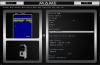
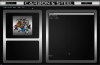
I have added images for a sneak peak of "Carbon & Steel 1.5" - most of the changes are cosmetic, some are to have better identification in the Title bar for various systems. Since this takes a bit longer to customize, I'm focussing on more of the frequently emulated systems and will include specific instructions for those using the theme for creating their own custom system backgrounds and will supply the blank backkground files for doing just that. Other changes will include an updated logo pack featuring many of the logos I have uploaded on page 16 of this thread and more that I have not. Sound files have also been updated, but can be changed easily enough by most anyone to their liking.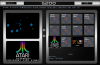
-
3D Models for GameEx
Draco1962 replied to headkaze's topic in FAQs, Guides, & Other Useful Information
I tested the .x converter and it seems to suffer the same brightness issue as 3D Rad plugin (conversions very dark) where as Zbyl's X Exporter does a better job of preserving the original brightness levels of the original graphics. All 3, however, do not seem to "play nice" with all graphics/textures in the .skp files and some are either lost in translation or original properties are not maintained (as previously noted, translucent glass becomes opaque and has to be removed in the .skp file prior to conversion so graphic behind it can be seen). -
Feature & Enhancement Requests
Draco1962 replied to Tom Speirs's topic in FAQs, Guides, & Other Useful Information
Another Feature Request - a Debug type GUI application that can be accessed from GameEx or externally that can display GameEx version and OS/CPU/Memory info, contents of log files, show list of where files are being accessed (example, I want to determine where a logo file is being accessed with path\filename), and would allow one to copy log files to clipboard for easier posting in forums. -
Even though you may be able to play the file in WMP or other media player outside of GameEx, the file may be corrupt enough to not play well with GameEx (my issue). What I would probably try is a substitution with a known working file that you can hear in GameEx and see if it works. If so, then your file may be corrupt. My Carbon & Steel theme has custom sound files. You may wish to try that and see if you hear the custom sounds.
-
I am using the Shark Codec Pack and the required x64 Components add-on pack since I am running Win 7 64-bit and this resolved quite a few video issues. Below are the page links: Windows 7 (32-bit and 64-bit Windows 7 (required for 64-bit in addition to above) Windows Vista and XP (Vista Codec Pack) If you try it, let us know if this helped or if the issue continues.
-
I believe that GameEx looks in the theme Media folder for the theme you have installed first, then Default-Default theme if the file is not present (be it a sound, video, or image file). I had a similar issue with some sound files a few months ago. I was getting DirectSound errors and GameEx would abort before it could even look in the Default-Default theme Media folder . I started substituting the custom sound files one at a time with the default sounds and discovered that one of the files that had worked previously was now corrupt. I deleted the file and replaced it with another and my sounds worked fine after.
-
PERK! Free pints! I'M THERE!
-
I have put this in as a Feature Request .
-
Feature & Enhancement Requests
Draco1962 replied to Tom Speirs's topic in FAQs, Guides, & Other Useful Information
Feature request brought over from General forum. Allow for the creation of "play lists" not unlike what can be done within iTunes, WinAmp, or WMP. This would allow for users to create lists of games across emulators so that they can group genres (example, all Mario games, Sonic games, mix & match for a child, etc.). This would be an additional layer beyond using Favorites and allow for even further flexibility and enjoyment of GameEx. -
It may be possible to get *some* of the desired results by setting up emulators through the Advanced Configuration app with the specific games in the paths in conjunction with Custom Menus. It would take some playing about but that may be a viable option. Would probably be best to have those games in separate paths for ROMs, Snaps, TItles, etc. for each to further isolate them from the general paths for the other games. This would get cumbersome real quick if you wanted to do it for much more than one genre. To be honest, I can't think of a single frontend that would support that level of filtering and retain it as a menu item. It sounds more like a "play list" functionality one would find in WinAmp, WMP, or iTunes. Would it be possible to program GameEx to allow for the creation of playlists in addition to its current functionality?
-
3D Models for GameEx
Draco1962 replied to headkaze's topic in FAQs, Guides, & Other Useful Information
That is awesome! Hopefully we will see him and his friend about some time! -
3D Models for GameEx
Draco1962 replied to headkaze's topic in FAQs, Guides, & Other Useful Information
Thanks for the tips! Try the Simpsons x file that I posted to the thread. It displays correctly for me. -
3D Models for GameEx
Draco1962 replied to headkaze's topic in FAQs, Guides, & Other Useful Information
I found a basic starting tutorial for Sketchup here that may be helpful to some getting started.


