|



Mike_da_Spike
-
Posts
3794 -
Joined
-
Last visited
-
Days Won
242
Content Type
Profiles
Forums
Events
Downloads
Store
Articles
Everything posted by Mike_da_Spike
-

PinballX 4.69 + Create Videos = Videos Playing Back Very Fast
Mike_da_Spike replied to TheProdigyUK's topic in General
Should you not get a sleep ? Its middle of the night in UK ! -
Just make notes of all the things you do or learn and you can help next time others with the same question
-
Nice ! @scutters we got work to do !
-
Thats the community is for. To help each other
-
You know there aren't any stupid question. Only stupid answers exists. 1) pinballx\media\<system>\ contains your media directories. Playfoeld, backglass and wheel. For system, create a file - system -.<extension> (note the spaves!) Using Database Manager (see download section) let you easily drag abd drop files for systems and other media content (also easy to go to the directory/file and get media from ftp/mega) 2) unfortunately there isnt a button to go back. Yiu can request this in the feature request topic
-
Something like this ?

-
Thanks for clarifying @tthurman!
-
Is having nothing a good thing ??
-
@Tom Speirs Completely unrelated question of this topic: I see that people has a badge in the profile picture. Looks like new people get a red hand and administrators got a shield. Are there more badges that other people can get?
-
[RESOLVED] NVRAM not saved after quiting game with PBX
Mike_da_Spike replied to Mike_da_Spike's topic in General
I dont think you can help Tom, or you need to fix VSS for Microsoft I first thought that PinballX was causing this issues,by closing/terminating vpx and pinmame. But after many hours/weeks searching, it was caused by VSS. Maybe also because I have a backup util running that will backup all files to my NAS. -
[RESOLVED] NVRAM not saved after quiting game with PBX
Mike_da_Spike replied to Mike_da_Spike's topic in General
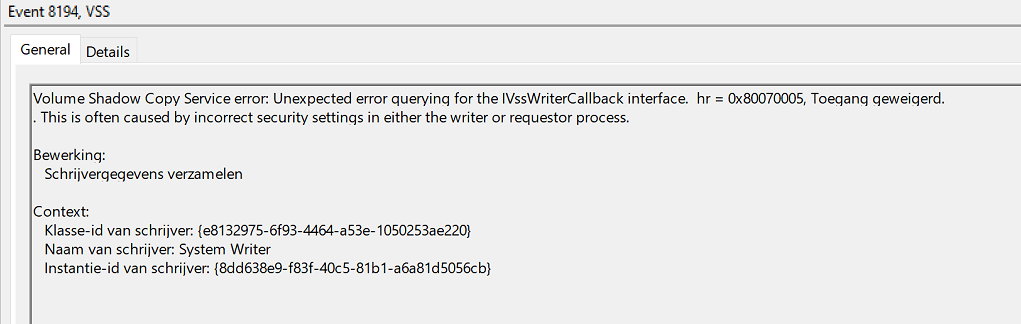
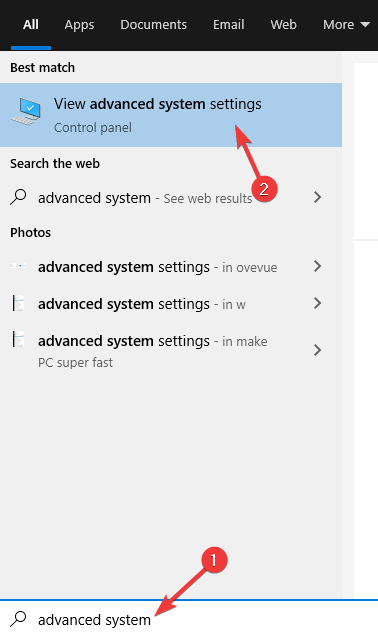
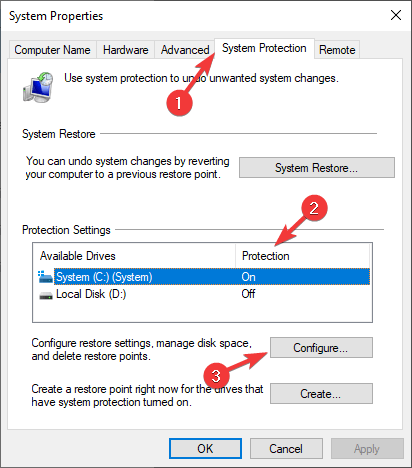
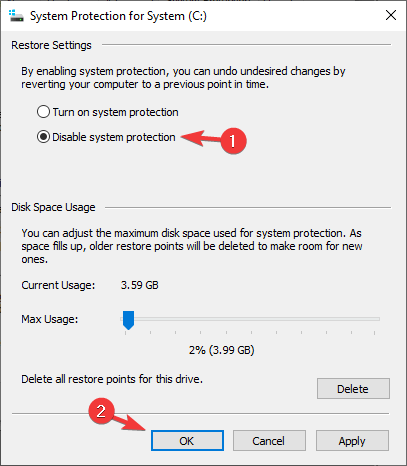
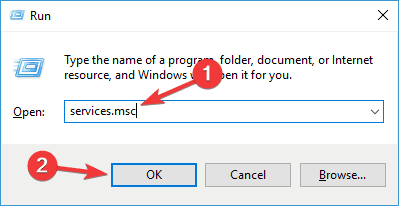
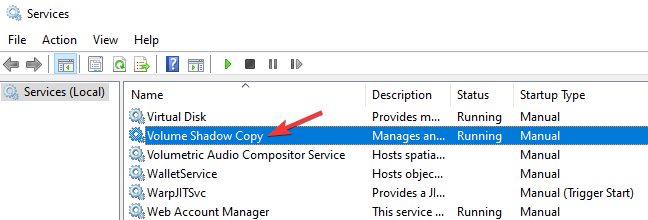
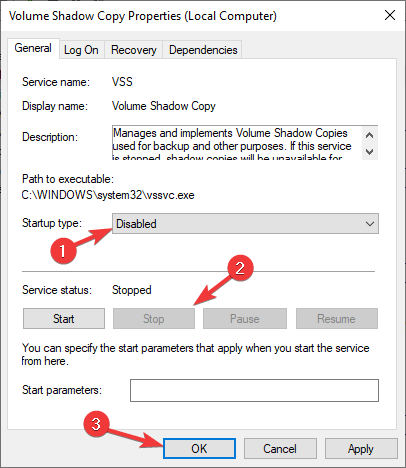
Thanks @scutters . That works for PinBot and JackBot And think find the Gremlin in my system. for some reasons, when PBX closes the tables (or kill it, not sure what method PBX is using), I noticed NVrams didn't save. I thought it was a PBX timing, but discovered that windows VSS (Volume Shadow copy Service) was trying to access the file as well. This gave an access denied, and the nvram wasn't saved at all Event ID 8194 generated a lot on my machine : (Sorry for my Dutch events) I completely stopped VSS on my computer to have a correct save of the nvram Note: By disabling this feature you’ll also disable System Restore, so keep that in mind. Here's a quick tutorial to stop VSS if you encounter the same issue : Press Windows Key + S and enter advanced system. Now select View advanced system settings. Navigate to the System Protection tab and select the drive that has protection enabled. Click the Configure button. Select Disable system protection. Now click Apply and OK to save changes. Note: By disabling this feature you’ll also disable System Restore, so keep that in mind. Alternatively, you can disable Volume Shadow Copy service by doing the following: Press Windows Key + R. Enter services.msc and press Enter or click OK. Locate the Volume Shadow Copy and double-click it. Set the Startup type to Disabled. If the service is running, click the Stop button to disable it. Lastly, click Apply and OK to save changes. Note: By disabling this feature you’ll also disable System Restore, so keep that in mind.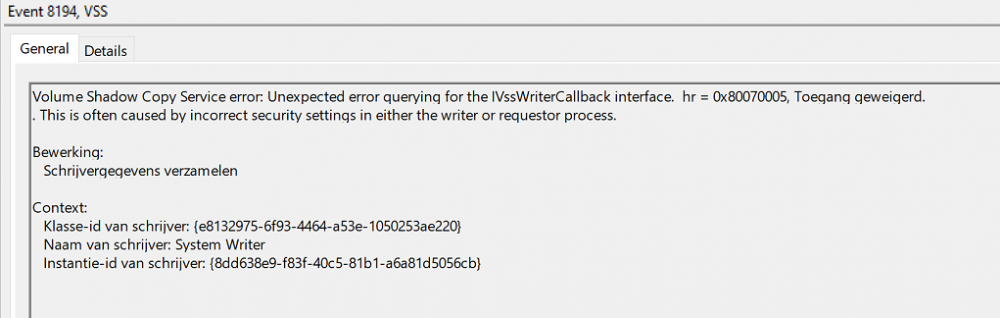
-
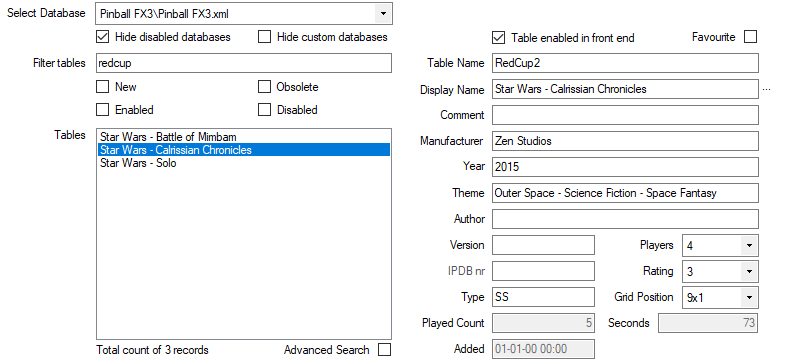
Thats the beauty of Database manager I think the devs could not find a way to translate the descriptions , but Redcup2 is defintly a table. Example : RedCup1 = Star Wars - Solo RedCup2 = Star Wars - Calrissian Chronicles RedCup3 = Star Wars - Battle of Mimbam So set it up like this, and it shows the correct display name with the correct table to launch : See also the following thread that will show how easy it is to add Williams Vol 6:
-
My last steam fx3 update was for Williams vol 6. That is working fine for me. Not checked for a newer version.
-
Well.. there is a program in the downloads section, called "database manager". This program will populate (if you have the steam version) all FX3 tables into your database file. You only need to give it a propper display name
-
According to your log, there is a file not found. Is your visual pinball path and exe file correct ?
-
[RESOLVED] NVRAM not saved after quiting game with PBX
Mike_da_Spike replied to Mike_da_Spike's topic in General
Need to check this. Give me some time (working this and next weekend ) -
Within gamemanager (but also in Database manager), there is a grid position select box. This means (as I understand it right), the position in the fx3 menu where that game is. So 1x1 takes the first game and with sendkeys PinballX will navigate to it. Not sure, but thought in the manual of Database manager there is a link to thread (and small explanation) Sorry, thats all I have, because running my version in cabinet mode(its free, just get the activation from zen studios)
-
1) FX3 parameters only works for cabinet mode. In desktop mode you can use the grid positions. I never used it, but that should do the trick 2) Yes build in records works (for me), but it cannot load a table in desktop mode
-
Your pinball collection is never finished! For mame games, nothing new will be released. But pimball... every week multiple new or updated tables.
-
Maybe we can have an internall discusion. To please all our users
-
L O A D I N G vs Sundial Spiral and few other questions
Mike_da_Spike replied to satio's topic in General
Here is a small video from my cabinet with scutters de-randomize loading videos: 20201029_061820.mp4 -
L O A D I N G vs Sundial Spiral and few other questions
Mike_da_Spike replied to satio's topic in General
I use Database Manager instead of gamemanager. This is an easy way to see if you misses media and you can add it easily from different sources: Drag and drop from explorer in the program, browse to file, doenload from FTP (if you got a member account) or add mega download links. for wheels, instructions cards, flyers and launch music, I use a combination of FTP and Mega links. Backglass and Playfield I create videos from my own. For DMD and Topper I use a program that is also availble to download that create a small video from wheel, company logo and year. For your loading, there is a folder under pinballx\media\loading images (and loading videos) Any files will randomly be showed during loading. There is an option in settings(i thought) that generates a still images from the playfield video and shows that. I use Scutters loading plugin with some other scripting that creates loading videos. A couple of DMD videos are generated and placed over the table video. And with scutters plugin, that specific video is loaded and shows an almost seamless experience See user projects for all the tools Hope this make sense to you -
I should also fix the command line parameters. Is the table behind gamemanager ? Or is that a background picture ?
-
Where did you find those parameters for VPX ? I thought most are for FP. I only use -play -"TABLEPATH]\[TABLEFILE]"
-
Not sure if this is the same issue, but noticed that vpinmame (freezy's dll) keeps sometimes the last frame on my dmd after ending a table. Starting an EM table after that, will still display the last frame on the dmd. During record it can be annoying(I don't record the dmd, so I dont care) When using PinballX, XDMD will show information in the frontend for every table, and will reset the freezing image. Maybe between recording, the DMD can be cleared by PBX ? @Tom Speirs