|



Mike_da_Spike
-
Posts
3789 -
Joined
-
Last visited
-
Days Won
241
Content Type
Profiles
Forums
Events
Downloads
Store
Articles
Everything posted by Mike_da_Spike
-
Maybe stupid question, but how can I see on the exe file which version it is ? I got a couple of back ups from the last couple of months, but checking the details it shows me 1.3.3.7. Launching the exe result that it want to update and not launching at all Please let me know, maybe I have a copy for you
-
Per table/rom you can also change the volume of the roms sounds/music. Most of my roms where set with low volume. Changing that when game was running sounds nice.
-
I think pinballx freezes on your initialization of your DMD. Can you try to set AutoPositionPinmane to false ? If that doesn't work, try to disable the Dmd itself to check if pinballx is not freezing
-
So, if it is showing another popup, it looks like it is not freezing. According to your ini file you only have fx3 enabled and shows the last table it showed was worlwar hulkmarvel. Did you setup all good within gamemanager ? If you launch settings and got to the end, there is a validate button. Is that showing all correct ? If you have the error, are you able to close pinballx and post the log.txt again ?
-
Not sure if this causes issues, but under your [pinballarcade] section in the ini file I don't see an entry enabled=true/false
-
3. "I normally shut down with power switch and have no problem when booting up again? " Do you mean that you don't give a graceful shutdown, but just power off your machine? What settings do you loose in the ini file? Did you check timestamp after rebooting, to see when the file was changed ? If you configure DOF correctly. It will not affect anything (I guess you refer to the lag of your flippers) Logfile and settings file will be a 'nice to have' to troubleshoot (simulate your issue before posting logfile)
-

[RESOLVED] Creating videos in 4k at 15fps ?
Mike_da_Spike replied to Mike_da_Spike's topic in General
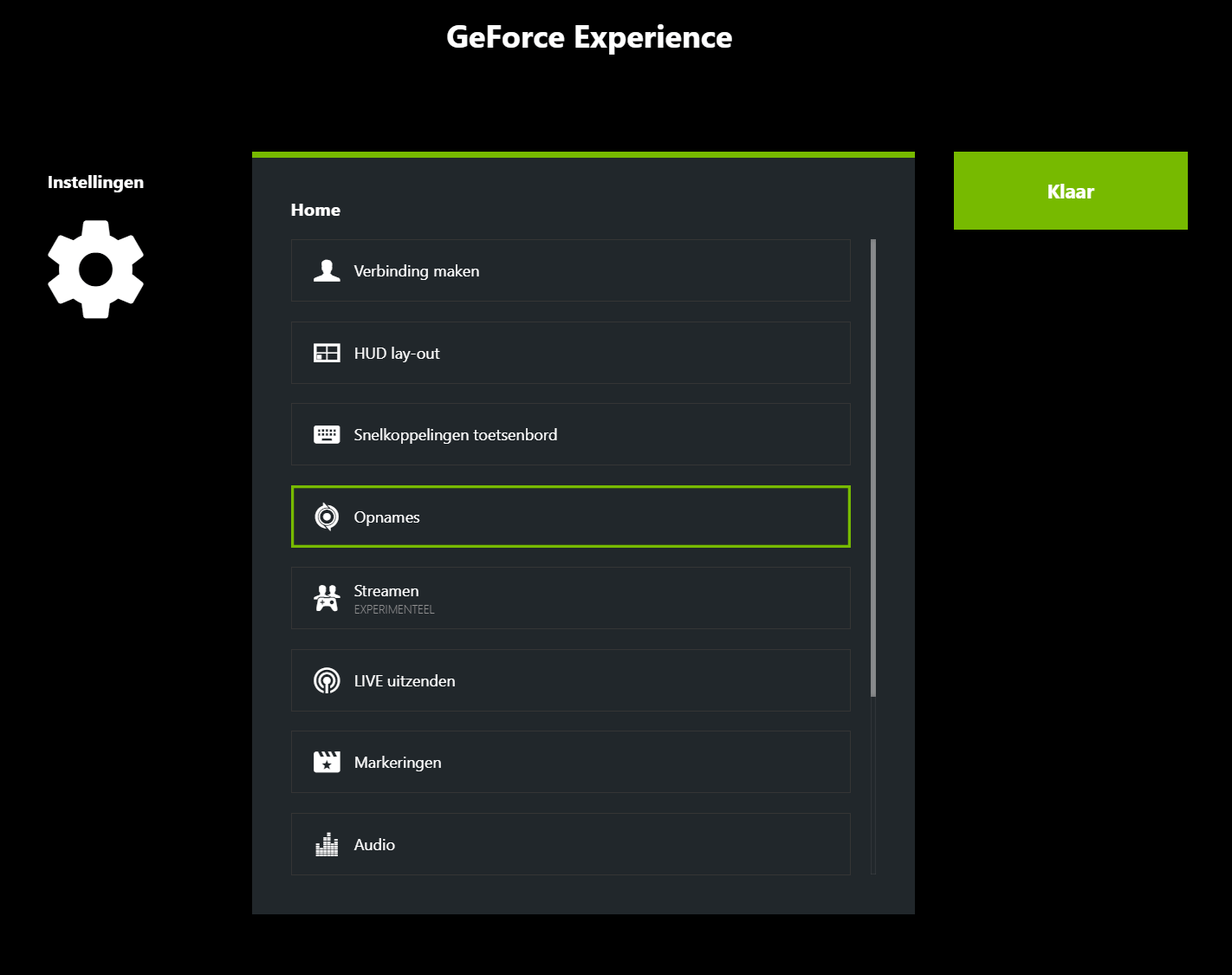
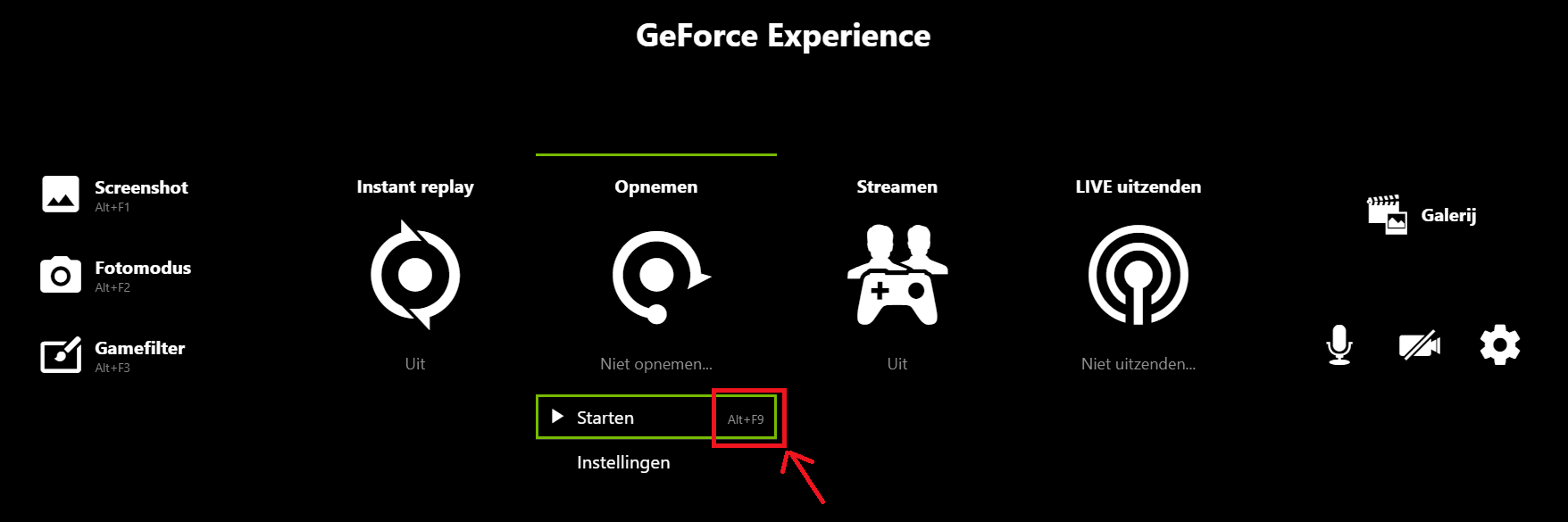
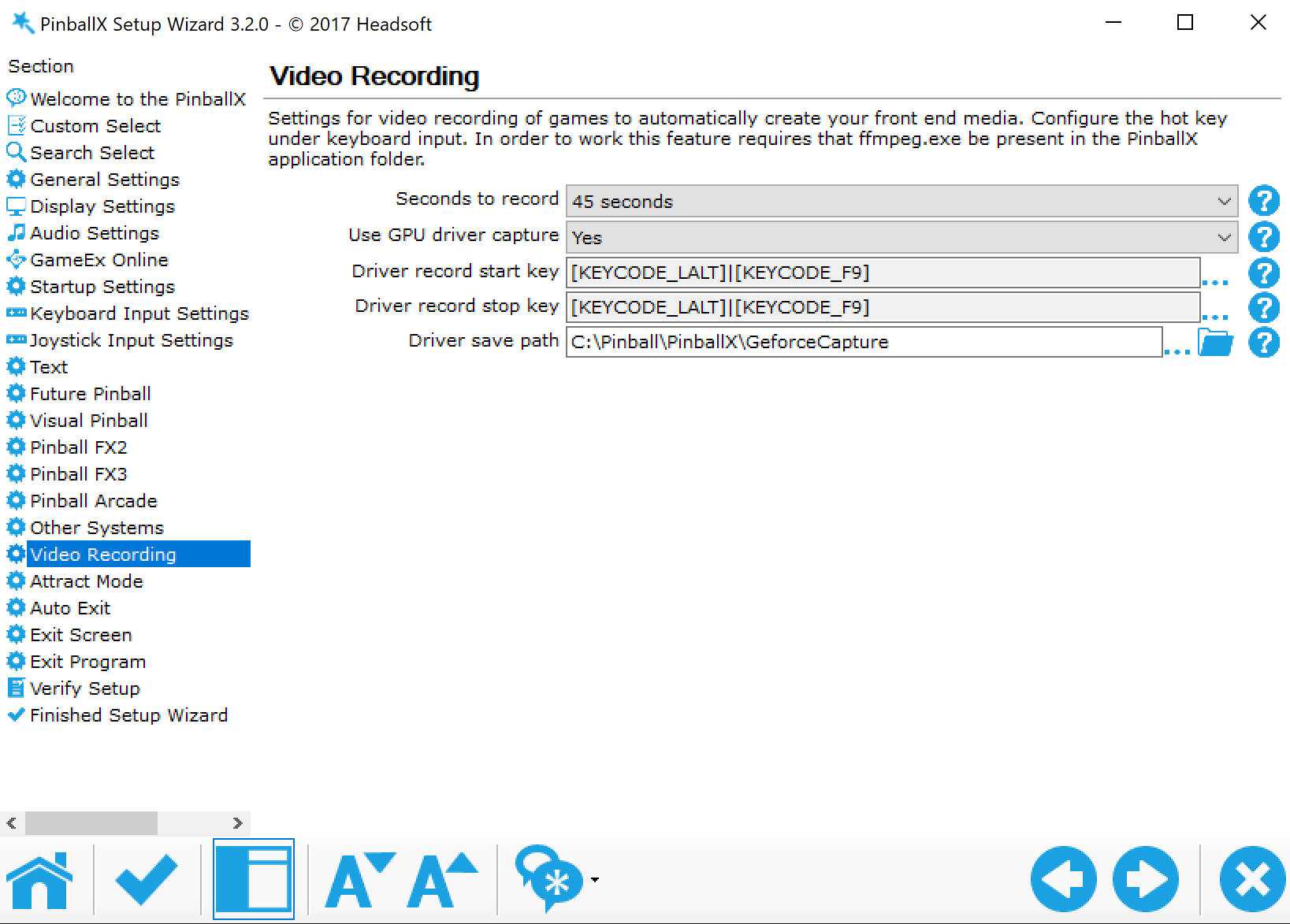
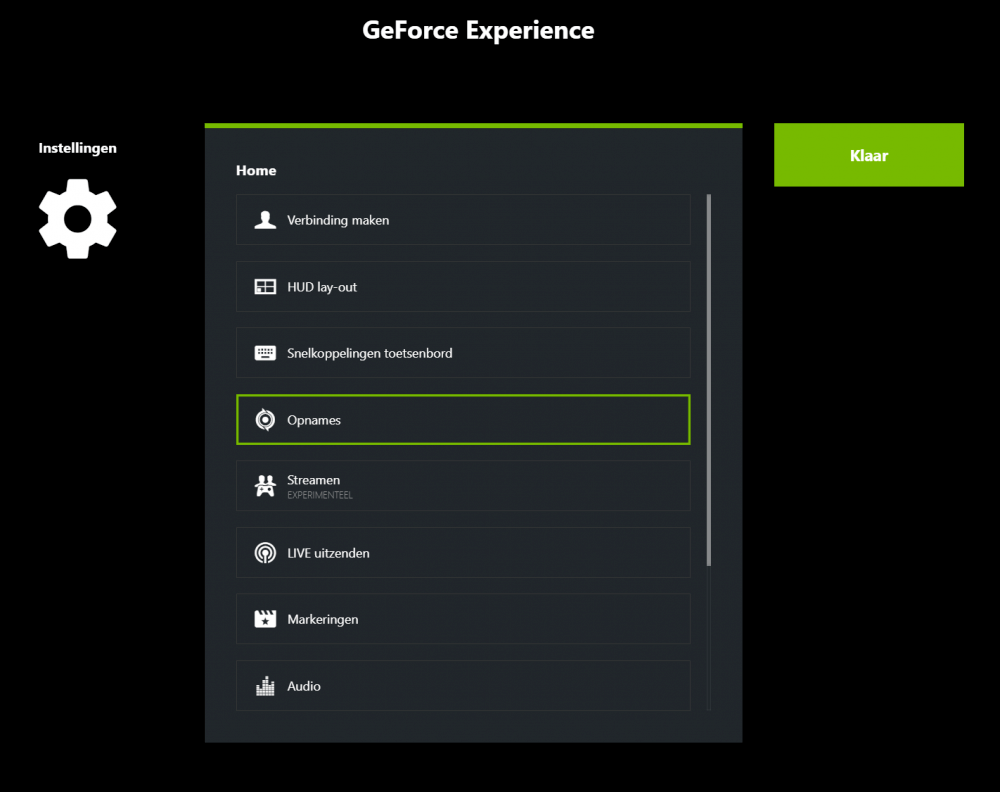
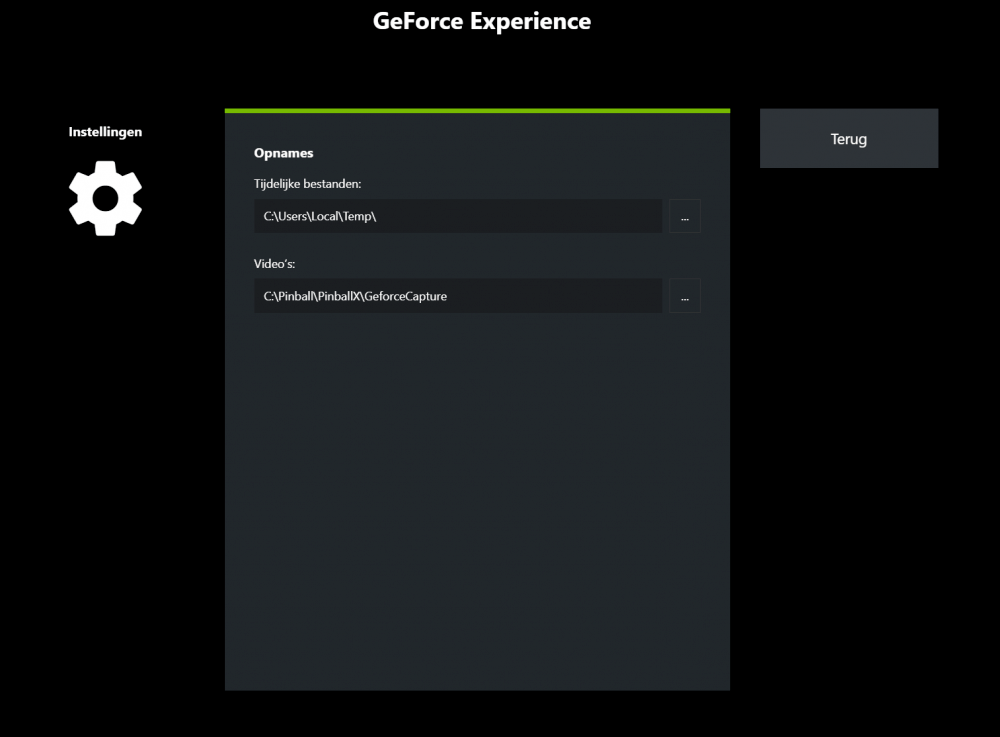
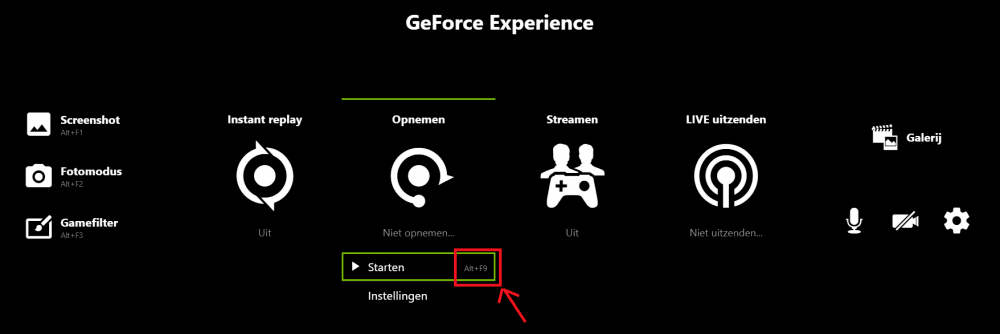
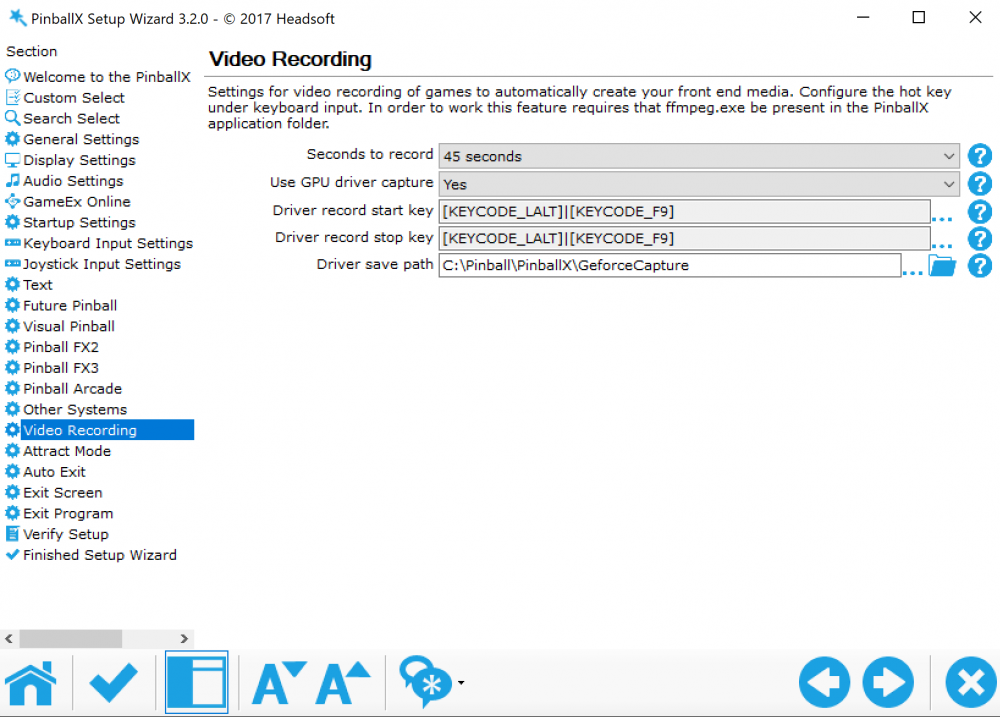
Using Geforce Experience driver to capture video's within PBX : Open your Geforce experience Press Alt+Z to bring up the Share overlay and go to Settings : NOTE: If the Share overlay does not appear it may be turned off. You can turn it on inside GeForce Experience by going to Settings > GENERAL > SHARE and toggling the switch. It will light up green indicating the Share overlay has been turned on. In Settings, click on Recordings: Set the path where the video’s will be recorded. For example c:\pinball\pinballx\GeforceCapture Hit the Back button and hit Done Check under Records what the key is to start a record. By default it is Alt+F9 Close the Share Overlay Open PinballX Setup Wizard and select Video recording in the left pane Select Use GPU driver capture to Yes Make Sure that the Driver record start/stop key are the same as the hotkey that is defined in the Geforce Experience Share overlay screen Set the Driver save path to the same directory as the Recording path in the Geforce Experience Share overlay screen Save your settings ! (sorry for the Dutch Screenshots, but could not set it to English)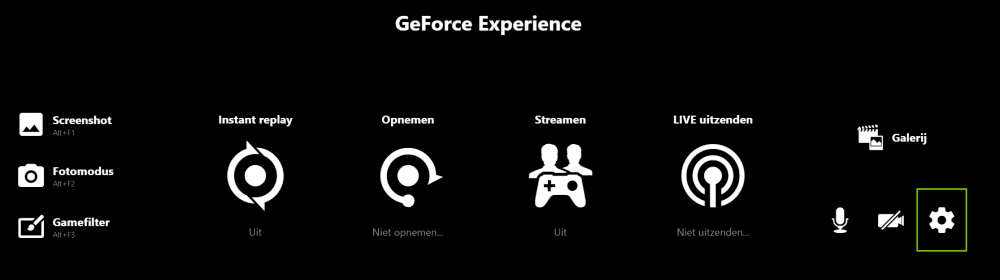
-
[RESOLVED] Creating videos in 4k at 15fps ?
Mike_da_Spike replied to Mike_da_Spike's topic in General
Awesome Tom ! I made a mistake. If I select in Geforce experince a folder, I normally dubbelclick that foler. but than it uses a subfolder. Just browsinf (for me) to c:\pinball and select pinballx did the trick ! Now it is capturing correctly. I will write down a little manual, so that others can use this too. (maybe it's already there, but could not find it) Thakns Tom for helping me out on this ! I really appriciate all your work you put into this nice front end tool and helpgin people on this forum ! -
This is function is added too gamemanager in pbx. And yes you can capture the TPA tables too.
-
[RESOLVED via WORKAROUND] Pinball FX3 Randomly exiting fullscreen
Mike_da_Spike replied to joyrider3774's topic in General
Odd issue @joyrider3774. I suspect teamviewer for some reason. Hope you find the solution soon -
[RESOLVED via WORKAROUND] Pinball FX3 Randomly exiting fullscreen
Mike_da_Spike replied to joyrider3774's topic in General
Didn't see this issue at all on my cabinet. Do you have installed teamviewer on your pc too ? I just use rdp to get into my cab. Also support multimonitor Maybe try full post it on the Zen studio forum ? -
I have indeed pbx32 bit running on my windowd 10 64 bit
-
I agree with Drago that the path name is a bit odd and that you rename it. I should also recomment to install the 32bit version of pbx instead of 64bit
-
[RESOLVED] Creating videos in 4k at 15fps ?
Mike_da_Spike replied to Mike_da_Spike's topic in General
I've setup in my Geforce Experience the capture setup. Also changed in the Video settings to use GPU for capturing, but still it is using FFMpeg with 15Fps If I hit Alt-Z it is launching the video settings overlay, and I can press a manual record. That is working fine log.txt PinballX.ini -
Looking forward to it, to test it on my cab
-
[RESOLVED] Creating videos in 4k at 15fps ?
Mike_da_Spike replied to Mike_da_Spike's topic in General
I have a Nvidia rtx 2070. How do I enable the driver capture option ? Is that the option in the settings under video capture? -
[RESOLVED] PinballX Doesn't start when i'm using two monitors
Mike_da_Spike replied to E36M3ZF's topic in General
I use the 32 bit version of pinballx on my 64 bot windows. Can you give that a try ? Not sure from the logfile, but looks like it misses a dll. Not sure if that is from .net framework or that you enabled a plugin that is causing this -
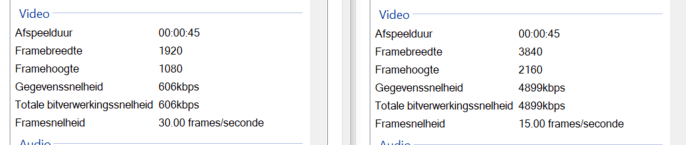
I just switched over from a Fullhd playfield to a 4K playfield. When I create video's in 4k (especially the FX3 tables) the table movement is not smooth Checking the frame rates of the captured video I see that the 4k (3840x2160) ar captured with 15 fps and the fullHd (1920x1080) at 30 fps Is is possible for me to set the fps for 4k higher than 15 fps? (Sorry for my Dutch version of Windows ...) The logfile shows an ffmpeg capture of 15 fps: log.txt PinballX.ini
-
These are really good. Thanks for sharing
-
[RESOLVED] After upgrading to Windows 1809 "LED Plugin" not working
Mike_da_Spike replied to Mike_da_Spike's topic in General
I can defently wait if you going to look at it. And if you want me to test something let me know I created a nice loop for it ( is arround 50 steps the maximum I can create?) and really love that plugin -
[RESOLVED] After upgrading to Windows 1809 "LED Plugin" not working
Mike_da_Spike replied to Mike_da_Spike's topic in General
Thanks Tom. Should I rollback to 1803 again ? -
After my cab is upgraded to Windows 10 version 1809, the plugin "LED Plugin" isn't working anymore. the logfile just shown : 12:14:11.7 4-12-2018: Loaded Plugin:"LED Plugin" Version 1 By Tom Speirs 12:14:11.8 4-12-2018: PlugIn Did not initialize. Disabling PlugIn I reinstalled PinballX, but still the same Unchecked and checked the plugin, doesn't make a difference. Launching the speech plugin is working fine Within VPX or Zen Pinball FX3), the Ledwiz is still working fine. Anyone got an idea ? log.txt PinballX.ini
-
Working through DMDext and DOFLinx setup for FX3
Mike_da_Spike replied to tkolakow's topic in General
No problem. Let me know if you still got any problems or questions. Is it least what I can do for the community. -
Working through DMDext and DOFLinx setup for FX3
Mike_da_Spike replied to tkolakow's topic in General
I don't have any issues when running doflinks in the background. I use my cab only for pinball : vp9,vpx an fx3 tables. (I stopped with the pinball arcade) So not sure if your cab will have issues with doflinks running in the background. If so, another solution will be to launch doflinks when pinballx is starting and killing on exit of pinballx -
Working through DMDext and DOFLinx setup for FX3
Mike_da_Spike replied to tkolakow's topic in General
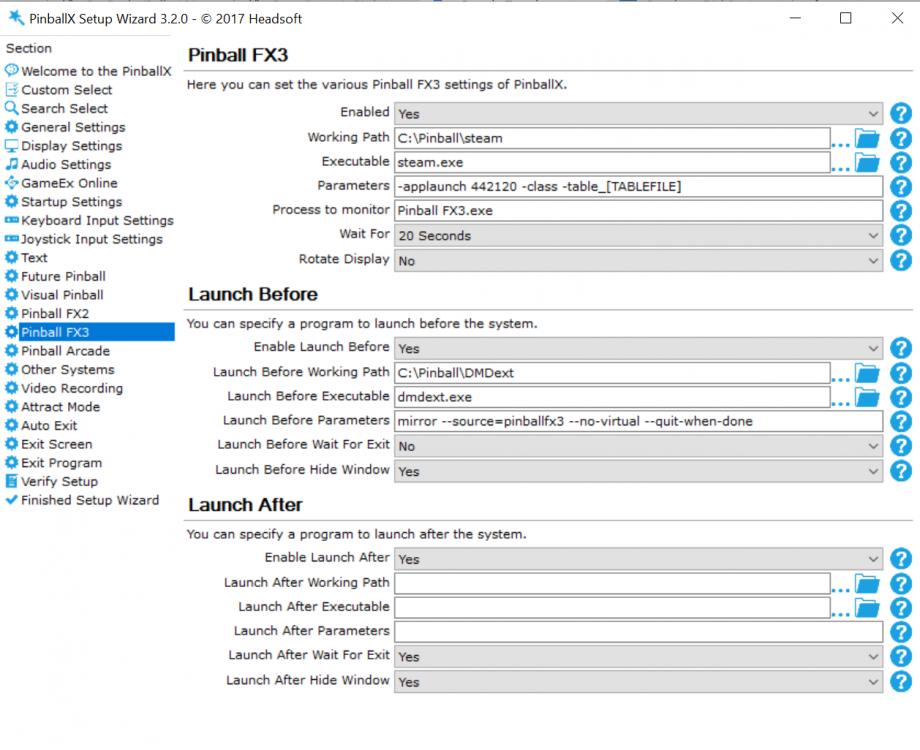
Maybe stupid question, but why a batch file ? I have doflinks setup to run at my system startup and runs in the background ), then i will run dmdext from pinballx command line (no wait)., bu close on exit paramters This works like a charm for me See screenshot below for my pinballX settins