|



bkenobi
-
Posts
4581 -
Joined
-
Last visited
-
Days Won
1
Content Type
Profiles
Forums
Events
Downloads
Store
Articles
Everything posted by bkenobi
-
Actually, I could see a tutorials thread being pinned at the top with video tutorials. Could be really useful. We could point newbies to that thread first, then answer any follow on questions and update the tutorial as needed. Sorry, this does not constitute volunteering to do it since I have no talent
-
cool! Probably not something I would use personally (no video camera), but still a great idea!
-
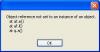
<droooooooling> Uh, oh... I'm getting an error when I hit the "x" to close CPWizard. Here's the error:
-
I don't see why it would be the problem, but did you upgrade MAME without upgrading your ROMS? It may be possible that MAME choked on an old ROM for some reason. Just make sure you are using the same version of MAME and ROMS and you should be good.
-
We're going to the inlaw's this year, so no tourney this year
-
Ahhh, so the solution should really be: 1) Format HDD 2) Install WinXP 3) ...
-
Huh, well I didn't know that.
-
Sounds like a lot of work to me for a feature I don't use. I'll step back and let others deal with this further.
-
There is an option to automatically update the **MAME** list?
-
Disclaimer: I haven't looked at the server for kaillera! Now, it might be possible to launch the server using a series of send keys and/or mouse clicks, but it would always pick the first server on the list. I don't think there's any *clean* way of adding this software. Like HK said, if you have to pick a server manually from a list, you would either need to write a script to do it automatically or come up with some kind of other similar solution (plugin?). Either way, it looks pretty messy which basically defeats the porpose of the front end (making things look clean). Perhaps you could suggest that the authors of the emulator incorporate the server list into MAME similar to how MAME now has a list of roms included? You load up the software and it brings up a list of servers. Anyway, that's my uneducated input.
-
MAME asks you to update your list? That has nothing to do with automatic update. That feature updates GameEx itself. There is no feature to update your MAME list automatically. Perhaps you have a stuck key or something? That's my best guess.
-
That's right, now I remember. You have to delete two files in the GameEx directory. I want to say one is the gamelist.txt file, but I can't remember ATM. Like Stu said, do a search and see if you can't find it. If so, please post here so that this thread isn't left open...
-
I've seen that in the past with certain games (lots of them by the way) being listed as shooters. I never found out why, so I just ignored it and I think it corrected itself somehow. Anyway, this is a new database, so perhaps (as Brian said) it's just a simple database error that can be fixed.
-
Same here. Windows desktop is REALLY blurry! But, GameEx looks great as do all games I've played on it. I have another machine running a CRT monitor and it looks great in Windows and great for the games as well. The difference is my TV is 27" but the monitor is only 19". I would take the 27" in a second!
-
Just realized I never finished off this thread. I used the 4148's and they worked great! Now my only problem is that when I set up an advanced configuration file, pressing two keys doesn't exit. I've never used a multi-key exit before, so perhaps I have it set up wrong. Anyone want to take a look and see if I missed anything? Generic_Emulator.zip
-
Yeah, I set them up manually before the new control system went into effect. I just have been dreading setting up the 5 and 6 button games again. Eventually I'll get to it, I was just hoping there might be another way to get around the tedious task...
-
It's going to look fuzzy if you try to view the desktop. There is no way around low resolution! I kinda just got used to having a crappy windows desktop display on the TV since ideally I will never need it. I set up a second account to login remotely and manage anything that way.
-
Thanks! I wouldn't say I did that much, but I appreciate the mention
-
My only advice would be to check and make sure it isn't launching a loader of some kind. If it is, then it's returning to GameEx after the loader finishes...
-
Cool! I've been wondering about this for some time now. I actually have an extended question though... If a game has 1-4 or 7 buttons, I want to use one config. If it has 5 buttons, I want a second config. If it has 6 buttons, I want yet a 3rd. This is for the same reason... My layout is as follows: 5 6 7 2 3 4 1 I normally use a Neo Geo layout as I find myself playing those games WAY more than any other. But, if I play a SF game, I want to have the 6 button layout. The problem is that all Capcom games are not 6 button SF games. Any ideas?
-
I use SVideo out as well and have everything set to 800x600. BUT, you are correct that this is not the actual resolution sent to the TV. TV's can't display above ~500 lines which is typically sent as stretched 640x480 I believe. In any case, the drivers take care of it and I don't have to worry about what it's actually doing...it's just there.
-
That may not be the script you want. If you do that, then if GameEx is running and you hit joy9, it will switch to GameEx and NOT sent Alt-F4. I don't know how you are using this, but if you are trying to kill a program with that button, but not GameEx, you would want: joy9:: if Not WinActive GameEx Send !{F4} return
-
Since Tom answered this in the features request thread, I'll append it here to: Top10 doesn't exist, but Most Played does. This displays more than 10 titles based on number of times launched, but I don't know what the threshhold is. If you want to name it something else, you can do so in the Text/... menu in the configuration wizard. Just search for text should work.
-
The log can be found in the GameEx Start menu or by going to Program Files\GameEx\LOG\log.txt