



|



emphatic
-
Posts
786 -
Joined
-
Last visited
Content Type
Profiles
Forums
Events
Downloads
Store
Articles
Everything posted by emphatic
-
You can use GameEx with Win32 if you prefer. Just point to your win32.exe. I use Zetamame for example, which uses graphical filters like AdvanceMame does to enhance the look of the games and allows for autofire, like in Mame32+. Emph
-
Since GameEx now is updated every day with a new version, how about hosting the "last stable version" installer on http://www.tomspeirs.com/gameex to save the people who just want to try it out the trouble with getting bugged? And perhaps a link to http://www.gameex.info for "get latest beta here"? I think this way, people can read about the current beta's issues before trying it, this way taking some load of this board / Tom. Emph
-
"New advanced MAME setting to bypass disclaimer and warning screens" - WOW, that was fast! You rock! Emph
-
Completed Feature Requests (Moved)
emphatic replied to jr9770's topic in FAQs, Guides, & Other Useful Information
Vertical GameEx!? How cool wouldn't that be? You could choose "enable vertical screen option" in the options and then, at startup, you would have a "boot" menu "horizontal or vertical GameEx?" so that if you're running it in a cab with a rotated or vertical monitor, GameEx would rotate to a resolution that you'd set in advance (of course) in options. And with (optional) perhaps "rotate game with GameEx", so that the mame.ini file would be altered automatically. And a "rotate GameEx to horizontal/vertical" option in the main menu (hidden optional). Perhaps most people rotate their monitor with everything disconnected, but in case you accidentally launch the wrong orientation. And with this option you could choose "show only games with current orientation". Or "show only vertical favourites"? How about that? Emph -
It's animated snapshots. Sort of like big gifs with matching .mp3 files for sound. Emph
-
Hi, I've not had any trouble with GameEx since getting everything setup the first time. Not until now, that is. I'm using ZetaMame as my executable (because I think it simply looks even better than AdvanceMame) and since 4.90, I've not been able to start GameEx as usual. Here's my log: 01:56:39.7 2005-08-30: GameEx: Version 4.93: Starting Log 01:56:39.7 2005-08-30: Operating System Platform: Win32NT 01:56:39.7 2005-08-30: Operating System Name: Windows XP 01:56:39.7 2005-08-30: Operating System Version: 5.1.2600 01:56:39.7 2005-08-30: Checking Registration 01:56:39.7 2005-08-30: Running Randomize() 01:56:39.7 2005-08-30: Running Misc startup tasks 01:56:39.7 2005-08-30: Setting Menu types 01:56:39.7 2005-08-30: Opening Configuration File 01:56:39.7 2005-08-30: Getting Configuration Values 01:56:39.7 2005-08-30: Using Theme: Default - GameEx - Animated 01:56:39.7 2005-08-30: Checking for alternate Image Directory for Theme: Default - GameEx - Animated 01:56:39.8 2005-08-30: Using Images from theme: Default - GameEx\MEDIA\ 01:56:39.8 2005-08-30: Text/Language: Custom 01:56:39.8 2005-08-30: Applying Language/Text 01:56:39.9 2005-08-30: Custom Keyboard Input enabled: Getting custom codes 01:56:39.9 2005-08-30: Creating Scancodes.txt (List of DirectInput scan codes) 01:56:39.9 2005-08-30: Snap Delay set to: 2 01:56:39.9 2005-08-30: Is Media Center running? 01:56:39.9 2005-08-30: Check Media Center Exit/Start Mode 01:56:39.9 2005-08-30: Media Center Mode 2 01:56:40.0 2005-08-30: Checking for applications to Launch On Startup 01:56:40.0 2005-08-30: Get other settings 01:56:40.0 2005-08-30: Using 2D Animations 01:56:40.0 2005-08-30: Using DirectInput for keyboard input 01:56:40.0 2005-08-30: Launching HideOS.exe 01:56:40.6 2005-08-30: Hiding Taskbar 01:56:40.7 2005-08-30: Start work for Form 01:56:40.7 2005-08-30: Getting Original Screen Size 01:56:40.7 2005-08-30: Loading ICON 01:56:40.7 2005-08-30: Initializing Component 01:56:42.6 2005-08-30: Initialising Bass Audio Library 01:56:43.4 2005-08-30: Loading default loading screen 01:56:43.5 2005-08-30: Using General Font: HandelGothic BT 01:56:43.5 2005-08-30: Using Title Font: HandelGothic BT 01:56:43.5 2005-08-30: Initialising DirectDraw 01:56:43.6 2005-08-30: Creating DirectDraw Device 01:56:43.6 2005-08-30: Using Device: C.P. Technologies Inc. RADEON 9250 GameFX 01:56:43.7 2005-08-30: Setting Resolution to 1024x768 32 bit color 01:56:44.4 2005-08-30: Creating DirectDraw Surfaces 01:56:44.4 2005-08-30: Creating Primary Surface - Full Screen Mode 01:56:44.5 2005-08-30: Creating Back Buffer 01:56:44.5 2005-08-30: Loading graphic surfaces 01:56:44.5 2005-08-30: Creating Surfaces Misc and Dialogs 01:56:44.6 2005-08-30: Creating Surface Volume 01:56:44.6 2005-08-30: Creating Surfaces Arrows 01:56:44.6 2005-08-30: Creating Surfaces GameEXlogo Text 01:56:44.6 2005-08-30: Creating Surfaces Toolbar 01:56:44.6 2005-08-30: Creating Surfaces Backgrounds 01:56:44.7 2005-08-30: Creating Surfaces Toolbar Controls 01:56:44.7 2005-08-30: Creating Surfaces GameEx Logo 01:56:44.8 2005-08-30: Creating Surfaces Home & Exit 01:56:44.8 2005-08-30: Creating Surfaces Snaps 01:56:44.8 2005-08-30: Creating Surfaces Menu and List Bars 01:56:44.9 2005-08-30: Creating Fonts 01:56:44.9 2005-08-30: Creating Menu Font 01:56:45.6 2005-08-30: Creating Game Font 01:56:46.2 2005-08-30: Creating Game Font Standard Size 01:56:46.7 2005-08-30: Creating Font Black 01:56:46.8 2005-08-30: Creating Font Black Small 01:56:46.9 2005-08-30: Creating Game Font Faded 01:56:47.4 2005-08-30: Creating Title Font 01:57:04.3 2005-08-30: MAME Path is: E:\Spel\mame32 01:57:04.3 2005-08-30: MAME EXE file is: zetaMAME32en.exe 01:57:04.3 2005-08-30: ROM Path is: E:\Spel\mame32\roms 01:57:04.3 2005-08-30: Catver.ini is located at: C:\Program\GameEx\DATA\catver.ini 01:57:04.3 2005-08-30: controls.ini is located at: C:\Program\GameEx\data\controls.ini 01:57:04.3 2005-08-30: History.dat is located at: C:\Program\GameEx\DATA\history.dat 01:57:04.3 2005-08-30: nplayers.ini is located at: C:\Program\GameEx\DATA\nplayers.ini 01:57:04.3 2005-08-30: MAMEinfo.dat is located at: C:\Program\GameEx\DATA\mameinfo.dat 01:57:04.3 2005-08-30: Loading Controls.ini map file 01:57:04.3 2005-08-30: Loading Custom Emulators 01:57:04.8 2005-08-30: Snap Path is: E:\Spel\mame32\snap 01:57:04.8 2005-08-30: AVI Snap Path is: E:\DOWNLOADS\bit.torrent\MNG\ingame 01:57:04.8 2005-08-30: Flyer Path is: E:\Spel\mame32\flyers 01:57:04.8 2005-08-30: Cabinet Path is: E:\Spel\mame32\cabinets 01:57:04.8 2005-08-30: Title Path is: E:\Spel\mame32\titles 01:57:04.8 2005-08-30: Panel Path: Not Found 01:57:04.8 2005-08-30: Icon Path: Not Found 01:57:04.8 2005-08-30: Marquee Path is: E:\Spel\mame32\marquees 01:57:04.8 2005-08-30: MAME CMD options: -skip_disclaimer -skip_gameinfo -triplebuffer -nowindow -joy -ftr 1 01:57:04.8 2005-08-30: Attempting to load game list 01:57:05.7 2005-08-30: Loading last used Game List 01:57:05.7 2005-08-30: Cannot Load Play List. Check Path and filename 01:57:05.7 2005-08-30: Creating DirectSound Device 01:57:05.7 2005-08-30: Trying: Primär ljuddrivrutin 01:57:05.7 2005-08-30: Loading Sound Files 01:57:05.8 2005-08-30: DirectSound Device Created Successfully 01:57:05.8 2005-08-30: Initialising DirectInput for Gamepad support 01:57:05.8 2005-08-30: Unable to create a joystick device 01:57:05.8 2005-08-30: Initialising DirectInput for Keyboard support 01:57:05.8 2005-08-30: Initializing MCE Remote 01:57:05.8 2005-08-30: Initialization OK! Starting GameEx! 01:57:05.8 2005-08-30: Testing Main Loop Once: Processing Frame 01:57:06.0 2005-08-30: ERRORS DETECTED: EXITING 01:57:06.1 2005-08-30: at GameEx.Functions2.IsPlaying() 01:57:06.1 2005-08-30: at GameEx.GameEx.mainform.DisplayFrame() Emph
-
Yes. Creating a background that works well with the menues is a bitch for me. Tutorial files with labelled fields would be of great help. And the forum will be flooded with themes... Emph
-
I second that. Emph
-
The key remapping is a great feature. However, it didn't work perfectly for me. I had problems getting the "back" button to work. But maybe that's a system specific problem as I was running a little low on system resources when I did the testing? Anyhow, in the "Scancodes.txt", could you please write " ( " or " < " instead of "LeftBracket". Because I'm not to sure which one you mean. And I don't think I will be alone at being confused by this. Keep up the great work! GameEx rules! Emph
-
If email size ever becomes an issue, try out http://www.yousendit.com Emph
-
Indeed, that looks awesome! Is there any way of implenting a border option around pictures, i.e. for snaps and mngs? Also, border colour would be a nice option if borders are coming. I mean, imagine how nice it would look with a 1 or 2 pixel white or black border around pictures on top of those backgrounds! This even makes me feel I should try out skinning this thing! Emph
-
Thank you! I will seed this forever! Emph
-
You can record your games using all mame versions, not only wolfmame. Unfortunately, the recordings are version specific. So if you record a game using mame 0.59 and then try to replay it using 0.62, there's a big chance that the driver or rom since then has been altered, and the playback won't work as planned. I was going to suggest myself that it would be cool to use .inp files for attract mode, but that would interfere with the coin-in during attract mode option, and would probably be too much work for nothing. Emph
-
I use the X-Arcade Dual controller. http://www.xgaming.com I'm, going to be building my first cab soon (purchase of material next week! ) and it will be based around it. My custom cab will be made from my own plans and the controller will be detachable because I'm thinking about replacing it with a homemade controller sometime in the future. Emph
-
I think this is a great idea. Emph
-
I see that you have put up 4.05. What's new in .05? No announcement this time? Emph
-
Completed Feature Requests (Moved)
emphatic replied to jr9770's topic in FAQs, Guides, & Other Useful Information
When you select a game and you get to the page where all the game info is (cabinet, flyer etc) the gamedescription is "selectable" (i.e. it's "focused" when you go from "add to favourites" to "Recommended games"). Is it possible for GameEx's navigation to "skip" that step? This way, if there's a lot of info about a game, and you want to see the recommended games, you don't have to step through all the info first. However, while typing this, I realize that stepping through gameinfo is a useful feature when you actually want to read it. So how about putting a link directly under "add to favourites" that takes you directly to "recommended games" I hope this makes sense, otherwise just have a look at my attachment. Keep up the great work. Btw, when can we expect to see full gui control custimization? Emph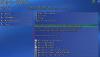
-
This will will be a feature later on. Emph
-
I will gladly help seeding it. Emph
-
Sounds (no pun intended) like you have internet applications running in the background that eats up your RAM. I get this too, especially when running EMule and MAME at the same time. Emph
-
So what do I have to do to actually use these in GameEx? Any special codecs? Please advice. Emph
-
Yeah, I saw it. Great! Emph
-
Completed Feature Requests (Moved)
emphatic replied to jr9770's topic in FAQs, Guides, & Other Useful Information
Adding support for high score is great. About the font size option, I don't particulary need it because I can use tighter fonts, but in most M.A.M.E. games, there's some information that doesn't fit the screen because it's so much text , like "bla bla bla gamename (US 19940531 revision version 11.56)". Maybe if there was an option like "show only short gamename" or "skip revision/clone info in gamelist"? Emph -
Completed Feature Requests (Moved)
emphatic replied to jr9770's topic in FAQs, Guides, & Other Useful Information
An option to change font size? Emph -
Completed Feature Requests (Moved)
emphatic replied to jr9770's topic in FAQs, Guides, & Other Useful Information
It would be cool if "current high score" could be displayed under game details. I know there's a highscore.dat file in circulation, but I don't know if this is how that's used. Maybe an option to change the filters for clones etc in GameEx directly? So if you want to play a Japanse romset for a change, you don't have to re-create the gamelist? Hope you get what I mean. This is not my native language, see? Emph
