|



Gildahl
-
Posts
216 -
Joined
-
Last visited
-
Days Won
8
Content Type
Profiles
Forums
Events
Downloads
Store
Articles
Everything posted by Gildahl
-
Yes. These are 222 roms. But I don't think this is a mame or rom runtime issue, I think the problem is that mame is not being launched. For example, if I replace my mame.exe with a compiled script that beeps when it is called, I can tell that the script never gets called because it never beeps. And that also seems to be what the log is indicating--that mame never gets called when one of these two games is the target rom. Keep in mind that the roms run fine both externally (using runitgame.bat) and even work fine from within GameEx--when using a custom list. They just won't launch from the main MAME list or from the favorites list in GameEx. I've attached a video file of how it looks when trying to run Omega Race from the Favorites list. Note how it says at 0:21 "Launching: Omega Race" at the bottom of the screen, and yet the log shows nothing. I would show you how it does run from my custom "Golden Age Arcade" list, but can't get the video to record the transition to the game...so you'll just have to take my word that it does work from there Gameex_omega_race.m4v
-
Yes, basically out of 230 games in my favorites list, only these two exhibit this behavior, and I have no issues at all with CPWizard for any of the working games. Of perhaps slight interest as well, if I go into gamelist.txt and change omegrace to omegrace2, it will now work. Of course, that's technically a different rom, but it at least verifies that the gamelist.txt record for the game isn't corrupted I suppose.
-
Thanks for taking a look at this. First off, I'm assuming that when you say to try without HideOS enabled, you mean to set Hide Desktop in the Display Settings screen to No, right? In my case the behavior is the same either way. I think I can safely take CPWizard out of the picture since if I completely disable it (set Use CPWizard and Load CPWizard to No and make sure it is closed before running GE), the games still don't load...though in a slightly different way. In this case (with CPWizard disabled), when I try to launch the game from the information screen I see GameEx's built-in control panel diagram, which remains on screen till I press Enter, at which point I just get returned back to the information screen again and the game never launches. Again, this is only for omegrace and wow. All other games get launched properly after display of the CP diagram. This behavior is the same regardless of the Hide Desktop setting, and the log shows nothing different than the one I posted previously. One curious thing I found while playing around, however, is that if I delete the path to controls.ini under MAME settings (or just remove the file), the behavior becomes different in another way. In this case, when I attempt to launch non-affected games, the built-in CP diagram is skipped and the game loads (which seems normal and what I would expect, since the control map is missing). However, for the affected games (omegrace and wow), when I attempt to launch the game it now goes to a blank/black screen (presumably the HideOS screen) where it just sits and from where I can continue to hear sounds from the video snap. If I hit enter, it appears to refresh the black screen, but stays on it. If I hit backspace, then it returns to the Favorites menu (not the information screen). On the other hand, if while I'm on the black screen and I press alt-tab, I will see a box for HideOS displayed briefly then disappear, at which point I can Alt-Tab back to GameEx whereupon it returns me to the information screen. Note that this disappearing HideOS process shows up with the Hide Desktop setting turned on or off, no difference. If I grab a log file at this point (attached), it shows the screen re-initializing, but nothing much different--and still no sign of it ever having made any attempt to actually launch the game. So my conclusion right now strongly suggest it's not a CPWizard issue and it's not an issue with the game itself (since both omegrace and wow can be launched successfully from another custom list in GameEx). Since the launching dialog is shown with the correct rom name displayed, it's clear that GameEx must have pulled the right information from the db necessary to launch the game, but for some reason it never gets to the point of actually launching it (since we never see the launch assertion written to the log file). That's the mystery I'd love to solve. Hopefully, these clues can narrow down exactly where in the code things could be going awry. Continued thanks for looking into this. P.S. One final question for you Draco1962. You seem to be seeing something a bit different from me, but was the issue you saw when you had CPWizard turned on limited to just omegrace and wow? If it was, then I suppose we could at least be able to say that there is something peculiar about how GameEx is processing these two games. log.txt
-
Looks like one more game has showed up in this category. Wizard of Wor (wow.zip). Does the same thing. Pretty sure those are the only two out of 230 games I've checked from my favorites list.
-
Tom: it runs fine using runitgame.bat. Correct, the log has nothing despite having selected "Play This Game". Removing from the Favorites list doesn't help since it doesn't run from the main MAME list either. Contents of db files I know about look ok (gamelist.accdb, data.db3, gamelist.txt)...and like I said, it does run from another map file list. But you're right that it sounds like a db issue maybe. Draco1962: I'm using MAME .222 (though it was happening in my last rev. .202 as well...and maybe earlier. Don't think its a MAME issue though since it can be launched both externally, and from another custom .map file list in GameEx...and it never even gets far enough to display the CPWizard screen (and disabling CPWizard doesn't help).
-
Hi Tom. Was wondering if you could help me troubleshoot a small issue I'm having. It's been there for a while, so I don't know in what version it started. I'm on 16.54 at the moment. In my main Favorites list, which contains over 200 games, there is one game (Omega Race - omegrace.zip) that won't start from this menu. It won't start from the main MAME list either. What happens is that when I click on "Play This Game" in the information screen, the screen briefly shows the "Launching" dialog at the bottom of the screen, then just returns to the information screen again. I've attached the log, but it doesn't seem to show anything. The log was taken right after attempting to launch the game. The sequence of launch is that it is supposed to launch the CPWizard control panel first then launch the game. If I select "Control Panel" it does show the CPWizard normally. It just never gets there, nor launches the game when selecting "Play This Game" The game runs fine externally, and if I put the game in a separate list in GameEx (i.e. a separate .map file), it runs also runs fine from within GameEx. So it is only when I launch it from the Information screen and it is the only game I have that does this. I also know that it used to work in the past. Any clues where I might look to solve this? log.txt
-
Any way to change this? Think I'd just like to have a plain white background.
-
Here's the AHK script for my work-around in case anyone else might find it useful. Just change the folders to match your own. ;This script will copy videos of favorite list games from a source ;folder to a destination folder GAME_LIST := "C:\GameEx\DATA\gamelist.txt" VIDEO_SOURCE := "D:\Assets\MAME\VideoThemes\All" VIDEO_DESTINATION := "D:\Assets\MAME\VideoThemes\Favorites" FILE_EXTENSION := "MP4" FileDelete, %VIDEO_DESTINATION%\*.* Loop, read, %GAME_LIST% { sFields := StrSplit( A_LoopReadLine, "|") bFavorite := sFields[16] if (bFavorite = "True") { sFavorite := sFields[1] FileCopy, %VIDEO_SOURCE%\%sFavorite%.%FILE_EXTENSION%, %VIDEO_DESTINATION% } }
-
Thanks Tom. It's not a big deal as I can work-around by creating a separate folder that contains just the videos I'd like to play back, but it would be a nice-to-have feature as I suspect this is the behavior most would expect for the Only Favorites option.
-
I'm not sure this would be classified as a bug, but it maybe it is. I just changed my attract mode to use theme videos instead of launching the games. However, it doesn't seem to work quite as expected. In the configuration wizard I say that only want this for Favorite games, but it still plays all videos in the folder rather than limiting it to just those associated with games in my favorites list. Is this as intended or should it be filtering the videos just as it does when it runs the games?
-
Yup, that did it. All gone now. So everything's back to normal. Thanks again!
-
Hmm. Now that I think about it, maybe I do remember seeing it a long time ago and disabled it. I'd like to make it go away again...especially given the fact that it is displaying a file path, which is kind of weird :-)
-
Hi Tom, Ok this build seems to have fixed the problem. Thanks! There is one new thing though...a new feature? On the main landing screen, I am now getting a scrolling message at the bottom right that says "C:\GameEx\THEMES\Dave's Deep Purple\MEDIA\start_scroller.txt" What is this and can I make it go away? Dave
-
Hi Tom. Just tried it out. Still the same. I tried using both the online update and also upgrading from the downloaded zip. Both continue to leave my theme altered. Here are before and after pictures. You'll notice that in the top picture (v.15.58), I had stretched the wheel to reach from top to bottom of the screen and gotten rid of the menu and logo...but in the bottom picture (v.15.67), the wheel is scrunched, the top menu and logo are back, and the bottom data fields have moved.
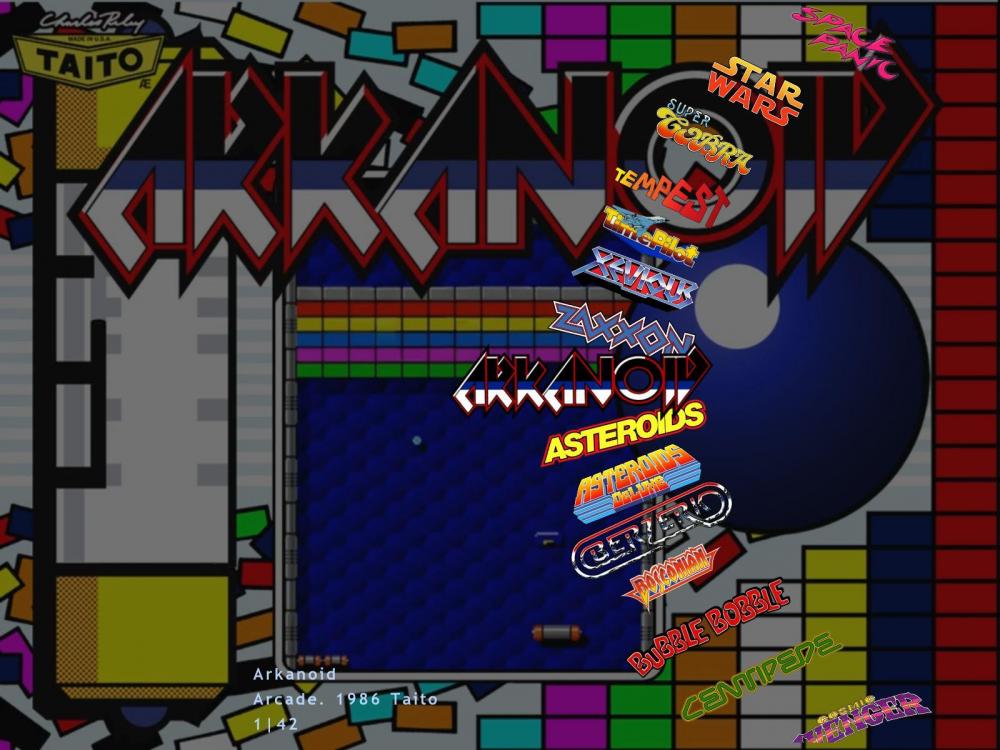
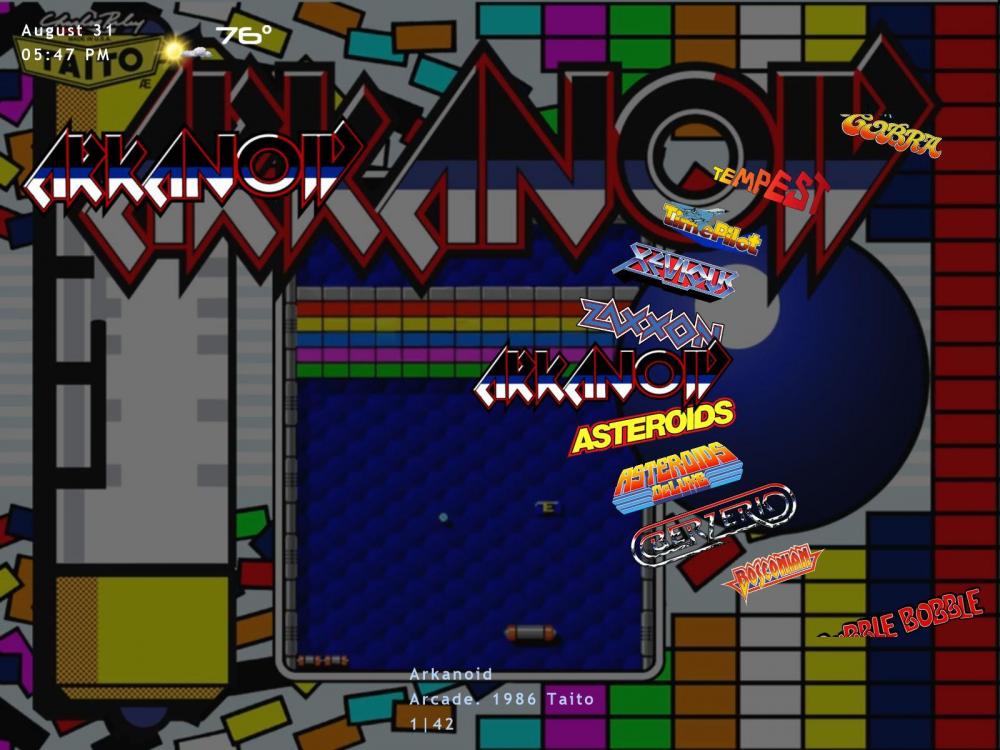
-
Hi Tom...just uploaded to the FTP site. It's in /-GameEx-/Other Uploads/dave
-
Hi Tom...the only thing in my theme folder that I didn't include was the media subfolder. But it's too big to attach here, and I didn't really customize anything there. It's just the [Layout] values in Golden Age Arcade.ini that don't seem to be being obeyed anymore. Things I stretched or moved just off screen edges are getting overridden (it would appear). So, for example, where I had the wheel stretched all the way from the top to the bottom of the screen, it now gets squashed to (what I think) is its default size. My screen resolution is 1600x1200.
-
Yeah, kinda my suspicion as well. :-)
-
Just upgraded to the latest GameEx and it seriously messed up a custom theme of mine. I tried replacing the gameex.ini file, then the theme, and then even the entire theme folder from a backup to no avail. Even tried replacing the entire root folder and it didn't fix it. Only by rolling completely back to the previous version (15.58) from a backup could I get my theme back to normal. I've attached my theme (it's the Golden Age one that gave me the problem). Also attached GameEx.ini from my currently working (rolled back) installation. Dave's Theme.zip GameEx.ini
-
Perfect! Turning off global Esc exit under input settings was exactly what I needed. Thanks Tom!
-
For all ordinary emulators, there is an option in the Setup Wizard Advanced Emulator Setup for Advanced Config. In here I can set, for example, whether the escape key closes the process. In the MAME Settings page, however, there is no option to set Advanced Config. Is there any other place where I can configure how the MAME emulator's exit process is managed? Basically, I'm just trying to prevent return to the front end until the exe process exits on its own as I can with other emulators by setting the aforementioned switch to false.
-
Ok, I get it. Just needed to stare at it for a while.
-
I've been toying with Evo since it came out, but have this one issue preventing me from giving it a thorough trial. I just tried again with 1.06 and have the same results. Here are the steps. 1. Clean install 2. Use Wizard to set mame working path, file name and rom path (that's it) 3. Run EVO When I do this I can see the game, select it, and launch it (and play it). However, when I press Esc, I get returned to the front end with it locked up. Nothing is responsive, no mouse or keyboard input is accepted. The only way to exit is to use Task Manager and kill the process. Basically, I've never been able to exit a game without this happening. I suspect it's probably just some configuration setting, but I have no clue, so just looking for any suggestions if someone might have one. Dave
-
I have this question too.
-
I hope no one takes this the wrong way. Evolution has obviously been in development for a long time and there is clear evidence that lots of hard work has gone into it. I want it to succeed as much as anyone; however, to do this it MUST do the fundamentals at least as good as GameEx. And the biggest fundamental that GameEx has going for it is that it is very fast/snappy. So far Evolution, in its current form feels really sluggish to me in comparison and so as of 1.02 I still can't take it seriously as a replacement (it can also lock-up my computer, but that's another story). I paid for Evolution--and don't regret it at all--but honestly, I'd be willing to spend similar money for *each* of just a few relatively minor updates to regular GameEx, which still remains the gold-standard front-end for me. Here's the list of upgrades I'd happily pay for (roughly in priority order): I'd pay $20 for... -- Support for star filters on lists in regular GameEx (both as sticky and dynamic). I'd pay another $20 for... -- the ability to specify more than one version of MAME as part of an emulator group I'd pay yet another $20 for... -- the ability to directly edit the database within the UI in the wizard (along with a couple of other refinements to the way the database is used). And I might pay up to $20 for... -- A new first-class theme editor. No new fancy features or animation support needed--just something that works more elegantly for customizing the features that already exist. Dave