|



Mike_da_Spike
-
Posts
3794 -
Joined
-
Last visited
-
Days Won
242
Content Type
Profiles
Forums
Events
Downloads
Store
Articles
Everything posted by Mike_da_Spike
-

[RESOLVED] After upgrading to Windows 1809 "LED Plugin" not working
Mike_da_Spike replied to Mike_da_Spike's topic in General
Thanks Tom. Should I rollback to 1803 again ? -
After my cab is upgraded to Windows 10 version 1809, the plugin "LED Plugin" isn't working anymore. the logfile just shown : 12:14:11.7 4-12-2018: Loaded Plugin:"LED Plugin" Version 1 By Tom Speirs 12:14:11.8 4-12-2018: PlugIn Did not initialize. Disabling PlugIn I reinstalled PinballX, but still the same Unchecked and checked the plugin, doesn't make a difference. Launching the speech plugin is working fine Within VPX or Zen Pinball FX3), the Ledwiz is still working fine. Anyone got an idea ? log.txt PinballX.ini
-
Working through DMDext and DOFLinx setup for FX3
Mike_da_Spike replied to tkolakow's topic in General
No problem. Let me know if you still got any problems or questions. Is it least what I can do for the community. -
Working through DMDext and DOFLinx setup for FX3
Mike_da_Spike replied to tkolakow's topic in General
I don't have any issues when running doflinks in the background. I use my cab only for pinball : vp9,vpx an fx3 tables. (I stopped with the pinball arcade) So not sure if your cab will have issues with doflinks running in the background. If so, another solution will be to launch doflinks when pinballx is starting and killing on exit of pinballx -
Working through DMDext and DOFLinx setup for FX3
Mike_da_Spike replied to tkolakow's topic in General
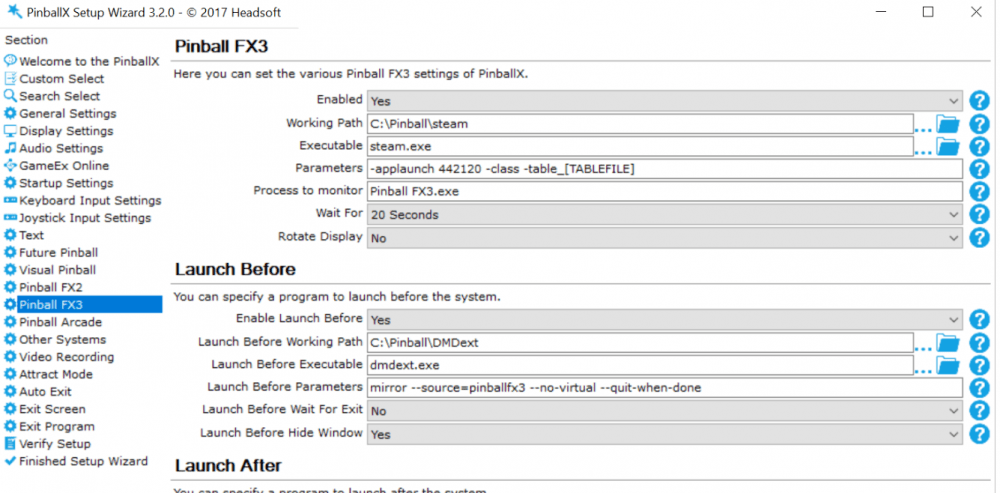
Maybe stupid question, but why a batch file ? I have doflinks setup to run at my system startup and runs in the background ), then i will run dmdext from pinballx command line (no wait)., bu close on exit paramters This works like a charm for me See screenshot below for my pinballX settins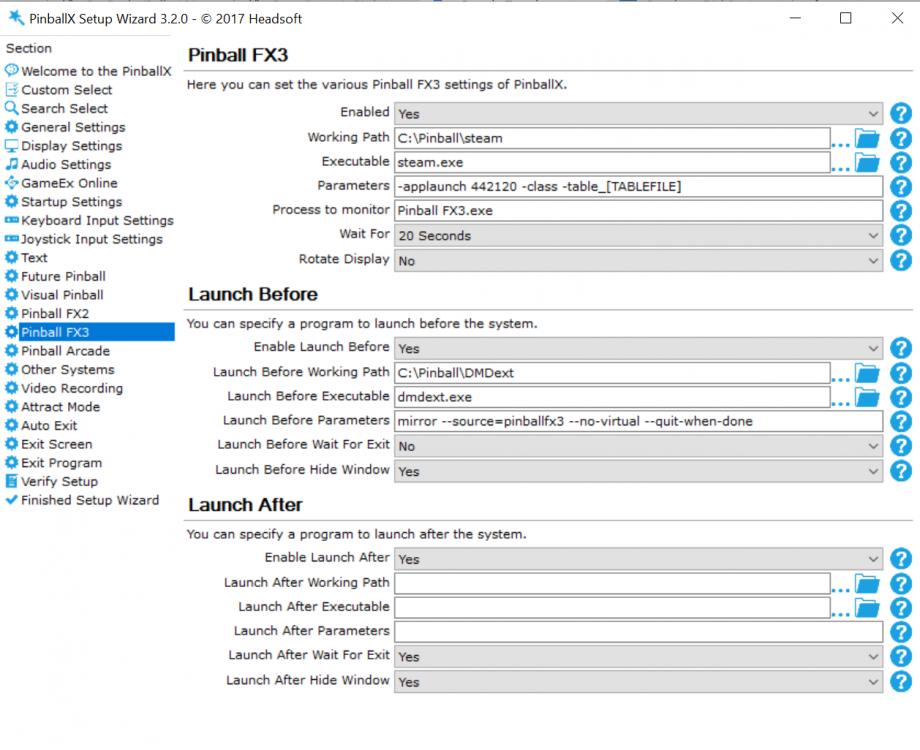
-
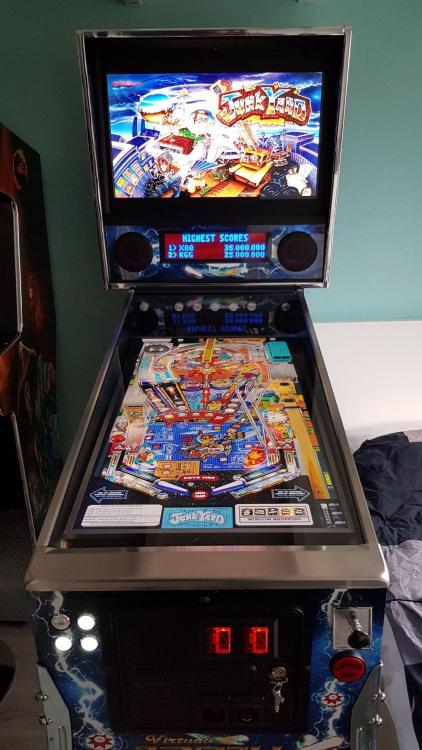
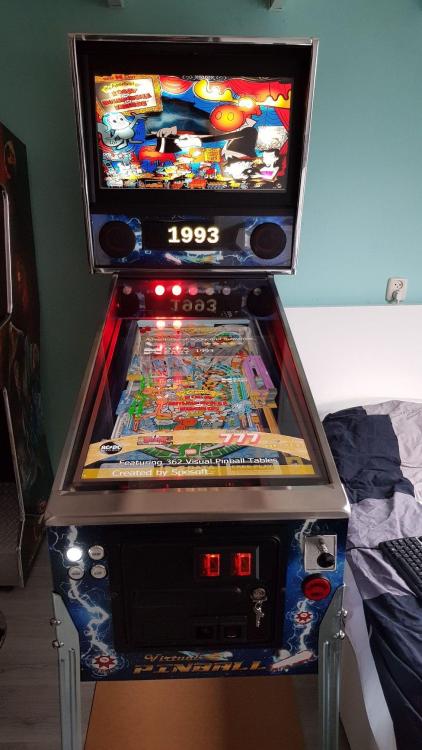
I have a 16:9 (1920×1080) 28" monitor as a backglass. Got arround 450 tables in vpx and all of them with this resolution Even zen pinball fx3 looks nice A 4:3 monitor is also hard to find, but would fit better in the backbox I asume. But I could not find a good one
-
Should you not change [tablepath] to [tablefile] in the parameter section ?
-
Hi @jhouff I'm not aware of any copying in PinballX. I have the sam econfig as you has. This is what I put into my 32 bit version of PinballX : If this doesn't work, check if the virual box is working (that is grapped from meory) Remove the --No-virtual in it or use something like : mirror --source=pinballfx3 --destination=virtual --virtual-hide-grip --virtual-stay-on-top --virtual-position 0 0 1024 --quit-when-done Hope this helps . **off topic : Just curious .. what PC do you have right now ?
-
Arcooda TPA is launching incorrect table + no backglass is displayed
Mike_da_Spike replied to cgoran's topic in General
Not exactly understand what you want. You can launch freecammod with parameters from pinballx right now. -
Hi all, I'm busy to create a script to create real DMD videos for FX3 (so I can use it in PinballX) With DMDext I can show the DMD from memory. With FFMpeg I can capture the output to MKV file. (command : FFMpeg -y -t 140 -rtbufsize 1500M -f gdigrab -framerate 30 -offset_x 0 -offset_y 0 -video_size 512x128 -i desktop -vcodec libx264 -preset ultrafast -qp 0 -threads 8 dmd.MKV) So I have the video now in 512x128. This is 4 times the ectual size, to keep the video nice) But when I convert it with FFmpeg to MP4, it won't show anything on screen. (command : ffmpeg -y -i dmd.mkv -ss 50.5 -to 130.5 -vf [in]scale=512:-1[middle1];[middle1]crop=w=128:h=32:x=0:y=0[middle2];[middle2]vflip[out] -c:v libx264 -crf 26 output.mp4) Converting the MKV with handbrakecli.exe, will crop it to big, so looks like it is zoomed. (command : HandbrakeCLI -i dmd.mkv -o output.Mp4 -e x264 -q 100.0 -a 1,1 -E faac,copy:ac3 -B 160,160 -6 dpl2,none -R Auto,Auto -D 2.5,0.0 --audio-copy-mask aac,ac3,dtshd,dts,mp3 --audio-fallback ffac3 -f mp4 --decomb --loose-anamorphic --modulus 2 -m --x264-preset medium --h264-profile high --h264-level 4.1 ) As you can see, I'm not familiar with both programs. So what would be the best way to capture a real DMD video and convert it soPinballX can play it ?
-
Arcooda TPA is launching incorrect table + no backglass is displayed
Mike_da_Spike replied to cgoran's topic in General
Had the same with windows Devender. Restored the exe from quarantaine and working -
Within win10 the extra monitors are numberd in the way you powered them on. During boot and you got multiple screens windows will setup up the numbering, but if you power off the monitors during OS is running and you power them on again, the sequence when the first device is recognized by the OS will get the lowest number. Try to power on 1 by 1 and that should you give the correct result
-
The next thread helpt me a lot : Filters you can create them manualy or via game manager
-
Did you have the checkbox on game manager "hide backglass" checked for that table ? This must be checked to have the original table backglass
-
[RESOLVED] Start Pinball FX3 Williams games in Arcade mode
Mike_da_Spike replied to breikers's topic in General
Not sure, but if you launch the table with -class would that do the trick ? -
Yes. With freecammod from Noex.
-
maybe post logs and INI file and prober screenshot This is just guessing what could cause the issue
-
Hmmm ... When I started my test environment, I didn't have a joystick or pinball controllers too, but launches quickly. Not sure why it waits for 60 sec. And I'm on w10 64 bit and also uses the 32 bit version of PinballX
-
Pinball FX3 2-Monitor Setup Backglasses
Mike_da_Spike replied to MItshiba's topic in PinballX Media Projects
Awesome! Thanks for that. I have a 3 screen setup, so need to cut the grill. -
Need to return to PinballX menu not PBFX2 menu
Mike_da_Spike replied to cyberjunk's topic in General
Is pinballx running as admin ? -
Works fine for me. I use latrst pbx, vpx 10.5 and verion 2.0 of bride of pinbot
-
Remove -class for animated mode
-
Check freezy's dmd extension: https://github.com/freezy/dmd-extensions There is a fx2/fx3 mode in it That should do the trick
-
@chip9399 Let me know if you figured out the DMD part. Not yet there. I have a pindmdv3. I just bought a hdmi connector that will simulate a screen. I want to have the dmd on that screen (so not visible to me) and mirror with dmdtext the content to my real dmd.
-
You mean with the kinect ? No just shows you yhe normall playfield, it only moves the camera a bit when you move your head, so it looks like you can look arround the object. I made some videos a couple of months ago in my test env. Not sure how I can share them