|



Rochabian
-
Posts
288 -
Joined
-
Last visited
-
Days Won
2
Content Type
Profiles
Forums
Events
Downloads
Store
Articles
Everything posted by Rochabian
-
Thanks for the tip of the accessibility options, it's quite good The diagonals are now set on numpad 1,3,7 & 9 keys But how can i map left+up arrow to Numpad7 for example I've tried up & left::Numpad7 but it doesn't seems to work.....
-
Hi all! For a specific game (Pebble) i have to write an autohotkey script to use arrow key as a mouse (keys A & Z are respectively remapped to LeftClic & RightClick too) because the Gameex Mouse emulation don't seems to work with this game So i've wrote this : *up::MouseMove, 0, -10, 0, R ; Win+UpArrow hotkey => Move cursor upward *Down::MouseMove, 0, 10, 0, R ; Win+DownArrow => Move cursor downward *Left::MouseMove, -10, 0, 0, R ; Win+LeftArrow => Move cursor to the left *Right::MouseMove, 10, 0, 0, R ; Win+RightArrow => Move cursor to the right <a:: ; LeftWin + RightControl => Left-click (hold down Control/Shift to Control-Click or Shift-Click). SendEvent {Blind}{LButton down} KeyWait RCtrl ; Prevents keyboard auto-repeat from repeating the mouse click. SendEvent {Blind}{LButton up} return <z:: ; LeftWin + AppsKey => Right-click SendEvent {Blind}{RButton down} KeyWait AppsKey ; Prevents keyboard auto-repeat from repeating the mouse click. SendEvent {Blind}{RButton up} return the cliks buttons works, directions too, but i can't find a way to use diagonals ( for example left+up ) Any ideas or a better to do this?? Thanks
-
Thanks headkaze, i already have set winuae & winuae loader to play WHDload games and it works great EDIT : OK, i've just found that my config file CD32.uae was crappy , so it works great now !! Thanks
-
I can do an autohotkey script to press ctrl+F12 after the launch of winuae to go to fullscreen Is it the only way? Is there an easier way to do this?
-
Well, I've set up winuae like this : command line :winuae -f CD32.uae It works but it launch winuae in windowed mode, whenever it is setup in fullscreen in the uae config file When i run winuae with his icon, load the config file then start, it works great in fullscreen Is there a special switch to add to the command line to start in fullscreen mode??? Thanks
-
My advanced config before your reply was : Process1=Winuae Process2=WHDLoader Now i've changed with your help to : Process1=winuae Process2=whdrun Now i don't see the window on background !! It's great! Many thanks headkaze for you help very appreciated
-
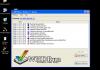
No ideas??? Perhaps with a picture you could better understand what i mean On the picture is the window that i dont want to see when WHDLoader exits
-
Hi! On some WHDLoad games, WHDRun display a log in a window when WINUAE has encountered an error in running the game Is there a way to disable this because when i'm in screensaver mode since an hour, i can see about 15 windows of errors in background and i have to click on "Quit WDRun" button on each window to close them.... Quite annoying... Thanks
-
Thanks to all of us Now it works great!
-
Humm... As it works now, i just want to add PC games in Gameex menu but when i use the "external program setup" i can't see a line to launch a prog before the .exe! How can i do that???? Do i have to set up those game in the emulator section? Thanks
-
Thanks fRequEnCy!!! It was quite simple in fact 4::Enter 2::Esc That's all Thanks again!
-
I just want to do a simple script for PC games to remap the enter and the escape key to navigate through game menus (i'm using a personal X-arcade setups o i don't use this keys by default) I can't find any example and the manual of this prog is not really simple... Can't someone tell me how i can do this with simple commands?? A script that i can modify using my own key top replace with???? Thanks!!!!!
-
Closing both WinUAE & WinUAELoader in the advanced config works great now Thanks for your help guys
-
Your script seems to be really good, i just have to modify the quit keys and i think it should work!! Nice!! But for WinUAE Loader, is there any idea??? Does anyone use this emulator in attract mode?? Are they using another loader to play Amiga Games?? WinUAE Loader is the best for me, but as my cab is running about 20 hour a day in attract mode, it's quite annoying....
-
From my experience : If you use a composite gun like Guncon 2 from PSX you have to download the WinGun driver on this site http://www.guncon2driver.com/ It seems to be down when i write this.....try to find it elsewhere version 0.8 But it's the best driver for PSX & PS2 Guncon2 Guns If you own an ATI Card then try this mod : http://ryoandr.free.fr/english.html Whenever you have an Nvidia card try this one : http://www.nexusuk.org/projects/vga2scart/circuit I've tried the first one with no result on a Nvidia card because just the ATI cards seems to output a real video composite signal ( it works on a TV but the gun don' t works with nvidia cards) So i'm trying to do the second one and it seems to works according to a french forum... I'll let you know about my experience....... If someone have tried this, let us know your results please
-
Ok i've tested your tricks : @ headkaze : I've set up an advanced config with the base of "[Mapping Off] Exit (Process Close).ini" file and changed the line process1 to WinUAE.exe but it's still running....... Any other idea or am i mistaking something?? @chriss : I'm happy to see you script which is well done but the problem is that i don't have a classic X-arcade setup (i use mode 4 because some emulators can't handle Left-Alt or some special keys) I'm not a programmer so can it be easy to compile your script changing the escape key ???( start 1 & 2 for me in my X-Arcadesetup) Thanks for your help! Edit : I've the same problem with 3DO loader so perhaps it can resolve the 2 problems if i find the way to stop emulators when a loader is launched.....
-
Many thanks for your reply, i'll try this as soon as i can @chriss : I'm very interested by your script, can you send it to me?? Thanks again
-
Hi! As said in the title, i've set up the attract mode to play Amiga games The problem is when attract mode skip an Amiga game, it doesn't really quit WInUAE in fact (it just return to Gameex and i hear the Amiga sound ) I've posted a similar problem with taking screenshot in Gameex with WinUAE Loader I think it's the same problem WinUAE Loader is already a wonderfull tool but it will be greater if these anoying problem should be resolved PS : Perhaps an advanced config to kill some processes on exit can resolve it???? Thanks EDIT : Another question as i'm setting up WinUAE Loader for Gamex : Is it Possible to assign 2 keys to quit WINUAE Loader ( for example, i push both start 1 & 2 on my XArcade in gameex on others emulators to quit a game)???
-
Thanks headkaze for your reply Your help is very appreciated Thanks again;) BTW, does someone knows where to find Amiga Videos Snaps???
-
I've quite resolved my problem I've remapped my X-arcade using the key "3" on a button Pressing it in attract mode works 1 time of 5 for all emulators played (about 8 emulators MAME,Project64, MESS, WINuae,etc) The 4 other times it just return to GameEX.. Is the any way to improve this??? Other Request : When i'm able to enter a game in attract mode, then i can't exit the game when y press my edited exit key, just the "esc key" works
-
Hi! My problem is i'm not able to create snaps within Gamex I'm able to play Amiga games & exit with the WHDLoader exit key without problem in Gameex, so my config is quite good i think But when i try to create snaps, it seems that winuae loader & winuae don't close when Gamex is changing game ( i can hear the the sounds of the game launched before and the procees are still active ) I've try to set up an advanced config for the emulator to kill the processes but this don't work So i'm obliged to close the processes by myself and then GameEx loads a new game to snap (quite annoying when you have more than 2400 games...) Any idea about that?? Other problem with X-Arcade I can't use my X-arcade with Winuae loader because in game, keys are not responding (directions works but not the buttons ) I use a custom X-arcade mapping (mode 4), but i've remmapped them in WinUAE loader and enabled the x-arcade so it should work..... I'm obliged to use "Keybord A" mapping and then buttons and directions works great but i lose some usefull keys..... Sorry for my poor english, i surely should have learned better at school Thanks
-
Yeah, the X-arcade works great wiht GameEx & MAME, the default keys are great...... If you own other emulators, then it should be a problem.... Because the 6th button of the X-arcade is mapped to the "left-alt" key and some progs doesn't like it, because it show the menu bar of the emulator.. The 3 key can be a problem with VpinMame because it adds credits when you press left flipper key...... With Znes it's a problem because Hotkeys uses "Left-Alt" Key The best way is to create a special configuration using X- Arcade (but you have to push the rear button twice each time you start your arcade machine......) Don't use left-alt key or any special key in your setup Be sure to have set the "3" key in your X-Arcade to be able to play games in attract mode because there is no other way to do it for now!!!!! That's all Good Luck An owner Of the X-Arcade
-
Nope, you need the freedo loader i think It works for me with this tool
-
@bkenobi-> Sorry, i don't have seen your post before.... You're right, the good solution is to put a "Stop Attract Mode Timer" button key in the custom input file, but i don't think it's possible as there is no option for that in the file. Or i don't know how to do this... Please help
-
I really wish that he read this thread, because the multi-emu attract mode in GameEX is really a great idea No other front-end do that i think So it works with basic setup , but just need to be improved..... Wait & see