|



Hunk_4TH
-
Posts
399 -
Joined
-
Last visited
Content Type
Profiles
Forums
Events
Downloads
Store
Articles
Everything posted by Hunk_4TH
-
Thanks guys! I must have over looked something. I see what you were talking headkaze. Sorry for not looking it over Thanks again! I have one more question how do I compile it for Windows XP x64?
-
After I load up the Mame Compiler I choose the hi_125u6.diff patch then choose Intel Core2 then Dual Core and Clean Compile it goes for about 10 minutes and gives me the error. And sorry for not giving the steps I was taking
-
Same thing I think I might be doing something wrong Thanks for the help btw!
-
Thanks! That seemed to work until I got this new error src/osd/windows/video.c: In function 'osd_update_hi': Finished! 0 Hours 10 Minutes and 54 Seconds Elapsed. src/osd/windows/video.c:235: error: too many arguments to function 'check_osd_inputs' src/osd/windows/video.c: At top level: src/osd/windows/video.c:245: error: redefinition of 'osd_update_hi' src/osd/windows/video.c:224: error: previous definition of 'osd_update_hi' was here src/osd/windows/video.c: In function 'osd_update_hi': src/osd/windows/video.c:256: error: too many arguments to function 'check_osd_inputs' src/osd/windows/video.c: At top level: src/osd/windows/video.c:266: error: redefinition of 'osd_update_hi' src/osd/windows/video.c:224: error: previous definition of 'osd_update_hi' was here src/osd/windows/video.c: In function 'osd_update_hi': src/osd/windows/video.c:277: error: too many arguments to function 'check_osd_inputs' mingw32-make: *** [obj/windows/mame/osd/windows/video.o] Error 1 Any ideas? I know this is a pain
-
I'm using a 32bit OS on my desktop trying to compile Mame for my cabinet PC. I guess that's the problem huh? Though after unchecking the 64bit OS I get this error src/mame/drivers/atarisy2.c: In function 'ssprint_init_common': src/mame/drivers/atarisy2.c:3092: error: 'machine' undeclared (first use in this function) src/mame/drivers/atarisy2.c:3092: error: (Each undeclared identifier is reported only once src/mame/drivers/atarisy2.c:3092: error: for each function it appears in.) mingw32-make: *** [obj/windows/mame/mame/drivers/atarisy2.o] Error 1 mingw32-make: *** Waiting for unfinished jobs....
-
I don't mean to high jack anyone's thread or anything but I'm getting this error Compiling Mame64... Using Parameters -j3 ARCHOPTS="-march=pentium-m -msse3" MSVC_BUILD=1 PTR64=1 Compiling src/osd/windows/vconv.c... Compiling src/emu/cpu/m68000/m68kmake.c... Compiling src/osd/windows/main.c... process_begin: CreateProcess(C:\MinGW\psdk\bin\amd64\cl.exe, cl.exe /nologo /O1 -D_CRT_SECURE_NO_DEPRECATE -c src/osd/windows/vconv.c /Foobj/windows/vmame/osd/windows/vconv.o, ...) failed. make (e=193): Error 193 mingw32-make: *** [obj/windows/vmame/osd/windows/vconv.o] Error 193 mingw32-make: *** Waiting for unfinished jobs.... mingw32-make: *** [obj/windows/vmame/emu/cpu/m68000/m68kmake.o] Error -99 mingw32-make: *** [obj/windows/vmame/osd/windows/main.o] Error -99 Finished! 0 Hours 0 Minutes and 0 Seconds Elapsed. Any ideas? I'm using the hi_125u6.diff patch and I have the following compile options checked. Intel Core 2,64 Bit Processor, and Dual Core any ideas? Thanks and sorry again for posting in this thread
-
Yea I think every sence I've been using GameEx I tweak it more than I play it. When I think I'm done and go to shell it I want to add something else to it Oh and awesome cabinet btw
-

User Submitted Themes & Media (Uploads)
Hunk_4TH replied to Tom Speirs's topic in GameEx Media Projects
Great work! Been looking forward to this -
I've been using Winkawaks to setup Neo-Geo as seperate emulator I set it to freeplay and console instead of arcade. Of course I have Neo-Geo arcade games setup in the Mame list. Oh and welcome to GameEx
-
Thanks Brian that worked
-
That worked out perfectly. I didn't think of that. And thanks for the quick reply this is why I love this forum One more question is there anyway to get rid of the CP-2 roms in the list?
-
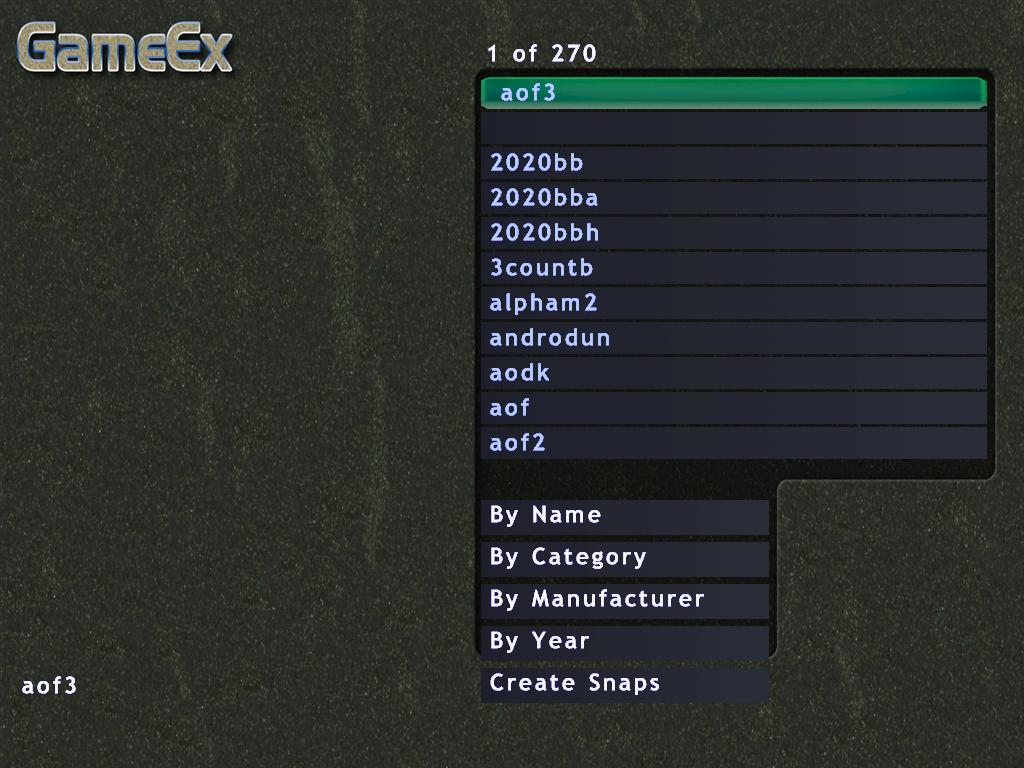
I recently just set up the emulator Kawaks for Neo-Geo in GameEx. Everything is working perfectly though the rom list looks like this. I know Neo-Geo is supported in Mame and I use that. But I also wanted to set it up as a console too. Any ideas? Appreciate any help Thanks!
-
I agree both of those are great games as well. I'm mostly setting up Nulldc to run fighting games that Mame doesn't fully support yet and games that are fun on the cabinet What about Sonic Adventure 1 and 2 and Sonic Shuffle? I'm sure they've already been mentioned.
-
Cabinets and HTPC Setups Running GameEx
Hunk_4TH replied to David R Hilgendorf's topic in Gamer Rigs
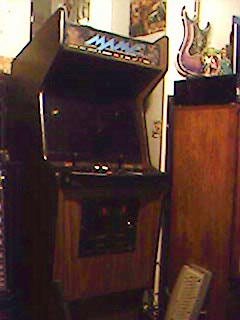
Heres an updated picture of mine. It's a totally new cabinet had to tear the old one down due to it's huge size. Someone actually threw this cabinet away so I jumped all over it. It's in pretty decent shape too. Only thing that sucks is who ever threw it away stripped the Marquee/light, cut everything on the monitor and took the cp out. but other than that it's in good shape little bit of wood chips on the bottom but I'm happy with it. Sorry for the crappy picture I really need a new camera
-
That cab does look pretty cool! Kind of like a Neo Geo/Naomi cabinet. I'd go with an empty cabinet that's what I ended up doing in the end
-
Thanks bkenobi! I'll give it a shot
-
I tried it with Vista Ultimate X64 with no luck it just complains about some .txt file being used I just setup Gameex to run upon startup be awesome if this could be fixed to work with Vista X64
-
Hmm Killer Instinct 1 and 2 work perfectly for me I'm not using Mame 32 though. Did you try a different Mame version?
-
In my cabinet I'm running an X2 3800+ with 3gb of ram both KI run at full speed for me. I would also suggest going with XP 64/Vista 64 if your using a 64bit processor it would only make sence
-
Hmm if your using an X-arcade control panel there is an adapter for consoles on their site chances are you made the control panel yourself *Sorry for the double I accidently clicked submit twice*
-
Hmm if your using an X-arcade control panel there is an adapter for consoles on their site chances are you made the control panel yourself
-
Oh nah I was using the Game Launcher theme I'll try changing it thanks! *Edit* Changed the theme that did the trick
-
Thanks a lot for another awesome update Tom! Though when I let it update upon starting up I got this error. Any ideas? Thanks! 21:14:52.8 3/28/2008: GameEx: Version 9.18: Starting Log 21:14:54.0 3/28/2008: Operating System Platform: Win32NT 21:14:54.0 3/28/2008: Operating System Name: Windows XP 21:14:54.1 3/28/2008: Operating System Version: 5.1.2600 21:14:55.7 3/28/2008: Checking for versions of .net Framework installed 21:14:55.7 3/28/2008: .net Framework 1.1 Installed 21:14:55.7 3/28/2008: .net Framework 2.0 Installed 21:14:56.0 3/28/2008: AMD Athlon(tm) 64 X2 Dual Core Processor 3800+, 3006MB 21:14:56.3 3/28/2008: 2Ghz - 2 Cores or CPU's 21:14:57.5 3/28/2008: Running Randomize() 21:14:57.5 3/28/2008: Loading PlugIns 21:14:57.9 3/28/2008: Checking for applications to Launch On Startup 21:14:57.9 3/28/2008: Running Misc startup tasks 21:14:57.9 3/28/2008: Setting Menu types 21:14:57.9 3/28/2008: Opening Configuration File 21:14:57.9 3/28/2008: Getting Configuration Values 21:14:58.1 3/28/2008: Using Theme: Default - GameLauncher Original 21:14:58.1 3/28/2008: Checking for alternate Image Directory for Theme: Default - GameLauncher Original 21:14:58.1 3/28/2008: Launching HideOS.exe 21:14:58.1 3/28/2008: Initialising Video/MNG DLL's 21:14:59.0 3/28/2008: Arcade Mode is on 21:14:59.0 3/28/2008: Hiding Taskbar 21:14:59.0 3/28/2008: Using Cabinet Friendly Control System 21:14:59.0 3/28/2008: Is Media Center running? 21:14:59.0 3/28/2008: Checking/Creating LCD Registry values 21:14:59.1 3/28/2008: Check Media Center Exit/Start Mode 21:14:59.1 3/28/2008: Media Center Mode 0 21:14:59.1 3/28/2008: Video previews on. Warning: Only recommended on modern systems 21:14:59.1 3/28/2008: Custom Game Device Input enabled: Getting custom codes 21:14:59.2 3/28/2008: Snap Delay set to: 2 21:14:59.2 3/28/2008: Get other settings 21:14:59.2 3/28/2008: Reading MAME hall of fame 21:14:59.9 3/28/2008: Desktop set to Hide ICONS and set Background to Black 21:14:59.9 3/28/2008: Backing up Registry Wallpaper Settings 21:14:59.9 3/28/2008: Set: Find emulator artwork on best match basis 21:14:59.9 3/28/2008: Start work for Form 21:14:59.9 3/28/2008: Getting Original Screen Size 21:15:00.0 3/28/2008: Opening Database Connection 21:15:10.1 3/28/2008: Initializing Component 21:15:11.1 3/28/2008: Retrieving resolution setting 21:15:11.1 3/28/2008: Creating Radio Station Genres 21:15:12.0 3/28/2008: Succesfully created station genres 21:15:12.0 3/28/2008: MAME Path is: D:\Roms\Mame 21:15:12.0 3/28/2008: daphne Path is: C:\Emulators\Daphne 21:15:12.0 3/28/2008: daphne EXE file is: Daphne.exe 21:15:12.1 3/28/2008: Use daphne on. Daphne.exe will launch games 21:15:12.2 3/28/2008: Model 2 Path Path is: C:\Emulators\Model2 21:15:12.2 3/28/2008: Multi Core/Hyper Threading detected. Looking for emulator_multicpu.exe 21:15:12.2 3/28/2008: Model 2 EXE file is: emulator_multicpu.exe 21:15:12.2 3/28/2008: Model 2 emulator with command line support detected 21:15:12.2 3/28/2008: Use Model 2 on. emulator_multicpu.exe will launch Sega Model 2 games 21:15:12.2 3/28/2008: ZiNc Path is: D:\Roms\Mame 21:15:12.2 3/28/2008: ZiNc EXE file is: ZiNc.exe 21:15:12.2 3/28/2008: Use ZiNc on. ZiNc.exe will launch PSX games 21:15:12.2 3/28/2008: MAME EXE file is: Mame.exe 21:15:12.3 3/28/2008: ROM Path is: D:\Roms\Mame\roms 21:15:12.3 3/28/2008: Catver.ini is located at: c:\program files\gameex\DATA\catver.ini 21:15:12.3 3/28/2008: controls.ini is located at: c:\program files\gameex\data\controls.ini 21:15:12.3 3/28/2008: History.dat is located at: c:\program files\gameex\DATA\history.dat 21:15:12.3 3/28/2008: nplayers.ini is located at: c:\program files\gameex\DATA\nplayers.ini 21:15:12.4 3/28/2008: MAMEinfo.dat is located at: c:\program files\gameex\DATA\mameinfo.dat 21:15:12.4 3/28/2008: Loading Controls.ini map file 21:15:12.5 3/28/2008: Snap Path is: D:\Roms\Mame\snap 21:15:12.5 3/28/2008: AVI Snap Path: Not Found 21:15:12.5 3/28/2008: Flyer Path is: D:\Roms\Mame\flyers 21:15:12.5 3/28/2008: Cabinet Path is: D:\Roms\Mame\cabinets 21:15:12.5 3/28/2008: Title Path is: D:\Roms\Mame\titles 21:15:12.6 3/28/2008: PCB Path is: D:\Roms\Mame\pcb 21:15:12.6 3/28/2008: Artwork Preview Path is: D:\Roms\Mame\artworkpreview 21:15:12.6 3/28/2008: Panel Path is: D:\Roms\Mame\cpanel 21:15:12.6 3/28/2008: Manual Path is: D:\Roms\Mame\manuals 21:15:12.6 3/28/2008: Icon Path is: D:\Roms\Mame\icons 21:15:12.6 3/28/2008: Marquee Path is: D:\Roms\Mame\marquees 21:15:12.7 3/28/2008: Loading Custom Emulators 21:15:12.9 3/28/2008: Using 3D Alpha Blended Animations. This could be slow 21:15:12.9 3/28/2008: Using Deadzone 21:15:12.9 3/28/2008: Using General Font: HandelGothic BT 21:15:12.9 3/28/2008: Using Title Font: HandelGothic BT 21:15:12.9 3/28/2008: Attempting to load game list 21:15:13.9 3/28/2008: Initialising DirectDraw 21:15:14.0 3/28/2008: Applying GameEx is Loading Image 21:15:14.3 3/28/2008: Creating DirectDraw Device 21:15:14.3 3/28/2008: Using Device: ATI Radeon Xpress Series 21:15:15.2 3/28/2008: 246mb video memory available 21:15:15.9 3/28/2008: Setting Resolution to 1024x768 32 bit color 21:15:16.2 3/28/2008: Creating DirectDraw Surfaces 21:15:16.2 3/28/2008: Creating Primary Surface - Full Screen Mode 21:15:16.3 3/28/2008: Creating Back Buffer 21:15:16.5 3/28/2008: Loading graphic Surfaces 21:15:16.5 3/28/2008: Display is running at: 1024x768 32bit color, 60hz 21:15:16.6 3/28/2008: Creating Surfaces Misc and Dialogs 21:15:16.7 3/28/2008: Creating Surfaces Volume 21:15:16.7 3/28/2008: Creating Surfaces Arrows 21:15:16.7 3/28/2008: Creating Surfaces GameEXlogo Text 21:15:16.7 3/28/2008: Creating Surfaces Toolbar 21:15:16.8 3/28/2008: Creating Surfaces Backgrounds 21:15:17.7 3/28/2008: Creating Surfaces Toolbar Controls 21:15:17.7 3/28/2008: Creating Surfaces GameEx Logo 21:15:17.7 3/28/2008: Creating Surface Unselected 21:15:17.7 3/28/2008: Creating Surfaces Home & Exit 21:15:17.7 3/28/2008: Creating Surfaces Snaps 21:15:17.8 3/28/2008: Creating Surfaces Menu and List Bars 21:15:17.9 3/28/2008: Creating Fonts 21:15:17.9 3/28/2008: Creating Game Font 21:15:18.7 3/28/2008: Creating Menu Font 21:15:18.7 3/28/2008: Restoring Menu Font From Cache 21:15:19.2 3/28/2008: Creating Font Black 21:15:19.4 3/28/2008: Creating Font Black Small 21:15:19.5 3/28/2008: Creating Game Font Faded 21:15:20.6 3/28/2008: Creating Title Font 21:15:20.7 3/28/2008: Restoring Title Font From Cache 21:15:26.2 3/28/2008: Fonts Created Succesfully 21:15:26.2 3/28/2008: 199mb video memory left available 21:15:26.2 3/28/2008: Creating instance of global keyboard hook 21:15:26.2 3/28/2008: Starting GameExtender Publisher 21:15:26.2 3/28/2008: Text/Language: Custom 21:15:26.2 3/28/2008: Applying Language/Text 21:15:26.4 3/28/2008: Initialising Bass Audio Library 21:15:27.2 3/28/2008: MAME CMD options: -nowindow -joy -skip_gameinfo -cheat 21:15:27.2 3/28/2008: Loading last used Game List 21:15:27.2 3/28/2008: Setting Music Volume 21:15:27.2 3/28/2008: Cannot Load Play List. Check Path and filename 21:15:27.2 3/28/2008: Creating DirectSound Device 21:15:27.2 3/28/2008: Trying: Primary Sound Driver 21:15:27.2 3/28/2008: Loading Sound Files 21:15:27.4 3/28/2008: DirectSound Device Created Successfully 21:15:27.4 3/28/2008: Creating ICONS 21:15:27.5 3/28/2008: Restoring Cached ICONS from File 21:15:31.0 3/28/2008: Initialising DirectInput for Gamepad support 21:15:31.3 3/28/2008: Unable to create a joystick device 21:15:31.3 3/28/2008: Playing intro sound file 21:15:31.3 3/28/2008: Initializing MCE Remote 21:15:31.3 3/28/2008: Initialization OK! Starting GameEx! 21:15:31.3 3/28/2008: Testing Main Loop Once: Processing Frame 21:15:31.5 3/28/2008: --**-- 21:15:31.5 3/28/2008: ERRORS DETECTED: EXITING 21:15:31.5 3/28/2008: Object reference not set to an instance of an object. 21:15:31.5 3/28/2008: at l.ds() 21:15:31.5 3/28/2008: at l.au() 21:15:34.2 3/28/2008: Disposing Plugins 21:15:34.2 3/28/2008: Closing database connection 21:15:34.3 3/28/2008: Checking for applications to Launch On Exit
-
Thanks Tom!!
-
I'm using an X-arcade dual joystick control panel, I went to use the search feature but can't seem to exit out of it using the control panel any ideas? Love the feature btw!