|



shaunopp
-
Posts
300 -
Joined
-
Last visited
Content Type
Profiles
Forums
Events
Downloads
Store
Articles
Everything posted by shaunopp
-
I wanted to mention that another disadvantage to the MAME Pause being tied to CPWizard is that other MAME controls like the Save and Load game (F7 & F8 I believe?) Function keys will trigger CPWizard. This, to me, is more of an issue for CPWizard being used long term because it actually negates a key MAME function that people use.
-
I thought maybe this had fixed my res change issue with multisync arcade monitors but no go. Just wanted to report it as a heads-up, I know it's probably tough to get to the bottom of without an arcade monitor. What happens is the first time I hit pause I see the CP image cutoff in a little box in the upper left corner of the screen, going back into the game and then hitting pause again will bring up the CP perfectly visible fullscreen. Seems to work consistently every other iteration of pressing the pause button. I have a Betson Imperial Multisync arcade monitor.
-
Groovy game Gear offers steering wheel tops for their Turbo Twist 2 spinners called 'Mini-Racers' in 5", 6" and 7" sizes. http://groovygamegear.com/webstore/index.p...products_id=268
-
I can make my blacks 95%, but I don't want my blacks 95%, I want them black. Who decided to use black for a color key anyway, that just weird? I was all stoked to design some cool interfaces for V4 but being unable to control core positioning of the main menu items, add/remove menu items, alter font sizes, set what my #2 image is or use tranparency correctly makes me want to stick with my V2 theme. Sorry. I appreciate the work on the update but the themes/skinning aspect is still just limping along. As the tools progress I think people will crank out some incredible GameEx themes.
-
D'oh. Looks like I'm not jumping on the V4 Bandwagon quite yet. I thought maybe there had been some of the updates above made, I also like my Home and Exit buttons.
-
I have a couple of questions. 1. Is it possible to set what image #2 will be? It looks to default to the marquee but I thought this was controllable somewhere. 2. Can I have different text size for the list vs. menu vs. game detail. When I change text size everything changes but the header. 3. I know we have limited transparency in that it supports a low res color key. Is this color still black? The color key should be something like lime green or blue like a blue screen. Black is actually used for shadows, borders and outlines on occassion. Is the transparency still 8-bit? 4. Is there any way to re-order or change the menu strip across the top? Thanks
-
Glad you responded with an explanation IMBerserk, I think we've all been on the receiving end of some intellectual brow beating so a knee-jerk reaction is understandable. You'll find the regulars here all very helpful unless someone's being an absolute a-hole. The time you spend learning the ins-and-outs of GameEx is well spent, it's a great front end. Welcome to the community!
-
This was a really angry response for such a benign comment. Where did you get the idea that he was 'looking down at you from his ivory tower' from that? As a developer you should be able to sympathize with how frustrating it can be to have to answer the same questions over and over for people when they don't bother to read the FAQ. I think if you relax and don't take things so personally you'll find the people on this forum some of the most helpful around. Comments like the above aren't likely to elicit help from anyone.
-
I know the Wells will work with mame projects, but as I said some people (ie. DJ Infinity) hate them with a passion so read up on them. Not sure about the MakVision. Make sure you get a multi-sync arcade monitor and the Ultimarc card, preferably something with a track record of having worked will with mame. Not sure why those are your only choices but there are other manufacturers you can go with as well. No, it doesn't make sense to get an arcade monitor without the corresponding ArcadeVGA card from Ultimarc for mame. The reason you're paying for a multi-sync arcade monitor is so that you can run arcade games at their native resolutions. Otherwise you might as well get a TV or Computer Monitor for half the price.
-
Alas, the one shortcoming. I've been looking at other combos of my existing buttons/controls that would be suitable for rotary games but haven't found anything that feels quite right. If you're dead set on having rotary capability you're pretty much stuck getting a rotary stick. For me it wasn't worth cramming them on my CP or sacrificing the U360's.
-
Most definitely, no reason to waste the space on your cp. For the majority of people the U360 is a great solution. The only way you may want a dedicated 4way is if you're say a pacman fanatic and want the joystick to be an exact replication of the one you played on in the arcade. Even then, I've heard of pacman fans using the U360's and liking them better. You can adjust the feel with stiffer tension springs and restrict movement with the optional restrictor plates which can make it feel more like a dedicated 4way. The U360's are just so versatile, one minute it's an analog controller, the next a 2way, 4way or 8way joy and with the ability to load custom maps it works great for specialty games like Qbert where you need 4way diagonals. Headkaze's plugin for GameEx means they will automatically switch to the proper type (for mame games) when you load a game.
-
edit: accidental double post
-
Yes, get them, they're great. Wonderful controllers and work excellent with GameEx. Headkaze built a GameEx plugin that automatically sets the joystick map (ie. 4-way, 8-way) to match the mame game so you never have to manually change the joystick map. Fair warning, they're a bit trickier to setup than a standard joystick but they are far more versatile than a standard joystick. You can program custom maps for yourself to tweak game controls as you like. Some people are put off by the fact that you don't have the standard 'click' of a microswitch but i like the smooth control. You can also get restrictor plates and stiffer springs to make them not quite as 'loose' feeling. I would highly recommend.
-
I would go with any multi-sync arcade monitor combined with the ArcadeVGA Card from Ultimarc. My first cab had a regular Radeon with S-video out card and a mid-range 27" CRT monitor. It got me by but the combo of an arcade monitor and the AVGA card was a huge upgrade and now I'd never go back. As for a VGA computer monitor, I personally don't like the way classic video games (or even the older console emulated games) look on a computer monitor so that wasn't a consideration for me. Wells Gardner used to have a really good rep with Mame enthusiasts but has since had a bad batch of monitors and many people have been soured on the brand. I personally bought a Betson Imperial 27" and have been very happy with it but can't say I've seen or compared others. BYOAC forums would be best for more feedback on other brands. As far as using an arcade monitor for emulators other than mame, it works perfectly for all but the newest consoles/games. Any of the older console emulators (Dreamcast, PS,NES,SNES,Genesis) look great since they're meant to be run on a tv screen anyway. If you want to play newest PC games or work in Windows you'll sacrifice quality since the ArcadeVGA tops out at 800x600. This wasn't a concern whatsoever with me, I'll play those games on a pc like they're meant to be played. I would rather have all of my mame and older console emulator games work perfectly on my cab. btw, buying a pre-built cab is cheating.
-
-
Yep, 9.46 fixed it for me too. Thanks Tom.
-
Thanks for the hard work and update! Can't wait to try the new theme editor.
-
Amen, about time that got cleaned out! Another main offender is non-emulated games. Thanks Brian.
-
I just installed the latest and no videos for me either.
-
[THEME] HyperStyle emulator backgrounds for GameEx
shaunopp replied to headkaze's topic in GameEx Media Projects
Not to [totally] derail the thread again but I almost forgot my pikachu comment and didn't get in on the fun. MightyP, that picture IS wrong and yet hilarious. The slang meaning was popularized by Chelsea Handler a U.S. comedian with her own late night show on the E network. See Urban Dictionary definition 6. Brian, you're safe. -
Tom has to weigh the benefits to all users vs. the development time to add a feature. Can't see Zune or FLV video support being anywhere near the top of the list unless it's extremely easy to add.
-
When mame fires up it tries to automatically pick the best resolution based on the game you're loading. For some reason it must think that 800x600 is a valid resolution for you and so it's using it. The easiest way to stop this is by disabling switchres. Open up the file in your mame folder named: mame.ini with a text editor scroll down to FULL SCREEN OPTIONS and change switchres from '1' to '0' and save the text file.
-
[THEME] HyperStyle emulator backgrounds for GameEx
shaunopp replied to headkaze's topic in GameEx Media Projects
Guessing you haven't heard that in America the word 'Pikachu' is being used as slang for a certain lady part? -
I used a single Mini-Pac, I think it'd be foolish to 'hack a keyboard' rather than using a keyboard encoder, the Mini-PAC is ~$40. The reason I was able to get away with just one Mini-PAC is because I use Ultimarc's U360 Joysticks. This joystick along with the buttons can be wired to act as a Game Controller rather than going through the keyboard encoder and using inputs. Through the Mini-PAC I'm only using 12 inputs: 3 buttons per player (Start, Coin, Pause), the main 4 nav buttons (Home, Start, Back, Exit) and the 2 coin slots. The joysticks, trackball and spinner are all USB devices.
-
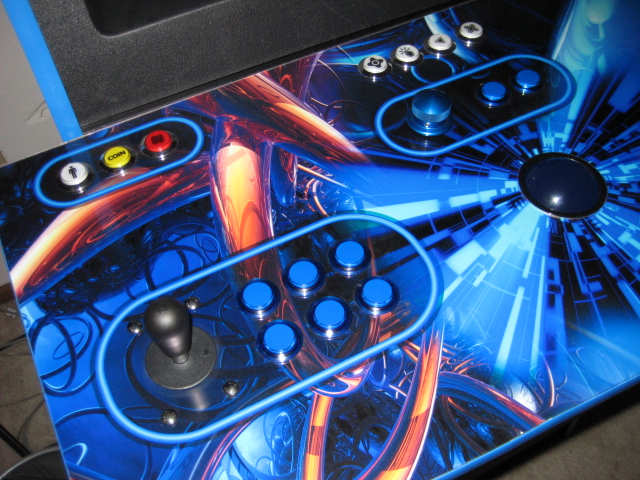
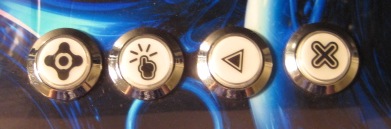
I had this question when I first built my cab and ended up installing extra buttons for GameEx navigation and things like pausing. On my cab I have a button for Home, Select, Back and Exit in the center (4 white on pic) and then a Player Start, Coin and Pause (White, Yellow, Red in pic) button by each player. This setup has worked fine for me (note that I only use my cab for games and not as an HTPC) but if I had to do it again I wouldn't have a special Home, Select or Back button. The reason are: A.) I never use the Home function in GameEx. B.)The Player 1/2 Joystick Buttons 1 and 2 work better as a select and back button, also the Player 1/2 Joystick Button 3 is a perfect modifier key for Alpha paging in GameEx. This way you have all of the controls at the players fingertips in GameEx. The pause and exit buttons make sense to have separate and away from the player controls because you don't want to accidentally hit them while playing. That's my ¢2. Sample pics of my layout below.