



|



bkenobi
-
Posts
4581 -
Joined
-
Last visited
-
Days Won
1
Content Type
Profiles
Forums
Events
Downloads
Store
Articles
Everything posted by bkenobi
-
Damn junkies
-
There may be a button you can assign. I don't think HOTD has that button though, so I think you would have to do it the hard way. Guns are no harder to set up than the trackball was. The problem is getting them to work in Windows first. If you can get them to work as a mouse, you are golden!
-
Thanks! I got them primarily for Ikari, but just lately I've started playing Heavy Barrel. I actually like it a bit better truthfully. If you aren't planning on going with trackballs, spinners, 360° steering wheels, or any other analog device, I would suggest the GPWiz or KeyWiz as well. They sell 'econo' versions that are ~$25 USD or a bit more for more options. There's nothing wrong with the Ultimarc products, but I've had great luck with RandyT's stuff personally. Actually, if you are thinking you might want other things like LED's, trackball and/or spinner, etc. down the road, you might consider the U-HID. It's got a lot more inputs than you are currently looking to need, but it's a pretty damn cool product at a decent price (for what it delivers). No experience though...just going off of specs.
-
If you thought your topic was being overlooked due to the title, you could have changed it rather than creating a new thread. This tends to clutter up the forum and makes the mod's lives harder.
-
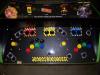
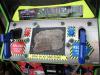
I don't want to throw a wrench in your plans, but I see a problem with your layout. You want to use a combination of button presses to quit a game rather than adding a dedicated button to the control panel, which makes perfect sense. You have decided on P1 start + P1 start. That's not a good choice. Think about it...you are playing Gauntlet with a buddy and, shocker, you've died again. You go to hit start but at the same time, your buddy has the same problem, so he hits start. Guess what? That game you've been playing for 90 minutes is gone! You hit P1 start to get back to the action at the same time your buddy hit P2 start so you just quit the game. I like combos, but that's not a good one. I suggest using pause in there as well. Maybe try P1 start + P2 start + Pause. That would be all 3 buttons across the top of your CP. I can't think of a reason you would try to start both players and pause all at the same time (short of being a klutz and just hitting at the CP). Fortunately, this is more of a setup problem than a hardware problem. If it were me, I might add a dedicated quit button (oh right, I did ). The two pictures are of my CP and the original Area51 CP that I was trying to match conceptually.
-
I had a long response ready to go, then I hit the wrong button and lost it. Here's the short version: The card should work fine in GameEx. WinXP definitely will work with GameEx. The problem is that if you can't get the card working in WinXP correctly, you can't get it to work in GameEx. Example: I had an early GeForce in a second PC a few years ago. I was running Win2k and everything worked fine. I decided to give this WinXP thing a try. It looked great on my main machine so I decided to try it on the second system. No matter what I tried (drivers, reinstall, calling the mfg, etc.), I couldn't get the card to play nice in XP. Things ran so slow, it was useless. The card wasn't broken and neither was the OS, but for whatever reason, the drivers that were supposed to work didn't. In the end, I upgraded my main PC's card and upgraded the second one to the hand-me-down. Worked great from then on. Oh, and when I tried that card in a different system and WinXP, things worked fine...go figure.
-
Use the force and try Brian's suggestion. Email Tom. It's your only hope!
-
Minimum System Requirements I don't remember the resolution, but there have been cases in the past where GameEx reported 0mb of video memory. One of the reasons was logging into the system remotely and running GameEx, but I think there were more.
-
There was discussion about combining 2 ISOs into a single ISO so that you could load it up easier. I think the one game that people tried this technique on first sorta worked, but not exactly. I haven't heard any more discussion about it here, so I think people who have this problem just save prior to swapping discs. The disc swap is essentially quiting the game and starting the game from the second disc image.
-
Are you really asking this question, or is this a joke? You are asking on the GameEx forums where the primary usage of GameEx is as a MAME front end... There are so many ways to set up a cabinet, it's basically endless options. If you don't want to add more buttons to the CP, you have a few options. 1) pressing a combination of buttons performs a special task (p1start + p1 coin + p1up + p1left quits) 2) add a hiden button somewhere - I hid 2 extra buttons under the CP on my 2 button racing cabinet that didn't require drilling new holes. I currently have it set up so that pressing both exits mame, but that may change at some point. 3) write a script that uses a series of button presses (think SF combo) - left right left right b a b a select start... 4) anything else that makes you happy!
-
Just to follow up on my question about the difference between the two guns. I emailed EMS and asked for a comparison this afternoon. I just got a reply (~6 hours later!). So, if you already have a TopGun, keep it and be happy. If you are looking to buy, get the TopGun II. If you have one gun and need a second one, buy the same thing you currently are using.
-
The GameEx Database Project
bkenobi replied to headkaze's topic in FAQs, Guides, & Other Useful Information
I just started a new job with double the commute and have a new, high energy puppy as well. I barely get a chance to turn the machine on these days. I'd help, but I suspect that I would just lock up a DB that someone else would finish quicker (wouldn't take much ). Anyway, if the project is still going when I get more time, I'll see what I can do to contribute. I was mainly looking to see what the state of the project is ATM. -
The GameEx Database Project
bkenobi replied to headkaze's topic in FAQs, Guides, & Other Useful Information
I checked it out...I was curious what was in there. Turns out it's in an XML format that Access can't read, so it was fairly uninteresting to me. -
I checked out play-asia and noticed that they have 2 TopGun's listed now. Anyone know the difference between the LCD TopGun and the EMS TopGun II? I assume the II is the new version, but that doesn't mean it's better in a way anyone cares about!
-
Just because you have a rom by the correct name doesn't necessarily mean that you will be able to use it. If the rom is really old (for instance), there might be a new dump which will supercede the one you have on a current version of MAME. I would lean towards other problems though, as most roms have not been redumped...
-
This is happening because MAME is not running the rom for whatever reason. It could be due to a video mode setting or an invalid rom. The best bet is to run a game that fails from GameEx, then quit and run the "Run Last Game.bat" file to see what the actual error was. You may need to edit the file to add "PAUSE" at the end to see the error.
-
The TopGun requires a sensor bar period. It doesn't matter what type of monitor you use.
-
The driver is intended to convert a PS2 GunCon2 compatible gun connected to a computer via USB into mouse movements. The Top Gun will work with it since it also works the same basic way. I don't know how the ActLabs guns work, but I would imagine they are pretty much the same. The real difference between GunCon2 guns and the Top Gun is that the PS2 guns detect an image on the TV by scan line timing and the trigger pull. The Top Gun uses the trigger pull and sends the computer some reference to where the LED bars appear to be. Anyway, that's about all I know well enough to feel comfortable explaining.
-
I don't think you need a special version of MAME anymore. I had 2 GunCon2 guns working for a while (until one broke and stopped the other from working). I know that around version 0.117 or so things changed a bit. My suggestion would be to set up MAME v0.99 or so just for the gun games. I had things working great back then, so I'm sure it can be done. I would be surprised if you couldn't do dual light guns on 0.126, but I have no experience with it ATM (need to go buy a new set of guns). There is a version of MAME that ActLabs recommends and even some drivers. I'm not sure if you need to use that stuff or not. There's another gun that everyone seems to like called the LCD Top Gun. It seems to work nicely for any monitor type (LCD, 60Hz CRT, 100Hz CRT, rear projection LCD/CRT, plasma, projector on wall). That one can use the same drivers as the GunCon2's. You may want to check out WinGun or GunCon2PC. I personally prefer GunCon2PC v0.96b as I recall.
-
It looks like it could be a TNT2. There were a lot of generic versions made by different manufacturers. They were VERY popular back in the day.
-
The icons are from your folders AFAIK. Those icons would be pretty big for Tom to include in the installer, so I'm sure he doesn't install them for you.
-
Completed Feature Requests (Moved)
bkenobi replied to jr9770's topic in FAQs, Guides, & Other Useful Information
Sorry, the setup wizard is meant for typical installations, so it's somewhat limited on the features you can adjust (makes for less searching for noobies). The Advanced Configuration utility lets you adjust essentially everything (meant for more advanced tweaking). There's a couple super advanced things that require editing files directly, but generally you will find the setting in one of the standard tools. -
That's a good question. You don't need to download one for GameEx, so I guess for fun? Seriously though, you probably downloaded the database that one of the members uploaded that contains the MAWS type data. You could use such a list if you have arcade games under an emulator slot (like kawaks, Zinc, Model2, etc.). There's no need for that in most cases since GameEx has Zinc and Model2 built in and MAME plays NeoGeo games just fine.
-
It's not complicated if you have the item in the list turned on. I suppose if you want to update the list without having the item, you could add a feature request to have a key combo. On the other hand, there is a command line parameter that you can use to update the list. I don't recall what it is off the top of my head though.
-
I think you can turn off update list. If you have it turned off, then it would be tough to update, obviously. GameEx usually asks me to update after I make changes, so that may get turned off when you disable "display update" also.

