|



emphatic
-
Posts
786 -
Joined
-
Last visited
Content Type
Profiles
Forums
Events
Downloads
Store
Articles
Everything posted by emphatic
-
I'm waiting for V2 theme stability. The keyword is WAIT. Emph
-
I guess that Tom is working on the V2 theme issues (bad game links etc) since Theme Editor 1.1 wasn't in GameEx 5.74. Any estimates when 1.1 will be included? *cough* hurry up *cough* Emph
-
You rotate GameEx? Please post pictures of what it looks like! Emph
-
You sir, are correct! Emph
-
I got it too, reported in this earlier post that somehow slipped through without comments: http://www.gameex.info/forums/index.php?showtopic=1209 I noticed it while browsing Recommended Games (read topic in link). Emph
-
Now that's a BIG improvement! Great! Emph
-
Praise the lord! Emph
-
Tom and Headkaze are considering splitting the object "Info / Image". This way you could perhaps get it out of the way. I'm also looking forward to this. There's a pinned post about Theme Editor questions btw. Emph
-
Yes, I get this as well. Looks like a bug. Emph
-
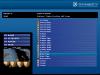
I've found a bug: When I select the game Black Tiger from the list of recommended games in the screenshot below, GameEx takes me to Arabian Magic instead. If I select Black Tiger from the main list, it works like it should. This seems to only happen if selected from recommended games. Emph
-
That's excellent! Looking forward to it! Edit: Found another thing, in Edit->Options, there's only a font selection for the main font. There should be either a checkbox for "use also for titles" and/or another box for "title fonts". Emph
-
When I installed 5.70, I had to do a "Update Game List" because all games beyond the letter B got lost from MAME. And my Favorites goes to B then only my Non-MAME favorites are showing. Anyone else experiencing this? I have tried reinstalling, and now I'm using the latest build, but still no return of my MAME favorites. As AdvanceMAME updated to 104, I started to use it with my GameEx setup again if this has something to do with anything? I switched binary at the same time as installing GameEx 5.70. Before AdvanceMAME was released, I used Mame32+ 104. I'm thinking that perhaps these builds use different ways of listing games? But them again, since this was a HUGE GameEx update, a bug might have crawled in. Emph
-
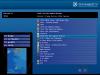
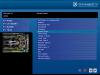
How do I disable the taskbar in my theme? I have set it to "always hide" in GameEx configuration, but in the V2 theme, it's always visible. That's a bug, right? Edit: Here's a feature request for the theme editor: Can you possibly split "Image / Info" into "Image" and "Info"? So you can place them correctly instead of just guessing where things end up? I hope that don't sound to much like I'm bitching, because the theme editor is really bitchin'! Edit2: I found an unorthodox way of getting rid of it, I put it down at the bottom and made it 1 pixel high. Now I have further questions, look at my attachment and watch the circled areas: As you can see, I can't figure out how to "get rid of" the home and exit buttons either. And since the "Image / Info" isn't working as it should I get both in my black space instead of just the screen, which I wanted to take up all the space that it currently does. I guess that I can do a bit of guess work and experiment, but full control is better. Edit3: Here's an example of what I can get with the current "Image / Info" setting. As you can see from the screenshot, the "Image" would look much better further down into the black area of my background. Another feature request for the theme editor: How about an option to disable the outlines on the selector bar? Emph
-
From the start page, see screenshot: http://tomspeirs.com/gameex/Images/10.jpg Emph
-
NICE! I'm gonna start making some themes now that I will actually submit! Does the CD player support CD Text? I don't know of ANY software player that actually does this, but it would be nice for users that have a computer without internet connection for gaming/jukebox purposes. Emph
-
Testing has begun. I've tried using these .bat files with my "problem apps" i.e. PC Games & Dreamcast games. The Dreamcast games needs to mount. None of my PC games does. Since I'm not using DaemonTools, but Alcohol 120% instead (more virtual drives), I want the Autohotkey script to send Alcohol mounting hotkeys.Btw, can .bat-files send keys by itself? This way, I wouldn't need to open any .ahk-scripts for my DC games. This is my RunPCGame.bat: @ECHO OFF REM -- Run Autohotkey script Start RunAHKScript.bat %1.exe REM -- Wait for RunAHKscript.bat to load C:\Program\Spel\GameEx\Sleep.exe 5000 REM -- Run game runwaitlnk %1.lnk REM -- Kill Autohotkey script C:\Program\Spel\GameEx\taskkill /F /IM %1.exeexit -- End -- This is my RunDCGame.bat: @ECHO OFF REM -- Run Autohotkey script Start RunAHKScript.bat %1.exe REM -- Wait for image to finish mounting C:\Program\Spel\GameEx\Sleep.exe 5000 REM -- Run game runwaitlnk %1.lnk REM -- Kill Autohotkey script C:\Program\Spel\GameEx\taskkill /F /IM %1.exe exit -- End -- This is my RunAHKScript.bat (I use identical files for both PC & DC): @ECHO OFF %1 EXIT -- End -- I've tested these methods in both debug and regular mode, but they don't work for me, so if you can point to my mistakes, I'd be as happy as a pig in fresh mud. Now I'm gonna play some games and wait for some kind soul to help me out with this. Emph
-
headkaze: A BIG thank you -> THANK YOU! I will test this tonight after work and family matters. Emph
-
More testing but I'm beginning to think that GameEx isn't 100% compatible with any of my Windows installations. Maybe Swedish XP is different? The issues I have so far: ANY emulation that involves any mounting or other processes starting other than started "directly" by GameEx fails. Example 1: I've tried to use Headkaze's Chankast emu setup, but a simple mounting operation that works 100% EVERY TIME outside of GameEx now never happens. So now I have to have ALL of my cd images mounted before entering GameEx should I want to play any of them. That's a LOT of friggin' virtual devices. Example 2 (PC game "Cho Ren Sya 68 K"): This is what I made this thread about, PC Games listed as Emulators. I've come as far now as to getting GameEx to "allow" my AutoHotKey script to run and then launch the corresponding game. To get that far I had to do this incredibly complicated list of aaarrgh! (sorry) "measures": I had to rename all files (I only did this for one test game since I'm not completely daft) per game: Cho_Ren_Sya_68_K.exe (ahk script, must be launched by GameEx as the emu/shortcut) Cho_Ren_Sya_68_K.exe.lnk (this is the "proper" game shortcut, launched "before") (Weird thing, I had to add the .exe to the .lnk-fle for it to work) Cho_Ren_Sya_68_K.exe.bat (batfile that launches taskkill.exe "after" to kill the corresponding AutoHotKey script, in this case "Cho_Ren_Sya_68_K.exe") (I tried to use the "launch after" command: taskkill /F /IM [ROMFile].exe but that never worked) So, what happens, you ask? Well, if I choose to run the game "Cho Ren Sya 68 K" from my PC Games folder, here's what I expect to be excecuted in the following order; Cho_Ren_Sya_68_K.exe (launch akh script) Cho_Ren_Sya_68_K.exe.lnk (launch game) When pressing the game thus exiting the game: Cho_Ren_Sya_68_K.bat (closing the ahk script so that the GameEx interfaceing will work) The .bat file won't run. So I'm confused. Is there a current "launch before/launch after" bug with the current build that I'm unaware of, or is this a system specific issue? I'm doing all the testing on my Laptop running XP Home sp2 (swedish). I did tests on my regular computer running XP Professional sp2 with the same results, so I don't think it's a Home issue. The config used: [Emulator_1] Enabled=True StartPageName=PC GAMES TitleText=PC GAMES StartPageLogo= RomFilter=*.exe RomsInFolders=False ROMPath=H:\Shortcuts\ SnapPath=H:\Spel\PC-SPEL\PC_SNAP_&_TITLE_SCREENS\snaps WorkingPath=H:\Shortcuts\ MapKeys=True WaitBeforeKeys= SendKeys= ReplaceDash=True ReplaceUnder=True Capitals=True RemoveBrackets=True AlsoLaunch= ShowDesktop=False Debug=False MapFile= OLDatZip= Command=[ROMPATH]\[ROMFILE] TitlePath=H:\Spel\PC-SPEL\PC_SNAP_&_TITLE_SCREENS\titles BoxPath=H:\Spel\PC-SPEL\PC_SNAP_&_TITLE_SCREENS\controllers LaunchBefore=[ROMPATH]\[ROMFILE].lnk LaunchAfter=[ROMPATH]\[ROMFILE].bat CartPath= configFile= ExcludedFiles= CustomBackground=bak Attached is my GameEx.ini Please, Tom, tell me it's a bug! Emph GameEx.zip
-
mec11: But when you have about 20 games, it's a lot easier and cleaner on the start page to only have a "PC Games" category instead of 20 items. And you can't add your apps to appear as favorites, can you? I just want to be able to browse through my favorites with MAME, Dreamcast and PC games all in one big, happy family. I will do some more testing after work tonight. Emph
-
I tried the debug mode and got the idea to look at the runitgame.bat and this is what it looks like now: H: CD "H:\Spel\PC-SPEL\CH050820" H:\Shortcuts\Cho_Ren_Sya_68_K.lnk.exe "H:\Spel\PC-SPEL\CH050820\LATEST.exe" c:\program\spel\gameex\taskkill.exe /f /im Cho_Ren_Sya_68_K.lnk.exe I also have learned that in order for my "[ROMPATH]\[ROMFILE].exe" to work, the .exe-file has to be called [ROMFILE].lnk.exe I don't understand why though. What happens now is that GameEx launches the runitgame.bat but when the AutoHotKey exe's (called [ROMFILE].lnk.exe, nothing else happens until I kill it. Bah! I'm too tired to keep trying tonight. Better get some sleep. I'm running Windows XP Home on my laptop btw if this has anything to do with it. Emph
-
I'm going crazy with setting up my PC games. I have a lot of freeware shooters from Japan that I want to play in my cabinet (pictures of it will show up as soon as it's done) and the keymapping isn't configurable ingame. I've configured AutoHotKey scripts for each game but I can't get GameEx to "also launch" them. I've tried "launch before" as well. They have the same names for example: "68 K.lnk" (I figured shortcuts are easiest and I have a folder called "Shortcuts" for my PC games. "68 K.exe" (this is a compiled .ahk-file that I need to "also launch" I've tried putting the .exe-files in the same folder as my shortcuts but that didn't work. I then tried to put them in the same folder as the game.exe with the appropriate name (68 K.exe) but that didn't work either. The weirdest thing is that I can't see any reference to "also launch" in the GameEx .log file. I have attached both the part of the log-file that is needed to see as well as my Oh, and I can't get "Roms in folders" to work either (for this config, haven't tried it before). Does anyone use this and confirm that it actually does work? From log file: 22:50:36.2 2006-02-15: Running: cmd.exe /c H: H:\Spel\PC-SPEL\CH050820\LATEST.exe 22:50:59.7 2006-02-15: Exiting GameEx! My Config for PC-Games: SendKeys_25= [Emulator_1] Enabled=True StartPageName=PC GAMES TitleText=PC GAMES StartPageLogo= RomFilter=*.lnk RomsInFolders=False ROMPath=H:\Shortcuts\ SnapPath=H:\Spel\PC-SPEL\PC_SNAP_&_TITLE_SCREENS\snaps WorkingPath=H:\Shortcuts\ MapKeys=True WaitBeforeKeys= SendKeys= ReplaceDash=False ReplaceUnder=False Capitals=False RemoveBrackets=False AlsoLaunch= ShowDesktop=False Debug=False MapFile= OLDatZip= Command=[ROMPATH]\[ROMFILE] TitlePath=H:\Spel\PC-SPEL\PC_SNAP_&_TITLE_SCREENS\titles BoxPath=H:\Spel\PC-SPEL\PC_SNAP_&_TITLE_SCREENS\controllers LaunchBefore=[ROMPATH]\[ROMFILE].exe LaunchAfter=C:\Program\Spel\GameEx\taskkill.exe /F /IM [ROMFILE].exe CartPath= configFile= ExcludedFiles= CustomBackground=bak
-
I did my own damn script! If you want the numlock to be turned on/off during GameEx start/exit just add the .exe's in my zipfile to your: Configuration -> Tweaks/Performance -> Launch on startup / Launch on exit fields Emph Numlock.zip
-
Yes, please someone compile a script! Emph
-
I can confirm that this is not a GameEx issue. Try running Zinc outside of GameEx with Brave Blade and you will get the same horrible stretching. Emph
-
The reason I don't want Windows to start with Numlock is because I can't use my keyboard normally (i.e. some keys will be numbers). So where in the GameEx configuration can I set also launch for the GameEx program itself? The easy way out is to reconfigure my X-Arcade to use non-numpad keys, but I'd rather not. Emph