



|



jejegameex
-
Posts
72 -
Joined
-
Last visited
-
Days Won
3
Content Type
Profiles
Forums
Events
Downloads
Store
Articles
Everything posted by jejegameex
-
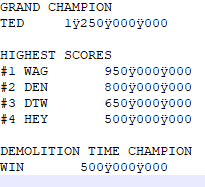
Yes, with original regional Windows settings (spaces as separators), the result of the command line exported to a file, give me the strange characters "ÿ" :
-
Hi Mike, Thank You for your interest. If I launch the command "PINemHI.exe dm_lx4.nv > test.txt", I have this message in the text file generated : "Not a valid command/usage".
-
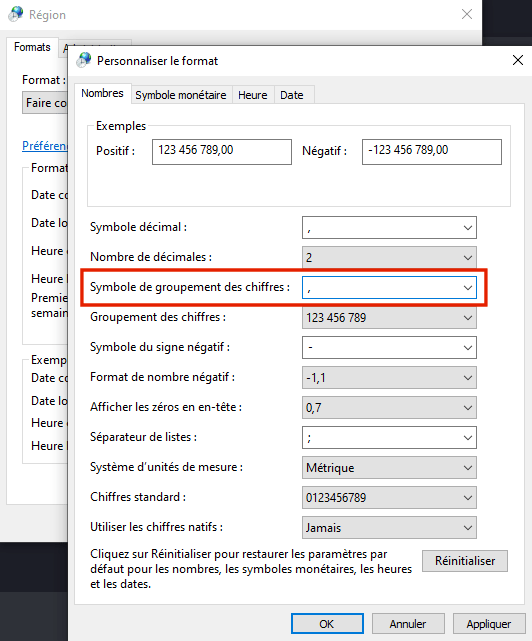
Thanks, As you do not have the same results as me, I tried to modify Windows regional parameters (Control Panel/Regional and Language Options) : When I change the "Digit grouping symbol" by a comma, PINemHI returns scores with commas, and PinballX Information menu too ! Maybe there is a correction to be made in PinballX or PINemHI, but for now the French can modify "Panneau de configuration/Région/Symbole de groupement des chiffres": Now that my scores are displayed, I can make a great score in Demolition Man !
-
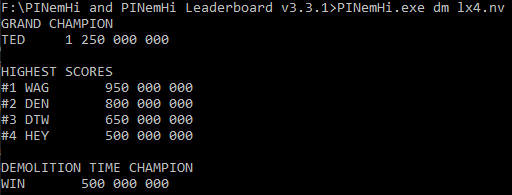
Thank You for your answer, fan of Red Dwarf (I also like) ! The result of the command line works : there are spaces as separators.
-
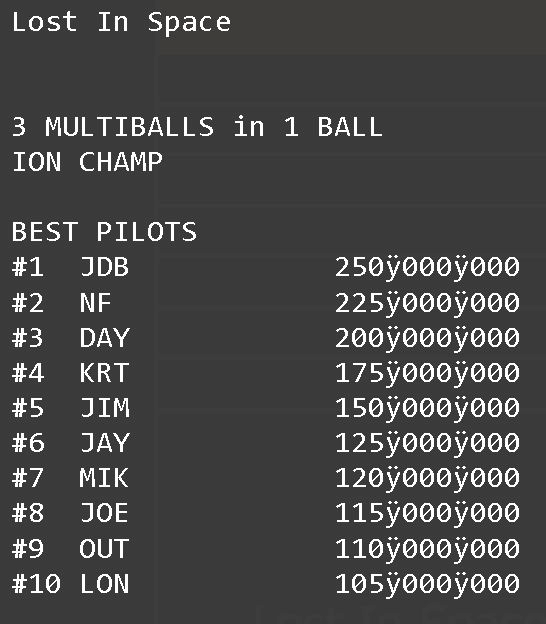
With PINemHI, scores from VPinMAME tables are exported to the folder PinballX installation\High Scores\Visual Pinball\. For me, the text files contains a strange character as thousands separator for the scores. When I use the menu Information in PinballX front-end, scores are displayed with the strange character. Do you have the same problem as me? Remarks : With the plugin "Statistics Display", I don't have the problem, the strange character don't appear. Files text in High Scores folder are encoded in UTF-8. I tried to add the last version of PINemHI, but the result is the same. I'm french, so my Windows system is in french. PinballX is in English. I use the last version of PinballX (5.16), but I believe the problem has always existed. Example from the menu Information of PinballX : Example : you can see a "y" character as thousands separator. I attach the file example. BEST PILOTS #1 JDB 250ÿ000ÿ000 #2 NF 225ÿ000ÿ000 #3 DAY 200ÿ000ÿ000 Lost In Space (Sega 1998).txt
-
both are important (teamlead and developer)
-
Thanks for spending time on this issue! I will correct my XML files, with the error messages that you reported. I'm also a developer and I know the time we can spend understanding a bug !
-
OK here my databases files, but with a fresh install, I have also the problem. Remark : the file MAME Vertical.xml create an error in PinballX Database Manager, I see the problem later. Reminder : I don't use original systems, only "Others systems" for choose the version I want for Visual Pinball. Thank You. Databases.zip
-
Maybe it's because I don't have the xml tag in my files : <?xml version="1.0"?> and </xml> I will add that and test again.
-
I test a new install of PinballX 4.65, and I added an .xml file (with just one another game) in Databases/Visual Pinball : the custom list don't appear in the menu. With PinballX Database manager, customs lists are detected. They are also detected with Game Manager. It seems that PinballX detects lists differently.
-
Hi. The first photo show the main menu (after selection of the system). I select the entry "Lists" and the second photo show the sub-menu : my custom lists don't appear. Thank you for your time !


-
I don't understand : I try this : I recreated the version 4.54 from my backup, and lists work. It also works when I copy the folder Databases from version 4.65 to 4.54 ! But when I upgrade 4.54 to 4.65 : I lost my lists in the menu. I try to create empty XML, or add a custom XML into Databases folder of an original system (because all mys systems are "Other systems") : it doesn't work. I will try a new install of PinballX, and add my databases step by step.
-
I see only the following entries : Most Played, Last Played, Recently Added, and All Tables. I don't see my custom lists. I had PinballX version 4.54 before, next 4.63 and 4.65. I have a backup of the version 4.54 : it works fine : I see the lists. I compared the files between the two version and I don't see a problem. Another remark : I have lost paths defined in the file pinemhi.ini (for nvram and fpram folders).
-
In the PinballX menu/Lists, I see only the following entries : Most Played, Last Played, Recently Added, and All Tables. I don't see my custom lists. But in Game Manager, lists are visible. See uploaded files for my config. Logs seems to be ok. Thanks. PinballX.ini log.txt
-
Hi, I have .xml files into the folder Databases\Visual Pinball X\ and since version 4.63, I can't see lists in the menu. The procedure has changed ?
-
Hi, here is an update to PBXRecorder in 1.9: this version kills the PinUpPlayer processes (PinUpPlayer.exe and PinUpDisplay.exe) after each table capture. Installation : get the previous full version of PBXRecorder (1.6 with ffmpeg.exe), decompress, and copy new files of version 1.9 into the previous installation folder. Remark : launch the program is administrator mode if process (like VisualPinball.exe or B2S.exe) are not killed. Other remark : prefer the use of the PinballX integration function if it works. PBXRecorder_x64_1.9.zip
-
You're welcome, I'm happy to contribute too. Thank you for your previous version. On PinballX, my conversion problem was creating empty files.
-
I had problems with PinballX for converting screens to videos. But I found the solution: my version of ffmpeg was too recent (2019-09). I used the same version as that provided in the PBXRecorder package (2015-11) and it works! Before finding this solution, I updated the PBXRecorder package to 1.8! Here are the evolutions for those interested: Add option for record videos directly on disk, without conversion after Add option for get or not wheel images at PinballX FTP Correction : the option for reduce playfield video to 1920x1080 was not perfect : the first record in .mkv, before last conversion in .mp4/.f4v, did not reduce to 1920x1080 Forms in steps configuration are pre-filled Add option for record audio in the playfield videos Get all XML databases files of PinballX (systems and lists) Installation : get the previous full version of PBXRecorder (1.6 with ffmpeg.exe), decompress, and copy new files of version 1.8 into the previous installation folder PBXRecorder_x64_v1.8.zip
-
Thank You ! I do not know AutoHotKey and it's really good. I will adapt the script for my use, and check the version 1.7 of scutters (script file in this forum post).
-
Hi, There are scripts files in the folder "AHK Script", but I tried to modify them and there is no effect ! I think scripts are compiled into PBXRecorder.exe. Reading the script I saw that the videos are first saved in mkv format, then converted to mp4. The conversion is very long. Is it possible to convert directly to mp4 (I think a powerful machine can) ? Thank you for this good tool,
-
Error with MAME, game launched in background without focus
jejegameex replied to jejegameex's topic in General
Thank you. It works ! -
Hello, When I play a MAME game, I have a black screen: I see the text 'LOADING' for a few seconds, then black screen (Windows windows left open before the launch of PinballX appear in the foreground). However, the game MAME does not appear (neither on the screen nor in the Windows processes Ctrl-Alt-Del). Yet it is executed because I can play by pressing the keys on the keyboard (I hear the game in the background). When I launch directly the MAME game in a command line without PinballX, the game works. Has anyone come across this problem before ? Do you have a solution ? Thank you for your answers. My configuration: I have the latest version of PinballX: 3.93. Windows 10. I use JoyToKey, but without it the problem is the same. I have 3 monitors. When I change the display in MAME config, the problem is the same. The system MAME is configured in PinballX for launch C:\Jeux\MAME\mame64.exe with parameter [TABLEFILE] All .exe are launched with Administrator rights. log.txt PinballX.ini



