



|

.gif.6d0defdbb7838a856f87aa25d43c69ad.gif)
scutters
-
Posts
2122 -
Joined
-
Last visited
-
Days Won
190
Content Type
Profiles
Forums
Events
Downloads
Store
Articles
Everything posted by scutters
-
Try all the other options for the backglass screen number in settings one at a time, start and close pinballx between each. The backglass should show for one of the options 2,3,4, or 5
-
That's weird!... Have a look in your pinballx\media\[system name]\table videos folder, are any of the videos in there table videos or are they all backglass videos?. Probably need fresh copies of your ini and log files too
-
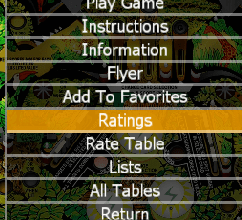
You mean the option highlighted here? To get rid of that i think you need to set all tables to unrated and restart pinballx. I don't think you can remove the Rate Table option. The Show Ratings option in General Settings only controls whether or not the front end displays your rating while navigating around the wheel, it doesn't disable them.
-
This should help https://www.vpforums.org/index.php?showtopic=27822
-
Just don't check the install 64bit checkbox in the install wizard, 32bit otherwise.
-
Check drivers & codecs as suggested above, and as it appears to affect only one screen i'd check your cable/connections too.
-
For Pinup pack tables i've always run a taskill to clear it down after as a launch after, not sure if it's still needed but it's not causing me any problems. LaunchAfterEnabled=True LaunchAfterWorkingPath=C:\Windows\System32 LaunchAfterExecutable=taskkill.exe LaunchAfterWaitForExit=False LaunchAfterHideWindow=False LaunchAfterParameters=/im pinupplayer.exe Edit the ini or add those settings via Settings.exe for Visual Pinball to see if it works for you. As for the xbox360ce kind of working temporarily try changing to FullScreenWindowed=False in the ini
-
Try installing the 32bit version of pinballx. Not sure if it will account for all your issues, but worth ruling out.
-
You can use the built in functionality in Game Manager or PBX Recorder By the way, it looks like you have 64bit pinballx installed - the 32bit version won't have the compatibility issues you're getting running B2S in the front end now, but i'd 3rd the view that videos are definitely the way to go for a smooth front end.
-
Import an image via Game Manager. Select the system name, then the table, then dmd image in the dropdown for imports and navigate to the image you want to use. Then uncheck the Hide DMD box for that table.
-
Came across this in an older post Doesn't show thumbnails straight off, but the html report it generates does have hyperlinks to open them and it highlights very quickly tables with missing media, if you ask nicely over at vpuniverse they might update it to show thumbnails. Looks look i now need to check media for a few tables i have loaded..
-
I've not tried doing it with videos, but i know when i copied a job lot of instructions / flyers into the pbx folders pbx picked them up straight away where the names matched, so yep i think if the names match pbx will find them
-
Good thinking, I've always imported in Game Manager from another location (USB stick as the cabs offline) so never tried it that way. If you're already copying the files to DMD videos folder manually then you could probably rename them at the same time to match the table and not use game manager at all. The only other problem i've had is with some table names with strange characters like Motörhead where i had to change the ö to an o in the name and the media files. Which files/tables do you still have issues with?
-
Same here, Setup Wizard v3.2.0 I've actually got only the bottom one enabled as the tooltip for that one makes sense. Seems to work.
-
I have a mixture of mp4 & f4v dmd videos and both formats work fine for me on lcd dmd. I'll try your airbourne f4v later on.. Edit- Gave your airbourne f4v file a go and it worked for me. I use the lav filters from the pinballx homepage, although i have since installed vlc player 2.2.8 32bit as well which maybe changed some stuff(?) . I'm on win10 64bit.
-
I don't know of anything. Game Manager does list what media is missing but only previews the wheel image, if you don't find anything then maybe a feature request to have optional media preview in game manager? Edit: Had a thought and this sounds a bit messy (because it is) but you might be able to create a new pinballx.ini file (backup current one 1st!) that shows pinball x playfield, dmd & backglass on one screen and then have game manager open on another at the same time. Then restore original pinballx.ini after. Just a thought... and i did say messy didn't i?!
-
I use company logo's on the 3rd screen for non dmd tables, import via game manager from the pinballx\media\company logos folder. Then uncheck hide dmd in game manager for that table so the image still shows after opening the game. I think if you've recorded a blank dmd video with pbx recorder that the video will take precedence over the image though so make sure you delete that in the dmd videos folder for that system if that is the case.
-
Depending what you see in the event log it might also be worth temporarily disabling any antivirus / Defender you have running and trying pinballx again, probably not a factor but worth ruling out. If event log clear and not related to anti virus then back up your pinballx media, database & config folders and uninstall / delete current installation completely. Reinstall the 32bit version and test, then copy your config, databases and media folders back across and retest.
-
The last entry in your log file is "Loading Game Statistics and Scores", in mine the line i have after that is "Main display running full screen windowed." so issue seems to have something to do with one of those lines activities. In your pinballx.ini file you don't have a line like "FullScreenWindowed=False" under the [Display] section which could relate to the info from the log files (there's actually a few lines missing when compared to mine). Do you have a backup copy of the pinballx.ini file from when it was known to be working for comparison purposes?. If not try adding that line to the end of the [Display] section. Also, please confirm pinballx install location/path , if running as admin or not (via right click on pinballx.exe, properties, compatibility, run as administrator), and the exact error message that says unable to load (or screenshot it)
-
I don't mind being a guinea pig. Count me in!
-
Was this fixed?.. i'm guessing not because using quicklaunch 1.0.4 with pbx 3.28 32bit on win10 64bit i'm getting the same issues - arguments get removed unless added to settings.xml directly and also get the "could not start process!" error when launching a table. Or is a there a later version somewhere?. Thanks
-
Sorry... i meant 64bit pinballx, should have been clearer. It's an option during pinballx install.
-
.thumb.gif.704e8e80bff8d8baa365115adc2ca31b.gif)
PinballX Enhancements/Features Requests
scutters replied to Draco1962's topic in FAQs, Guides, & Other Useful Information
+1 from me!, by table and or system would be good. Default to the current loading screen if no image found. I did try changing the loading.png image via a launch before bat file, but it seems the loading image is loaded before that fires (or at least doesn't honour the wait for exit flag), which i suppose makes sense as you'd want the loading screen there for any long running launch before activities, Edit: 25/02/19 functionality now added via plugin. Would still like 'native' support in pinballx though -
Are you using the 64bit version? You have UseB2S=True in the ini file, B2S is 32bit so that could be a problem. If not try turning that feature off and using backglass videos instead.
-
Yeah, that would be a problem. I've inadvertently shut down power without shutting down windows before, and yes it did corrupt/reset the pinballx config.ini. Don't do it, always shutdown windows first! - you're asking for problems if you don't, even hardware issues.

