|



imek
-
Posts
81 -
Joined
-
Last visited
Content Type
Profiles
Forums
Events
Downloads
Store
Articles
Everything posted by imek
-
Thanks! I downloaded Model 2 Emulator v1.1a and then directed GameEx to the root folder for it. But I don't see Model 2 emulator anywhere when I run GameEx? where do I look for it?
-
The ROM now works in GameEx! Thank you so much for your help you guys are amazing!
-
OK I got the ROM I wanted to work using the batch program RedDog gave me and the MAMEUI64_0.139_29-07-2010 from the website RIP Felix showed me outside of GameEx! But it asks me some unwanted questions before the ROM actually loads. How do I bypass these questions? is there a flag or something I can enter?
-
Also I noticed you put the file name pacman.zip at the end of the Rompath. I took this out and only put C:\Emulators\MAME 0.164 (64bit)\MAME 0.164 Extracted\roms
-
I'm not sure what I did but Pacman is up and running now in the integrated MAME! here are the ini and log files
-
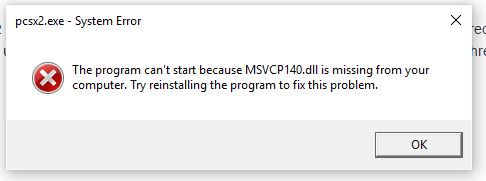
Hello, I tried using my PlayStation 2 Emulator to open an ISO ROM but I don't know if my command line is correct. I tried using pcsx2.exe -e "[ROMPATH]\[ROMFILE]" and then I tired using pcsx2.exe "[ROMPATH]\[ROMFILE]" but it didn't work. I read this thread but it didn't help me. What is the command line I should use? I also tried pcsx2.exe [ROMPATH]\[ROMFILE] but it gave me an error message. I attached a screen pic of the error message.
-
I cleared the Custom Lists Path and updated the list. Also here is the log file.
-
I tried using my PlayStation 2 Emulator to open an ISO ROM but I don't know if my command line is correct. I tried using pcsx2.exe -e "[ROMPATH]\[ROMFILE]" and then I tired using pcsx2.exe "[ROMPATH]\[ROMFILE]" but it didn't work. I read this thread but it didn't help me. What is the command line I should use? I also tried pcsx2.exe [ROMPATH]\[ROMFILE] but it gave me an error message. I attached a screen pic of the error message.

-
I deleted -window from the mame options. It still goes black, but then for a brief moment I see the loading screen and it says "loading Machine %0" and then it goes back to the GameEx program.
-
I don't see the option in the Setup Wizard to run the Model 2 emulator.
-
Here is the attachment for the ini file GameEx.ini
-
I turned off the Hide Desktop option. Do you need the log and ini files again? The same problem persists.
-
Here are my Log and Ini files. I also want to mention that Pacman did open and work when I put MAME 0.164 (64bit) in the Setup Emulator section, but not the integrated MAME section.
-
I applied all the setting RedDog described. Then I opend GameEx (not simple mode) Then I updated the GameEx game list. I was then able to see the games I wanted. Then I tried running pacman and it took me to a black screen and it just stayed black. I pressed the escape key and after about 10 seconds it just returned to GameEx.
-
Ok so I altered the batch file you gave me to try and open primrage and it finally opened up. But just like in GameEx the game seems to load to 100% and then blacks out.
-
It worked, pacman opened up. I guess I just don't know how to open it manually.
-
Here is the path to my Mame Executable C:\Emulators\MAME 0.164 (64bit)\MAME 0.164 Extracted Here is the exact name of the Mame executable mame64.exe Here is the path to the Rom folder C:\Emulators\MAME 0.164 (64bit)\MAME 0.164 Extracted\roms i'm using pacman.zip as the ROM with rom set version 0.164
-
oh I see now. Well then according to the website I used the ROM set is "MAME 0.164 ROMs" I also got the same version emulator MAME 0.164 (64bit) But this still leaves me with the problem below
-
OK I found out the version of the ROM I have and the version of the MAME I need. Now I need to test them to see if it works. ROM - version 2.3 MAME version 0.164 (it doesn't specify 32bit or 64bit so I will try both if I need to) I put the ROM in the roms folder and then opened MAME version 0.164 but that's as far as I got. I don't see a list of games just a box that shows the title of the ROM at the top and under that is configure general inputs and then under that is Exit. When I click on the title of the ROM it just says i'm missing the ROM and CHD files. But I know the ROM file is there... so the title of the ROM must represent a different ROM than the one I put in the roms folder. Sorry I'll keep trying.
-
OK so I went to the place where I got the ROM and people voted that MAME 0.172 (64-bit) would be best to open the ROM. So I downloaded MAME 0.172 (64-bit) and tried opening the ROM but I realized that the ROM doesn't show up (I did put the ROM in the roms folder). However, the same ROM I chose is already provided in MAME 0.172 (64-bit). But when I try to run the ROM it says there are files missing. Thus I think the ROMs I have been running are not my ROMs but the ROMs provided by the different MAMEs. I need to have my ROM show up in the game list both in and out of GameEx.
-
No I don't. I used the ROM file that came with MAMEUI and also with the Integrated MAME. - I used MameUI version 0.176 64bit - I used the integrated MAME inside GameEx, as well as outside GameEx in addition to MameUI - No I wasn't aware there was an importance. I'll do some research on that. Thank so much for your help
-
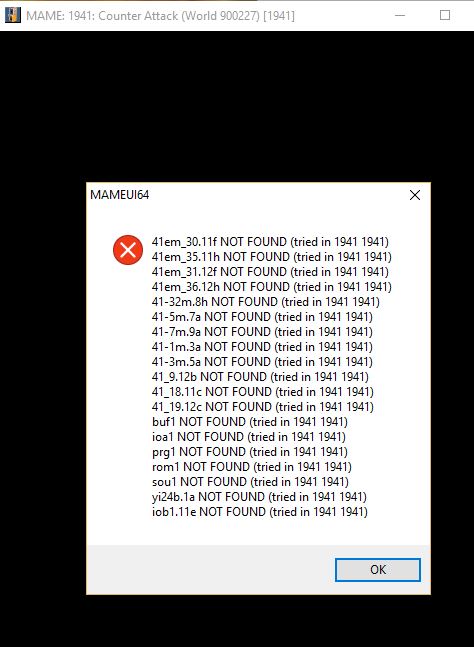
- I attached a pic of the error I get with I run MAMEUI outside of GameEx. - Also, I opened the integrated MAME for GameEx ouside of GameEx and I tried running 1941 but it said it could not find the ROM or CHD files.
-
I added 1941 to the exclude from filter list and then updated the list. Then I tried running 1941 and the same problem occurs it just blacks out and goes back to GameEx.
-
primrage.zip or Primal Rage and House of the dead 1 and 2
-
I created a folder in the root of MAMEUI called roms but the zip ROM that I put in there doesn't show up in the MAMEUI game list (outside of GameEx) also there is another ROM with the same name as the one I have already in the game list of MAMEUI. I know it is not mine because it says it is in a different directory (a directory that I don't see exists in the root folder). How do I get MAMEUI to recognize the ROMs inside the root folder called "roms"?