|



Ginsonic
-
Posts
111 -
Joined
-
Last visited
-
Days Won
1
Content Type
Profiles
Forums
Events
Downloads
Store
Articles
Everything posted by Ginsonic
-
Really ? Hmhh, I never noticed it before, but of course it might be possible. I will examine this behaviour a bit more, maybe I can find an improvement...
-
Actually, it is possible I suggest to create a shortcut to PinballArcade11.exe in the same directory, rename it e.g. to Start_PBA (no extension necessary) and add skipwhatsnew as parameter within the shortcut. In the PbaCamMod settings file change the program call of PinballArcade11.exe to Start_PBA and everything should work like a charm.
-
I am running LAV Filters 0.67 (latest release). I tested again and it might be a focus issue ! It seems that PBFX2 (tablefile as parameter for directly starting) takes the focus and the backglass window demands it back, which lasts a few seconds and might cause the flickering. When the PBFX2 playfield appears (table loading has finished) everything calms down.
-
When I tested my new videos for PBFX2, I noticed the first time, that the backglass videos have some problems, when I start Pinball FX2 out of PinballX. When the Pinball FX2 main screen appears, the backglass video starts to flicker (short black interrupts) for about 5 seconds then it loops flawlessly regardless which video (also other older ones) I choose. When I run this video looped in VLC (first screen) and start Pinball FX2 without PinballX (third screen), everything works flawlessly, it looks like PinballX makes some "screen actions" after starting Pinball FX2, which end after a few seconds. I did not notice this ever before, does have someone similar troubles ? I can not remember, that I have changed anything in my system. Tom ? I am aware, that I did not attach my config and log, because I am sure that nothing has changed before the flickering has begun.
-
The backglass images and videos are on FTP now (PinballX/Other Uploads/Ginsonic/Artwork/Pinball FX2) !
-
You're welcome I will upload to FTP when I have finished rendering the (slightly) animated mp4 videos !
-
Hi Guys, I just created three backglass images for the new Pinball FX2 Pack "The Force Awakens" for 16:9 FullHD screens (format 2560x1440). Edit: The backglass images and videos are on FTP now (PinballX/Other Uploads/Ginsonic/Artwork/Pinball FX2) ! Preview:



-
Yes, no problem at all. Attached you can find a new version with the parameter useRotation. Set to no, if you do not need rotation, you even do not have to install display.exe then. PBA_Starter_1.1.zip
-
Mega Docklets Style Pinball Arcade Wheel Images
Ginsonic replied to Draco1962's topic in PinballX Media Projects
Great, many thanks Draco ! -
Or this :


-
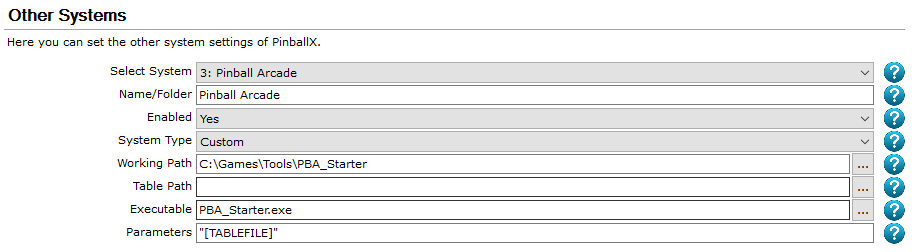
Hi Guys, attached you can find the PBA starter (incl. table rotation using display.exe) like promised above. HowTo: Unpack attached ZIP fileEdit Settings.ini (please note comments in the upper part of the file)Create Windows shortcuts for PinballArcade11.exe (and PBAFreeCamMod.exe if in use, if not please set "ModStart" to "no") in the same folders as the executables. In the attached ini they are named StartPA11 and Start_PBAFreeCamMod. Note: Renaming of PBA executable is no longer necessary !Set PBA as a custom emulator in PinballX (see attached image) and disable PinballX onboard PBA emulation in the page before !For table rotation please unpack display in a desired folder (see http://www.gameex.info/forums/topic/17239-pinball-arcade-disable-the-keypresses-provided-by-the-integrated-support/#entry152109) AHK Sourcecode is included, feel free to modify ! BTW, if PBA is started with the parameter "skipwhatsnew" (without quotes), it skips the news screen ! You can add this parameter to the PBA shortcut and edit Settings.ini in PbaFreeCamMod directory (if MOD is in use): ; Path to the game executable. ;GamePath=C:\Spiele\Steam\steamapps\common\PinballArcade\PinballArcade11.exe GamePath=C:\Spiele\Steam\steamapps\common\PinballArcade\StartPA11 Sounds a bit difficult, actually it is quite easy. Have much fun ! PBA_Starter.zip

-
I will post it soon, the only thing is, that it currently does not support autorotate, but I will try to include this feature before posting.
-
TPA DX11 NoExCamera Mod table videos
Ginsonic replied to bloodydrake's topic in PinballX Media Projects
Thanks, this link is working ! -
Yes, my loader accepts the tablename as a parameter and selects it automatically after starting PBA. Since it calculates table position from the alphabetical order of the entries in the PinballX XML file, it is not necessary to enter gridposition in the game manager.
-
I could post my PBA loading solution here if desired. PBA is started (together with FreeCamMod) in a custom emulator slot using a AHK loading script, where you can set all parameters (delays, keypresses..) in an INI file.
-
TPA DX11 NoExCamera Mod table videos
Ginsonic replied to bloodydrake's topic in PinballX Media Projects
Thanks, but MEGA asks for a decryption key... -
Did you try to raise the WaitFor parameter ?5 seems a bit low, start with 15, you can lower it afterwards, if it works then.
-
[RESOLVED] PinballX and new Pinball Arcade supported rotation in a cabinet.
Ginsonic replied to mamemaster's topic in General
Tom, unfortunately no success (still leaves out many cursor jumps), but you mention above, that you change the delay according to the resolution. FYI, PBA does not work on resolutions greater than 1920x1080, it is the PBA DX11 back buffer, that is set to e.g. 2160x3840 and that slows down wheel movement ! Probably PinballX does not detect a resolution change (actually there is none) and the wheel key delay remains the same ! -
[RESOLVED] PinballX and new Pinball Arcade supported rotation in a cabinet.
Ginsonic replied to mamemaster's topic in General
Caught, Tom Thanks, I will try soon ! Regards, Dieter -
[RESOLVED] PinballX and new Pinball Arcade supported rotation in a cabinet.
Ginsonic replied to mamemaster's topic in General
I know, that the parameter is not necessary here, but I left it from my former custom AHK script setup. If you do not use PbaFreeCamMod, set path to steam PBA subdirectory and and exe to PinballArcade.exe or PinballArcade11.exe -
[RESOLVED] PinballX and new Pinball Arcade supported rotation in a cabinet.
Ginsonic replied to mamemaster's topic in General
VP is great, but combined with PbaFreeMod IMO it is a really nice alternative, especially in cabs. -
[RESOLVED] PinballX and new Pinball Arcade supported rotation in a cabinet.
Ginsonic replied to mamemaster's topic in General
Not enough, many jumps get lost ! I know this behaviour from my former own AHK script and therefore implemented a variable delay (currently 150ms). The problem is, that users with regular resolutions do not need a general delay, it slows down selection and so the whole starting progress. BTW: When the selected game was located on the second half of the wheel, I made the script skip backward, actually saves much time. -
[RESOLVED] PinballX and new Pinball Arcade supported rotation in a cabinet.
Ginsonic replied to mamemaster's topic in General
Tom, I am playing PBA in highres settings (buffer: 2160x3840), which makes the game wheel spin much more sluggish then in "normal" mode. Is there a way to set delay for the wheel spinning (cursor down movement), because currently the built-in script skips several tables on each movement and always selects the wrong one in the end. -
Hi Jombee, well, it seems to be a common problem. According to your log you start the BAT file using "cmd.exe /c" where "/c" means "close after execution". GameEx waits for the termination of the process it created, which in your case is the command line interpreter, which itself closes after execution, so that GameEx thinks, the game was shutdown properly. But is the emu really closing ? That is unusual, normally it stays in background. Did you check the task manager ? Try to start the BAT file directly without "cmd.exe /c" ! BTW: Why are there two "cmd.exe /c" in your start command ?
-
Open table file in "normal" VP.exeOpen script editorNo need to change anything !Select "compile" from menuClose Script editor windowSave File (Ctrl + S)Then close VP.exe and try to start it in VP_PM5 using PinballX If this does not work, try to repeat the steps above using VP_PM5.exe I once tried some combinations compiling/saving, but I do not exactly remember, which worked finally. But it worked ;-)
- 22 replies
-
- 1
-

-
- acdc stern crashing
- pinballx crashing
- (and 3 more)