



|



Ginsonic
-
Posts
111 -
Joined
-
Last visited
-
Days Won
1
Content Type
Profiles
Forums
Events
Downloads
Store
Articles
Everything posted by Ginsonic
-
@hlr53: You're welcome ! Correct ! No, if you doubleclicked the AHK you did not compile it, you actually started it ! To compile, please click with right mouse button, then choose "compile script". This creates the EXE file. Yes, it definitely has ! Please remove the trailing backslash from the Variable "steamPath" in settings.ini, then it should work ! steamPath="C:\Program Files (x86)\Steam\" -> steamPath="C:\Program Files (x86)\Steam"
-
If you already downloaded the ZIP file above, please do it again, the English confirmation window title had the wrong case!
-
You should do it by yourself, it is quite easy: After the installation of AutoHotKey simply click the AHK file with the right mouse button and choose "compile", ready
-
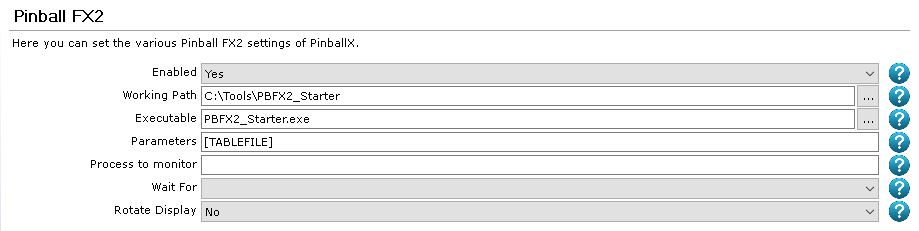
Here is my current workaround. Steps: Install AutoHotKey (if not already installed) Unzip attached PBFX2_Starter directory and copy it to a folder of your choice (don't forget to set correct path in PinballX afterwards!) Compile PBFX2_Starter.ahk to create the corresponding exe Set your Steam path (steamPath) in settings.ini Important: If your confirmation dialog window title is not "Allow game launch?", please modify it in settings.ini, my German Steam version has (of course) a German window title Set PBFX2 start parameters in PinballX (see screenshot below) Enjoy your new/old starting behaviour without the confirmation dialog Edit: New ZIP attached, I had to change the case of the confWinTitle variable! PBFX2_Starter.zip
-
Thanks Tom, and sorry for the false alarm of a possible playfield replacement. Actually it did not really replace it, but created a new file with a different extension (f4v), because all my playfield videos are mp4, I did not notice that first !
-
Yes, at least a textual preview would be necessary ! But by no means existing files may be overwritten when selecting "No"
-
I just tested the bulk online media download feature of the new version 2.34. I selected "All online" and pressed "No", when the game manager asked, if to overwrite existing media. Nevertheless it replaced all the existing media (wheel, playfield video...), and it even replaced it with media from a similar but wrong table (actual table: 4 Queens, media from: "Kings & Queens") !
-
PinballX Enhancements/Features Requests
Ginsonic replied to Draco1962's topic in FAQs, Guides, & Other Useful Information
And another +1 on this ! -
Sorry to hijack your thread, but I just uploaded: alternate backglass image and video alternate table video flyby table video with audio See: -PinballX-/Other Uploads/Ginsonic/Artwork/Pinball FX2
-
Many thanks Tom, I changed the password, everything works like a charm now
-
Still no luck Could you find something wrong Tom ?
-
Setting FTP to port 22 disabled downloading, reset to port 21 leads to error 530 Also my login to GameEx online does no longer work, could you please check, what's wrong here Tom ? Edit: GameEx Online is working again, FTP still shows error 530 on port 21
-
Thanks Tom ! I actually did not connect many times in the last days/weeks, just tried a few times without success
-
since a few days I can not connect to my FTP account (error 530), a password change did not help. Am I the only one, or is something wrong with the FTP in general ?
-
hint #2: Look at /-PinballX-/Other Uploads/Ginsonic/Artwork/Pinball FX2/Backglass Videos on the FTP
-
Bethseda backglass images + videos and table videos
Ginsonic replied to Ginsonic's topic in PinballX Media Projects
+1 Draco, this content is made to support PinballX and its community ! Both backglass images and videos are on my FTP directory now. I also added a recently animated Family Guy backglass video, have much fun ! Please ignore the numerous zero bytes files, someone uploaded them into my folder and unfortunately I can not delete them. It would be a GREAT help for contributers, when there could be fundamental access rights on the FTP (RW on the own folder, other files readonly). Tom ? -
Bethseda backglass images + videos and table videos
Ginsonic replied to Ginsonic's topic in PinballX Media Projects
@32assassin: I finally could do a proper recording of the FlyBy table videos for you ! They are now uploaded on the FTP under: Other Uploads/Ginsonic/Artwork/Pinball FX2/TableVideos/FlyBy -
Bethseda backglass images + videos and table videos
Ginsonic replied to Ginsonic's topic in PinballX Media Projects
Do you mean without the DMD part (like my other videos) ? -
Bethseda backglass images + videos and table videos
Ginsonic replied to Ginsonic's topic in PinballX Media Projects
Sorry, OBS Studio refuses to record fly by videos correctly. I fear, that the amount of moving video data is too high. The recorded file has over 10gb but is totally distorted. -
Bethseda backglass images + videos and table videos
Ginsonic replied to Ginsonic's topic in PinballX Media Projects
Sure, I just need some time, stay tuned -
Bethseda backglass images + videos and table videos
Ginsonic replied to Ginsonic's topic in PinballX Media Projects
Table videos added: Other Uploads/Ginsonic/Artwork/Pinball FX2/TableVideos -
Bethseda backglass images + videos and table videos
Ginsonic replied to Ginsonic's topic in PinballX Media Projects
Backglass videos are online: Other Uploads/Ginsonic/Artwork/Pinball FX2/Backglass Videos -
New backglass images added to FTP: Other Uploads/Ginsonic/Artwork/Pinball FX2/Backglass Images Simple animated backglass videos will follow...


-
Thanks Carny, Yes, you are pretty right ! I know, that the current software situation is far from stable, and I can live well with a custom VP system for now. I will write an AHK script to handle the different VP versions, since terminating a table with the assigned key currently seems not to work in fullscreen mode for me. PBXRecorder does not support fullscreen, but it can be handled easily with automatically changing the registry value before and after.
-
Yes of course, sorry, I did not post them, because I thought, that config/log could have no connection to this issue... When I create a custom system, backglass appears, when I set the system type to "custom". And it disappears again, when I set back to "Visual Pinball" ! The log attached is from my default config without a custom system, but it looks the same. During all tests there were no errors in the log. BTW: In VpForums it is suggested to start Windows TaskManager in the back, this action has no effect for me... One additional maybe useful information: I tried to start VPX within an AHK script instead of starting VPinballX.exe directly. When the backglass did not appear, the AHK run command did show this error: Only part of a ReadProcessMemory or WriteProcessMemory request was completed No error when starting with system type "custom"...
