|



bkenobi
-
Posts
4581 -
Joined
-
Last visited
-
Days Won
1
Content Type
Profiles
Forums
Events
Downloads
Store
Articles
Everything posted by bkenobi
-
I think you have the wrong forum. This forum is used to discuss the GameEx front end and related issues. If you have questions about wiring of an actual arcade, you would get answers quicker from a forum/news group that discusses those topics.
-
Glad you got it going! Have fun...
-
I haven't delved into this yet, but it looks to me like Virtual CloneDrive should work if your discs are in bin/cue format... That is, unless it only supports the binary chunk and not the cue sheet for some reason. http://www.slysoft.com/en/virtual-clonedrive.html
-
Possibly. You can always include MAME to see if that helps. Tom always wants to get bugs fixed, so if you can help figure out what is causing this problem, then he would certainly use your findings.
-
Sounds good! Btw, you might be interested in speaking to Pimpdaddy Stu about the match logic. I know he spent a lot of time tweaking his Fuzzy Text Match Utility, so it's possible that he might have some ideas you could use (or perhaps some things he looked at that didn't work out). Just a thought.
-
Can you add a MAME game to your favorites to see if that makes things better? GameEx was originally designed to be a MAME front end and almost all other features were added with time. I'm wondering if the favorites list works better when it has at least one MAME title in there.
-
You can't use button combinations in GameEx menus. If you want to do that, your best bet is to use either XPadder (you could stick with JoyToKey as well, but XPadder is MUCH better) or an AHK script. I have a system set up that uses P2 Up + P2 Down for Escape, so it certainly can be done! Likewise for your hat switch, you would be best served using XPadder to remap your gamepad to send keyboard input. Set the DPad and analog stick to send arrow keys so you can use either.
-
I just did a quick test and things look and work a lot better! Nice job. I do have two comments: 1) You have a confirm box that displays the match settings and then when you click 'Ok' it takes you to the FatMatch tree view screen. You then have to click start to get things started. It feels like when you get to this screen, it should just start automatically since you've already confirmed that you want to use these settings IMO. 2) When the match was done, I didn't select anything to rename and clicked 'Begin Renaming'. When it was done doing nothing, it was all grayed out so I couldn't do anything except exit. I would think it would be better to at least give the option to match again if not give back full control. Again, just my opinion. Thanks!
-
Glad to hear! I'll be grabbing some stuff soon and it looks like all the links are working again as well.
-
So Tom, you have any special plans when it comes to v10.0? Or, are you going to roll like MAMEdevs and go 9.100?
-
Looks to me like there is a list that has no data and GameEx is not tolerant. The only thing I can suggest is to temporarily disable all emulators to see if that fixes it. If it does, then you will probably need to delete the cached files (probably the solution either way actually).
-
Oh, I was also successful using custom joystick buttons as well FWIW.
-
I seem to remember at least one thread discussing alternatives to nlite that might work. As I recall, there's a package you can use to create your own minimal install of Windows that allows you to select the database stuff that GameEx requires. Nlite doesn't give those types of options as it's a one-size-fits-all type of solution. If I remember correctly, it was over a year ago started by Tom in case you wanted to try searching for it.
-
Someone else should answer as I'm just guessing, but I would assume Yes (within reason and after talking to a CSR) and No (since downloading is through a different channel than the physical copy) unless they have a download code inside the box.
-
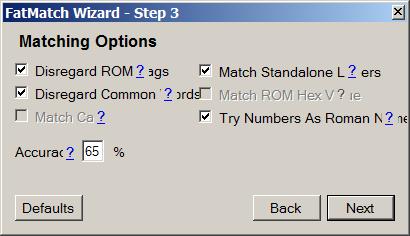
I have a couple things I found when I did a quick test. First, the help dialog buttons covered up the text for the check boxes on the Step 3 screen. Second, when I have "Disregard Tags" turned on, it doesn't seem to work the other way. In other words, I can't have tags on my pics and not on my roms. I only get 2 matches with the included test set. This could be really nice once finished. Thanks for sharing! test.zip
-
You can download games from places like http://store.steampowered.com/ instead of driving to the store and buying physical media. I personally would prefer the physical copy, but I can see an advantage if this means you don't have to put the media in every time...
-
Well there you go! I recently replaced most of my sets to keep them to a single file type. Before I did that, my N64 set was composed of 3 or 4 different types. I didn't like it, so I fixed it!
-
Awesome! I was a bit disapointed that there was no audio for Parsec or Hunt the Wumpus for TI-99/4a
-
I think the easiest thing to do is to run a different version of GameEx for each setup. You can do that using the script that Tempest put together. The only problem is, I can't find the thread where it was being discussed! DOH!!!
-
I'm surprised the emulator let you play files with the wrong extension. Enjoy!
-
I used to use GameEx's built in joystick support (well over a year ago). When I did, alpha/paging worked fine. The only reason I use XPadder for my main input is because I have two players using the same gamepad encoder and I wanted both to control the GUI. GameEx can't do that natively, so I convert my button presses to key presses for each player. I haven't tried using the joystick support in a while, so I can't say whether it works right now or not.
-
Storage-wise, I agree. But, my connection is not going to get any faster for quite some time. I still see the download time as a big deal since we are now talking about a LD-CHD set of nearly 500GB all said and done (from what the unspeakable threads above guesstimated). My Saturn set is 66GB and it took FOREVER to finish (and now I find out I can't play them on my current rig ). But yes, drive space is getting really cheap! I have 3 750GB drives in RAID5 and expect to expand them to 6 750's within another year depending on the plans for our server's usage. Those 750's cost $150USD when I got them but I've seen them for ~$50USD recently.
-
The digital leasures releases were cleaned during remastering I assume. The MAME team is simply capturing the original release in the best quality it can and preserving it in a lossless format. I understand what they are doing and why, but I'm not sure I agree with doubling the recorded resolution even if it might capture some lost data before as this data obviously wasn't needed to make things work. Either way, I'm happy the MAMEdevs are going to include the LD-CHDs, but at this point I'm simply not willing to use that much space for the current releases since Daphne works just fine. If things change, then I'll change as well, but that's something for down the road I guess.
-
Ok, I misspoke myself. What I meant to say was that the databases don't use just the no-intro format. They include several formats...but that's what you said Flash
-
I just posted the fix for your problem in the features request thread. But, basically you just need to use an advanced config to tell GameEx what process you want it to wait for prior to taking over again. By default, when the process GameEx launches disappears, GameEx will take over. This is correct 99% of the time...until you have a game with a wrapper.