|



Tom Speirs
-
Posts
19656 -
Joined
-
Last visited
-
Days Won
1076
Content Type
Profiles
Forums
Events
Downloads
Store
Articles
Everything posted by Tom Speirs
-
Ive tested on integrated, discrete and GPU. No issues. Did you uninstall Lav and install the official release? Did you install the 32 bit version too? PinballX uses 32 bit codecs. Did you exclude the PinballX folder from avg and windows defender. If you have the issue on two machines and others don't its got to be something you have installed.
-
well I can see your using a daily build of Lav instead of an official release. So that could have bugs. Your also using hardware acceleration (dxva2) and that could also cause issues.
-
I would think its a codec issue but I just released a new version. Worth trying.
-
[RESOLVED] GameEx 15.20 - Video Snaps are not working after upgrade
Tom Speirs replied to tttttwii's topic in General
I released a new version. You can try but I think its a codec issue. -
[RESOLVED] GameEx 15.20 - Video Snaps are not working after upgrade
Tom Speirs replied to tttttwii's topic in General
X-Codec pack is probably your issue. It installs codecs on your system and may stop Lav from working. The issue is almost certainly codec related. I know where those videos came from. They should play fine. The latest release should fix the keyboard issue. It was released after. -
2.66 here - hardware accelerated video rendering
Tom Speirs replied to Tom Speirs's topic in General
Here is another one to try. Note that this does not save the graph. PinballX.zip -
2.66 here - hardware accelerated video rendering
Tom Speirs replied to Tom Speirs's topic in General
If your up for it I would like to look at how the video graph is building. The attached will save a video graph on your desktop. I won't be able to see the results here but I would like you to download a copy of x86 graphedit and show me what the graph looks like. The issue has to be something it does not like with your videos. Ive attached an image what it should look like. PinballX.zip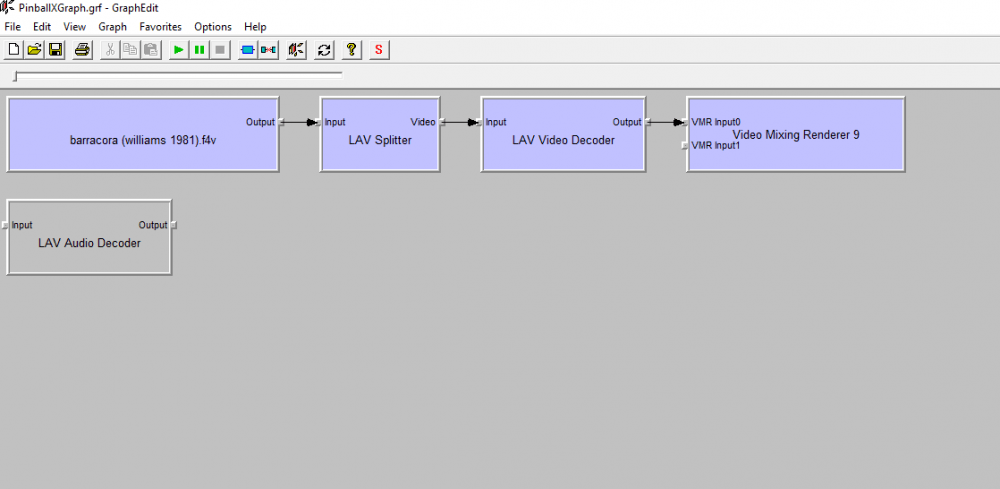
-
2.66 here - hardware accelerated video rendering
Tom Speirs replied to Tom Speirs's topic in General
Did you get the same unhandled out of memory exception? Are you using hardware acceleration in lav by any chance? The only thing I can suggest now is get your files to me by putting them on the ftp. Videos are a bit slower loading now for everyone by the way but I think 4k 60fps support is more important. I don't think there any memory leaks but I did notice an issue with a couple of certain videos in GameEx. Videos with the old format color bits (YUV420p) also seem to work better. The newer format has issues even in windows without lav. You have to specifically tell FFMPEG to use that format so it could be the issue. Worth trying but will require transcoding. The videos I upscaled to 4k and am testing with I encoded with my Nvidia card which I think uses 444 so its still not an issue for me. -
[RESOLVED] GameEx 15.20 - Video Snaps are not working after upgrade
Tom Speirs replied to tttttwii's topic in General
Here is an updated exe to try. Don't know if it will help but worth a try. GameEx.zip -
You haven't confirmed if the issue is only related to 4k videos or not with 2.68 but here is an exe to try. PinballX.zip
-
2.66 here - hardware accelerated video rendering
Tom Speirs replied to Tom Speirs's topic in General
Here is another exe to try. Please let me know if things are any more stable. Thanks. Tom PinballX.zip -
I wont have a real dmd to test until the end of the month. Maybe that is the issue or the DOF plugin. I don't think there are any major issues with the latest release and the whole point was high end video support. If you wanted to really help me out you could upload everything for me to test but again it should just work.
-
The issue should be fixed in 2.68.
-
2.66 here - hardware accelerated video rendering
Tom Speirs replied to Tom Speirs's topic in General
Thanks. It appears 4k may have issues but I can duplicate nothing here. 4k content runs well for me on three normal hd displays and works well on a single 4k display. -
2.66 here - hardware accelerated video rendering
Tom Speirs replied to Tom Speirs's topic in General
Hey, I realise its a pain but I've not given up on this. All I can suggest is you upload everything to the FTP so hopefully I can duplicate the issue. I know is a pain but until I can duplicate issues here we are out of luck. I don't have any 4k displays on the cab, all I can do is test 4k content. That all seems to work without issue. I do have a separate machine with a 4k display and that's been running in the screensaver for days without issue. -
The latest release is for people like you who. Any help you could provide troubleshooting would be great. I just have no issues I can duplicate here. PS: That error is occurring loading an overlay or an underlay but I can see nothing wrong.
-
I'm confused. I thought you were all AMD based?
-
It should just work. Ive had my cab running for days with all videos upscaled to 4k in screensaver mode. No issues. I don't actually have 4k output on the cab though, Is there anything in particular you are doing to make it crash? It could be a corrupt image. Is 2.68 stable with 2k videos for you?
-
All ive done is make SSL required. It does run under explicit. I'm not sure wht you are having issues. What clients are you using? Maybe there is an issue with them or you have some kind of firewall issue?
-
[RESOLVED] GameEx 15.20 - Video Snaps are not working after upgrade
Tom Speirs replied to tttttwii's topic in General
Hi, again, where did the videos come from? Maybe upload a couple that are not working? Do you have codecs installed? I notice the ArcadeVGA and that you are running at 30hz. What kind of display do you have? -
2.66 here - hardware accelerated video rendering
Tom Speirs replied to Tom Speirs's topic in General
Perhaps you can upload the videos to the ftp? If I can duplicate the issue we are golden. -
Just a long shot, before that try the attached updated exe. PinballX.zip
-
Okay, fair enough. I think it is possible. The numbers are really virtual.
-
Ive not pushed out the update yet. You can do it manually without issue,
-
Ive not pushed out the update yet as there has been a few issues reported. You can do it manually no problem.