Jump to content

All my products and services are free. All my costs are met by donations I receive from my users. If you enjoy using any of my products, please donate to support me. My bare hosting costs are currently not met so please consider becoming a contibuting member by either clicking this text or the Patreon link on the right.

Patreon

1 Screenshot

About This File

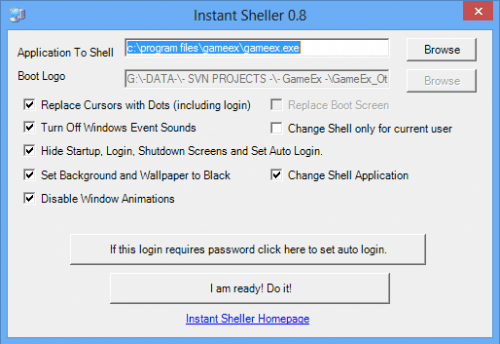
Instant Sheller: It allows you to one click shell GameEx or any other front end. Its for Windows XP Service pack  2 and above, Vista, Windows 7 and the latest versions of Windows 10/11. It also requires the .net framework 2 service pack 1 or above. It features a one click ‘Undo’.

Updated May 2018 for support for the latest versions of Windows 10 Pro and Windows 10 Enterprise. For Windows 10 and 11 Enterprise it can completely hide everything.

It can change the uefi boot logo on windows 10 and 11 too. To use this feature ensure secureboot and bitlocker is disabled.

There is an option to set the windows resolution. This is intended for a portable PC where it may be connected to different TVs and upon connection to a new display the resolution may be reset.

For those that need to be told and don't understand what this is, this software is use at your own risk. Otherwise ensure that you install to or put the portable version in a folder that has read/write access without needing admin access.

It is a good idea to not disable the quick sheller option. This ensures the shell is digitally signed in Windows and allows you to undo by tapping "u" when windows starts up.


What's New in Version 2.03   See changelog

Released

No changelog available for this version.

  • Like 9
  • Thanks 2

User Feedback

Join the conversation

You can post now and register later. If you have an account, sign in now to post with your account.

Guest

albertogl

   1 of 1 member found this review helpful 1 / 1 member

the best tool to hide windows and to empower our arcade machine, thanks @Tom Speirs

mschwabe

   0 of 1 member found this review helpful 0 / 1 member

test

Glegaria

   0 of 1 member found this review helpful 0 / 1 member

testing

basty

   0 of 1 member found this review helpful 0 / 1 member

test

Petey

   0 of 1 member found this review helpful 0 / 1 member

trying to download

RampageGenius


Can't wait to use this what a brilliant idea.

Moma11


🛡️ Windows "Black Screen" Fix Guide
(After deleting UI modification programs like Instant Sheller)
The Problem: When deleting programs like Instant Sheller while "Hide" options are active, Windows gets stuck on a black screen because the system can no longer find the Shell file.
⚠️ Important Warning: In many cases, the emergency shortcut (repeatedly pressing the "U" key during boot) does not work. You must use the manual Command Prompt (CMD) method below.
Step 1: Open CMD with Administrative Privileges
 * Press Ctrl + Alt + Delete and select Task Manager.
 * Go to the File menu and select Run new task.
 * Type cmd in the box.
 * Crucial: Check the box "Create this task with administrative privileges" and click OK.
Step 2: Shell Recovery Commands
Run the following two commands to restore the Windows Desktop for both the user and the entire system. Copy each line and press Enter:
1. To fix the current user's settings:
reg add "HKCU\Software\Microsoft\Windows NT\CurrentVersion\Winlogon" /v Shell /t REG_SZ /d explorer.exe /f

2. To fix the global system settings (The Root Cause Fix):
reg add "HKLM\SOFTWARE\Microsoft\Windows NT\CurrentVersion\Winlogon" /v Shell /t REG_SZ /d explorer.exe /f

Step 3: Apply the Fix
Once you see the message "The operation completed successfully" (or "L'opération a réussi"), run the restart command immediately:
shutdown -r -t 0

Additional Tips:
 * To start the desktop "now" without rebooting, type start explorer.exe in the CMD.
 * Always ensure there is a space before the /f in the commands to avoid "Syntax Error".

ysr


Thanks

et12345


5 big booms

raychu


Bueno

emulatci


Excellent application. Thank you.
Windows 10 can hide the opening and closing screens in all ltsc series.
Windows 11 ltsc 24h2 version can hide the opening screen but unfortunately the closing screen cannot be hidden.


david_padge


This sounds awesome to me!

tonio


ello

rovandersluis


Thanks man, i have been looking for a program like this

juan Ma


la mejor herramienta que he podido utilizar 

×
×
  • Create New...