|



BritInVA
-
Posts
83 -
Joined
-
Last visited
Content Type
Profiles
Forums
Events
Downloads
Store
Articles
Everything posted by BritInVA
-
I'm having an issue running Visual Pinbal via GameEx. As I had been using Ranzo's install guide (highly recomended) I was posting my issues over in that thread but thinking might get better visibility here. Problem I'm having is when I navigate thru GameEx to a pinball game and choose to play, all I get is a Visual Pinball logo and nothing else. The pinball I'm testing with plays fine directly in Visual Pinball. I had been thinking I'm running into limitations on what my PC can do. Spec of PC I'm using is: - 1.3GHz Celeron - 512Mb RAM (at Max) - XP SP3 32bit - Radeon 9200 Video card with 128Mb The Visual Pinball Logo I think is the logo that the VPLoader app uses to hide any Visual Pinbal screens as when I Ctrl-Alt-Del to exit I see some Visual Pinbal windows maybe Errors (happens to quick to see). So I tried reconfiguring to not use VPLoader App so can see the windows behind logo and now get Error Loading -"Game Name" Attached is my Visual Pinbal Config. My .vpt files are loaded in D:\Emulators\Visual Pinball\Tables and I'm using VP9 Originals so they don't need a ROM file. Appreciate any help..... still think its a PC issue but want to be sure before I give up on Visual Pinbal in MK1 of my MAME. Thanks, Mark vpinball.txt
-
Full Configuration Mame Package
BritInVA replied to ranzo's topic in FAQs, Guides, & Other Useful Information
Something I've noticed is that when I Ctrl-Alt-Del to shutdown PC I see for split second Visual Pinball windows and Errors. So Id the Visual Pinbal Logo I see something GameEx or Ranzo's install is throwing up? Anyway of stopping that so I can see what the errors are? -
Full Configuration Mame Package
BritInVA replied to ranzo's topic in FAQs, Guides, & Other Useful Information
Will I be better to move this discussion into main forum? Wondering if should try this card http://www.newegg.com/Product/Product.aspx?Item=N82E16814130477 But thinking if my CPU/RAM is the bottleneck its not going to help. -
Full Configuration Mame Package
BritInVA replied to ranzo's topic in FAQs, Guides, & Other Useful Information
I've only tried a few games but they seemed to work fine. -
Full Configuration Mame Package
BritInVA replied to ranzo's topic in FAQs, Guides, & Other Useful Information
Sorry yes - its XP SP3 32bit, installed per guide. The graphics card (sparate) is a Radeon 9200 / 128Mb GameEx.ini and log attached GameEx.txt log.txt -
Full Configuration Mame Package
BritInVA replied to ranzo's topic in FAQs, Guides, & Other Useful Information
OK, I'm back. Been working on my cabinet and GameEx interface and all thats coming along nicely. Started looking at Visual Pinball, have followed guide and completed sections 1 thru 4. Got a game playing in Visual Pinball (as per section 3) Problem I'm having is when I navigate thru GameEx to a pinball game (that works in VP) and choose to play all I get is the Visual Pinball logo and nothing else..... am I running into limitations on what my PC can do? I'm using a 1.3GHz Celeron with 512Mb RAM (at Max). -
Just posted some details there.
-
Cabinets and HTPC Setups Running GameEx
BritInVA replied to David R Hilgendorf's topic in Gamer Rigs
This is my first MAME, and so no experience, so I decided to â??tryâ?? the Project Arcade II plan thatâ??s in 2nd Edition book. I had old Windows XP, 1.3Ghz Celeron processor & 512Mb RAM PC which is a bit slow but so far doing OK. I also had a Sony WEGA 25â? Flat Screen CRT (KV-XA25M80) TV. So main cost is in the materials and controls. For controls Iâ??m using a pair of UltraStik 360â??s and using the built in encoder for the main play buttons. Iâ??m also using an IPAC for other buttons that Iâ??m including in the bezel. Main reason for this is if I later want to have changeable control panels I just have to buy the main controls only (e.g. steering wheel). Other than the modification for the bezel my other deviation from p Project Arcade II plan is Iâ??m making the coin panel into a door. For the software Iâ??m following Ranzoâ??s excellent guide and so far installed Mameuifx32 and GameEx. Iâ??m using David Frâ??s Game EX theme but been tweaking for my needs. Still putting finishing touches to the cabinet and also installing Visual Pinball. Anyway â?? enough of that â?? here is a picture of current status.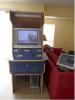
-
For now I've started with a theme called Game Ex by David Fr...... I'm tweaking it for my needs. Might look at something more personalized later but will get cabinet finised first.
-
Thanks - I was looking in wrong place
-
Yes, re-enabled and working. Got to work out a few items, install visuall pinball and complete the cabinet.
-
I've been having trouble with the kids using the GameEx interface and an Exit Button mapped to ESC. Basically you need the ESC to exit out of a game but its also used to Exit GameEX..... so sometimes they are pushing it when at a GameEx menu and then obviously it shutdown so only way of getting back is to show the taskbar and then start GameEx. So I'd like to either map GameEx Exit to something other than ESC or map Exit Game to something other than ESC (either should work) Was looking in the GameEX configuration and seems you can change other mappings but didn't see anything for this.
-
Well my issues seems to be resolved..... I took the Custom Menu out of the equation and my problem still existed. I tried a default profile and problem went away. So tried the original 'Game Ex' theme and problem was back, tried 'Custom Steel' problem was there and then tried TalkingBulls Arcade theme and problem went away. So I compared TalkingBulls theme.ini with my 'edited Game Ex' theme.ini. I reordered everything the line up to compare easier and nothing was different except version and some extra parameters. So I changed version from 4 to 2 and got a Game Ex error. I changed in back to 4 and thought I'd restart Game Ex before changing anything else and problem went away So no settings changed - just the order they are in and everything appears to be OK So now keeping fingers crossed. I've attached the v1 & v2 of the themes. Thanks for all the support! Theme v1.txt Theme v2.txt
-
Tried clearing cache files twice and still defaults to the logo and not the background. Just so clear this is s desktop capture. http://www.youtube.com/watch?v=I3SE5y_4dNk
-
Well, yes if I click on Change View it does indeed display correct background and logo. Problem is when I restart GameEx it reverts back to showing the Logo as the background..... is there a way to default it to the the View I want? Also I have GameEX set to start on boot (i.e. added GameEx to Start --> Programs --> Startype) but sometimes its starting minimized. Is there a way to ensure its always started full screen? Thanks for the help.
-
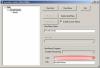
Hmmm - I think I've found whats happening. Seems whatever is selected as the 'Logo' is showing up as the background. If I leave blank it shows a folder.
-
Here ya go CustomMenu.txt
-
Yes, those seem to be set as you suggest. Attached is the GameEx.ini file GameEx.txt
-
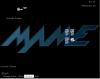
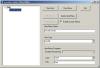
Thanks - that looks like what I need, However, I created a new menu with Item/Menu Name = Arcade Games Item Type = MAME Logo = mame Title = Start I'm using the 'Game Ex' Theme by David fr and using those custom settings breaks the theme. So is there a relationship between the Custom Menu Settings and the Theme This is how editor is set up (simple till I know what I'm doing ) And also whats happening on GameEx start up
-
How do I remove these from menu - Emulated Games - Multimedia - More Games & Programs - News I've been looking arounf the GameEx Advanced config but not located.
-
Great - guess thats path I'll take. Thanks.
-
Hmmm - bit disapointing. Hope something is developed. One thing - would I be right that if I only include my favorite ROMS in the ROM directory thats all that will show up in GameEX? And then if I want others later I just add back into the ROM directory and update list?
-
Sorry maybe a very noob question, did search and did not find answer. What I would like to have is a very simplified menu structure when GameEx starts Arcade Games - game 1 - game 2 - game 3 - etc Pinball Games - game 1 - game 2 - game 3 - etc More - All Arcade Games - All Pinball Games Idea being that my Favorite arcade & pinball games are easily located rather than scrolling thru thousands I did find this thread and did manage to set up a Folder with just games I want easily assessable but you have to drill down to MAME layer whereas I would like them on the first screen. Hope someone can point me in right direction. Thanks, Mark
-
Full Configuration Mame Package
BritInVA replied to ranzo's topic in FAQs, Guides, & Other Useful Information
Made great progess. The ROM rebuild seemed to work great, I've now installed MAMEUIFX and was able to play a game (albeit badly as was using keyboard - control panel parts on way). I've installed GameEx too but still got to finish setup. Cant thank you guy's enough!!!! Thanks, Mark -
Full Configuration Mame Package
BritInVA replied to ranzo's topic in FAQs, Guides, & Other Useful Information
Actually I found the great tutoral which seems to cover what I needed http://www.cphsolutions.f2s.com/guides/cmprotutorial.htm Basically other than not merging ROM sets it seems to have worked but only once I finish André's guide won't know. Be doing that later this evening so fingers crossed