



|



deadmanworking
-
Posts
13 -
Joined
-
Days Won
1
Content Type
Profiles
Forums
Events
Downloads
Store
Articles
Everything posted by deadmanworking
-
@scutters can confirm that now like in the older versions an entry is created/updated without "-". Thanks @Tom Speirs for fixing!
-
Small music bug in the frontend for first table only
deadmanworking replied to deadmanworking's topic in General
Hi Tom, thanks for getting back to me - startup sound is already disabled. Also this is not happening for the first table displayed after startup, but for the first table listed in the overall database (I think). I'm attaching two videos, one with 2 in 1 table activated, so this is the first table overall and it has no sound in the frontend. When I deactivate 2 in 1, Aliens becomes the first table and consequently loses audio (even though it was working right before.) Before I added the FP tables, it was the first table in the VPX listing (2001) without audio, this one is also working fine now. All table audio is accounted for and also working in the frontend as long as there is another table before it. Weird problem but also no big deal, I can happily enjoy the software anyhow, I was just wondering if this is known behaviour or if I'm missing something obvious here. Thanks! PXL_20250825_073518000.mp4 PXL_20250825_073621133.mp4 -
Hi guys, a somewhat weird issue came up, on my PinballX install I am not getting music in the frontend for exactly only the very first table shown. So for the longest time this was 2001 (VPX), then I added some FP tables and the 2001 suddenly had music again, but Aliens (FP) did not. Now it's 2 in 1 (FP) that's muted and Aliens is back to normal. Any idea why this could be occurring? Log and config attached. Thanks! log.txt PinballX.ini
-
Well! Now you caught me there, it certainly shouldn't feel too far fatched to look for the documentation on your own hard drive within the installation 😅 Anyway, thanks for pointing it out, I'm now all caught up on the program, just re-recorded all media for 850+ tables and the front end now looks exactly as I wished, happy user here 😊
-
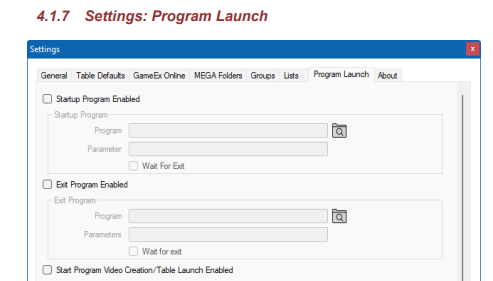
Hi Mike, I did check the available documentation, but the DBM manual is dated September 2022 and does not contain any information on the differences between using PBX vs. DBM recording modes, and the tab "Media Recording" is not shown in the manual at all, that's why I was struggling a bit with the differing behaviour between the settings. Is there a more current manual available somewhere? Anyway, thanks a lot again for your help and your great software, very much appreciated.
-
Hi Mike, success! After deleting the media by right-clicking and selecting delete I was able to record with DBM and the videos are now stored in the correct folder and correct orientation. Didn't think of deleting the media in the box since recording via PBX it would simply overwrite any media present. So while the recording process is ongoing with DBM I can now also see that the playfield is turned upside down while recording (which I assume is expected behaviour). Thanks so much for helping me out!
-
Hi Mike, yes I did try DBM recording as well, hitting test works as expected and identifies the screens correctly. However, if I select it and hit Create Videos, I get the following output: (even though Video is checked for playfield and backglass, and I removed the existing videos in playfield and backglass videos of Pinballx) MEDIA RECORDER : JP's Deadpool v55_VPX8 Started MEDIA RECORDER : Starting To Check If Media Recording Is Needed For JP's Deadpool v55_VPX8 MEDIA RECORDER : Nothing Found To Record For Table JP's Deadpool v55_VPX8. Skipping. WARNING : Something Went Wrong While Running MEDIA RECORDER. Please Check The Log File MEDIA RECORDER : Finished For JP's Deadpool v55_VPX8 Full log attached. Any idea? Thanks again for helping, very much appreciated DBManagerLog.txt
-
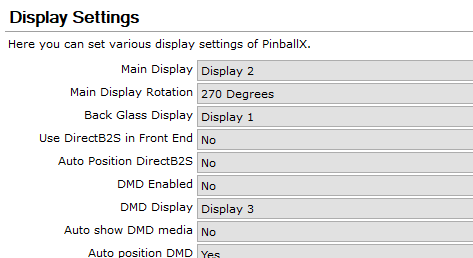
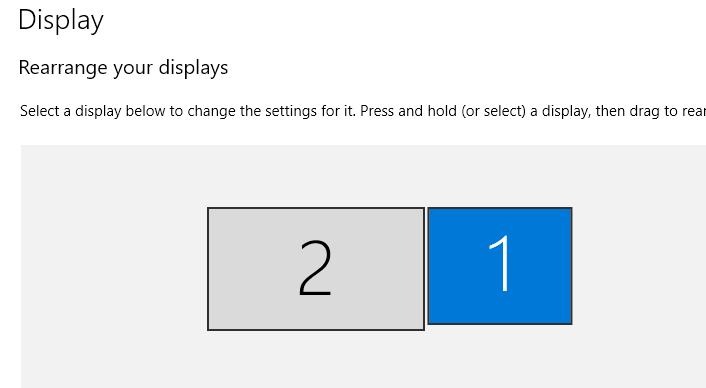
Hi guys, thanks for getting back to me! PinballX.ini and logfile attached. Mike, I already switched the displays in PinballX and everything is displaying in the correct spot when launching the program. Please see screenshot of PinballX settings and Windows display preferences. It's only when recording that I get the videos mixed up and also upside down, even though from the log and the ini it looks like theroretically it should match? (Backglass is display 0 and Table is display 1, idx=0 recording to Backglass Videos and idx=1 recording to Table Videos?) Any idea where the hiccup might be? Or is there a possibility to alter the syntax of the ffmpeg commands? Thanks a lot, Manuel PinballX.ini log.txt
-
Hi guys, running into another strange issue, I originally set up my pincab with playfield monitor as display 1 and backglass monitor as display 2 in Windows, but on numerous occasions (after unplugging the primary monitor) Windows would switch the order of the displays, which was cumbersome to correct with registry edits etc. So at some point I decide it to leave it in that order (so 2-playfield, 1-backglass) and simply switch the output displays in VPX (Screenres) and PinballX settings, which worked fine for the software, even for the PUPpacks and Virtual DMDs etc. The only issue I now have that recording videos from Game Manager or Database Manager results in the playfield video being placed in the Backglass Videos folder and vice versa, and both videos are rotated by 180 degrees. Can I edit the settings for video recording somewhere? I have tried looking in the settings for PinballX and Database Manager and found no solution yet. Thanks!
-
@Draco1962 OK sure, here's another example: table was added in November 2024 (without a "-" in title) and the current entry in Statistics.ini: [VisualPinball_Beavis_and_Butthead_Pinballed] dateadded=18.11.2024 20:31:45 description=Beavis and Butt-Head Pinballed lastplayed=17.07.2025 14:52:04 timesplayed=5 rom secondsplayed=273 favorite=True After launching PinballX a new entry (with "-" in title) is added to Statistics.ini and consequently updated, but the Statistics plugin and Database manager keep reading the older/first entry only. [VisualPinball_Beavis_and_Butt-head_Pinballed] dateadded=29.07.2025 09:19:49 description=Beavis and Butt-Head Pinballed lastplayed=29.07.2025 09:21:03 timesplayed=1 rom= secondsplayed=31 Log file of that PinballX startup is attached. Thanks! log.txt
-
@Draco1962 attaching my PinballX.ini file, unfortunately I don't have a log file from when I originally updated. PinballX.ini
-
Thank you @scutters. I have now checked the statistics files a bit more and I can see that after an update I installed on 29 December 2024, I got a whole bunch of new entries for tables that include a "-" in addition to their original entry missing the hyphen. (I do recall that this update (6.54?) was the last one that worked for me for a while, because installing later versions that came out in early 2025 were crashing the program during startup. When updating to the latest version in May that was fixed.) I also noticed that other special characters like [ and ] also trigger the same behaviour. Thanks for your help!
-
Hi guys, first of all thanks for this amazing project, I use it extensively on my minicab and it's absolutely perfect for my needs. I recently added the Statistics plugin and when displaying the last played, date added, time played and play count statistics I noticed that some tables would not display anything, even though the statistics would update in the Statistics.ini file. It would show: Last played: Never, Date Added: Unknown, Time played 00:00 and Play count: 0 After deleting old entries and generally looking for patterns I noticed that at some point this year PinballX must have changed how it writes entries into Statistics.ini: For tables added with an older version, it would omit any hyphen and write the table entry like so: [VisualPinball_F14_Tomcat_Williams_1987_VPW_Mod_10] But the latest versions seem to have changed this behaviour and are now leaving the hyphen in it, even creating a new entry in the ini file: [VisualPinball_F-14_Tomcat_Williams_1987_VPW_Mod_10] <== notice the "-" between F and 14 So any table's statistics that were stored under the latter scheme could not be read by Database manager and the Statistics. I can fix this temporarily by removing the hyphen in Statistics.ini to get a correct display in Database manager and the plugin, but when I next play the table a new entry (including) the hyphen is generated and added to the file, but still the old one is read. I guess I could rename all tables with a hyphen but maybe there's another idea how to fix this? Example here: [VisualPinball_CountDown_Gottlieb_1979] dateadded=27.07.2025 10:00:57 description=Count-Down (Gottlieb 1979) lastplayed=27.07.2025 10:01:55 timesplayed=7 rom=countdwn secondsplayed=450 [VisualPinball_Count-Down_Gottlieb_1979] dateadded=27.07.2025 11:18:50 description=Count-Down (Gottlieb 1979) lastplayed=27.07.2025 11:30:09 timesplayed=1 rom=countdwn secondsplayed=34
