|



ourgrace
-
Posts
90 -
Joined
-
Last visited
Content Type
Profiles
Forums
Events
Downloads
Store
Articles
Everything posted by ourgrace
-
open Advanced Configuration and goto "EMULATOR 3(pinball)" The third line down has a button labled "EXPORT" use that put a copy of YOUR ini in a folder then you can compare yours with mine -OR- open Advanced Configuration and goto "EMULATOR 3(pinball)" use the browse buttons to point to the folders an files for he following lines ROMPath (Tables folder) Working Path (Visual_pinball folder) Also Launch (vpauto.exe) Command Line (VPinball.exe) then add ( -play -"[ROMPath]/[ROMFILE]") It should look like: VPinball.exe -play -"[ROMPath]/[ROMFILE]" make sure your "Rom filter" line is set to *.vpt and your "ROMS in Folders is set to NO ourgrace
-
try pointing to the files and paths with the browse buttons in the configuration, and make sure you add any flags ( -play -"[ROMPath]/[ROMFILE]") this is a copy of my ini for vpinball compare it to yours. (use the export feature in the configuation) pinball.zip
-
can you send the last few lins of your log file again ourgrace
-
Does this work outside of GameEx? you could also try changing your command line in the GameEx configuration to: VPinball-XPFix4.exe -play -"[ROMPath]/[ROMFILE]" Let us know if this works ourgrace
-
Thanks Tom
-
I am getting an error when I select a optioin from the games or jukebox list on the left, i.e. By Name, By Catagory, By Title, By Artist ect. I tried different video drivers and reinstaled DirectX
-
Back on my cab now I am not having problems with the plugin now, I goofed around with it for about 2 hours (playing games, scrolling the lists, restarting gameex and restarting the PC) with no problems My brother and his kids are coming over tonight so I know it will get a work out. Bob
-
I loaded everything up on another system and tried it out, and this is what I got this time. System.runtime.Interopservices.Com exception (0x8004503A): Exception from HRESULT: 0x004503A at SpeechLib.SpVoiceClass.Speak(String Text,SpeechVoiceSpeakFlags Flags) at GameEx.Plugin.SpeakButtons(ControlsDat.control) Bob Well the punch card reader was old then, but the reel to reel on the mainframe wasn't. I still have some 5.25s in a box somewhere. Bob
-
Ok it seems to be working now! EDIT: it did work good a few times, but now I am getting the same error again System.InvalidCastException: QueryInterface for Interface SpeechLib.ISpeechVoice Failed at SpeechLib.SpVoiceClass.Speak(String Text,SpeechVoiceSpeakFlags Flags) at GameEx.Plugin.SpeakButtons(ControlsDat.control) Bob
-
Downloaded it again and the leds stay on in the game but the second or third game selected gives this error System.InvalidCastException: QueryInterface for Interface SpeechLib.ISpeechVoice Failed at SpeechLib.SpVoiceClass.Speak(String Text,SpeechVoiceSpeakFlags Flags) at GameEx.Plugin.SpeakButtons(ControlsDat.control) I wish I could help with that but its almost gibberish to me. I've been around computers since punchcards but always on the hardware side. LOL Bob
-
Headkaze This is what is going on now, 1. Go to all games list and scroll, the right buttons are lighting up. 2. Select a game and it lights up the buttons one by one and says the function. 3. Start the game and the buttons turn off 4. Exit the game and return to the list 5. Select another game and some times it lights up the buttons one by one and says the function, and other times it gives the error message. 6. If it doesn't give the error on the second game then on the third it does It doesn't seem to matter which games you choose, I did this about 20 times with different games. I also tried this on one of my other 'puters and got the same results A couple of other things, when I am in a game the leds are off, can these be left on? And when I scroll through favorites, the leds stay on when I "highlight" a none mame game Bob
-
Headkaze Im still getting the same error on some games. I didnt have time to play with it to much. Im off work thursday to sunday. I should have plenty of time then to do testing. Bob
-
Quixote Quest I have been testing this for headkaze, the computer I use for benchtesting is a amd 2400 I havent had any probs so far. this plugin is very cool looking on a cab after HK gets the bugs worked out I'm going to post a link to a movie file of this running on my cab. look for it Headkaze has done a hell of a job with this ourgrace
-
I know 1,3 and 4 work Ill do some more testing tommorow, Bob
-
Headkaze It's getting better, It seems to work ok on most games, but on some I get a error message "system invalid cast exception: query interface for query interface speachlib,Ispeach failed at speachlib sp voice class. speak(string text speach voice speak flag flags) at gameex plugin speach buttons(controls dat control)" or some thing like that Bob log.zip
-
I added my log to the last post
-
Headkaze I dont think the audio mode is working. The first time I selected a game from the all games list the buttons lit up and read the name off. then when I started the game the led turned off. after exiting the game and selecting another one, the leds and speach wouldn't work. Ill be in and out for the next few days so let me know what you need done and Ill get to it as I can. Thanks Bob Here is my GameEx log Log.zip
-
Try this to keep them from coming loose threadlocker http://www.loctiteproducts.com/products/de...153&PID=452 Bob
-
here is another video of the audio mode My video
-
Headkaze Ok, all is good with the audio mode. I didn't realize how sensetive the adjustment for the sterio mix out is, but it is working good now. I am thinking of changing all my led's to three color, is there some way to set the color of the buttons and controls to a certin color when lighting them up for the game being played, (I.E. only red). then using all the colors for the other modes? I'll post another clip of the audio mode today. Thanks Bob
-
Headkaze The buttons and controls all seem to light up the right way now. The Speak Control Actions feature works good except it stops on the last button/control, It would be nice if it would light the buttons and controls for the game back up. The audio mode flashes some of the buttons then lights them all up. it also turns the inside of the ledtest window red. (see post #40) Bob
-
Headkaze The buttons light up right now, and the 1-2 player and the coin lights are fine too. but none of the other controls work (trackball, dial, paddle, ect.). Thanks again for working on this, it really adds alot to my cab. Bob
-
Headkaze Here it is Bob LCD.zip
-
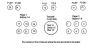
Headkaze I hope you can figure this out me and the kids are loving the looks of this cp. Anyway here are some of the outputs from ledwiz configuration, and which buttons light up. '88 games --------- SBA:224,24,224,0,2 --------------- P1 B6&8 P2 B6 19XX ---------------- SBA:192,24,192,0,2 --------------- P1 B8 MISSLE COMMAND - SBA:224,24,224,0,2 -------------- P1 B6&8 P2 B6 MORTAL COM 3 ----- SBA:252,24,252,0,2 -------------- P1 B3-6&8 P2 B3-6 Here is a diagram of my LEDWiz hookups
-
Headkaze the demo attract and audio modes seem to be working good, but I still cant seem to get the buttons for the games to work right. I'll get the video posted in a few minutes. Bob My video (edit) when I start the audio mode the area around the ledwiz turns red (see pic)