



|



Invincer
-
Posts
102 -
Joined
-
Last visited
Content Type
Profiles
Forums
Events
Downloads
Store
Articles
Everything posted by Invincer
-
User Submitted Themes & Media (Uploads)
Invincer replied to Tom Speirs's topic in GameEx Media Projects
Okay then, that's cool Tom; I will release it in parts, the first basic components the end of this week (background animation, intro, sounds, basic pics); then tweak and maybe release a part each week. Depending on what parts anyone wants they can download their preferences. I may do the vote thing later and offer the main background in the various highest vote getter styles to give people choices if you want to host the backgrounds. I only ask that when I upload to you that you and maybe a select few test it to make sure it will work fine for everyone else. This is my first big theme making attempt here, and I can only test it presently on my big screen HDTV. -
User Submitted Themes & Media (Uploads)
Invincer replied to Tom Speirs's topic in GameEx Media Projects
Ah, thanks! Glad to see some folks liked it (especially GrandGameExMaster Tom himself!) Sure, you can put it on youtube or anywhere else you want to. I have made a couple changes and am continuing to work on it. Got a little sidetracked this weekend though when I updated my Video drivers and now my whole Windows desktop screen is about a cursor width too high and low and too far left and right from the edges. Irritating as all get out, but can't find a fix or anyone else with the prob. Using a 72" HDTV, and there is no TV vertical or horizontal resizers. Oh Well.. Finally getting my cab next week, that's the good news. The Theme is now a bit more detailed than you saw on the video, as there is a different tunnel for each of the animated areas (emulation, jukebox, videos, pictures, MAME, Daphne). It might be better to let you host it in pieces depending on how detailed people want to get with it... Maybe basic is the theme and background animation and pics and sounds. Then part two; multimedia video images for selection. Part 3, Basic Gaming video image selections. Part 4, gaming background animations (MAME, Daphne, Emulators). Part 5 Multimedia background animations (Videos, Jukebox, Pictures. Starting to work on the individual gaming video animation selections this week, that will be a project, but it could be released as add-ons if wanted if going this route. Otherwise, the whole thing will wind up being like a 2 gig download when it's finished... What are your thoughts or ideas? I have about 20 or so tunnel type HD animated backgrounds I am using here. What do you think of an idea of posting a video with about 5 seconds of each, and having votes for which ones people liked best to use in the theme? Just an idea... -
User Submitted Themes & Media (Uploads)
Invincer replied to Tom Speirs's topic in GameEx Media Projects
Hi guys, I was loving some of the flashiness of HyperSpin, but not wanting to give up the styles and features and ease of use in GameEx. Wasn't really crazy about most of the themes available. So a few weeks ago I went about trying to kill 2 birds with one stone. Teach myself how to use Adobe Premier Pro and create a flashy theme with background avis and avi selections for categories. I used and borrowed from many places and created some things from scratch. Anyways, it isn't finished yet, but you can definitely see the style I am trying for. I made a preview video with fraps which came out humongous for a 17 minute file. Tried dubbing it down and then winraring it, but it is still 170 megs in a half size 50% quality video. Any suggestions on compressing it so people would have an easier time downloading it? Any suggestions would be appreciated. If people want me to upload to the themes section, I will be happy to when finished (depending on if there is a size limit, because it is big). It would include my custom menu mapping too since the categories take advantage of customization for grouping as well if you would want to use some of the avis. I would hope to have some testers first since it would be so big. For anyone downloading and viewing the TunnelVision theme preview, the theme itself is in 1024 x 768. In looking at the preview tell me what you like, what you don't like, what might need changing so far, etc...Thanks! I wouldn't want to kill Tom's bandwidth considering the file's size, so I uploaded the rarred avi preview to my website temporarily... TunnelVision Theme Preview -
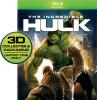
Yep, this is what it automatically gave me for "The Incredibles". Not a big deal though since I know where it is and can sinply replace it manually...
-
That is the problem then, they are ISOs in the "DVDs on Disk" category. Is there a way then to make the DVDs on disk pick up two images like in the emulators? I could download previews and use them if I know where I can put them where they can be picked up by GameEx. The boxart is a bit better, about 50% I am finding (The incredibles returned an Incredible Hulk box and if I rename some things I don't expect it to find them ie renamed all Lord of the Rings movies to start with just LotR since the titles are so long). No big deal though, Knowing where the boxart is picked up at I can just download the appropriate ones from Amazon so they match correctly. As a sidenote, what about previews of eBooks? I have tons of comics in crb and crz formats and it would be great if GameEx could pick up the first image as the cover for displaying. If there is a folder it will recognize I could store an image of the cover for GameEx if needed; if so, where should the folder be? Thanks Tom! I do not understand at ALL how Maximus Arcade could get a higher ranking. Although I would bet it is because many of the Maximus Arcade users either have never bothered trying GameEx, or they don't like change and are stuck in their ways, or they need their heads examined. I could see how HyperSpin gets so many votes for style, but not for substance. I have been making my own theme in GameEx over the last few weeks which I really like. Lots of animations on custom menus that in my mind stands up fairly well to HyperSpin but this way I get the full features of GameEx.
-
Quick question... where is GameEx pulling the boxart/descriptions from? Thanks P.S. preview videos for my DVDs on Disk still don't play like they will on avi videos; tried different codecs, out of ideas... at least want to make the boxart and descriptions accurate for the ones that are not, so I can just maybe go online to the site it pulls them from and manually add them (I hope)
-
H Tom, Well for some reason, the problem still exists. I went through every theme on GameEx and none show a preview or boxart for "DVDs on Disk" ISOs. Also, after upgrading to 10.08, and seeing the notes that said "Fixes removable media insert detection" I thought that may fix the issue where every ISO I try to start in GameEx instead will start the movie DVD from the DVD tray if one is already in it. If the movie is ejected prior to starting GameEx, the selected ISOs start appropriately.
-
about halfway through creating my own. Having individual pages with avi backgrounds; may be my fault though because I have not done anything with that page yet individually, so that may be why they aren't displaying (videos were fine, so i didn't think the different theme page could be why). Will change themes when I get home to check and see if they work like the video ones..... (any chance of genre categories or folder support being added in the future? Also something that would be cool is an automatic movie intro. People pay big bucks from what I have seen online to create their own movie intros for home theaters (baah, I do my own). But the point is you could have a choice in the advanced menu asking if you want the movie intro on or off for videos and DVDs on Disk (and regular DVDs possibly). Then you could maybe have a cool GameEx movie intro as the default which could be edited if people wanted to use their own (maybe make the ability to use their own a paid subscriber feature). Just some thoughts, and thinking out loud. I know, that should have just been added to the requests forum thread probably...
-
Okay, got it working. Had to try the Cyberlink Video/SP Decoder (had a couple different Cyberlink codecs in there). Then every time I started, regardless of which ISO was selected, it would play the DVD in the drive. ??? That one really through me for a loop... Had to make sure both DVD trays were empty for it to work. But is it supposed to work at all like the Videos category? Because there is no preview, no DVD box art, and no folder structure (wanted to put them into categories like in AVI Video section).
-
Hey Tom, I am sorry. I guess I don't fathom how this is supposed to be used appropriately. The avis in videos work fine, but when I put DVD files in the DVDs on Disk it returns to GameEx when I try to start. From a previous post it was mentioned they should be ISOs for that area. Same thing though, returns back to GameEx screen like when trying to start a game that isn't configured right in an emulator section. In the advanced config it is on for DVD from Disk, and I haave tried multiple codecs...
-
Okay. Going to try to go through the effort of putting DVD files to HD (hate all avi quality in conversion processes, want to customize DVD files too so transfer to HD first) , then having to convert to ISO so GameEx can read. But when I try this, GameEx is not reading. Anyone else having issues with the DVDs to Disk features?
-
Oh I registered the first day I used GameEx. But the DVD on Disk feature takes 2 minutes to load the menu page, and it supports only ISOs, not IFO menu files like on the DVDs. I don't want the whole DVD, just the movie parts, with IFO reading you can customize what you want from the DVD (maybe even include your own intro to start a movie if you wanted to like mentioned previously). It would be like the best of both worlds. Customization like when ripping AVIs, but with the full DVD quality of the real DVD VOB files...
-
Any chances of increasing the kinds of video formats in the future? I have tried and tried and just can't find a way or format I am happy with when converting a DVD to an AVI. I can dump the DVD to the HD and launch the identical quality movie by IFO file (or the VOBs directly). I would love it if GameEx could treat IFOs like AVIs (play the, preview the vid file, show DVD art... Also... would be cool if the launching of videos or DVDs could prelaunch a short intro avi or mov file. This would be great for people using GameEx on their home theaters and if they have a personal movie intro. Just a thought...
-
Any GameEx forum readers here have any experiences they can share about Dream Authentics? Everything I have read about them seems to be good from news articles to testimonials. But I am beginning to get anxious and a little bit worried. I had them start building a tricked out cab for me over two months ago, and admittedly, I wanted a lot done to it, more than I know I would have been able to do myself (thus the reason for using them). Originally it was planned to be finished early Apri, but then I wanted them to also include multi colored LED buttons so I can use GameEx's plug-in; and knew that may take a bit longer, more work, etc.; but here we are in May and I get few updates from them. A few weeks back they said end of April, last one two weeks ago said some time in May. I just want to know what experiences any of you have had with them, if any; and whether they have been good or bad. Thanks.
-
Okay, will update every few days; added breakdown in my edited first post of choices, and a chart... (still wish we could put like 1 question, 60 choices though)
-
True enough... What I really wish is that I could put up the poll with 60 emus, and people could not only vote on the most important or recommended emulators, but weigh the choices as like 1st, 2nd, 3rd, 4th, etc. Then possibly give us the weighted results. Any options for this in the forums controls Tom? If not, would anyone like me to find an online poll results/posting place to put it up where people could vote?
-
Oh well, this may not work so well. In practice it makes me vote for at least one of the choices in each of the 3 groups (whether I want to or not), and in looking at the results by percentage points, since it can't be one question the figures will be way off. Tom, is there any way to edit the "only 20 answers allowed" part of the polls in the forums??
-
UPDATE: Due to how the votes are only allowed through 3 questions, the percentages above are incorrect, so I will periodically update the rankings here (unless the number of vote answers allowed is increased)... 1st: MAME (by default of course) 2nd: Project 64 (Votes:8) 8.89% T 3rd: Future Pinball (Votes: 6) 6.67% T 3rd: ZSNES (Votes: 6) 6.67% T 3rd: Kega Fusion (Votes: 6) 6.67% T 6th: MESS (Votes: 5) 5.56% T 6th: Stella (Votes: 5) 5.56% T 8th: nullDC (Votes: 4) 4.44% T 8th: Daphne (Votes: 4) 4.44% T 8th: Visual Pinball (Votes: 4) 4.44% T 8th: ePSXe (Votes: 4) 4.44% T 8th: psX (Votes: 4) 4.44% T 13th: WinUAE (Votes: 3) 3.33% T 13th: DOSBox (Votes: 3) 3.33% T 13th: MagicEngine (Votes: 3) 3.33% T 13th: FCE Ultra (Votes: 3) 3.33% T 13th: SSF (Votes: 3) 3.33% T 18th: VisualBoyAdvance (Votes: 2) 2.22% T 18th: FreeDO (Votes: 2) 2.22% T 20th: ZiNc (Votes: 1) 1.11% T 20th: Mednafen (Votes: 1) 1.11% T 20th: WinArcadia (Votes: 1) 1.11% T 20th: Sega Model 2 (Votes: 1) 1.11% T 20th: ScummVM (Votes: 1) 1.11% T 20th: Jum's 5200 (Votes: 1) 1.11% T 20th: 02EM (Votes: 1) 1.11% T 20th: Meka (Votes: 1) 1.11% T 20th: UNZ (Votes: 1) 1.11% T 20th: Nostalgia (Votes: 1) 1.11% T 20th: VirtuaNES (Votes: 1) 1.11% T 20th: Snes9x (Votes: 1) 1.11% T 20th: GENS+ (Votes: 1) 1.11% T 20th: PCSX2 (Votes: 1) 1.11% T 20th: CCS64 (Votes: 1) 1.11% I wanted to start a poll like this for a couple of reasons; but it is very dependent on a lot of you voting and giving your thoughts. I tried this on arcadecontrols forum, but had little response from the oldschoolers. I am (im)patiently waiting on my custom Sting arcade cabinet from Dreamauthentics, and I have set up many of the emulators on GameEx on my TV on a 1.5TB HD and will just transfer it over to the cab. In planning my work on the cabinet, I want a gameplan of what to work on in what order for setting up the emulators and games. With so so many working systems through so many emulators to choose from, this would be a good roadmap I think. It would help show what order to start in, what emulators are considered the best rated, the most efficient with GameEx, the preferred emulators per system, etc by the GameEx community... at least that is what I am hoping for as I plan out my roadmap of work. So, "let's get out the vote"... (Ughh, I had hoped to not have to hear, much less say, that phrase again for another 3 years) Unfortunately, in these forums I am only allowed 20 answers, so i broke it down into 3 polls as groups. You can vote for multiple emus, so scan through and make your votes amongst the 60 choices If you feel i left off a choice that should be there, then let me know, and recommend any you think should be taken off if you think no one uses it. Thanks!!!
-
Feature & Enhancement Requests
Invincer replied to Tom Speirs's topic in FAQs, Guides, & Other Useful Information
I think GameEx excels above and beyond every other frontend out there considering it's ease of use and numerous features. If there was any one weakness or area it is a little stale in (reminded of this by another post); it would be in the area of themes. The ones available range from not bad to good; but none will really knock your socks off. I have tried a mishmosh of the themes to get something I like, but would really like some good selections out there to choose from... Some suggestions for GameEx (in addition to the "need more themes request to any theme makers out there) * The ability to choose "random themes", kind of like we can have random intro videos by putting multiple one in the intro folder. * Maybe the ability to have random page backgrounds for each selection in GameEx * The ability to choose which folder is the "2nd" image folder on theme backgrounds * Maybe the ability to create specific themes for specific games * Random or selectable transition effects from one selection to the next ... Just some ideas, what do you think? P.S. A plea once more to the theme makers out there... how about some themes with avi type backgrounds? Hyperspin has their flash style themes, but GameEx can actually have avi videos as the background... why is it there are such few selections using it? Again, just some requests and recommendations here and by no means a criticism. -
So how well does GameEx 10.04 coexist with Wife 1.0? They each try to use the most RAM? I always find with Wife 1.0 it is better to partition memory for "selective memory" usage sometimes. I guess the good news for Wife 1.0 is that with GameEx 10.04 and Cab1.x there won't be enough resource usage left to run many versions of PokerNight 10.3, BeerBash 2.5, and PubNight 7.0. Wow, did I sidetrack my own thread in the very beginning or what??? The point of the thread (which seems almost lost now) was to ask what applications and news sites is everyone running in their cabs? What are suggestions for great ones to run with GameEx on a cab. Anyone? Everyone?? Thanks....
-
Before the menu customization feature, it wasn't something I worried about; but now I am wondering if this is a bug for everyone or something maybe only I am experiencing. Even though in the gameex ini you can add a LOT of emulator entries (255???); on the advanced config menu, it only goes up to 62 and stops there. Using the ini I am up to about 88 now and would much rather do them in the adv config menu. Now that we have menu customization, I have my PC games in separate emus for the menus. Is it just me where the menu stops at 62, or is this a known issue? Thanks...
-
ROFLMAO!!!!!!
-
I had been going back and forth trying to install/tweak GameEx and HyperSpin. It was like trying to decide between two women. On one hand, you had GameEx... the perfect wifey material type girl, the one who can do almost anything and everything. Not the perfect looker, but fine in her own right (not at all homely), and she was fairly easy to satisfy and not too high maintenance. Then there was HyperSpin. Vavavoom in the looks department, looks like a model, all the guys look at her as she goes by, etc. But she was EXTREMELY high maintenance, it was difficult to get her to do anything but look pretty, and as much as you might "want" to marry her, she just wasn't "wife" material over the long haul it seemed. Then Tom created GameEx version 10 with menu customization. The choice was made for me... It was like the GameEx wife candidate went out and had a makeover. Although she may never look as good as HyperSpin, now it is like she has learned how to be even more accommodating than before. So fine, I will marry her to my cab... I may still look at hyperspin as it walks by every now and then, but in addition to it's looks i will remember the wasted hours and finicky behavior it exhibited, and I will be happy with what I have in GameEx. Now that I have been doing the menu customizations I am ready to play around with some of the extra features like the News feature and the Application set ups. My question is this (long winded, I know)... What are some of the best applications and news sites or feeds for mapping to GameEx on a cab? I know many of you have probably used these features and I would love some suggestions. Thanks in advance!
-
Working! It was the zips. I have had to turn them off before to stop the graying out of the name; but on Raine, since all roms were zipped, I thought zip should be on. On other emus I have had zip probs and simply unzipped all games/roms; turned off zip feature and worked. I just thought on this one like Mame they had to be zips and zips needed to be on as a feature because of it. Live and we learn Thanks!!!
-
[Emulator_37] Enabled=True STARTPAGENAME=Raine TITLETEXT=Raine StartPageLogo=Raine ROMFilter=*.zip RomPath=I:\ARCADE\raine\roms SnapPath=G:\MAME\Movies TitlePath=G:\MAME\titles BoxPath= CartPath= ManualPath= ControlPanelPath= WorkingPath=I:\ARCADE\raine\ MapKeys=True WaitBeforeKeys= SendKeys= ReplaceDash=True ReplaceUnder=True Capitals=True RemoveBrackets=True ShowDesktop=False Debug=False MAPFile=C:\Program Files\GameEx\MAP FILES\[Arcade] Raine.map AlsoLaunch= Command=raine32.exe -n -game [ROM] OLDatZip= LaunchBefore= LaunchAfter= configFile=[Mapping Off] Exit (Process Close) ExcludedFiles= CustomBackground=Raine.png PlayMusic=False DontShowInfo= PlaySelectionMusic=False SelectionMusicFolder= PCGame=False DATABASE= GamesIn7Zips=True PlayInScreenSaver=False ShowMostPlayed=True RandomMostPlayed=True CDCheck=False CDCheckFile= RomsInFolders=False InstructionsPath= UseDbName=True MergeSets=False CustomArtName1= CustomArtPath1= CustomArtName2= CustomArtPath2= CustomArtName3= CustomArtPath3= lastgame= I have tried with database pointing to mame also
