|



SixOfTwelve
-
Posts
42 -
Joined
-
Last visited
-
Days Won
1
Content Type
Profiles
Forums
Events
Downloads
Store
Articles
Everything posted by SixOfTwelve
-

PinballX Enhancements/Features Requests
SixOfTwelve replied to Draco1962's topic in FAQs, Guides, & Other Useful Information
A humble feature request for future versions: Would it be possible to add an option to turn off menu visibility as long as an instruction card is visible? I've had people confused on what to do (namely, press exit to quit the instructions) because they think the menu is still operable (it's visible, just not responsive). Or perhaps an option to display an overlay of choice (even if it's just a black screen) while the instructions are shown? Thank you! -
I've noticed a few of my visitors are confused with one aspect of the menu handling in PinballX. Navigating with LEFT and RIGHT FLIPPER, pressing START to activate a menu and EXIT to cancel comes easy to most. When flyer images or tutorial videos are shown on the backglass, it's also fairly obvious that you can quit them with the EXIT button. What tends to confuse people is that when instruction cards are displayed, the whole menu is still visible on the playfield, and rather than pushing EXIT, they try to continue navigating with LEFT and RIGHT, trying to select an item from the (now unresponsive) menu. Is there a way to turn off menu visibility as long as an instruction card is visible?
-
Random PinballX freezing on exiting VPX 10.7 tables
SixOfTwelve replied to scutters's topic in General
Got finished earlier than I thought and was able to test it. No change for me either, and as soon as I switch to exclusive fullscreen, PinballX does the "freezing on exit" again. -
Random PinballX freezing on exiting VPX 10.7 tables
SixOfTwelve replied to scutters's topic in General
I'll be able to try tomorrow, but seeing as I exit Visual Pinball via a script that kills the vpinballx.exe process, I'm not sure how much help my findings will be. I will report back though! -
Random PinballX freezing on exiting VPX 10.7 tables
SixOfTwelve replied to scutters's topic in General
After some more testing, I think I can say that that it was definitely turning off exclusive fullscreen mode in VPX that did the trick. Weirdly enough, it never made trouble before. Maybe a Windows update changed something in the way my graphics card handles things, I don't know. -
Random PinballX freezing on exiting VPX 10.7 tables
SixOfTwelve replied to scutters's topic in General
I think I may have cracked it: The error doesn't seem to occur when I launch my VPX tables in windowed fullscreen instead of exclusive fullscreen. I've been testing random tables (scripted, VPinMAME, with DMD and without, with Pup-Packs and without) for the last 45 minutes without any issues. Of course not having exclusive fullscreen may lead to the problem of some tables not having focus when they start up, but that's easily fixed with a script that watches for the "Visual Pinball Player" window and activates it if it's not on top. I'll keep the thread open for a bit longer while I do some more testing. -
Random PinballX freezing on exiting VPX 10.7 tables
SixOfTwelve replied to scutters's topic in General
Got another weird one: PinballX will randomly freeze after I close vpx tables. I tried running PinballX in windowed mode to check for error messages, but there is none. It just stops working, stuck on the loading animation. Event viewer simply tells me the program has stopped communication with Windows. I first noticed the problem on tables that utilize Pinup Player, but now it seems other tables are affected too. The problem seems to affect newer tables rather than older ones. Future Pinball tables that use the PuP Player will exit back to the menu normally. So will all other emulators I've set up. It seems to be purely a VPX issue. The tables launch without errors from VPX standalone, and will close back to windows without issues. From day one I've had the problem that Esc doesn't close VPX for me from out of PinballX, so I wrote a start script that on Esc kills pretty much everything that VPX could reasonably start. I've attached it as pinkeysx.ahk . Things I've already tried: - deleted the temp folder - reinstalled latest version of PinballX - reinstalled latest version of Pinup Player - reinstalled latest version of Backglass Server - reinstalled latest non-beta version of VPX (10.7.0) - installed latest Windows updates - checked VPX, PinballX, VPinMAME and Backglass Server exe files: None of them are running as admin, none are set to compatibility mode. I'm at my wits' end. A few days ago, everything was working fine. I can't think of anything else I changed, apart from applying the 4GB patch to the Backglass Server exe in order to run the newly released Wizard of Oz table. But after my problems started, I copied back the original exe. And at any rate, I reinstalled and re-registered the backglass server, so the new version is unpatched. Another issue I've noticed, which may be related to the problem: When I restart PinballX after a crash, the starting game will NOT be the one I last exited successfully (in my case, "Alle Neune"). I don't know where PinballX is pulling this game from. Even weirder, if after the restart I start a VPX table and am able to exit it successfully (in my case "AC/DC"), the PinballX menu will NOT display AC/DC after exiting the table, but "Alle Neune" again. Maybe my database is corrupted? If so, are there ways to fix it? Speculations: - Is the database corrupt? To test this, I added an additional system named "VPX Test" which also runs VPX tables. This leads to the same crashing problems, leading me to believe that the database isn't the problem. - Not enough memory? My system is an i7 with 8GB of RAM, running in cab mode with 3 screens, no LED toys or similar, just a VirtuaPin plunger. I have ample hard disk space left. I could see that maybe RAM may be an issue, but until a few days ago, everything was running smoothly. Then again, I have just cracked the 300 tables mark on PinballX. Could that affect things? log.txt PinballX.ini pinkeysx.ahk -
For what it's worth, I built an AHK script that rotates my playfield to portrait mode when I press a certain key combination and back to landscape when I press another. For some reason, the often-quoted ctrl+alt+arrow keys didn't work for me. I also have a NAS share mapped, since I tend to do my downloading, my frontend graphics/videos and my table sound editing on another computer with a comfortable chair. And - at least while I'm still in the process of setting everything up - I have a wooden board wrapped in a bright pink towel that I can place on the playfield without scratching it. It's just the right size for holding my keyboard and mouse. It's a totally ghetto solution, but it works. Feel free to mock mercilessly.
-
[Resolved] Text at the bottom of the screen is suddenly missing
SixOfTwelve replied to SixOfTwelve's topic in General
I don't rightly remember, to be honest. Hitting the exit key didn't always work for everything (especially older Windows games and similarly exotic stuff), so one day I switched to adding the AHK scripts for certain systems and it just worked. Never thought to question it, never had the time or the nerve to change it (shrug) -
[Resolved] Text at the bottom of the screen is suddenly missing
SixOfTwelve replied to SixOfTwelve's topic in General
Kids are the best beta testers though, because they do things that would never occur to you! A game crashes the frontend because the kid is impatient and presses the exit key five times before the game has loaded properly? Time to finally add BlockInput commands to your AHK start script. -
[Resolved] Text at the bottom of the screen is suddenly missing
SixOfTwelve replied to SixOfTwelve's topic in General
I'm using a 1TB SSD that's not even 25% full, so disk space was never the issue. My guess is that either me or my kid must have crashed PinballX at some point, and that may have created corrupted temp files. -
[Resolved] Text at the bottom of the screen is suddenly missing
SixOfTwelve replied to SixOfTwelve's topic in General
Clearing out the temp folder did the trick! Thank you so much! -
[Resolved] Text at the bottom of the screen is suddenly missing
SixOfTwelve replied to SixOfTwelve's topic in General
Date and time don't shop up either. BUT! As soon as I switch to windowed mode, the text (scrolling as well as date/time) shows up, so it's some kind of problem with the full screen mode. Also, it doesn't matter if I go windowed or non-windowed fullscreen, the text is still invisible. Windowed: Full screen: -
[Resolved] Text at the bottom of the screen is suddenly missing
SixOfTwelve replied to SixOfTwelve's topic in General
Thank you for your reply. Other text (for example when starting a game) is displayed normally. Could it be a DirectX or VisualC++ issue? I've recently added a few old (i.e. originally intended for Windows 95/98/XP) games and their installers sometimes included old versions of the runtimes. Could those have overwritten something? Also one of the games (Adventure Pinball: Forgotten Island) needed a 3DFX wrapper (https://www.zeus-software.com/downloads/nglide) - could that have screwed something up? EDIT: Installed a Visual C++ all-in-one pack (https://www.techpowerup.com/download/visual-c-redistributable-runtime-package-all-in-one), installed the latest Windows 10 updates and did a complete reinstall of PinballX. No change so far. -
I don't know when exactly this happened, because I generally don't pay much attention to it, but it seems the text that scrolls past at the bottom of the menu ("Featuring xx tables" / Name of the current game / " Free Play" and all that) has disappeared. I'm using a 3-screen setup: 1920x1080 playfield, 1600x1200 backglass and 1024x600 DMD screen. Certainly didn't have the problem a few days ago, but I can't pinpoint exactly when it happened. Other than that, PinballX is running perfectly, with VPX, VP9, FP, MAME, Windows games and RetroArch happily coexisting. Not sure about the version number since it's not being displayed anymore, but my pinballx.exe is dated 21-03-2022. I've attached the PinballX.ini and log.txt - if anything else is required I'll gladly supply it. Thank you! PinballX.ini log.txt
-
PinballX Enhancements/Features Requests
SixOfTwelve replied to Draco1962's topic in FAQs, Guides, & Other Useful Information
Actually, what @scutters suggested is a relatively good trade-off. I'm losing the plain text, but 99% of the wheel images are readable enough so it's not a problem. Also, the plain text title is always visible at the bottom text bar, so it's a really good solution for me. Thank you both for your replies! (Also sorry about the state of the cab in the pictures, it's still very much under construction)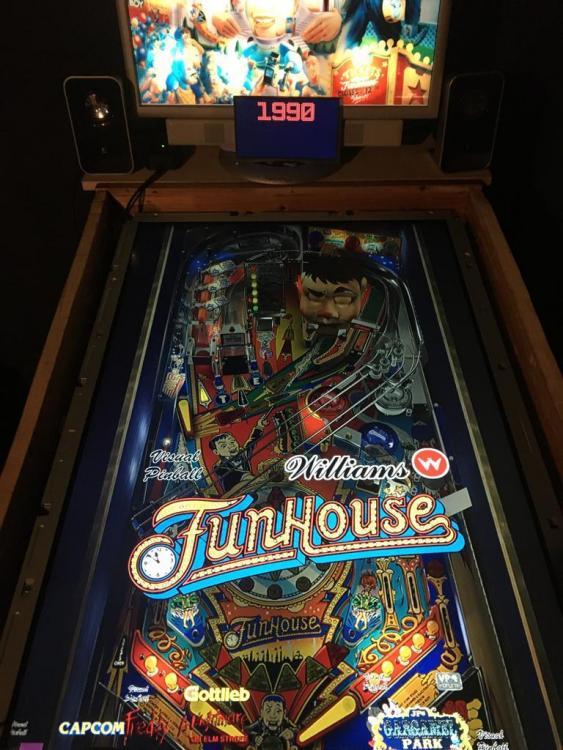
-
PinballX Enhancements/Features Requests
SixOfTwelve replied to Draco1962's topic in FAQs, Guides, & Other Useful Information
Hi, relatively new user here, so this may have been answered already (or I'm just too dumb to find the search function in this forum): Two questions/requests: 1. Is there a way to center the text and graphics in the display window? I use my DMD monitor to display the production year, so all I want in the main window is the title, the system logo and the company logo. However, since it's all left-justified, it doesn't look as nice. A way to select the placement of the text and image elements would be great. 2. Can we add an extra keypress option for Flyer Display, like we have for the Instruction Cards? I have a separate "info" button to show the instruction cards on my backglass monitor. I also want to keep my cab menu as simple as possible (no "last played", no "add to list", no ratings, no favorites), so the menu is configured to launch the table immediately upon pressing start. I'm thinking it may be nice to add another "flyer" button to show the flyers. Alternatively, how do you call that function from an .exe file? I could easily rig up an AutoHotKey script if I knew what to trigger. Thank you!