



|



magenois
-
Posts
30 -
Joined
-
Last visited
Content Type
Profiles
Forums
Events
Downloads
Store
Articles
Everything posted by magenois
-
oh nice 😊 Do you mind sharing on how you got GameEx to launch without the window manager? I should get back to my project sometimes next week. I was able to get all the 15khz resolutions to work fine.
-
I appreciate the testing. I had to put my project on the backburner for a little while. I'll try that when I get back to it. Thanks Tom!
-
The latest version work perfectly. thanks for the quick update! I'll have a look at this. thanks for sharing.
-
Thanks very much Tom!
-
Thanks Tom. I am doing testing at the moment with Windows 10 if I can get 15khz resolutions to work so I can keep on using GameEx following my hardware upgrade. I have a brand new install of windows 10, I have installed the latest version of GameEx. When I launch GameEx I have the following error. I assume it's a missing dependency but cant figure which:
-
no. I have looked in the directory where I have Gameex and into the subdirectory, nothing. Edit: If you want me to do some troubleshooting or test more recent builds, let me know how I can help.
-
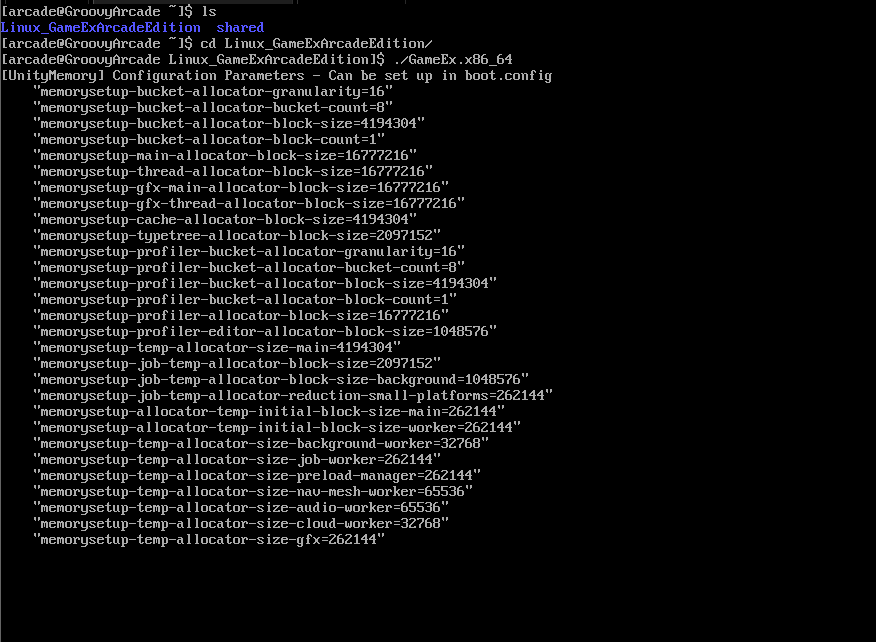
I did a quick test and no luck. I get this output then it stuck there forever.
-
My CRT is triple sync so, on windows at least, I ran GameEx at 640x480p and when launching a game groovymame would switch the resolution to the original game resolution. GameEx is looking good at 640x480 at least on the version I have. I haven't updated in many many years. Not sure about running 15khz resolutions on Windows 11. I would have to make some research but I really want to ditch windows. With XP we could hide it quite well but I'm not sure we can do the same with recent versions. I might as well wait until the multiplatform version of GameEx is ready.
-
Hello! I built my mame cabinet in 2010 with Windows XP, Soft15k and GameEx. I am using a wells gardner D9800 27" arcade CRT monitor. Now, I need to do a hardware refresh (new mobo and cpu) and I would like to use GroovyArcade as the operating system this time. It's a customized version of Arch Linux with patches to support arcade CRT native resolutions. I would also like to continue using GameEx as my frontend. The only emulators I am using at this time are mame and daphne. What's the best way (if there is one at all) to run gameex on groovyarcade? The multi-platform version of gameex is still in alpha so I dont think it's wise to use it at this time. Anyone has been successful in using gameex on groovyarcade? thanks in advance!
-
hello I havent had the time to test this until today. I can confirm that this procedure has fixed the issue on my cabinet. Thanks very much for sharing!
-
Thanks for sharing! I'll give it a try. Will this resets my favorites (I cant remember in which database they are stored)?
-
I did a full uninstall/reinstall of GameEx. The only thing I kept was my .ini file to preserve my settings. I see the same issue with the latest release of the 5 files discussed above. The vast majority of the ROMs will show the right information but some of them will show game information from a different game. At least I am not the only one seing this I will just keep on moving on configuring my new PC and wont bother with this issue anymore.
-
I'm going to try the uninstall/reinstall method later on today. Will report back. If it doesn't work, I will simply disable this feature and move on. thanks again for the help
-
I noticed the issue first when I was using the latest files of the "extras". The files I had were "0.171" release. I can try again with 0.170... what are the right sources for these files, there seems to be multiple sources, some "official" some less official?
-
yes I did double and triple checked everything. I tried with the most recent version of those files and went back to the ones that are shipped in the gameex installation package.
-
I did some more research and troubleshooting. The game description displayed is coming from the file history.dat. What I found is that all of my roms that don't have corresponding description entry in the file history.dat will show a random description in GameEx. The issue do not happen at the display time (ie. when gameex display the game info) but rather when the game list update process happen. If I look in the gamelist.txt, I can see the line for the rom and the wrong description beside it. Can anyone else try to repro the issue? find a ROM you have that doesn't have a description in history.dat and see if you have a good description for it in gamelist.txt or in GameEx MAME game list menu? I don't know what else to try. Looks like a small bug in the game list building process to me. I don't remember having this issue on my "production" PC in cabinet which is running GameEx 11.xx thanks!
-
I am already using MAME 0171 from mamedev.org. I will switch to groovymame when the PC will be in cabinet but for now I am still using a "stock" mame. I would be very surprised that the theme would have any influence because if I look in the gamelist.txt file that is built by GameEx I can see the bad entry, ie. for the example above I see the line for "lasso" but with the description of "crush roller"
-
Hello I deleted those 5 files (catver,history,nplayers, command and mameinfo) and re-installed GameEx. The versions of those files contained in the gameex installation package are somewhat older but I wanted to start from scrath. I rebuilt my game list. The issue is still present, however less widespread than with the previous files. By randomly browsing in the game list, it took me about 20 hits to find an occurrence. See below. "lasso" is being described as "crush roller"

-
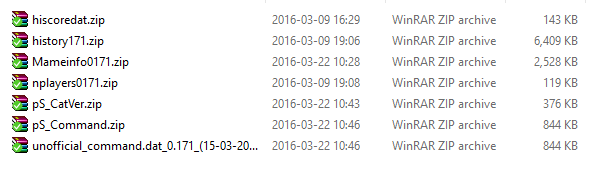
Confirmed. I have the 0.171 release of all those files. My mame version is also 0.171. Here is a list of the files on my hard drive and also below a screenshot of the source I used for the files.
-
Attached. Thanks! Let me know if you want a log file of a game list rebuild log.txt GameEx.ini
-
I downloaded the mameinfo.dat linked above, copied it to my Gameex\data folder (C:\Gameex\Data) and rebuilt my game list in GameEx. Same issue. My GameEx config for the mameinfo.dat location is "DATA\mameinfo.dat" what else should I try?

-
Hello! Thanks for the quick reply. I do not have the latest mameinfo.dat. When I tried to download it from the link provided in the support file section of the Gameex website, (http://www.gameex.com/support-files/) then link was invalid so I went on and forgot about this. I will try to update it tonight when I am back home and report back. thanks
-
Hello all! I am currently rebuilding a new computer for my cabinet as everything in it is currently 6 or 7 years old, including GameEx. To make a long story short, I installed Gamex and configured it and I have a small issue. When I browse the MAME game list and select a game, quite often but not all the time, the game information shown is totally wrong and not related to the game. See the screenshot attached as an example. The description says that the game "Gunmasters" is a "F1 Racing game". Some games will show the right information but many are just wrong. I downloaded the latest "history.dat" from the link (http://www.arcade-history.com/) provided in the download section of the gameex web site and placed it in the DATA folder and then rebuilt updated my game list. Anyone have a fix for this problem? thanks very much!

-
I think i'll just leave the high score support to off in gameex. Didnt really used it much anyway. Also, if I decide to try to get it working again, I assume that just recompiling my MAME build will give the same results, so I guess there is an updated hi-score patch that I need to apply to my MAME source, right?
-
nope, I only updated GameEx, same mame build. My cabinet is now working by turning off the high score option in GameEx. I'll re-enable it and post a log file tomorrow.