



|



pcraenme
-
Posts
37 -
Joined
-
Last visited
Content Type
Profiles
Forums
Events
Downloads
Store
Articles
Everything posted by pcraenme
-
@scutters Isn’t that Exit coming from the Q key I pressed? I have no other VPX window open. I wonder how this should work with the button setting only in PBX? When the table is started from PBX, I assume PBX is running in the background and VPX in the foreground. How will my system detect I am pressing the button I have mapped to Exit in PBX, when it is not running in the foreground, but VPX is running in the foreground?
-
It’s not a test setup. I am just starting to use PBX, because I hear so many good things about it from @Mike_da_Spike and wanted to give it a go. I am playing on desktop (3440x1140) and VR (Quest 3 using VDj. Desktop Mode is already enabled in PBX. Maybe there is some confusion about what I mean by backglass, but on the left top op my screen in PBX a backglass is displaying when I have the Use DirectB2S option set to yes, but… I don’t use any directb2s files on my vpx setup. When Use DirectB2S option set to No, nothing is displayed anymore on the top left of my screen.
-
@Draco1962Why was this updated to RESOLVED? I said PBX works, but not without this issue. Maybe you misunderstood my post? Thanks.
-
Hi Mike, Log file attached. Pressing Button7 on my controller did not exit the table and VPX. I waited about 5 seconds and then pressed the Q key once, and that returned me directly to PBX. I used VPinballX64.exe, so not playing in VR. I also attached screenshots of my VPX and PBX button mappings. And no, I am not using a touchscreen, so have no clue why that is showing up in the log. Thanks log.txt
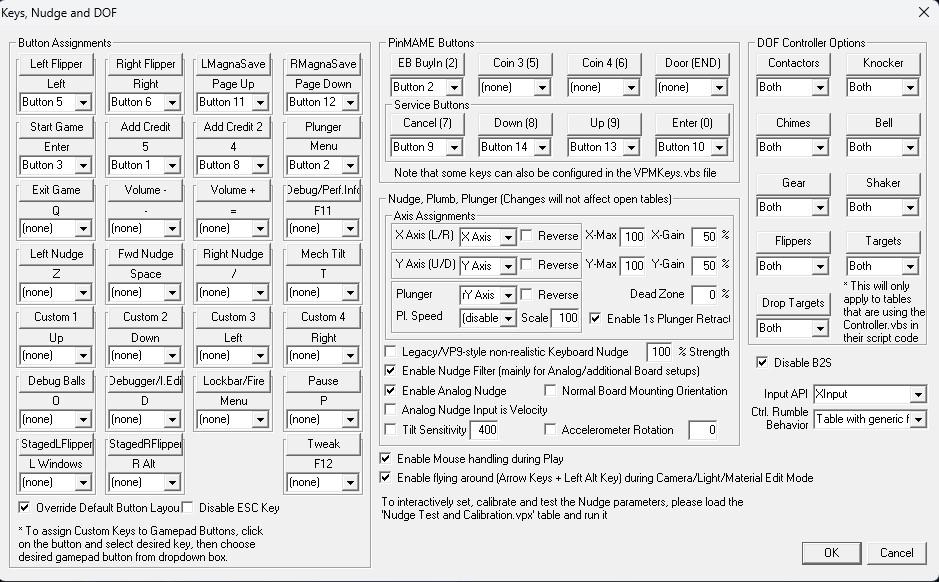
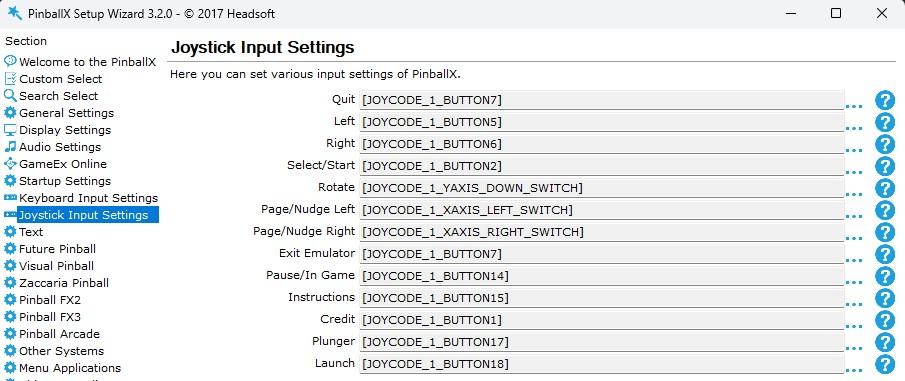
-
Yes, PXB works. I just did a fresh install last week, because somehow PBX was showing all the tables I had in my VPX Tables directory, and I only had 4 tables setup yet in the PBX database. A did a fresh install of PBX and PDM, and at least that issue got fixed. But the other issues remained.
-
I normally never use admin, but when the Use DirectB2S setting is on No, PBX does not start when not using admin. But, since I have to have Use DirectB2S on Yes to have the backglasses display in PBX, I can start PBX normally without admin.
-
Videos are playing fine when setting is on 'Yes'. When I set it to 'No', I have to start PBX as an Administrator and then it starts, but without backglasses displaying. When I do not run it as an Administrator, PBX does not crash, screen stays black after PBX startup splashscreen. B2SBackglassServerEXE.exe is not in my PinballX directory. Some more info.,. I am still using NVIDIA driver 560.94, which is quite old, but very stable for all my games and VR using Virtual Desktop on my RTX 4080.
-
@Mike_da_Spike "Could you please provide your pinballx.ini file?" Added to thread start. "we would be grateful if you could include a log file captured when you launch PinballX and then press the exit button on your game controller" Added to thread start. "We recommend configuring this specifically within PBX rather than VPX." I did that already, see thread start. "Are you currently running VPX as an administrator?" No. It is installed using Baller Installer. Did not change any startup setting.
-
Topic has been split up and updated. Also added my PinballX.ini file.
-
I use a Hori game controller (XBox compatible) for playing pinball. When I start VPX from PinballX, I have no way to exit the table and return back to PinballX frontend using my contrroller. I can configure a button in VPX for Exit Game in VPX, but that displays the popup of VPX and then I have to use the mouse to exit the table. But then I return to VPX Editor instead of PinballX frontend, so have to close that as well. When I do not map a button to Exit Game in VPX, but map that button to 'Quit' and 'Exit Emulator' in PBX, the button does not work in VPX and I have to use my keyboard to close the table and VPX. In PBX itself though, the button work and when I press it I get the menu with Exit in it. So the button does work in PBX. The only workaround I found is to use JoyToKey and map a button to the ESC key. When I then hold that button, I return directly to PinballX frontend from VPX. PinballX.ini log.txt
-
@Mike_da_Spike, @Draco1962, Thanks for your responses. I will change this thread and split it up in two threads. Ok?
-
Hi, I just started using PinballX and am having an issue with backglasses displaying in PBX and PBX not starting with certain setting. When I have the 'Use DirectB2S in Front End' setting set to 'No', I have no backglasses displaying. I also need to start PinballX as an Adminstrator when this setting is on 'No', otherwise I get a black screen after the PinballX startup splashscreen and have to logoff the user in Windows to get control back. When I have the 'Use DirectB2S in Front End' setting set to 'Yes', the backglasses (not the DirectB2S ones, but the 'normal' ones setup in the PinballX database) are displaying, and I also don't need to start PinballX as an Administrator. I could leave the setting is set to 'Yes' (which does not make sense, but ok), but then I cannot use PDM to assign the backglasses to the tables. I have attached the logfiles of having the setting on 'No' and 'Yes'. Thanks, Patrick log-DirectB2S-Yes.txt log-DirectB2S-No.txt log-DirectB2S-No-Admin.txt PinballX.ini
