|



madmic
-
Posts
37 -
Joined
-
Last visited
madmic's Achievements

Super Member! (3/5)
0
Reputation
-
I won't know for about a week. It would happen about once a week or every other.
-
Just updated. Do I need to resend any files?
-
Let me know if there's any issues with it. Thanks GameEx.zip
-
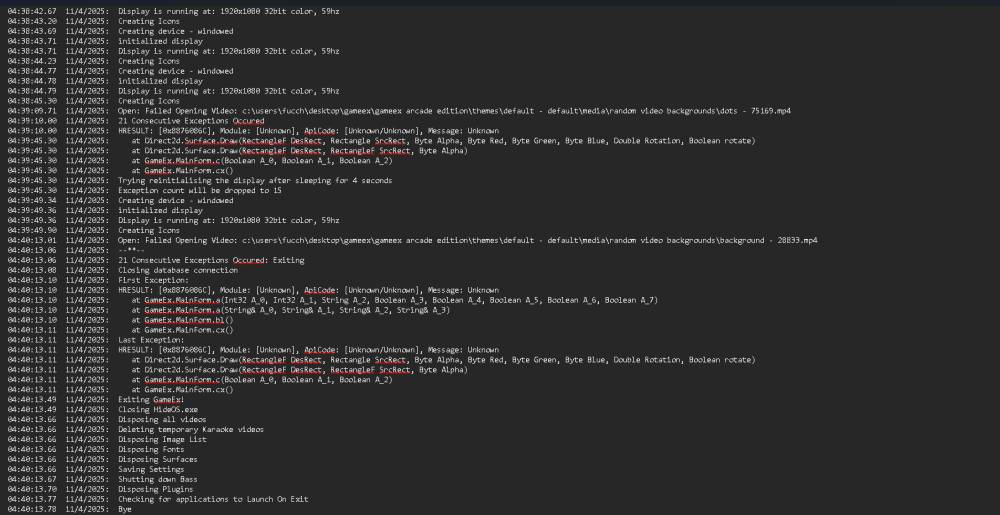
For the most part GameEx arcade runs great for me and has been for a few years now. About once a week or maybe longer it encounters an error and crashes. Just wondering if somebody could help me out with fixing this. I feel like I might see where it's happening but not sure what to do about it. Thanks for any help. I tried attaching a text file of the crash log to this post but get Error code -200 So I attached an image of the end of the crash log.
-
Draco it is at 18.75 now. Tom, thanks for the MAME setting option. Never had to do that before but I figured it out. I managed to sort out the Marquee Masher settings just now also. Again, I appreciate any and all help that you gentlemen offer. ***** I have it all squared away now. Everything seems to be working great and the correct way*****
-
I installed the latest update to GameEx Arcade. It did change some of the look I had but that's fine. Still having issues with the Marquee/screen setup. I've always ran this with 2 monitors, one being the marquee. When I am in the menus scrolling through the games everything is working as it should. As soon as I launch a game the marquee goes away and the game launches in the secondary/marquee monitor. When I exit the game it goes back to normal again. Sorry if I seemed snippy in earlier comment, I appreciate the help. Sometimes things just make absolutely no sense to me at all. GameEx-3.ini log-2.txt
-
Nope. Same HDMI cable as the old one.
-
I just don't get it. Everything was working perfect. Has been for years. I unplugged main monitor and replaced it. Now the game opens on second monitor. Maybe I'll get around to doing all that this weekend. My days of tinkering and troubleshooting are dwindling. Thanks
-
I've had GameEX Arcade and Marquee Masher set up and working great for a few years now. I just had to replace my main monitor. All I did was unplug old monitor and plug new one in. Now when I launch GameEX The Marquee doesn't show on top screen. Sometimes it shows up on main screen. Then when I am able to launch a game the game play screen comes up on the marquee monitor. Or it just shows Marquees on main screen. I am using Marquee Masher. Any idea what I should look for? It's been a few years since I last tinkered with this. I never changed any settings at all and it has worked perfect for a few years up until the monitor swap. Also if I was to update to a newer version of GameEX Arcade will I have to redo all my settings? I really don't want to have to go through that again. Any ideas or help is greatly appreciated. Thanks, Mike log.txt GameEx.ini
-
Thank you very much. I appreciate it.
-
Just wondering if anybody can point me in the right direction. I am using GameEx Arcade with MAME and an Xarcade tankstick. For some reason my save state(create and load) are assigned to the bottom 2 buttons of the 2nd players controls. Where should I be looking to find out how to change them from those buttons to something else that won't interfere with the game play. Thanks
-
*****Please ignore, I just managed to fix it right after posting this. Feel free to delete. Sorry about that.***** Hi, been doing some searching and came across this. I'm in t he process of redoing arcade cabinet. For some reason Tempest and maybe a few other games are not showing up. Would the CarnEvil bug effect MAME 183 the same way? And if so would this file fix it. On my old setup I didn't have CarnEvil (PC wouldn't run it) but I have it now. Any help/feedback would be greatly appreciated. Thanks
-
Setting up new computer in my arcade cabinet. (Old one died) I am having trouble figuring out Marquee Masher. I have GameEX and GameEX Arcade installed but pretty much run Arcade all the time. I run dual monitors and have an ultrawide monitor I built into top of cabinet. I'm too the point where I have it displaying a default image but for the life of me cannot figure out how to get it to show game marquees. I had this all running great before but it's been a while so I'm clueless. How do I point it to a certain folder or where do I put that folder so it will see the marquee images? Any help is greatly appreciated. THank you.
-
So is or has anybody successfully run marquee masher and used Aimtrack light guns? If so could somebody point me in the right direction as far as configuring it. When I have dual monitors enabled it messes with the light guns.
-
Not completely the way I would like it but if I change the marquee folder path to an empty one it shows game flyers. They take up more screen space and the Game description/rating that pops up kinda gets lost in front of it. At least if it's showing the marquee image it doesn't always do this. That video marquee really added a big Wow to my cabinet. Between the marquee, the logo floating in the background, the logo on the wheel and the video snap I just don't feel the need of the other image showing up. I'll tinker with it here and there and see if I can get it to just show up blank. It's all running so good I don't want to go in and mess anything up. Maybe I should take some time to actually play a few games.