|



Games001
-
Posts
121 -
Joined
-
Last visited
-
Days Won
3
Content Type
Profiles
Forums
Events
Downloads
Store
Articles
Everything posted by Games001
-
Missing ROMs? Yet they play just fine when accessed through MAME or MAMEUI, outside of GameEx. R (Arcade) Drive is a physical drive attached to the PC by external HD USB.
-
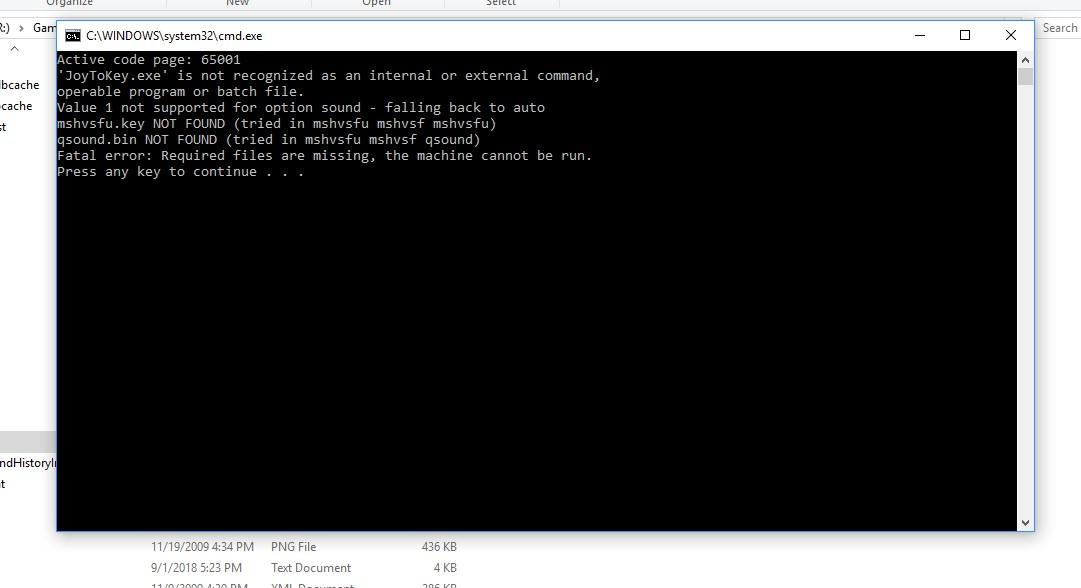
R Drive is the drive where MAME, ROMs, GameEx and all other 'Arcade' files are located. Not sure how the above image helps me define where the error is, I only see missing items but no details as to where they might be missing from.
-
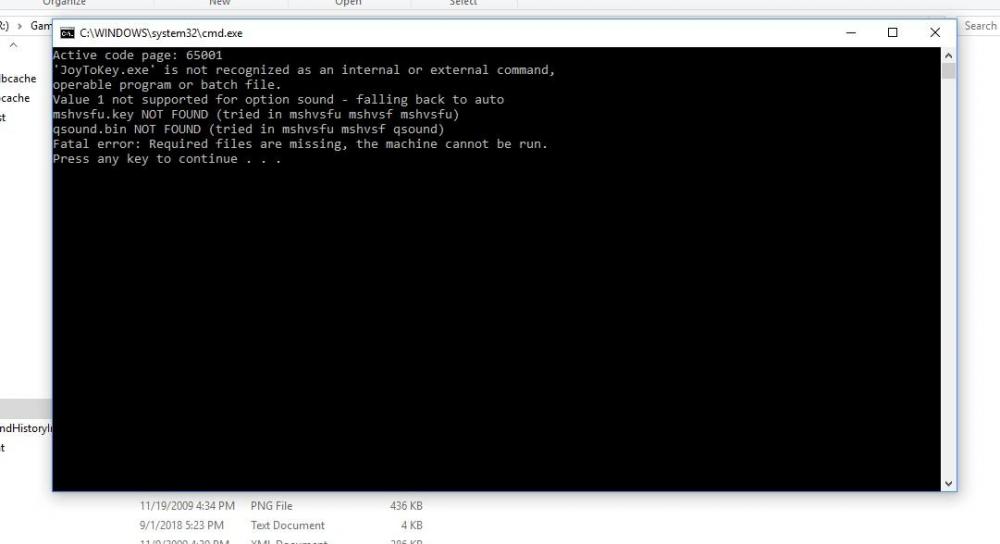
Runitgame.bat.. paused..
-
Marvel SH vs Street Fighter (USA) will load to 59%, then do the crash after single fast white screen flash, returning back to 'Play This Game' ROM options list. Runitgame.bat opens, window flashes by too quickly to read, then does the same 'loads to 59%' and crashes, window closes.
-
Run runitgame.bat after attempting to play one of the failing games.. but run the program with GameEx still open or close the GameEx FE and then use runitgame? I do not recall the GameEx version which was running well before this new version was installed. I believe it was first used back in April of 2017 (MAME v185 I believe) on this PC when it was a Windows 7 machine. Since then the PC has grown into a Windows 10 box and the GameEx update was done just two days ago.
-
Everything runs perfectly outside of GameEx and MAME never had this issue with GameEx until the most recent update of GameEx. Files, I believe the correct ones, of the last session attempting to run a Marvel Fighter, attached. Thanks. log.txt GameEx.ini
-
Hello all. Windows 10, latest GameEx FE, MAME .127u5 with equivalent ROM Set The MAME program suddenly no longer runs certain games. It has always been stable before and never failed to open a ROM but now, after the install of the newest GameEx FE MAME will run some ROMs fine but nearly every Capcom or other 'Fighting Game' style ROM will load partially (59-99%), then it will pause for 2-3 secs, screen quickly blinks white once, then the ROM will crash back to the MAME menu at the Play This Game selection. Note: When playing MAME directly, not with GameEx, these crashing ROMs run 100% correctly and without issue. As noted this is a new problem that NEVER took place before the install of the latest GameEx version. Thoughts?
-
Is there a page or doc that explains the file location options needed to compile the latest ROM sets (v185, v185b emu in my case)? I get what looks like a completed run of the program, using the images found on HeadKaze's site as instruction, but where does the output data go? Where should the compiler be run from and does it need to be in specific folders to influence the roms? etc.. thnx.
-
TY for the link. That should be helpful.
-
Then it looks like I need to find a good install guide, or someone who knows the ropes. The basic readme install I followed to the letter and got errors on the compile go.
-
Is there really any strong selling point for a compile? The program Headkaze has created is great, though I have no clue what file folders are to be chosen at some points (the install info does not click for me for some reason and I get errors on Go!) and just wondering if this whole step is all that important.
-
Ahh, the horrors of compiling are at an end it seems. I recall having major pains doing so on my first cabinet back in 2003. I will do so now. TY.
-
I guess the install of the latest GameEX version I downloaded the other day just did not take? ;P I will try that direction and see what goes. TY. UPDATE: The newer install of GameEX seems to have cleared up many of the issues first noted above. Not sure why my machine did not install the updated version correctly, but we're almost up and running. TY.
-
Hi all. I recently downloaded the latest GameEx files and MAMEv185b(32bit) to rom my v185 RomSet in a new arcade build. The three primary issues I am having are: 1. Video Snaps will not play, only Still Snaps show up on Rom List. The directories are correct, unless I oopsed, but no go. 2. MAME Update List will run up to Reading List.dat (25%) then hangs.. for hours, without completing. 3. Some MAME roms (i.e. Victory Road - Ikari Warriors II) will run just fine if I load MAMEv185b (and runs fine in my older MAMEUI32v175 version), but not if I run it through GameEx. GameEX running will show the rom and still snap but when trying to run the game I get a 2 seconds black screen then get dropped right back to the 'Play this game' option in the main menu. Any thoughts would be appreciated. Thank you. LOG DATA: 18:41:00.2 5/9/2017: GameEx: Version 10.25: Starting Log 18:41:00.2 5/9/2017: Operating System Platform: Win32NT 18:41:00.2 5/9/2017: Operating System Name: Windows Vista 18:41:00.2 5/9/2017: Operating System Version: 6.1.7601 18:41:00.2 5/9/2017: Aero running 18:41:00.2 5/9/2017: Initializing Vista/Windows 7 volume control 18:41:00.2 5/9/2017: Checking for versions of .net Framework installed 18:41:00.2 5/9/2017: .net Framework 2.0 Installed 18:41:00.2 5/9/2017: Intel(R) Core(TM) i7-4820K CPU @ 3.70GHz, 16299MB 18:41:00.2 5/9/2017: 3.7Ghz - 8 Cores or CPU's 18:41:00.2 5/9/2017: Running Randomize() 18:41:00.2 5/9/2017: Loading PlugIns 18:41:00.2 5/9/2017: Checking for applications to Launch On Startup 18:41:00.2 5/9/2017: Running Misc startup tasks 18:41:00.2 5/9/2017: Setting Menu types 18:41:00.2 5/9/2017: Opening Configuration File 18:41:00.2 5/9/2017: Getting Configuration Values 18:41:00.2 5/9/2017: Using Theme: Default - Deep Purple 18:41:00.2 5/9/2017: Checking for alternate Image Directory for Theme: Default - Deep Purple 18:41:00.2 5/9/2017: Launching HideOS.exe 18:41:00.2 5/9/2017: Initialising Video/MNG DLL's 18:41:00.2 5/9/2017: Hiding Taskbar 18:41:00.2 5/9/2017: Is Media Center running? 18:41:00.2 5/9/2017: Checking/Creating LCD Registry values 18:41:00.2 5/9/2017: Check Media Center Exit/Start Mode 18:41:00.2 5/9/2017: Media Center Mode 2 18:41:00.2 5/9/2017: Video previews on. Warning: Only recommended on modern systems 18:41:00.3 5/9/2017: Custom Keyboard Input enabled: Getting custom codes 18:41:00.3 5/9/2017: Advanced Custom Keyboard Input enabled: Getting custom codes 18:41:00.3 5/9/2017: Custom Game Device Input enabled: Getting custom codes 18:41:00.3 5/9/2017: Snap Delay set to: 3 18:41:00.3 5/9/2017: Get other settings 18:41:00.3 5/9/2017: Set: Find emulator artwork on best match basis 18:41:00.3 5/9/2017: Using DirectInput for keyboard input 18:41:00.3 5/9/2017: Start work for Form 18:41:00.3 5/9/2017: Getting Original Screen Size 18:41:00.3 5/9/2017: Opening Database Connection 18:41:00.3 5/9/2017: Initializing Component 18:41:00.3 5/9/2017: Retrieving resolution setting 18:41:00.3 5/9/2017: Initialising Windows Media Player Component 18:41:00.4 5/9/2017: MAME Path is: R:\MAME 18:41:00.4 5/9/2017: daphne Path is: R:\Daphne 18:41:00.4 5/9/2017: daphne EXE file is: daphne.exe 18:41:00.4 5/9/2017: Use daphne on. daphne.exe will launch games 18:41:00.4 5/9/2017: MAME EXE file is: mame.exe 18:41:00.4 5/9/2017: ROM Paths are: N:\ROMs\MAME\roms;N:\ROMs\MAME .78\roms;N:\ROMs\MAME .139\roms;N:\ROMs\MAME 0.37b5\roms 18:41:00.4 5/9/2017: Catver.ini is located at: R:\GameEx\DATA\catver.ini 18:41:00.4 5/9/2017: controls.ini is located at: R:\GameEx\data\controls.ini 18:41:00.4 5/9/2017: History.dat is located at: R:\GameEx\DATA\history.dat 18:41:00.4 5/9/2017: nplayers.ini is located at: R:\GameEx\DATA\nplayers.ini 18:41:00.4 5/9/2017: MAMEinfo.dat is located at: R:\GameEx\DATA\mameinfo.dat 18:41:00.4 5/9/2017: Loading Controls.ini map file 18:41:00.4 5/9/2017: Snap Path is: R:\MAME\Snap 18:41:00.4 5/9/2017: AVI Snap Path is: R:\MAME\Video_MP4 18:41:00.4 5/9/2017: Flyer Path is: R:\MAME\flyer 18:41:00.4 5/9/2017: Cabinet Path is: R:\MAME\Cabinet 18:41:00.4 5/9/2017: Title Path is: R:\MAME\Title 18:41:00.4 5/9/2017: PCB Path is: R:\MAME\PCB 18:41:00.4 5/9/2017: Artwork Preview Path is: R:\MAME\Artwork_Preview 18:41:00.4 5/9/2017: Panel Path is: R:\MAME\CP 18:41:00.4 5/9/2017: Manual Path is: R:\MAME\Manual 18:41:00.4 5/9/2017: Icon Path is: R:\MAME\Icon 18:41:00.4 5/9/2017: Marquee Path is: R:\MAME\Marquee 18:41:00.4 5/9/2017: Loading Custom Emulators 18:41:00.4 5/9/2017: Loading Emulator 1: Sega Master System 18:41:00.4 5/9/2017: Loading Emulator 2: Commodore C64 18:41:00.4 5/9/2017: Loading Emulator 3: Pinball Games 18:41:00.5 5/9/2017: Using Version 3 Themes Animations 18:41:00.5 5/9/2017: Using General Font: Trebuchet MS 18:41:00.5 5/9/2017: Using Title Font: Trebuchet MS 18:41:00.5 5/9/2017: Initialising DirectDraw 18:41:00.5 5/9/2017: Applying GameEx is Loading Image 18:41:00.5 5/9/2017: Creating DirectDraw Device 18:41:00.5 5/9/2017: Using Device: NVIDIA GeForce GTX 760 18:41:00.7 5/9/2017: -65mb video memory available 18:41:00.9 5/9/2017: Setting Resolution to 1680x1050 32 bit color 18:41:00.9 5/9/2017: Creating DirectDraw Surfaces 18:41:00.9 5/9/2017: Creating Primary Surface - Full Screen Mode 18:41:00.9 5/9/2017: Creating Back Buffer 18:41:00.9 5/9/2017: Loading graphic Surfaces 18:41:00.9 5/9/2017: Display is running at: 1680x1050 32bit color, 60hz 18:41:01.0 5/9/2017: Creating Surfaces Flags 18:41:01.0 5/9/2017: Creating Surfaces Misc and Dialogs 18:41:01.0 5/9/2017: Creating Surfaces Volume 18:41:01.0 5/9/2017: Creating Surfaces Arrows 18:41:01.0 5/9/2017: Creating Surfaces GameEXlogo Text 18:41:01.0 5/9/2017: Creating Surfaces Toolbar 18:41:01.0 5/9/2017: Creating Surfaces Backgrounds 18:41:01.2 5/9/2017: Creating Surfaces Toolbar Controls 18:41:01.2 5/9/2017: Creating Surfaces GameEx Logo 18:41:01.2 5/9/2017: Creating Surface Unselected 18:41:01.2 5/9/2017: Creating Surfaces Home & Exit 18:41:01.2 5/9/2017: Creating Surfaces Snaps 18:41:01.2 5/9/2017: Creating Surfaces Menu and List Bars 18:41:01.2 5/9/2017: Creating Fonts 18:41:01.2 5/9/2017: Creating Game Font 18:41:01.3 5/9/2017: Creating Game Font Faded 18:41:01.3 5/9/2017: Creating Title Font 18:41:01.3 5/9/2017: Restoring Title Font From Cache 18:41:01.4 5/9/2017: Creating Font Black 18:41:01.5 5/9/2017: Creating Font Black Small 18:41:01.5 5/9/2017: Fonts Created Succesfully 18:41:01.5 5/9/2017: -169mb video memory left available 18:41:01.5 5/9/2017: Creating instance of global keyboard hook 18:41:01.5 5/9/2017: Playing Startup Video on thread 18:41:01.5 5/9/2017: Attempting to load game list 18:41:01.5 5/9/2017: Failed Opening Video: r:\system videos\mamelogo.mpg 18:41:01.6 5/9/2017: Applying Language/Text 18:41:01.6 5/9/2017: Text/Language: English 18:41:01.6 5/9/2017: Initialising Bass Audio Library 18:41:01.8 5/9/2017: MAME CMD options: -nowindow -joy -skip_gameinfo -video d3d -noswitchres 18:41:01.8 5/9/2017: Loading last used Game List 18:41:01.9 5/9/2017: Loading Start Page 18:41:02.0 5/9/2017: Setting Music Volume 18:41:02.0 5/9/2017: Creating DirectSound Device 18:41:02.0 5/9/2017: Trying: Primary Sound Driver 18:41:02.0 5/9/2017: Loading Sound Files 18:41:02.0 5/9/2017: DirectSound Device Created Successfully 18:41:02.0 5/9/2017: Creating ICONS 18:41:02.0 5/9/2017: Restoring Cached ICONS from File 18:41:02.0 5/9/2017: Initialising DirectInput for Gamepad support 18:41:02.1 5/9/2017: Unable to create a joystick device 18:41:02.1 5/9/2017: Initialising DirectInput for Keyboard support 18:41:02.1 5/9/2017: Initializing MCE Remote 18:41:02.1 5/9/2017: Initialization OK! Starting GameEx! 18:41:02.1 5/9/2017: Testing Main Loop Once: Processing Frame 18:41:02.3 5/9/2017: Testing Main Loop Once: Main Loop ran successfully 18:41:07.5 5/9/2017: Writing Game List to disk 18:41:07.5 5/9/2017: Updating MAME Game List 18:41:07.5 5/9/2017: Running: R: R:\MAME\mame.exe -listxml > R:\MAME\listinfo.dat 18:41:54.0 5/9/2017: Opening Listinfo.dat 18:41:55.5 5/9/2017: Reading ListInfo.dat
-
Hmmm, I think Deep Purple is a version #3 theme and the editor only does #2/#4 versions.
-
Using the Deep Purple Theme in GameEx, but what option do we turn off to remove the Media Buttons and 'top list' (<change view>, <home>, etc) so that only the main menu list remains on the Start Page? Thanks folks.
-
I've been doing some testing and it seems utterly random. Of the 70 times I ran a system boot today on the cabinet, 8 times the Enter Error showed itself (yes, lots of start up / shut down). It must have something to do with program loading, since it seems so random. Of the 8 error loads I noticed, they seem to come in groups. 2 times, then 3 times, then 3 more times it would load into the OS with the Error in effect.
-
Glad someone else has seen this.. thought I was going mad at first. It only happens to load with this constant input -now and then- and is only the Enter Key for my machine.
-
Now and then, when GameEx loads into the cabinet OS, upon its start up, the program begins 'pressing' enter endlessly and about every second or two. I have tested all other programs and it's just GameEx that causes this issue, as noted when I shut down GameEx, the 'entering' stops. Any ideas?
-
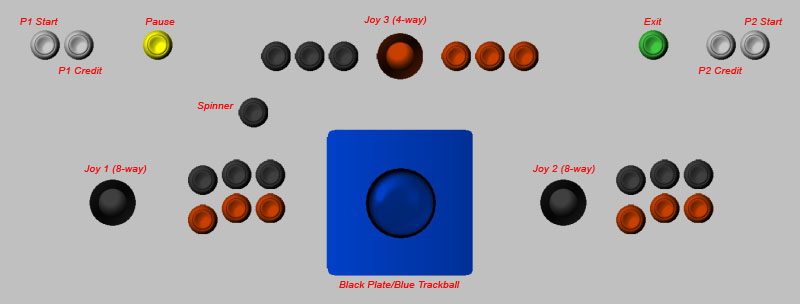
My common setup for basic MAME controls is something like this... 2: 8-way sticks, 6 buttons each (sometimes 7 each) 1: 4-way at the mid-top with 3 buttons on left or right, or both sides 1: 2.25" or 3" trackball with mounting plate over or under CP top 1: spinner as it fits... Player 1/2 and Credit 1/2 (sometimes in the coin door mech) Pause/Exit/Config as needed on the CP top or on the machine by the panel bottom
-
ISSUE FIXED - Forgot the best way to view videos is to turn the Video Option ON!!! I can't seem to find a method of starting up the cabinet with an Intro Video before GameEx loads. I go right from blank desktop to GameEx Loading screen, then GameEx Menu.. it never even shows my .avi or .mpg video I have saved in the ../Meda/Videos folder and configed to play. Windows XP with Vista Codex (runs avi snaps fine) Any ideas?
-
The Visual Pinball issue still is at large. Seems there has been no change in the reinstall of that 'oddity'. And trust me fReqEnCy, I know how tough updates can be on builders.. I'm just glad to be a part of the group that shows so much concern for a program such as GameEx. Keep up the excellent work!
-
It seems this a BUG, as when I fresh reinstalled the GameEx files to this machine, the game list now returns to normal activity.
-
I am beginning to assume it's a small bug as well. It does not halt game play in any way, just makes Menu use a pain at times. Let's see where we go tomorrow.
-
With working Path as: Z:\Visual Pinball or even as: Z:\Visual Pinball\ I get a black screen, then reverts back to 'Play this game' menu page. This is with .vpt or .lnk files both. No dice. The only working method I can find is... Working Path: Z:\Visual Pinball\Tables ROM Path: Z:\Visual Pinball\Tables ROM Filter: .vpt Command Line: ..\VPinball.exe -play -"[ROMFILE]" But then I still have the original issue of the menu defaulting back to the Start Page once I exit out of a pinball table and try to begin another/or the same table.