|



rye74
-
Posts
3 -
Joined
-
Last visited
-
Days Won
1
rye74's Achievements

Member (1/5)
2
Reputation
-
I ran into this today. Is there a way to disable the hide mouse functionality? Perhaps with an ini entry?
-
I found the solution. The backglass and dmd was set to monitor=0 in the .ini file. I changed that and now I am no longer getting the popup.
-
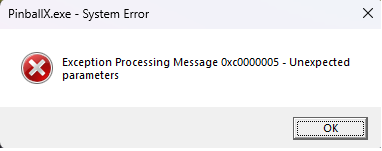
Hi There, new install of PinballX and shortly after it starts (everything looks good) but then I get the following pop-up and it crashes to desktop. Looking in the event log I see the following: Application: PinballX.exe CoreCLR Version: 8.0.1525.16413 .NET Version: 8.0.15 Description: The process was terminated due to an unhandled exception. Exception Info: System.AccessViolationException: Attempted to read or write protected memory. This is often an indication that other memory is corrupt. Stack: at Direct2d.Device.Present() at Direct2d.Device.EndScene() at PinballX.FrmMain.a0() at PinballX.FrmMain.InternalNew() at PinballX.FrmMain..ctor() at PinballX.FrmMain.Main(System.String[]) Any help would be appreciated. I'm not sure where to begin troubleshooting. Here is my ini file PinballX.ini log.txt