|



mace
-
Posts
127 -
Joined
-
Last visited
-
Days Won
6
Recent Profile Visitors
9595 profile views





mace's Achievements

Ultimate GameEx Guru! (4/5)
30
Reputation
-
I'm didn't presume to use the 'B' word 🙂 and that makes sense Tom, as the other PC does not perform that way and it's set up with a different fullscreen option. Because I'm running other programs than Mame (like a Fruit Machine Emu set) I can't change the screen without causes issues so if you could add that as an option when you have time that would be very useful for my set up, hmmmm typing this I feel a bit needy - sorry, and thank you.
-
Hi Tom, I've found that since the last (~4 or so) update group that the PC in my game cabinet does not enter fully into sleep mode, the screen blanks but the power to peripherals remains on. Without Gameex running the machine behaves normally entering sleep without issue. This happened some time back and I posted then, as a result the issue went away in the following update. I've not attached files as I've not changed anything in some time so the only thing that has changed in the machine (aside from Win 11 updates) is the Gameex code. It's not a big issue, I've just swapped the power button into shutdown mode but I wanted to flag it for your information. Thank you , as always for all your work supporting the platform, it's appriciated. Mark
-
Awesome 🙌 Thanks Tom!
-
Hi Tom, First of all a very merry Christmas to you and yours 🎅 I've just got around to updating my cabinets and I have a common issue again, this time it's the update process. I have this set up to 'Ask Before Updating' and I get the flagged box with 'Select to Update', when I so it goes to the white updating screen and then no blue progress bar appears, after a while the window snaps shut and then GameEx reboots triggering the same situation above. I can replicate this on both machines and it appears to have been present on at least the last two iterations prior to 19.61 (I'm unable to check 19.61 until the next update so apologies if you are aware of this). There's no issue with getting onto GameEx Online, I'm using my full email address rather than a username. Updated in both cases by file download. I've attached what I hope are the appropriate log files as usual: log.txt SetupWizard.log
-
Awesome, working perfectly now thanks Tom. There's been a lot of updates recently, thanks for all your hard work I've sent you a beer👍
-
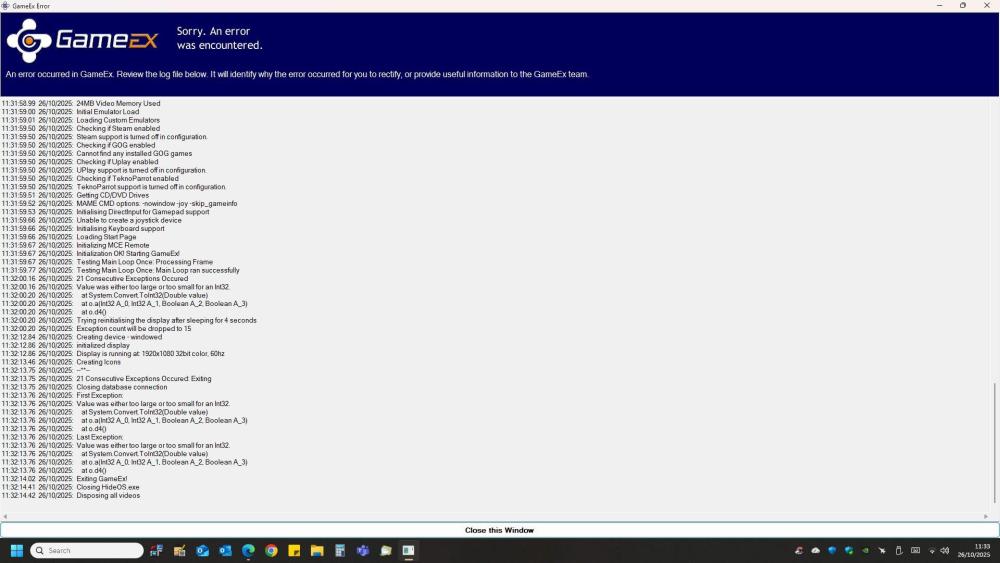
Hi Tom, I'm seeing an issue with a loading error after installation of v19.51 (previously I was running 19.47), I have the same behaviour on both of my machines and I have uninstalled/reinstalled a couple of time to check. From my limited experience it looks like it may be a database error, the usual files are attached, as always thatnk for all your hard work. v19.47 log.txt GameEx.ini v19.51 log.txt
-
Tom, looks like you've had a busy Easter updating our favourite program, so thank you for all your work 👍
-
19.04 is in and working perfectly, thanks again Tom 👍
-
Hi Tom After I updated from 19.01>>19.02 the menu appears as normal but selecting any group item causes a hang on the please wait animation. The program is still running as the screen saver starts as normal however the please wait animation comes back on resume and to get out of the loop the GameEx process has to be shut down in Task Manager. The only menu items that function are search and a direct program link to my jukebox software so my assumption is the program is struggling to read the databases. Rolling back to 19.01 fixes the issue. Thanks for all your hard work.
-
 Thanks yet again for the support Tom that fixed it 😀 Admin please mark as resolved 👍
 -
Hi All. Happy New Year. Updated my two systems to 18.99 today and after the process completed correctly and I rebooted GameEx now starts as usual but jumps past the Home Menu straight into Mame and is only showing the first Rom. I've tried changing the settings to add other Mame menus (such as Vertical/Horizontal games) but its the same result each time. I can go back to the main menu and my installed other system (LaserDisk) is unaffected. Image and usual files attached. Many thanks as always: log.txt GameEx.ini

-
Hi Tom, Loaded 6.25, after running twice (first occasion there were a couple of wrong table loading issues in one system) all confirmed as working. Many thanks for your work 👍
-
Thanks Tom, when I get home I’ll upload the new version and report back 👍
-
Hi All, Upgraded to the latest PinballX v6.23 today and my main (systems) screen is no longer showing backglass and table videos/images for some of the system categories. There does not seem to be any logic to the missing stuff, for example Pinball FX2 and Mame are fine but Pinball FX3 and Virtual Pinball are blank if matching is off in setup and default if matching is on. I've not attached the usual files as everything has been A1 up until this point. The in table select menus are all fine. And while I'm here Merry Christmas All 🙂
-
Good news! it’s fixed and works perfectly 👍 Thanks so much for your guidance, can’t express how much it helps to work these challenges through with other folk. The issue in short was that I am a bloody idiot, the longer explanation was to create the GlobalConfig_PinballX.xml file I dragged and dropped the GlobalConfig_B2SServer file and in doing so I accidentally created a shortcut. I then renamed the shortcut to GlobalConfig_PinballX.xml. That may have been possible to spot if I didn’t have a ‘hide shortcut arrows’ program running. So the plug-in could not see it but every time I checked it with a double click it remotely opened the GlobalConfig_B2SServer.xml which, being identical, looked fine <sigh> what are the odds…… Now all I have to do is find all the hair I tore out and stick it back on again 😆