|



Outhere
-
Posts
341 -
Joined
-
Last visited
-
Days Won
4
Content Type
Profiles
Forums
Events
Downloads
Store
Articles
Everything posted by Outhere
-
I had read somewhere way in the past that having joystick settings in pinballx can screw it up so I have never had them in pinballX because I remove them when I first installed it so I don't know if that will solve your problem. But it's something to try... Also try Turning off the b2s backglassed for the front end And Try videos
-
Go with - Pinballx I run all of these --- VP9, Future Pinball, PinballFX2. For VP Cabinet Tables Full Screen CabinetFull Screen B2S Cabinethttp://www.vpforums.org/index.php?showforum=53http://www.vpforums.org/index.php?app=tutorials&article=136http://www.vpforums.org/index.php?showtopic=23072&hl=b2sbackglassserverexeROMs -- For a lot of the tables
- 1 reply
-
- 1
-

-
Try putting all three monitors on the 960 card
-
 How does one use this idea
 -
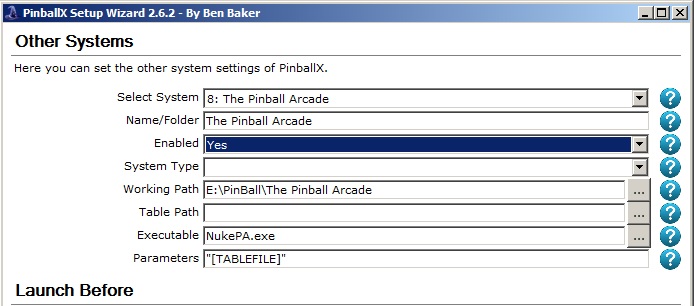
[APP] NukeLauncher - NukePA for (The Pinball Arcade)
Outhere replied to time299's topic in User Projects
Check the timing in the INI file http://www.nukelauncher.com/item.asp?iid=33 -
How does one use the spoiler effect
-
[APP] NukeLauncher - NukePA for (The Pinball Arcade)
Outhere replied to time299's topic in User Projects
Remove all of this " from your Game list in your INI file - If that don't work try my files and rename yours My files are at the Bottom NukePA.ini The Pinball Arcade.xml
-
Oops
-
Americas most haunted VP9.91 works
-
Windows 7 Americas most haunted VP9.91 works PinballX.ini log.txt
-
On my cab the mouse always starts out in the third monitor after loading pinballX maybe that's normal but I have the same thing happening that you (steveg64) do but in my case its only one game America's Most Haunted VP10... I have to click the desktop after it loads but but last week it was fine. I've downloaded the 2.04 of pinball X and the latest version 217 which I don't think is needed for America's Most Haunted.. I updated to see if that would fix it But no go..
-
http://www.vpforums.org/index.php?showtopic=31994&hl=
-
How do you use the FTP
-
Do you have a Screenshot of your settings for Pinballx
-
RoadRunner Did you get it to work??
-
Road Runner Hyperspin NukeLauncher I have all the games on the wheel but no matter which one I pick it goes to the first game and goes to where you can select players
-
mymichelleNukeLauncher ini file ---> ExitMethod = savekill ---> I set mine to Kill Did you try adjusting the timers in the NukeLauncher ini file
-
Roadrunner In the NukeLauncher ini file put number of players 0 In Hyperspin Mine selects the first table, I cannot get it to change but still working on it
-
Did you try it like this in your NukeLauncher ini file = L:\Arcade\PinballX\Databases\Pinball FX2\Pinball FX2.xml
-
I have NukeLauncher running on my pinball cab with pinballX and works perfect Thank for your help
-
Okay I got it running I'm as far as you are between the two of us hopefully we can figure it out
-
Now it says I have no ROM path
-
Is there a way of turning something off?
-
I must have something set different Hyperspin keeps asking me for
-
Are you using a Pinball fx2.ahk in the modules folder with your set-up?