|



piggei
-
Posts
16 -
Joined
-
Last visited
-
Days Won
3
Content Type
Profiles
Forums
Events
Downloads
Store
Articles
Everything posted by piggei
-
 Great tool! Thanks!!
 -
OK, RTFM is still alive! 😄 Thank you for the reply.
-
Thank you also to you, @scutters! I noticed sometimes I can't check some boxes... For example, I just tried a bulk video grabbing for new tables, but I can't select the upper boxes (PF, BG, DMD...). I can select the botton ones (for example the skip option). Do I'm doing something wrong?
-
I spent all the day to check configurations, coordinates, I made it again from scratch and now it's all perfect about PDM!! There's still the PBX recording problem, but now I can use you program, so I stop my researches. Scutters, I connected BG monitor on first GPU so I can see the windows logo in the BG screen and not in the PF one. Was not a problem with windows 7 and there are not big problems with windows 10, so I move nothing. Thank you both for the support! P.S. Mike, your program is great!
-
That's why I supposed monitors are hardcored in PinballX, without reading the config file. Why the BG and DMD screens are otated during recording? rotation option tip talk only about PF (and it's correct). My problem in this tool is with DMD videos, because DMD dont't use all the monitor area and the position is not vertically symmetrical, so the videos are cut off. Videos with PBX are perfects, because the offset/dimension area are correct.
-
I love this program!! and recordings are perfect! Now I only need to refine some parameters... You made my day, thanks!
-
Thank you, I tried it but nothing changed... I think it's because the precedence is for the mainboard, then the graphic card... BG in connected at the MB, PF and DMD are connected to Geforge. So this is the reason because BG is the first screen. But PinballX knows monitors sequence (and works correctly), so why it make this mess with video recording? Maibe the code assumes FB as monitor ! and BG as second, without checking the configuration?
-
What a nice tool!! I did'nt know it... Test is correct: PF, BG and DMD are in the correct monitors... Let me play with this tool, I'll try to record with it.
-
Hi Mike, I'm sorry for the misunderstanding.. Maybe my english is not to good, but I always said my problems are only with the video recordings.... Just to understand: I grabbed all the videos, I rotated them and I swapped the two directories PF/BG and now it's all ok. For the images I don't encounter any problems, directories and orientation are OK. Also with downloaded videos I don't have problems. My raw question is: there is a way to modify the ffmpeg parameters I can find in the log file? so I modify it to add a rotation parameter. Thank you for the support.
-
In windows 7 I created my videos, because sometime I modify the VP visual settings. Now I'm upgrading all the tables for the new VPinball10, so I want to create new videos updated.
-
Windows and PinballX monitor numbers are not the same... I read it depends on graphic cards connections... so In windows PF is 1 and BG is 2, in PinballX are inverted As I said, PinballX and VPinball work correctly, also pics snapshots. Only video snapshots are inverted and rotated.
-
All my monitors are in landscape mode. I started in this way in 2011 and still prefer this configuration. 1 PF 1920x1080 2 BG 1366x768 3 DMD 1280x600 This is the same HW configuration I used in Windows 7. The only difference is the PinballX version: now I'm using the last version, in windows 7 was installed the 4.05 version).
-
Sure! I added also the screenres file Thanks log.txt ScreenRes.txt
-
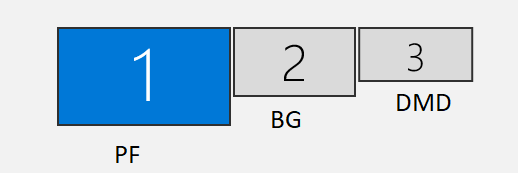
Hello everyone, I reinstalled my pinball computer to update the system from Windows 7 to Windows 11. Everything is working OK but I am encountering two problems with video recording: 1) The BG videos are saved in the PF directory, the PF videos are saved in the BG directory. I don't know if it is due to the fact that in windows the PF monitor is set to 2 and the BG monitor to 1. In the settings they are specified correctly. [Display] Monitor=1 [BackGlass] monitor=0 BTW I can't set the DMD as screen 3 but I have to use screen 0 and set an offset equal to the width of screen 0. 2) Once placed videos in the correct directories, they are rotated 180°, both PFs and BGs. There are no problems taking snapshot pics: correct directories and correct orientation. Is there a place where I can check and change these settings? I tried via game manager and also via hotkey in PinballX. In attach my ini file and a pic of my monitors configuration. Thank you in advance. PinballX.ini
-
Yes, I think the problem is that another loop starts when the first is working... That's because the problem appears at the second "table change"... There are the files... led.ini is without the loop command at the end... log.txt LED.ini PinballX.ini
-
Hi guys, finally I found why my pinballx freeze when it starts the attract mode: I think there's a problem in the Led plugin and the loop command. If I end the sequence wit a loop the pinballx freeze in attract mode after the first loop... If I remove the command, all works OK... This is the portion of the ini for my attract mode... [Commands_Select_Attract_1]device=0cmd=2ports=wait=0[Commands_Select_Attract_2]device=0cmd=0ports=0;1;16wait=80[Commands_Select_Attract_3]device=0cmd=1ports=0;16wait=0[Commands_Select_Attract_4]device=0cmd=0ports=2;19;20;22;23wait=80[Commands_Select_Attract_5]device=0cmd=1ports=1;2;19;20;22;23wait=0[Commands_Select_Attract_6]device=0cmd=0ports=3;16wait=80[Commands_Select_Attract_7]device=0cmd=1ports=3;16wait=0[Commands_Select_Attract_8]device=0cmd=0ports=2;19;20;22;23wait=80[Commands_Select_Attract_9]device=0cmd=1ports=2;19;20;22;23wait=0[Commands_Select_Attract_10]device=0cmd=1ports=wait=0